• Home
  • News
  • Software
  • Knowledge
  • MMO
  • Tips
  • Security
  • Network
  • Office
AnonyViet - English Version
  • Home
  • News
  • Software
  • Knowledge
  • MMO
  • Tips
  • Security
  • Network
  • Office
No Result
View All Result
  • Home
  • News
  • Software
  • Knowledge
  • MMO
  • Tips
  • Security
  • Network
  • Office
No Result
View All Result
AnonyViet - English Version
No Result
View All Result

Instructions for creating a photo holding a QR code to receive super cute lucky money for Tet

AnonyViet by AnonyViet
February 14, 2026
in Tips
0

Create a photo holding a QR code to receive lucky money is a trend of “making waves” every Tet holiday, especially the 2026 Year of the Horse. Instead of sending a dry account number, you can transform into a 3D character holding an extremely adorable and delicate QR code. Let’s explore with AnonyViet how to do it right below.

Join the channel Telegram belong to AnonyViet 👉 Link 👈

3D AI photo fever for the 2026 Lunar New Year

The atmosphere of Tet 2026 is approaching, and social networks are once again aroused with the trend of transforming into 3D cartoon characters. This year’s special feature is the combination of AI technology and traditional lucky money culture.

Instead of regular photos, users are racing to create handheld photos QR code Receive lucky money in a humorous and cute style. These photos not only help make your personal page more lively, but are also a subtle and charming way to “remember” lucky money.

3D AI photo fever for the 2026 Lunar New Year

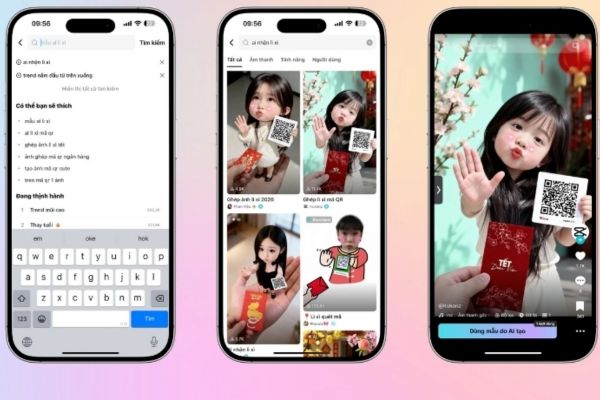
Instructions for creating a photo holding a QR code to receive lucky money on CapCut

To own these “million like” photos, you only need a smartphone and the CapCut application, you can follow the process below:

Step 1: Open the application CapCut on your mobile device (phone or tablet). At the main interface, click on “Template” located in the toolbar below the screen.

Step 2: In the search bar at the top, enter keywords related to this trend such as: “AI model to receive lucky money”, “AI lucky money”, or more specifically “create a photo holding a QR code to receive lucky money”. The system will return a series of results with many different design styles.

Step 3: Browse and choose a template that you feel most comfortable with. These templates often have a 3D character layout holding an envelope or a QR code board.

Step 4: After selecting a template, the application will ask you to upload a personal photo. The advice is to choose a selfie portrait with good lighting and a clear view of the face so that the AI ​​can identify and process facial features most accurately.
Instructions for creating a photo holding a QR code to receive lucky money on CapCut

Step 5: Wait a moment for CapCut to automatically analyze and merge your face into the 3D character. AI will add cinematic shading, smoothing, and color correction effects to make the photo look most realistic.

Step 6: Check the results again in preview mode. If you are satisfied, just press the button “Export” to save photos to your device or share directly on social networking platforms such as TikTok and Facebook.

Refer to AI photo samples that are going viral

Below are descriptions of some models that are being enthusiastically sought after by the online community. You can search by description to apply:
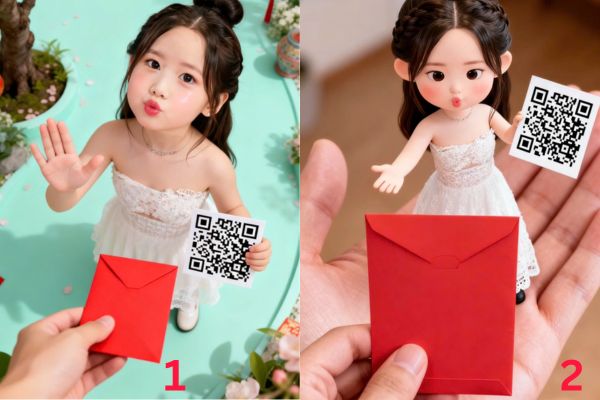

Sample 1

Sample 2

Refer to AI photo samples that are going viral

Sample 3

Sample 4

Model 3 and model 4
Model 3 and model 4

Note for smooth image creation process

This trend brings a lot of joy during the Lunar New Year 2026. However, to ensure you get the most satisfactory product when creating a photo holding a QR code to receive lucky money, please note the following points:

  • First, in terms of equipment, AI processing requires quite a large amount of machine resources. Therefore, prepare a phone with a stable configuration and strong network connection (Wi-Fi/4G) to avoid lag or errors when exporting files.
  • Second, regarding input images, the quality of the original image determines 80% of the beauty of the AI ​​image. Avoid using photos with faces covered, photos that are too dark, or group photos with too many people, making it difficult for the AI ​​to recognize the owner’s face.
Note for smooth image creation process

Q&A: Frequently asked questions

1. Can I replace the QR code in the template with my bank’s QR code?

Answer: Yes. Some CapCut templates allow you to insert a personal QR code image in a specified position (overlay). If the template doesn’t support it, you can export the image and use the “Add overlay” feature to insert your QR code later.

2. Is there a fee to use these AI models on CapCut?

Answer: Most of the templates for creating photos holding QR codes to receive lucky money on CapCut are free. However, some Pro models may require you to watch ads or upgrade your account to remove the blurred logo when exporting photos.

3. Why do AI-processed photos not look like me?

Answer: AI technology to create 3D images often tends to “animate” the lines so it will not be 100% like real photos. To be as similar as possible, choose the original photo taken frontally, clearly, and without glasses or masks.

Conclusion

Trend Create a photo holding a QR code to receive lucky money will definitely continue to “cause a storm” in the upcoming Tet days thanks to its convenience and high entertainment value. Hopefully with the detailed instructions above, you will be able to design unique 3D photos yourself to show off to your friends and receive lots of luck. Wishing you a happy, prosperous and joy-filled New Year 2026, Binh Ngo!


Tags: CodecreatingcuteholdingInstructionsLuckymoneyphotoreceivesuperTết
Previous Post

How to see the package Viettel is using to avoid losing money unfairly

Next Post

7 other features of USB you may not know

AnonyViet

AnonyViet

Related Posts

Instructions on how to create POV product review videos using Flow
Tips

Instructions on how to create POV product review videos using Flow

July 13, 2026
How to fix “This PC can’t run Windows 11” error This PC doesn’t meet the minimum system requirements
Tips

How to fix “This PC can’t run Windows 11” error This PC doesn’t meet the minimum system requirements

July 13, 2026
How to fix Windows 11 error of not being able to install .Net Framework 3.5
Tips

How to fix Windows 11 error of not being able to install .Net Framework 3.5

July 11, 2026
How to encrypt messages with GenZ’s smiley face icon
Tips

How to encrypt messages with GenZ’s smiley face icon

July 10, 2026
Download the Copyright-Free Music app for Cafes now
Tips

Download the Copyright-Free Music app for Cafes now

July 9, 2026
Multcloud – Manage, copy, and move data between Cloud Drives
Tips

Multcloud – Manage, copy, and move data between Cloud Drives

July 9, 2026
Next Post
7 other features of USB you may not know

7 other features of USB you may not know

0 0 votes
Article Rating
Subscribe
Login
Notify of
guest

guest

0 Comments
Oldest
Newest Most Voted

Recent News

Instructions on how to create POV product review videos using Flow

Instructions on how to create POV product review videos using Flow

July 13, 2026
How to fix “This PC can’t run Windows 11” error This PC doesn’t meet the minimum system requirements

How to fix “This PC can’t run Windows 11” error This PC doesn’t meet the minimum system requirements

July 13, 2026
Compact design, durable battery, excellent camera: Review of OPPO Reno 16 Pro 5G

Compact design, durable battery, excellent camera: Review of OPPO Reno 16 Pro 5G

July 12, 2026
Download the free 3D Pinball Space Cadet game on the App Store now

Download the free 3D Pinball Space Cadet game on the App Store now

July 12, 2026
Instructions on how to create POV product review videos using Flow

Instructions on how to create POV product review videos using Flow

July 13, 2026
How to fix “This PC can’t run Windows 11” error This PC doesn’t meet the minimum system requirements

How to fix “This PC can’t run Windows 11” error This PC doesn’t meet the minimum system requirements

July 13, 2026
Compact design, durable battery, excellent camera: Review of OPPO Reno 16 Pro 5G

Compact design, durable battery, excellent camera: Review of OPPO Reno 16 Pro 5G

July 12, 2026
AnonyViet - English Version

AnonyViet

AnonyViet is a website share knowledge that you have never learned in school!

We are ready to welcome your comments, as well as your articles sent to AnonyViet.

Follow Us

Contact:

Email: anonyviet.com[@]gmail.com

Main Website: https://anonyviet.com

Recent News

Instructions on how to create POV product review videos using Flow

Instructions on how to create POV product review videos using Flow

July 13, 2026
How to fix “This PC can’t run Windows 11” error This PC doesn’t meet the minimum system requirements

How to fix “This PC can’t run Windows 11” error This PC doesn’t meet the minimum system requirements

July 13, 2026
  • Home
  • Home 2
  • Home 3
  • Home 4
  • Home 5
  • Home 6
  • Next Dest Page
  • Sample Page

say88 tỷ lệ kèo nhà cái kèo nhà cái 5 febet

No Result
View All Result
  • Home
  • News
  • Software
  • Knowledge
  • MMO
  • Tips
  • Security
  • Network
  • Office

say88 tỷ lệ kèo nhà cái kèo nhà cái 5 febet

wpDiscuz
0
0
Would love your thoughts, please comment.x
()
x
| Reply