• Home
  • News
  • Software
  • Knowledge
  • MMO
  • Tips
  • Security
  • Network
  • Office
AnonyViet - English Version
  • Home
  • News
  • Software
  • Knowledge
  • MMO
  • Tips
  • Security
  • Network
  • Office
No Result
View All Result
  • Home
  • News
  • Software
  • Knowledge
  • MMO
  • Tips
  • Security
  • Network
  • Office
No Result
View All Result
AnonyViet - English Version
No Result
View All Result

How to install Microsoft Edge on Ubuntu

AnonyViet by AnonyViet
January 1, 2026
in Tips
0

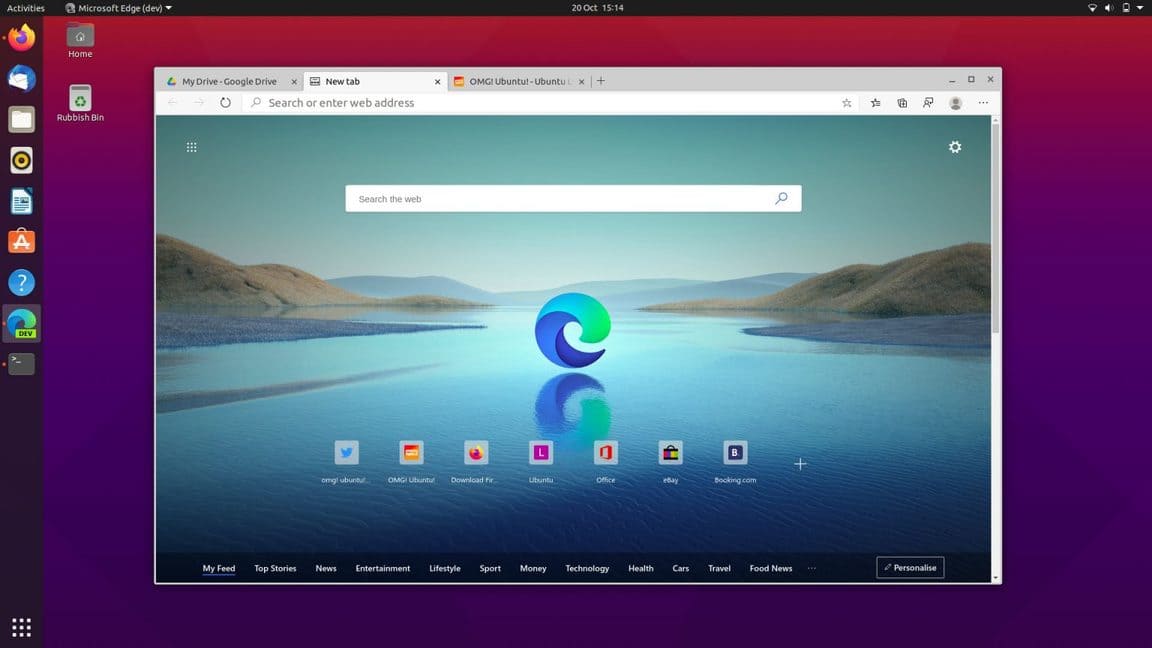
In this article, I will guide you how to install Microsoft Edge on Ubuntu (or any other Linux distribution based on Ubuntu, like Linux Mint) in two methods: graphical (GUI) and command line (CLI).

Join the channel Telegram belong to AnonyViet 👉 Link 👈

How to install Microsoft Edge on Ubuntu

It doesn’t matter which method you choose because you’ll be downloading and installing the same version of Microsoft’s latest browser. Additionally, both methods set things up so that you automatically receive future updates as they are released.

Microsoft Edge is based on Chromium, an open source browser engine developed by Google (though not exclusively). Any website, web app, or web service that can work in any Chromium-based browser, such as Google Chrome, will also work in Edge.

How to install Edge on Ubuntu

Remember that Microsoft Edge on Linux is currently in developer testing mode. It is not a “stable version”. It’s not even a beta. Some features (like browser synchronization) are not currently supported on Linux. Is there an error? Have. Does it crash? Absolutely possible!

Use a graphical interface/GUI

Installing Edge using the graphical user interface is easy to do because Microsoft provides official installation packages for distributions based on Ubuntu and Fedora. You can use these builds to install the browser on your system using your system’s package manager.

Step 1: Go to the Microsoft Edge download page

Fire up the browser and open the page download Microsoft Edge Official Microsoft. Here you will find two builds for Linux. Select the ‘Linux (.deb)’ option for Ubuntu.
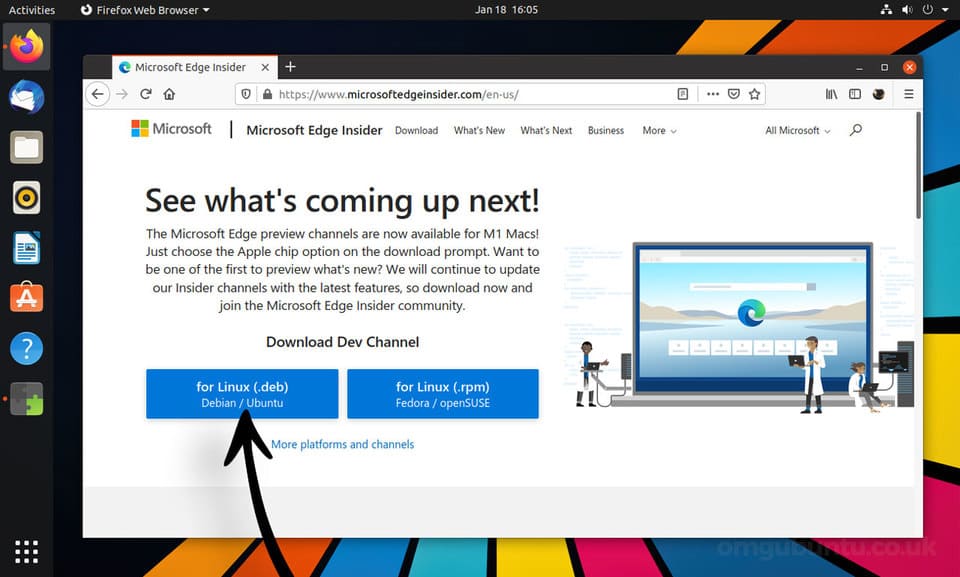
How to install Microsoft Edge on Ubuntu 8

Step 2: Download Edge

Save the .deb file to the Download folder (or any other folder you can access easily). If you are using Firefox, you can select the “Save File” option to do this.
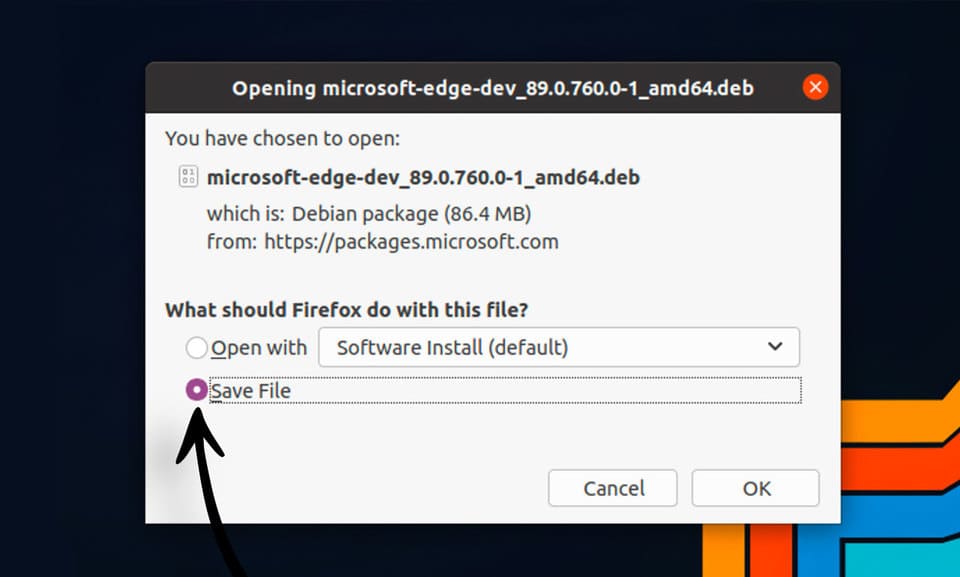
How to install Microsoft Edge on Ubuntu 9

Step 3: Open the Edge installer

Once the download is complete, you need to double click on the saved file to start the installation and follow the on-screen prompts.

How to install Microsoft Edge on Ubuntu 10

When you install Edge using the official installer, the Microsoft Edge repository is added to the system’s software sources list. You can upgrade to newer versions of the browser as they are released using the tool Software Updater.

Step 4: Open Microsoft Edge

Let the installation finish, then open the browser from the Apps grid (or whatever app menu, launcher, etc. you use on your system).

Use terminal/CLI

Do you like to install software from the terminal? Wise choice, if you use Linux, you must use Terminal, so you can become a pro.

Firstly: You must add the Microsoft Edge repo to the system and enter the Microsoft GPG key to authenticate packages:

curl https://packages.microsoft.com/keys/microsoft.asc | gpg --dearmor > microsoft.gpg
sudo install -o root -g root -m 644 microsoft.gpg /etc/apt/trusted.gpg.d/
sudo sh -c 'echo "deb [arch=amd64https://packages.microsoft.com/repos/edgestable main" > /etc/apt/sources.list.d/microsoft-edge-dev.list'
sudo rm microsoft.gpg

Second step: Run this command to install Microsoft Edge:

sudo apt update && sudo apt install microsoft-edge-dev

Once done, launch the browser from the app grid or run a command microsoft-edge-dev in terminal.

How to uninstall Edge on Ubuntu

So you’ve installed Edge. But after a while of tinkering, you find that Edge is no longer interesting or doesn’t meet your needs, so you want to uninstall Nos? It’s easy, follow me.

Open terminal and run the following command:

sudo apt remove microsoft-edge-*

Alternatively, you can also open the Ubuntu Software application, search for ‘edge’, click on the result and press the ‘remove’ button.

Frequently asked questions

Is Microsoft Edge on Ubuntu stable?

Currently, Microsoft Edge on Linux is still in testing mode for developers. So, some errors or problems may be encountered.

Can I update Microsoft Edge after installing it?

Have. When installing using the official installer, the Microsoft Edge repository is added. You can update through your system’s package manager (e.g. Software Updater).

How to uninstall Microsoft Edge?

You can uninstall with command sudo apt remove microsoft-edge-* in the terminal or through the Ubuntu Software application.


Previous Post

How to create photos with immense charisma like Korean stars

Next Post

Instructions for receiving Perplexity Education Pro for 1 year for free

AnonyViet

AnonyViet

Related Posts

Instructions for creating Minecraft-style food photos
Tips

Instructions for creating Minecraft-style food photos

June 9, 2026
Get free Cambridge courses to prepare for IELTS, Starters, Movers
Tips

Get free Cambridge courses to prepare for IELTS, Starters, Movers

June 4, 2026
How to record reaction videos with Android phones, no app needed
Tips

How to record reaction videos with Android phones, no app needed

June 1, 2026
Instructions on how to get Google AI Pro 1 year for free for new accounts
Tips

Instructions on how to get Google AI Pro 1 year for free for new accounts

June 1, 2026
Top free AI tools to help write, test and optimize content
Tips

Top free AI tools to help write, test and optimize content

June 1, 2026
Instructions for receiving Lovable Pro 12 months for free
Tips

Instructions for receiving Lovable Pro 12 months for free

May 29, 2026
Next Post
Instructions for receiving Perplexity Education Pro for 1 year for free

Instructions for receiving Perplexity Education Pro for 1 year for free

0 0 votes
Article Rating
Subscribe
Login
Notify of
guest

guest

0 Comments
Oldest
Newest Most Voted
Inline Feedbacks
View all comments

Recent News

Cách làm mờ khuôn mặt trên iPhone, không cần tải app

Cách làm mờ khuôn mặt trên iPhone, không cần tải app

June 11, 2026
Website to check the World Cup 2026 match schedule intuitively, with automatic calendar synchronization

Website to check the World Cup 2026 match schedule intuitively, with automatic calendar synchronization

June 11, 2026
PDF editing application on Android worth 199k is free

PDF editing application on Android worth 199k is free

June 10, 2026
Instructions for creating Minecraft-style food photos

Instructions for creating Minecraft-style food photos

June 9, 2026
Cách làm mờ khuôn mặt trên iPhone, không cần tải app

Cách làm mờ khuôn mặt trên iPhone, không cần tải app

June 11, 2026
Website to check the World Cup 2026 match schedule intuitively, with automatic calendar synchronization

Website to check the World Cup 2026 match schedule intuitively, with automatic calendar synchronization

June 11, 2026
PDF editing application on Android worth 199k is free

PDF editing application on Android worth 199k is free

June 10, 2026
AnonyViet - English Version

AnonyViet

AnonyViet is a website share knowledge that you have never learned in school!

We are ready to welcome your comments, as well as your articles sent to AnonyViet.

Follow Us

Contact:

Email: anonyviet.com[@]gmail.com

Main Website: https://anonyviet.com

Recent News

Cách làm mờ khuôn mặt trên iPhone, không cần tải app

Cách làm mờ khuôn mặt trên iPhone, không cần tải app

June 11, 2026
Website to check the World Cup 2026 match schedule intuitively, with automatic calendar synchronization

Website to check the World Cup 2026 match schedule intuitively, with automatic calendar synchronization

June 11, 2026
  • Home
  • Home 2
  • Home 3
  • Home 4
  • Home 5
  • Home 6
  • Next Dest Page
  • Sample Page

6789 kv999

No Result
View All Result
  • Home
  • News
  • Software
  • Knowledge
  • MMO
  • Tips
  • Security
  • Network
  • Office

6789 kv999

wpDiscuz
0
0
Would love your thoughts, please comment.x
()
x
| Reply