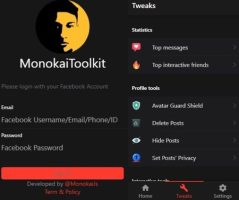
Feel used MonokaiToolkit on the browser is a bit complicated and difficult for everyone. Author Nguyen Anh Nhan has just launched App MonokaiToolkit – Support toolkit for Facebook on Android and iOS. Like other Apps, you just need to go to CH Play, download it to your phone and use it. This is considered MonokaiToolkit’s most useful toolkit ever.
| Join the channel Telegram belong to AnonyViet 👉 Link 👈 |
Now there is no need to sit on the computer and press F12 and paste the utility code into the browser. You can Download MonokaiToolkit App – Support Toolkit for Facebook on CH Play. Then log in with your Facebook account’s Email and Password to use Facebook’s utility features on your phone.
From February 11, 2021, the author added MonokaiToolkit App on iOSif you are using an iPhone or iPad, you can use this set of Facebook utilities.
Features of MonokaiToolkit 6 Facebook utilities on Android phones:
- Delete posts on timeline based on time, poster, private mode status.
- Hide posts on timeline based on time, poster, private mode status.
- Enable/Disable Avatar Shield.
- Bulk set up Privacy of posts.
- See who texts you the most.
- See who interacts with you the most.
- Prank all your friends.
- Emotional bombs on friends’ walls.
- Bomb comments on friends’ walls.
- Automatically comment on the wall.
- Automatically drop emotions on the wall.
- Send mass messages.
- Schedule a post.
- Mass unfollow.
- Filter friends by interaction.
- Post in bulk.
- Auto comment supports photos.
AVAILABLE FEATURES
Click on the images in the article to see detailed information & Instructions for use.
See top interactions
See the list of people who interact & comment on your personal page the most.
View top messages
See the list of people who message you the most on Facebook.
View Story & Download Story
View other people’s Stories without checking Seen (Does not appear in the list of viewed Stories). Allows you to download Story photos & Videos comfortably.
View messages without Seen
Read messages from the most recent inboxes but do not mark them as Seen.
Reply to messages without Seen
Reply to messages but not Seen Inbox (Still shows Offline).
Automatic texting
Automatically send mass messages to friends.
Avatar Shield
Avatar Shield to prevent others from capturing Avatar as well as Downloading Avatar (Chong RIP).
Set post privacy
Set bulk privacy for Wall posts.
Delete inactive friends (Filter friends)
Delete people who don’t interact on Facebook.
Delete all friends
Delete all friends from your friends list.
Unfollow all your friends
Unfollow everyone in your friends list.
Auto Emotions on Newsfeed
Auto drop random emotions (allows selection) on Newsfeed. Maximum 50 articles.
Auto Comment on Newsfeed
Auto comment on Newsfeed. Maximum 50 articles.
Emotion bombs on friends’ walls
Auto drop random emotions (allows selection) on friends’ walls. Maximum 50 articles.
Bom Comment on your friend’s wall
Auto comment on friends’ walls. Maximum 50 articles.
Automatically reply to messages
Automatically reply when there is a message to your account. Messages can be set in the Settings tab.
NOTES
- This version has a fairly high delay time (1 – 5 seconds) to ensure the account is not locked for interaction. Delay time settings are available on any page that uses delay time as well as the Settings tab.
- To log in using QR, please install it Extension according to.
- After logging in, please surf Facebook for a bit (In webview) and then turn it off to log in.
Features MonokaiToolkit Version 2.0.1
Feature update:
- Temporarily close interactive features for maintenance to avoid Checkpoint.
- Update login – Log in directly on Facebook.
- Updates automatically reply to messages – no need to run in the background.
- Update and complete “Read messages without Seen”.
- Updated interactive statistics feature.
- Update top messaging features.
- Automatically sending messages has minimized feature blocking.
- Deleting inactive friends is no longer misleading.
- Details of the features will be updated below.
- View & Download Stories
Note: Features related to interaction such as automatic reactions or automatic comments are not available at this time to avoid Checkpoint.
Details of newly added features
- Log in: From now on, you will no longer have to log in via Token. Basic features will not be performed via Token and completely avoid being stuck with Checkpoint…
- Automatically reply to messages: Automatically replying to current messages does not depend on background tasks so there will be no sudden crashes.
- Read messages without Seen: Update & perfect interface and features. In addition to reading messages, you can now reply to messages stably right in the MonokaiToolkit App without having to go out to Messenger.
- Interaction statistics & Remove inactive friends: Top interactions are supported by the Loc Mai API.
- Delete all friends: Adjust some parameters, now in the near future it will work without causing “symptoms” of feature blocking.
- Set up post privacy: Post privacy is set synchronously, there are not as many filters as before.
- View Stories anonymously: Watching Stories leaves no trace, doesn’t get detected, doesn’t have to worry about your crush seeing it!
- Download Story: From now on, you can freely download any Story you like from anyone
How to use the MonokaiToolkit App on Android phones:
First you need to Download the App MonokaiToolkit – Support toolkit for Facebook about Android phones.
Open the MonokaiToolkit App on your phone. Enter User/Password of Facebook account. Then press Sign in.

On the first screen is basic information about your account. Note that the line above is Full Access Token, if you need to use it for something else. You switch to Menu Tweaks below to use the App’s features

Here you will find all the useful features for Facebook as mentioned above. The author has also minimized the risk of Checkpoint so you can use it with peace of mind

How to install MonokaiToolkit App on IOS
- Download IPA file: https://drive.google.com/file/d/1mw_28WTGJuGIkrwWhEKRN1IOS8kvi88F/view
- Sideload using AltStrore according to the instructions this article.
Note: When logging in with this application, your account may be Checkpointed. Note that Checkpoint is a measure by Facebook to check whether your account has unusual login activities (here, logging into applications outside of Facebook). The application does not collect any data related to your identity or account.
To support Vietnamese products. Please rate 5* for MonokaiToolkit App – Support toolkit for Facebook so that the author has more motivation to develop new features.
Frequently asked questions
Does MonokaiToolkit App support both Android and iOS?
Yes, the MonokaiToolkit App is now available on both Android and iOS operating systems.
Do I need to use a web browser to use MonokaiToolkit?
No need anymore! You just need to download the MonokaiToolkit application to your phone and log in with your Facebook account to use.
What are the main features of App MonokaiToolkit?
The application provides many useful features such as: delete/hide posts, manage privacy, view top interactions/messages, send mass messages, schedule posts, automatically comment/drop reactions, view and download Stories anonymously, and more.