• Home
  • News
  • Software
  • Knowledge
  • MMO
  • Tips
  • Security
  • Network
  • Office
AnonyViet - English Version
  • Home
  • News
  • Software
  • Knowledge
  • MMO
  • Tips
  • Security
  • Network
  • Office
No Result
View All Result
  • Home
  • News
  • Software
  • Knowledge
  • MMO
  • Tips
  • Security
  • Network
  • Office
No Result
View All Result
AnonyViet - English Version
No Result
View All Result

How to get 10TB TeleBox storage for free

AnonyViet by AnonyViet
November 30, 2025
in Knowledge
0

How to get 10TB TeleBox Free is a trick sought after by the online community to solve worries about cloud storage space. If you frequently struggle with “storage full” notifications from other services, this is the perfect solution. This article will be your guide, guiding you through the simple steps to owning a huge archive in a completely legal way.

Join the channel Telegram belong to AnonyViet 👉 Link 👈

Instructions on how to get 10TB Telebox for free

Step 1: Get a temporary educational email (.edu).

Since this program is aimed at an educational audience, having an email .edu is a prerequisite.

  1. First, you need to visit the website that provides temporary email at address HERE.
  2. Please enter any name and find the drop-down menu next to the email address and select the domain name with the extension @academic.edu.rs.
  3. Immediately, a new educational email address will be created for you. It is important that you keep this browser tab open to receive the authentication code and activation link in the following steps.
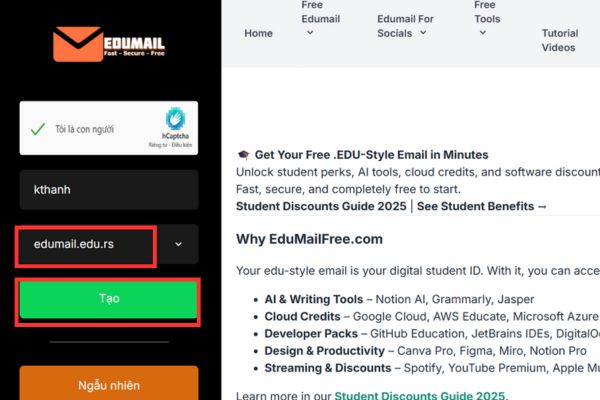
Possess a temporary educational (.edu) email

Step 2: Register a Telebox account and initial authentication

Once you have your .edu email in hand, it’s time to use it to create a Telebox account.

  1. Please open a new tab and visit Telebox’s homepage at: https://www.telebox.online/.
  2. Next, click the button “Register” and use the @academic.edu.rs email address you just created to fill out the form.
  3. Once completed, Telebox will send one authentication code to your .edu mailbox. You just need to return to the edumailfree.com tab, open the newly received email and copy the code.
  4. Finally, you paste the code into Telebox’s registration page to complete the basic account creation.
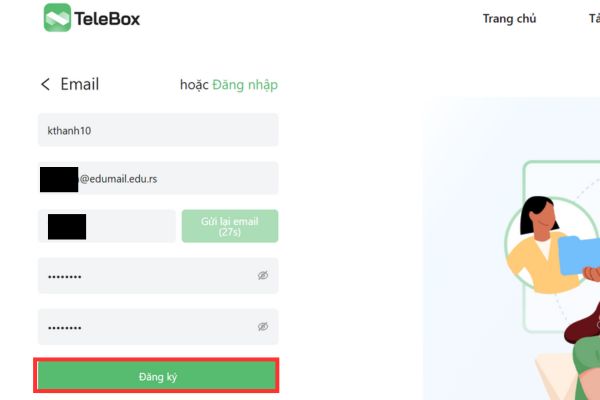
Register a Telebox account

Step 3: Submit a special account authentication request

After successfully logging in to Telebox, click My account > Authenticate special accounts. On the new page, click the button Start authentication.
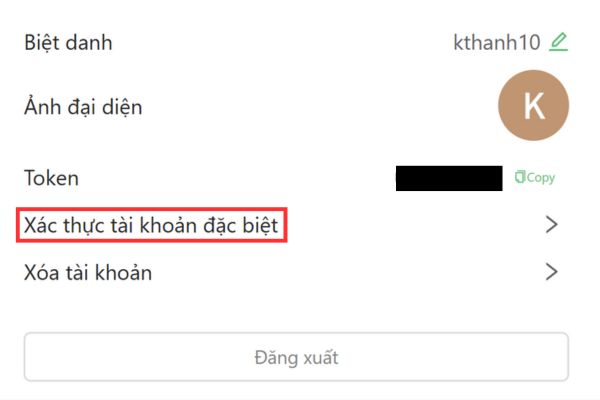
Click Authenticate special account

A form will appear, and you need to fill in the information correctly as follows to ensure the highest success rate:

  • Choose account type: You need to choose is education.
  • Organization name: You can fill in as Bach Khoa.
  • Email: Please re-enter your email address @academic.edu.rs correctly.
  • Reason for registration: You can choose one of the following compelling reasons (written in English) to paste into the content box.

Reason 1:

As a student, I need a large amount of space to store documents, assignments, and research data. With 10TB from Telebox, I can keep everything well-organized, work with classmates smoothly, and concentrate better on my learning.

Reason 2:

Being a student means dealing with many types of files like lecture notes, coursework, and videos. Having 10TB on Telebox allows me to store all my academic data safely and without worry.

Reason 3:

Telebox’s 10TB storage helps me gather all my homework, team projects, and learning resources into one secure and convenient location.

Reason 4:

Having extra storage is extremely important for handling my school tasks and educational materials. With 10TB from Telebox, I can organize and manage everything much more effectively.

After filling in completely, press the button Send to complete the request.
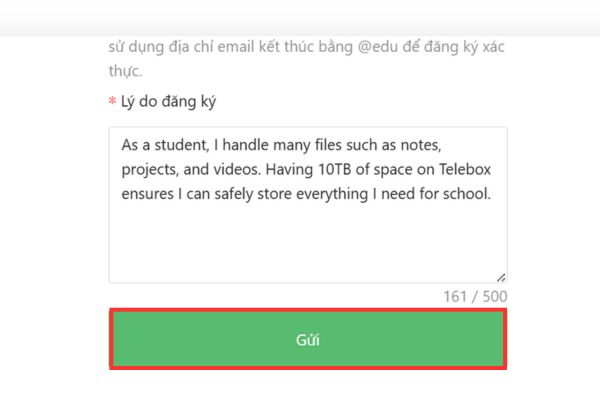
Fill in the information then click Send

Step 4: Complete verification and enjoy the results

Please return to the edumailfree.com mailbox tab again. You will now see a new email from Telebox about special account authentication. This email will contain an activation link, just click on it to confirm.
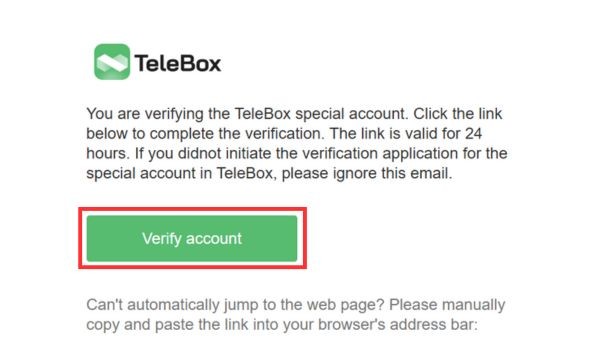
Click Verify Account

Now, when you check your account information, you will proudly see that your storage capacity has been upgraded to 10TB!
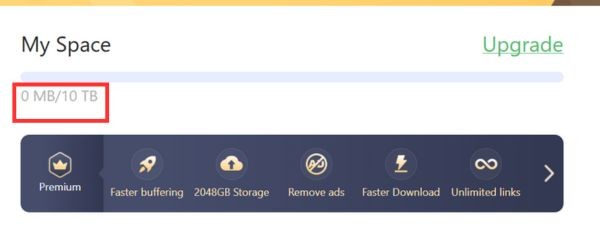
How to get 10TB TeleBox free storage in just 5 minutes

Conclusion

With just a few simple steps, you’re done How to get 10TB TeleBox free and forever. Now you have a space storage Huge space to comfortably back up study documents, personal projects or any important data without having to worry about capacity limits. Wishing you success!


Tags: 10TBfreeStorageTeleBox
Previous Post

The easiest and safest way to clean a computer screen

Next Post

Hướng dẫn lập trình PowerShell trên Windows

AnonyViet

AnonyViet

Related Posts

Instructions for receiving Shodan Academic Membership for free
Knowledge

Instructions for receiving Shodan Academic Membership for free

December 11, 2025
How to create Mind Map and Flowchart using ChatGPT is super simple
Knowledge

How to create Mind Map and Flowchart using ChatGPT is super simple

December 7, 2025
Free Gemini Google certification exam guide and Answers
Knowledge

Free Gemini Google certification exam guide and Answers

December 6, 2025
Instructions on how to set a recording file as a ringtone for iOS 26
Knowledge

Instructions on how to set a recording file as a ringtone for iOS 26

December 5, 2025
Instructions for creating Gemini Enterprise for free for 30 days
Knowledge

Instructions for creating Gemini Enterprise for free for 30 days

December 2, 2025
Instructions for turning on fall detection on Apple Watch
Knowledge

Instructions for turning on fall detection on Apple Watch

December 2, 2025
Next Post
Hướng dẫn lập trình PowerShell trên Windows

Hướng dẫn lập trình PowerShell trên Windows

0 0 votes
Article Rating
Subscribe
Login
Notify of
guest

guest

0 Comments
Oldest
Newest Most Voted
Inline Feedbacks
View all comments

Recent News

App MonokaiToolkit 6 – Facebook utility toolkit on Android and iOS

App MonokaiToolkit 6 – Facebook utility toolkit on Android and iOS

December 12, 2025
Instructions for receiving CapCut Pro for 30 days for free

Instructions for receiving CapCut Pro for 30 days for free

December 12, 2025
How to Turn off “Seen” mode on Messenger 2021

How to Turn off “Seen” mode on Messenger 2021

December 11, 2025
Instructions for receiving Shodan Academic Membership for free

Instructions for receiving Shodan Academic Membership for free

December 11, 2025
App MonokaiToolkit 6 – Facebook utility toolkit on Android and iOS

App MonokaiToolkit 6 – Facebook utility toolkit on Android and iOS

December 12, 2025
Instructions for receiving CapCut Pro for 30 days for free

Instructions for receiving CapCut Pro for 30 days for free

December 12, 2025
How to Turn off “Seen” mode on Messenger 2021

How to Turn off “Seen” mode on Messenger 2021

December 11, 2025
AnonyViet - English Version

AnonyViet

AnonyViet is a website share knowledge that you have never learned in school!

We are ready to welcome your comments, as well as your articles sent to AnonyViet.

Follow Us

Contact:

Email: anonyviet.com[@]gmail.com

Main Website: https://anonyviet.com

Recent News

App MonokaiToolkit 6 – Facebook utility toolkit on Android and iOS

App MonokaiToolkit 6 – Facebook utility toolkit on Android and iOS

December 12, 2025
Instructions for receiving CapCut Pro for 30 days for free

Instructions for receiving CapCut Pro for 30 days for free

December 12, 2025
  • Home
  • Home 2
  • Home 3
  • Home 4
  • Home 5
  • Home 6
  • Next Dest Page
  • Sample Page

trang chủ f168 nhà cái 78win https://www.qq8827.com/ https://go99.ae.org/ https://nohu90.bid/

No Result
View All Result
  • Home
  • News
  • Software
  • Knowledge
  • MMO
  • Tips
  • Security
  • Network
  • Office

trang chủ f168 nhà cái 78win https://www.qq8827.com/ https://go99.ae.org/ https://nohu90.bid/

wpDiscuz
0
0
Would love your thoughts, please comment.x
()
x
| Reply