I just bought the screen less than a week ago and it’s so dirty, full of water jets, shiny streaks, but mostly just dust. Maybe it’s because I eat in the corner at work :v that’s why. If you are ready to clean the screen, you should write an article to guide you on how to clean it in the safest and easiest way.
| Join the channel Telegram belong to AnonyViet 👉 Link 👈 |

When should you clean your computer screen?
Whether you’re using a desktop, laptop, or tablet, the most important thing to keep in mind is to keep your screen clean. For some screens LED or OLED TV same.
Light rays can obscure what you see on the screen. Smudges and fingerprints that accumulate over time will leave you with an unsightly screen. As a result, the experience of viewing content on that screen will be significantly reduced.
Those are signs that your screen needs to be cleaned. This cleaning process only takes a few minutes but in return, you will get a shiny screen like when you first bought it.
Tools needed to clean computer screens
You don’t need too many tools to clean your computer screen. All you need is a bottle of screen cleaning spray or filtered water and a soft, microfiber, lint-free cloth.
- Cleaning solution
- Soft, microfiber, lint-free fabric
If you don’t have the above specialized tools, don’t worry. You can also use common everyday things instead, such as rubbing alcohol, white vinegar and distilled water (I recommend just using distilled or filtered water to keep it healthy), and a roll of toilet paper is enough (super soft ones for babies are even better). Because paper towels are lint, if you are not used to using them, you can switch to using soft cotton towels. Remember to absolutely avoid anything hard that can easily scratch the screen.
In short, if you have specialized tools, the better, but if you don’t, it’s okay.
How to clean computer screen
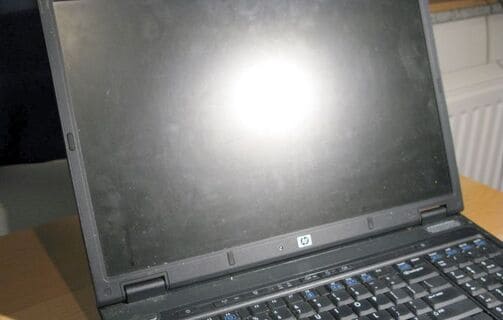
Before spraying water on the screen, Make sure you have turned off the device completely. If using a PC, just turn off the screen Laptops Then turn off the laptop completely.
If you think that you can spray water at this point, you are wrong. Droplets from liquids may flow onto the screen edges, causing electrical problems. On laptops, steam can enter the heatsink and keyboard, as well as run into the bezel.
Instead, spray the solution first onto the fabric.
Hold the cloth firmly in your hand, and clean the screen by moving both your wrist and arm (if you remember the principle of holding the right hand, you can apply it :v), avoiding unnecessary force. Start at the top left corner and work your way toward the center of the screen. Don’t push the cloth from the left side to the right side close to the screen edge. At that time, it was easy for dust and dirt to get into the edges of the screen. You should start from the screen cleaning tablet to the center of the screen.
If the stain is too stubborn, just do it 3 or 4 times. After cleaning, let the screen dry naturally, do not use a dryer :v.
How to clean old-style CRT screens
Today, Cathode Ray Tube (CRT) monitors are rare, but they can still be found in old internet cafes. You can even buy a video game console with a CRT screen, or simply buy that old CRT TV you want.
Preparation tools:
- Anti-static fabric
- Fabric is not frayed
- Screen cleaning solution (can use glass cleaner)
Starting with an anti-static cloth and cleaning solution, wipe down the case.
Next, spray screen cleaning solution on a lint-free cloth, wipe the screen in the above way, focusing on the center of the screen. If the fabric is dry, just spray more solution on the fabric and continue wiping.
How to clean the touch screen
If you are using a 2-in-1 laptop that is both a laptop and a tablet when folded, cleaning will be a little different.
These devices attract more grease and dust than computer screens. So you will need to clean them in a slightly different way. The 2-in-1’s touchscreen is cleaned just like standard tablets and smartphones.
The main aim here is to remove grease, then clean the screen of other dirt and debris. But before doing so, remember to completely turn off the device.
After cleaning the computer screen, what do you do next?
Summary of steps to clean a computer screen:
- Turn off the screen
- Start with a microfiber cloth and screen cleaning solution
- Spray the solution onto the fabric
- Wipe the screen clean towards the center of the screen
If you are using a laptop, follow the same steps. And carry cloths in your bag when you go out, believe me sometimes they will be very useful.
Meanwhile, if you are using a CRT monitor, follow the same steps, but remember that you can use glass cleaner. The case and screen should also be wiped clean with an anti-static cloth.
Finally, if you use a 2-in-1 or touchscreen laptop, you’ll need to be more aware of grease issues. After cleaning the screen, you should also clean other electronic devices such as the keyboard and mouse.
Frequently asked questions
What can I use to clean my computer screen?
You should use a specialized screen cleaning solution and a soft, lint-free cloth. If you don’t have it, you can use distilled or filtered water diluted with rubbing alcohol or white vinegar and a soft cloth. Absolutely avoid strong detergents or hard objects that can easily scratch the screen.
How to safely clean a computer screen?
Before cleaning, turn off the device completely. Spray the cleaning solution onto the fabric, do not spray directly on the screen. Wipe the screen in a radial motion, from the outside in to avoid dirt sticking to the edges. Let the screen dry naturally, do not use a dryer.
How should the touch screen be cleaned?
The touch screen needs to be cleaned more thoroughly to remove grease. Cleaning is similar to a regular screen but more attention should be paid to cleaning grease stains. Remember to turn off the device before cleaning.