• Home
  • News
  • Software
  • Knowledge
  • MMO
  • Tips
  • Security
  • Network
  • Office
AnonyViet - English Version
  • Home
  • News
  • Software
  • Knowledge
  • MMO
  • Tips
  • Security
  • Network
  • Office
No Result
View All Result
  • Home
  • News
  • Software
  • Knowledge
  • MMO
  • Tips
  • Security
  • Network
  • Office
No Result
View All Result
AnonyViet - English Version
No Result
View All Result

Where to make a passport in Ho Chi Minh City from July 2025?

AnonyViet by AnonyViet
July 24, 2025
in Knowledge
0

Where to make a passport in Ho Chi Minh City It is a question that many people are interested in, especially before the changes in the venue of the upcoming procedures. From the date July 1, 2025the process will be streamlined and concentrated in certain locations. This article will answer your questions, provide accurate addresses and guide you on how to make super convenient online passports.

Join the channel Telegram belong to Anonyviet 👉 Link 👈

Where to make a passport in Ho Chi Minh City from July 1, 2025?

According to the new regulations, after the merger, citizens need to grant and change passport In Ho Chi Minh City, the procedure will be carried out at one of the following three locations:

  • Location 1: No. 196 Nguyen Thi Minh Khai, Xuan Hoa Ward, Ho Chi Minh City
  • Location 2: No. 239 Ngo Gia Tu, Thu Dau Mot Ward, Ho Chi Minh City
  • Location 3: No. 120 Pham Hung, Ba Ria Ward, Ho Chi Minh City

Please save these addresses to actively arrange work and move conveniently when needed.
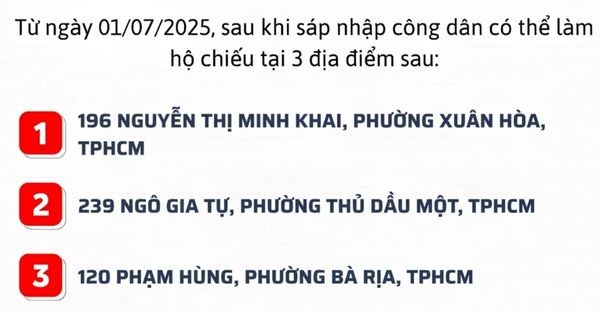
Where to make a passport in Ho Chi Minh City

Instructions for making convenient online passports

Instead of having to come directly, you can sit at home and complete the procedure for applying for a passport online. This process is not only fast but also extremely simple with 4 steps:

Step 1: Open the browser and access the page Public Service > Click Login, use electronic identification accounts Vneid To log in to the system (must identify level 2).
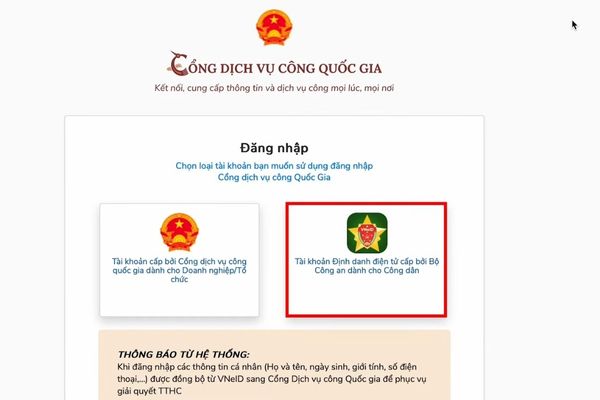
Click Login with VNEID

Step 2: Click on the item Apply online.

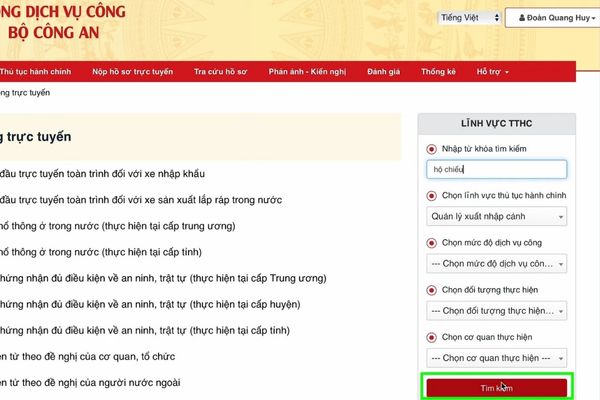
  • At the search keyword section, you fill out “passport”.
  • In the selection of administrative procedures, you choose Immigration management.
  • Then press Search.
Instructions for making convenient online passports

Step 3: Continue Passport issuance in the country > Press Apply.
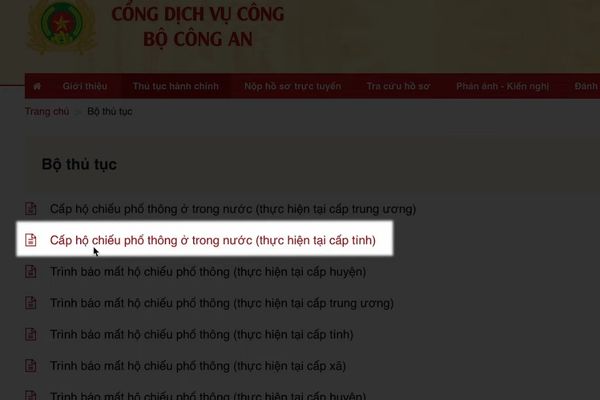
Choose to issue ordinary passports in the country

Choose the right information. After that, upload required files such as portrait photos, CCCD photos, …
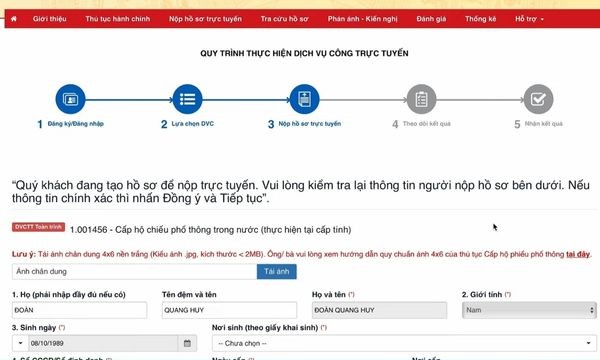
Choose the right information

Step 4: After the application is approved, the notice will be sent with a link to the payment gateway. You can choose to pay the fee via e -wallet, bank card safely and secure.
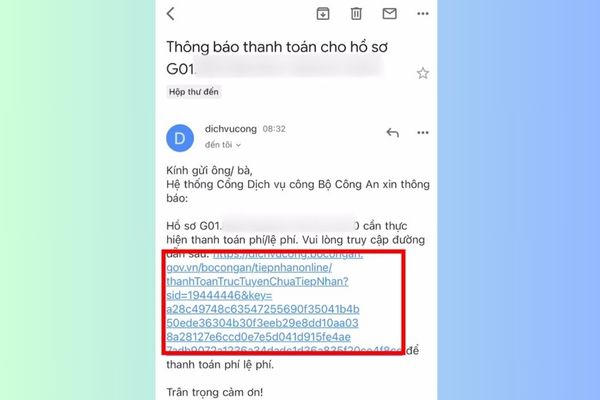
Payment fee
Payment fee

Step 5: Wait to receive a passport at home

How long does the passport grant time?

The time for processing records and your passport will depend on the receiving agency:

  • 8 working days: If you apply at the provincial Immigration Management Department.
  • 5 working days: If you apply at the Immigration Department – Ministry of Public Security.

Note: This time does not include weekends and holidays and New Year as prescribed.
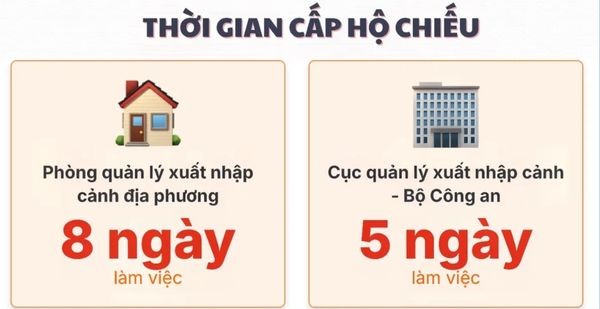
How long does the passport grant time?

Conclusion

With the above details, questions Where to make a passport in Ho Chi Minh City There was a clear and specific answer. Catching new locations and taking advantage of the online process will help you be more proactive, saving maximum time and effort. Wishing you a successful and early procedure to have your passport!


Tags: chíCityJulyMinhpassport
Previous Post

Share code Coinwink Matrix website

Next Post

How to add a parking card to Samsung phones everyone can do

AnonyViet

AnonyViet

Related Posts

Instructions on how to exit iOS 27 Beta and update to the official version
Knowledge

Instructions on how to exit iOS 27 Beta and update to the official version

October 22, 2026
Instructions for turning off automatic subtitles on iPhone and Macbook
Knowledge

Instructions for turning off automatic subtitles on iPhone and Macbook

October 20, 2026
MBTI, Big Five, DISC or Holland: which personality test should you choose?
Knowledge

MBTI, Big Five, DISC or Holland: which personality test should you choose?

October 15, 2026
Super virtual way to change the photography angle using AI on iPhone
Knowledge

Super virtual way to change the photography angle using AI on iPhone

October 9, 2026
How to create Safari extension on iOS 27 and macOS 27
Knowledge

How to create Safari extension on iOS 27 and macOS 27

October 3, 2026
How to write the word Hoa Ki on Casio calculator
Knowledge

How to write the word Hoa Ki on Casio calculator

October 3, 2026
Next Post
How to add a parking card to Samsung phones everyone can do

How to add a parking card to Samsung phones everyone can do

0 0 votes
Article Rating
Subscribe
Login
Notify of
guest

guest

0 Comments
Oldest
Newest Most Voted

Recent News

Instructions for registering for OxionAI Pro for 1 year with many powerful AI models

Instructions for registering for OxionAI Pro for 1 year with many powerful AI models

October 24, 2026
How are Windows 11 Pro and Windows 10 Pro different?

How are Windows 11 Pro and Windows 10 Pro different?

October 23, 2026
Instructions for using CleanYourTV: Remove ads on Android TV, Google TV

Instructions for using CleanYourTV: Remove ads on Android TV, Google TV

October 23, 2026
Receive copyright for 3 Halloween software worth 0

Receive copyright for 3 Halloween software worth $150

October 23, 2026
Instructions for registering for OxionAI Pro for 1 year with many powerful AI models

Instructions for registering for OxionAI Pro for 1 year with many powerful AI models

October 24, 2026
How are Windows 11 Pro and Windows 10 Pro different?

How are Windows 11 Pro and Windows 10 Pro different?

October 23, 2026
Instructions for using CleanYourTV: Remove ads on Android TV, Google TV

Instructions for using CleanYourTV: Remove ads on Android TV, Google TV

October 23, 2026
AnonyViet - English Version

AnonyViet

AnonyViet is a website share knowledge that you have never learned in school!

We are ready to welcome your comments, as well as your articles sent to AnonyViet.

Follow Us

Contact:

Email: anonyviet.com[@]gmail.com

Main Website: https://anonyviet.com

Recent News

Instructions for registering for OxionAI Pro for 1 year with many powerful AI models

Instructions for registering for OxionAI Pro for 1 year with many powerful AI models

October 24, 2026
How are Windows 11 Pro and Windows 10 Pro different?

How are Windows 11 Pro and Windows 10 Pro different?

October 23, 2026
  • Home
  • Home 2
  • Home 3
  • Home 4
  • Home 5
  • Home 6
  • Next Dest Page
  • Sample Page

say88 tỷ lệ kèo nhà cái kèo nhà cái 5 febet

No Result
View All Result
  • Home
  • News
  • Software
  • Knowledge
  • MMO
  • Tips
  • Security
  • Network
  • Office

say88 tỷ lệ kèo nhà cái kèo nhà cái 5 febet

wpDiscuz
0
0
Would love your thoughts, please comment.x
()
x
| Reply