You want to temporarily leave social networks but still keep in touch with friends via text? Disabled Facebook but still use Messenger Is the perfect solution. This feature allows you to temporarily stop working on Facebook without affecting the use of Messenger. Anonyviet will guide in detail step by step to perform, along with important benefits and notes. Let’s explore!
| Join the channel Telegram belong to Anonyviet 👉 Link 👈 |
Disifying Facebook but still using Messenger?
Disable Facebook is a temporary way to “hide” from this platform. When disabled, your profile will not appear on Facebook, friends cannot find you and posts and comments temporarily hidden. However, you can still use Messenger to text and call as usual. This is the ideal choice for those who want to reduce time on social networks but still maintain personal contact.
Unlike the account deletion (permanently deleted), disabled allows you to return at any time just by logging back in. This brings flexibility, especially when you just want to “rest” temporarily.

How to disable Facebook but still use Messenger
Below are detailed steps to disable Facebook But still use Messenger on the phone app. This process applies to both iOS And Android, extremely simple and only takes a few minutes.
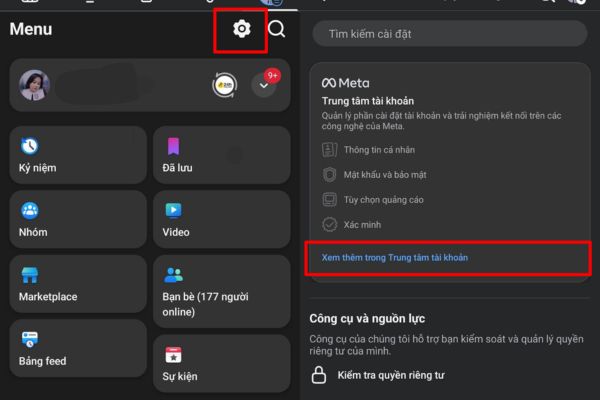
Step 1: Open the Facebook app on your phone, log in to your account you want to disable. In the upper right corner, click the three -tile icon (menu). Pull down and choose Install & Privacythen click Setting. Continue to pull down and choose See more in the account center.
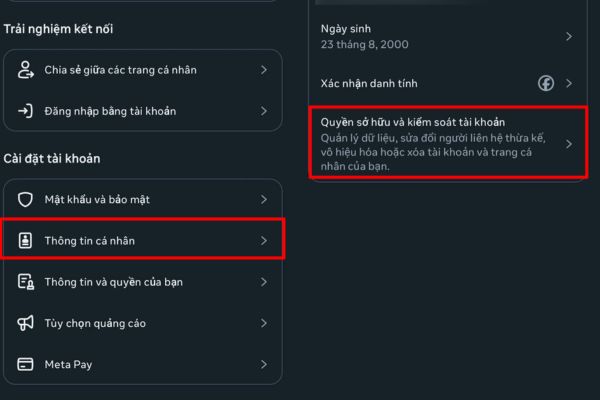
Step 2: Part Personal informationthen choose Account ownership and control. Here, you can adjust your account -related settings, such as disabling or deletion.
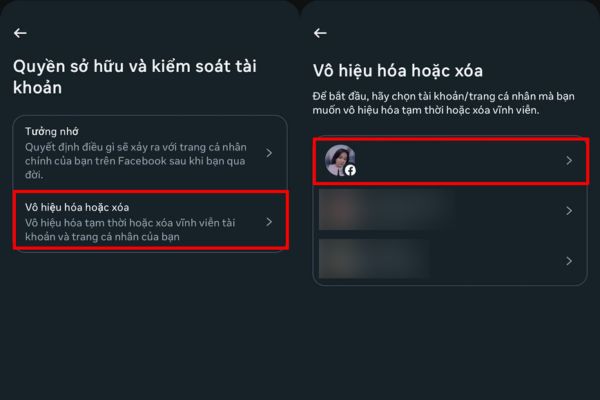
Step 3: Click Disabled or deletedyou will see the list of accounts linked in the account center. Choose a Facebook account to disable.
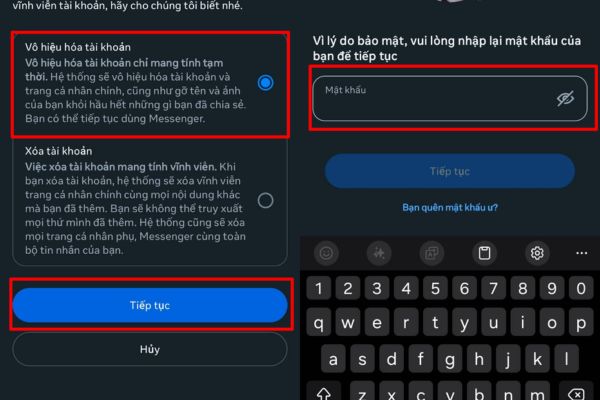
Step 4: After choosing an account, click Disable account and follow the instructions. The system will require a password to confirm. Finally, press Continue To complete. After disabling, you can still use Messenger as usual.
The benefits of disabling Facebook but still using Messenger
- Minimize annoyance: You will no longer be disturbed by announcements, post or advertising on Facebook, helping to focus more on work or personal life.
- Maintain contact: Messenger still operates independently, allowing you to text, call, send photos or videos with friends and family.
- Flexible return: If you want, you just need to log in to activate your account without losing data.
- Privacy protection: Your profile temporarily “disappears”, reducing the risk of being monitored or collecting information.
How to return after disabling
If you want to return to Facebook, you just need to log in with email/phone number and password. The account will be restored immediately, including posts, photos and friends. Messenger will not be affected during this process.
Conclude
Disabled Facebook but still use Messenger A great solution to balance the reduction of time on social networks and maintain communication. With just a few simple steps, you can enjoy private space while keeping connected with important people. Try applying today!