• Home
  • News
  • Software
  • Knowledge
  • MMO
  • Tips
  • Security
  • Network
  • Office
AnonyViet - English Version
  • Home
  • News
  • Software
  • Knowledge
  • MMO
  • Tips
  • Security
  • Network
  • Office
No Result
View All Result
  • Home
  • News
  • Software
  • Knowledge
  • MMO
  • Tips
  • Security
  • Network
  • Office
No Result
View All Result
AnonyViet - English Version
No Result
View All Result

Instructions for finding different content 2 documents by Diffchecker

AnonyViet by AnonyViet
March 31, 2025
in Software
0

When working in an environment that requires collaboration and constant content changes, the comparison of document versions is a big challenge. Especially for programmers, editors, or people working in projects that need to monitor the change of text or source code. This is the time Diffcheckeran online tool, becoming a useful solution to save time and effort for you.


Join the channel Telegram belong to Anonyviet 👉 Link 👈

What is Diffchecker?

Diffchecker As a free online tool designed to compare and detect the difference between two documents, documents, or source code. This tool not only helps users quickly recognize the differences between the two files, but also supports many different types of documents, including images, PDF files and spreadsheets. If you are looking for a difference between versions of a text or source code, Diffchecker is the ideal choice.
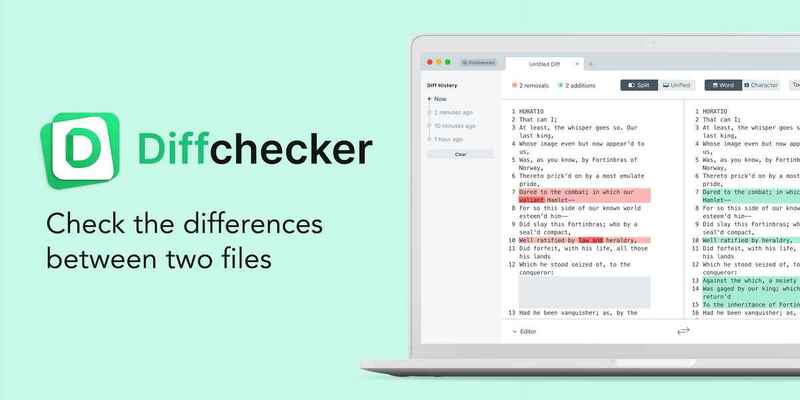
What is Diffchecker?

See also: Wayback Machine: Discover the old interface of any website

Diffchecker special features

1. Quick and accurate comparison

Diffchecker works by displaying the differences between the two documents uploaded by the user. Each change will be clearly marked with colors, with changing lines that will be red or blue, making it easy to identify differences. This is extremely useful when you need to compare many documents that have changed.
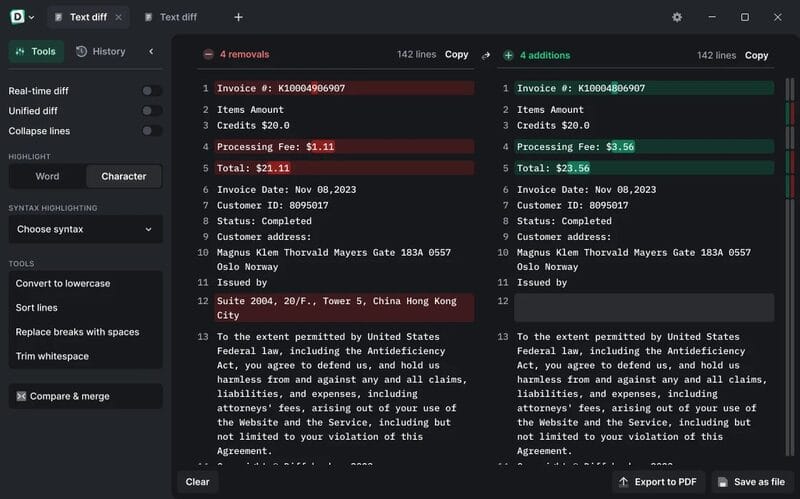
Diffchecker compares quickly and accurately

2. Compare images

You can compare two photos by using a slider to compare each pixel or apply a fading mode to see a clearer difference. This feature is useful when you need to compare the editing versions of the image or check the change in graphic design.
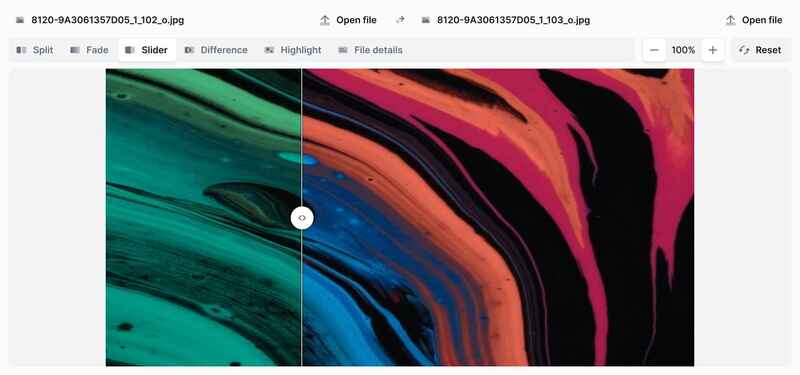
Compare images
Compare images

3. Compare PDF and Word files

Diffchecker does not only stop comparing pure texts, but also supports comparison of PDF and Word files. You can upload two document files and the tools will automatically extract and compare their content. The changes between documents will be clarified, helping users save time when working with complex files.
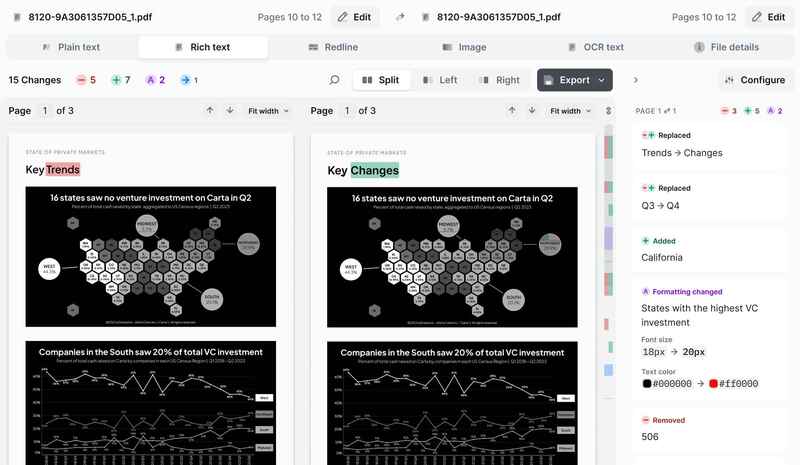
Compare PDF and Word files

4. Compare spreadsheets

Diffchecker also supports the comparison of Excel or Google Sheets. You can easily check the change between data cells, helping to manage information and data easier than ever. This function is extremely useful when working with large data tables or when checking in data changes.
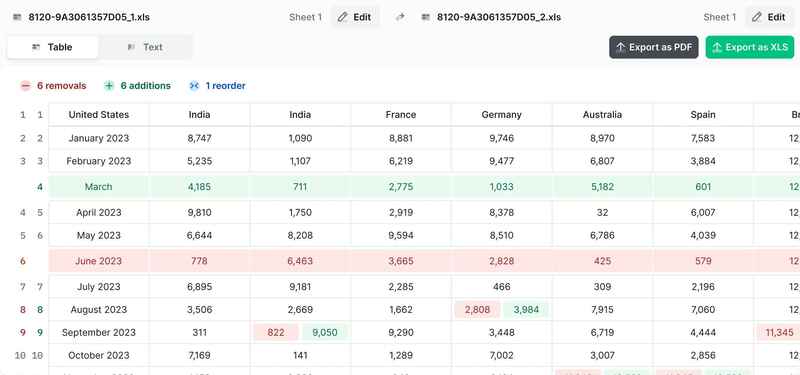
Compare spreadsheets

How to use Diffchecker

To use, you just need to follow the following simple steps:

Step 1: Visit Diffchecker website HERE.

Step 2: Copy and paste the content of the two documents you want to compare to the input boxes on the website.

Step 3: Press Find Difference And Diffchecker will automatically compare and display the differences between the two documents. Changes will be red or blue for users to easily identify.

In addition, you can also upload PDF, Word, images or spreadsheet files to make comparisons, making the work simpler and more effective.
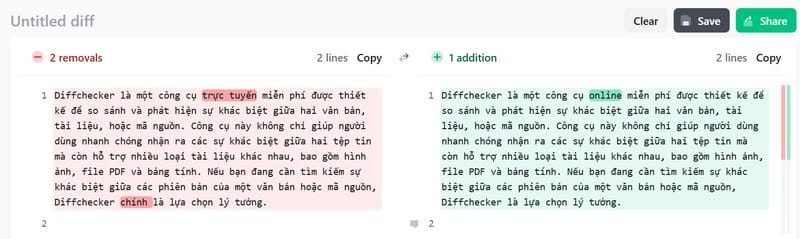
How to use Diffchecker

Advanced features of Diffchecker

Compare Real-time

When you paste the content into the input cells, Diffchecker will automatically create an immediate comparison without having to do anything more. This feature saves time and easily tracks changes in documents.

Explain is easy to understand

Diffchecker also provides the feature to explain the difference between documents with AI. Artificial intelligence technology will help users better understand the complicated changes, especially when you face large documents or contain many confusing changes, this essence only supports English.
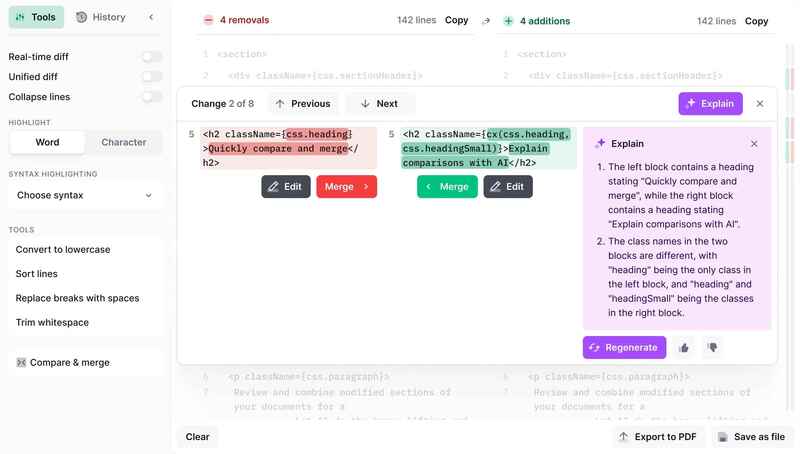
Explain is easy to understand

Collaboration and sharing easily

You can send comparison results to colleagues or collaborators with just a simple link. This helps improve cooperation in group projects or jobs that require continuous change monitoring.

See also: Capsolver: Automatic Captcha solution For businesses

Conclusion

Diffchecker As an easy -to -use and extremely useful tool for those who need to compare and monitor the change between documents, source code, images or data. With quick and accurate comparison, and powerful support features, Diffchecker is an indispensable tool for programmers, editors and those who work in group projects. If you haven't tried, do not hesitate to explore and experience today!


Tags: contentDiffcheckerdocumentsfindingInstructions
Previous Post

5 best Google Photos replacement services today

Next Post

How to SKIP Microsoft Account on Windows 11

AnonyViet

AnonyViet

Related Posts

Instructions for receiving 3 months of MultCloud Premium for free with 200GB data
Software

Instructions for receiving 3 months of MultCloud Premium for free with 200GB data

October 17, 2026
Instructions for receiving pension through VNeID without going to the ward
Software

Instructions for receiving pension through VNeID without going to the ward

October 16, 2026
Record first, choose focus later: how to use 4K 60 fps Cinema mode on iPhone 18 Pro
Software

Record first, choose focus later: how to use 4K 60 fps Cinema mode on iPhone 18 Pro

October 15, 2026
How to receive 22k from Viettel Tammi on the occasion of 22nd birthday
Software

How to receive 22k from Viettel Tammi on the occasion of 22nd birthday

October 15, 2026
3 valuable upgrades on Samsung Galaxy A08 compared to its predecessor A07
Software

3 valuable upgrades on Samsung Galaxy A08 compared to its predecessor A07

October 12, 2026
Ambient light for YouTube: Change video background color extremely magically
Software

Ambient light for YouTube: Change video background color extremely magically

October 12, 2026
Next Post
How to SKIP Microsoft Account on Windows 11

How to SKIP Microsoft Account on Windows 11

0 0 votes
Article Rating
Subscribe
Login
Notify of
guest

guest

0 Comments
Oldest
Newest Most Voted

Recent News

The website helps you draw beautifully like TikToker Viet My

The website helps you draw beautifully like TikToker Viet My

October 21, 2026
Instructions on how to hard reset iPhone 18 Pro / iPhone 18 Pro Max

Instructions on how to hard reset iPhone 18 Pro / iPhone 18 Pro Max

October 21, 2026
Warning: Serious PHP RCE vulnerability and how to fix it

Warning: Serious PHP RCE vulnerability and how to fix it

October 21, 2026
Anyone can do how to increase Internet speed using CMD

Anyone can do how to increase Internet speed using CMD

October 20, 2026
The website helps you draw beautifully like TikToker Viet My

The website helps you draw beautifully like TikToker Viet My

October 21, 2026
Instructions on how to hard reset iPhone 18 Pro / iPhone 18 Pro Max

Instructions on how to hard reset iPhone 18 Pro / iPhone 18 Pro Max

October 21, 2026
Warning: Serious PHP RCE vulnerability and how to fix it

Warning: Serious PHP RCE vulnerability and how to fix it

October 21, 2026
AnonyViet - English Version

AnonyViet

AnonyViet is a website share knowledge that you have never learned in school!

We are ready to welcome your comments, as well as your articles sent to AnonyViet.

Follow Us

Contact:

Email: anonyviet.com[@]gmail.com

Main Website: https://anonyviet.com

Recent News

The website helps you draw beautifully like TikToker Viet My

The website helps you draw beautifully like TikToker Viet My

October 21, 2026
Instructions on how to hard reset iPhone 18 Pro / iPhone 18 Pro Max

Instructions on how to hard reset iPhone 18 Pro / iPhone 18 Pro Max

October 21, 2026
  • Home
  • Home 2
  • Home 3
  • Home 4
  • Home 5
  • Home 6
  • Next Dest Page
  • Sample Page

say88 tỷ lệ kèo nhà cái kèo nhà cái 5 febet

No Result
View All Result
  • Home
  • News
  • Software
  • Knowledge
  • MMO
  • Tips
  • Security
  • Network
  • Office

say88 tỷ lệ kèo nhà cái kèo nhà cái 5 febet

wpDiscuz
0
0
Would love your thoughts, please comment.x
()
x
| Reply