Here’s a generally accepted fact: Facebook knows too much about you. Millions of people knowingly disclose to Facebook information about what they like, what they hate, who they are satisfied with, what school they went to, and more.
| Join the channel Telegram of the AnonyViet 👉 Link 👈 |
However, at least Facebook has terms that govern how it can and cannot use your data. However, what if that data gets into the wrong hands?
If someone has access to your account without your knowledge, the situation is very dangerous.
The risk of unauthorized access
There are countless dangers when someone accesses your account without your knowledge. Let’s briefly summarize some of the most dangerous troubles:
- Exploitation of personal information: If you’re a Facebook addict, chances are there’s information on your account that you don’t want to share with the world. Perhaps it has to do with sex, religion, politics, or another “hot” topic. You may even be a victim of violence, for example.
- Online Threats: Cyberbullying is a real and growing threat. We’ve seen apps like After School heavily criticized by teachers, parents, and governments for their inability to protect users. Since people can sign up for Facebook when they turn 13, there is a significant potential for online threats if someone gains unauthorized access to personal information.
- Viruses: There have been many cases of the virus spreading through Facebook. The Messenger service is a particularly popular means of attack, with malicious links spreading rapidly. A hacker could use your account to send links to people you know, causing trouble for both you and them.
- Other account: People often link their Facebook accounts to other social networks. Unauthorized users can take advantage of your account to access those linked accounts.
Is someone accessing your Facebook account?
We all agree that if someone has unauthorized access to your Facebook account, that’s bad news. If you don’t react quickly, it can become a disaster.
But how do you know if someone is accessing your account?
Fortunately, Facebook has made it easy for you to do this. In fact, this feature has been around for a long time, but Facebook doesn’t promote it much.
First, let’s login to your account and click the little arrow in the upper right corner of the title bar. You will see a menu as shown below. You need to choose Settings and Privacy > Settings.
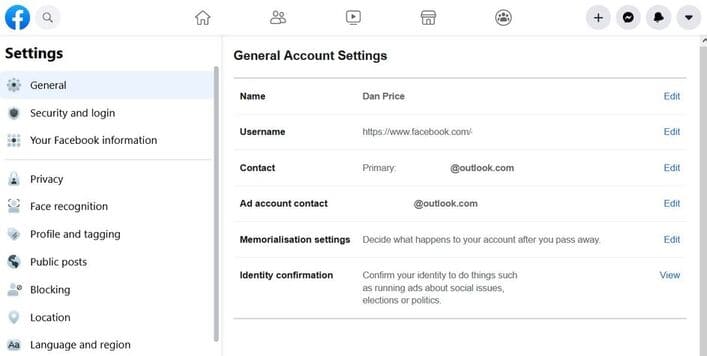
Find Security and login on the menu on the left side of the screen.
On this page you will find a lot of features to prevent someone from accessing your account again in the future. For now, we only need to care about the Where you are logged in.
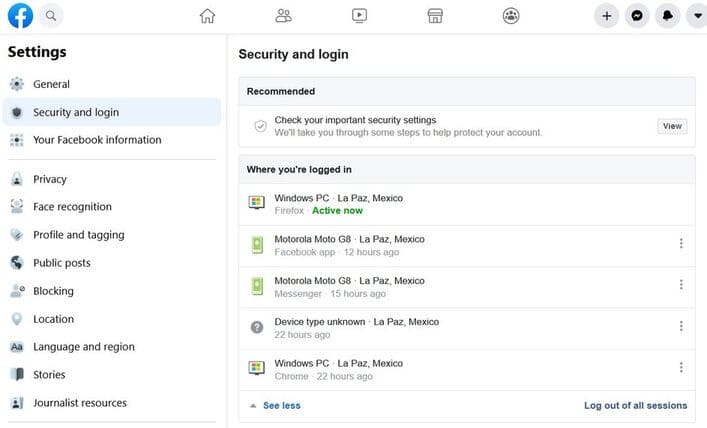
You’ll see a list of all the devices and locations currently allowed to access your account. Make sure you click see more to see the full list.
It’s worth noting that this list combines Facebook logins with Messenger logins. So if you think only one of the two services has been compromised, it’s very easy to check.
Erase device
If you see something that looks suspicious, you can use this list to revoke your device’s access.
To revoke access, click the three vertical dots next to the device you want to remove and select Log out.
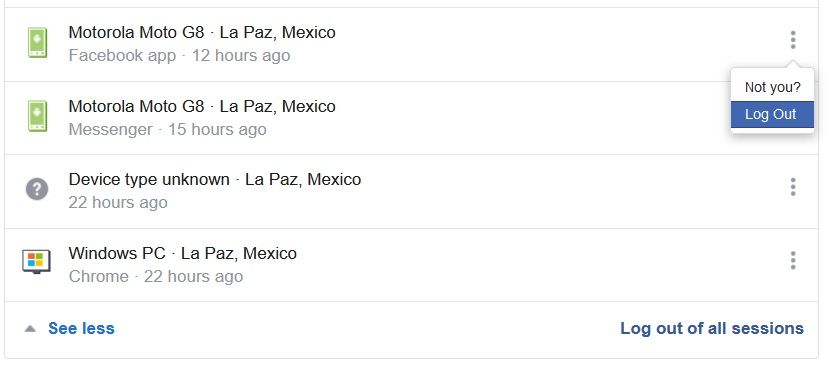
If you click Aren’t you?, Facebook will block the device and walk you through some steps to secure your account. If you click Log outaccess will be revoked, but the person can log in again if they know your password.
Prevent crashes
Once you’ve revoked an unauthorized person’s access, you’ll need to take the steps below to make sure it doesn’t happen again.
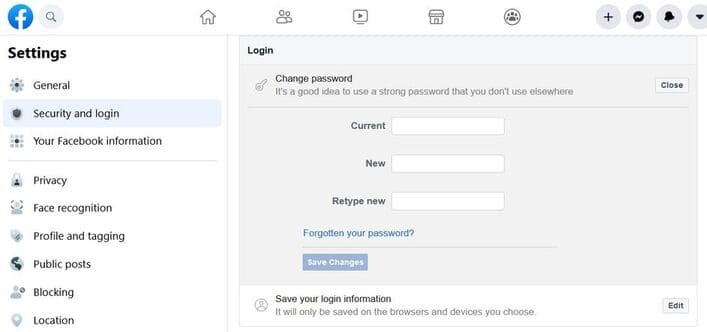
Of course, the first step is to change your password. You can do so by going to Settings and Privacy > Settings > Security and Login > Login > Change Password. You will need to enter your old password to complete the process.
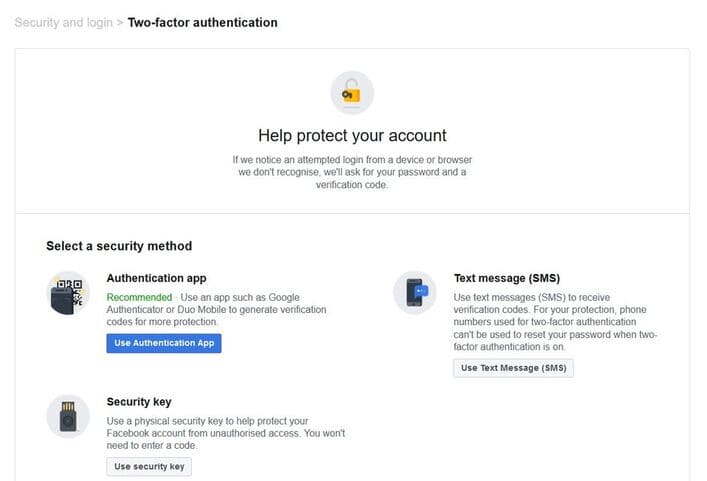
But changing your password is only half. You should also consider setting up two-factor authentication. Two-factor authentication can use a text message, a Universal 2nd Factor (U2F) security key, an official Facebook code generator, or a third-party code generator. To set up a third-party code generator, you need to scan a QR code.
To turn on two-factor authentication, go to Settings > Security and sign-in Settings and Privacy > Settings > Security and sign-in > Use two-factor authentication.
You should also set up warnings for unaccepted logins. By enabling this feature, Facebook will notify you if it sees login information from a suspicious source. It will allow you to react faster in that case.
To set up the feature, go to Settings and Privacy > Settings > Security and Sign-in > Set up additional security > Get warnings about unrecognized logins.
In addition, you can also use the multifunctional Facebook management tool here.