• Home
  • News
  • Software
  • Knowledge
  • MMO
  • Tips
  • Security
  • Network
  • Office
AnonyViet - English Version
  • Home
  • News
  • Software
  • Knowledge
  • MMO
  • Tips
  • Security
  • Network
  • Office
No Result
View All Result
  • Home
  • News
  • Software
  • Knowledge
  • MMO
  • Tips
  • Security
  • Network
  • Office
No Result
View All Result
AnonyViet - English Version
No Result
View All Result

Instructions for downloading Google Drive files when limited to 24 hours

AnonyViet by AnonyViet
December 17, 2024
in Tips
0

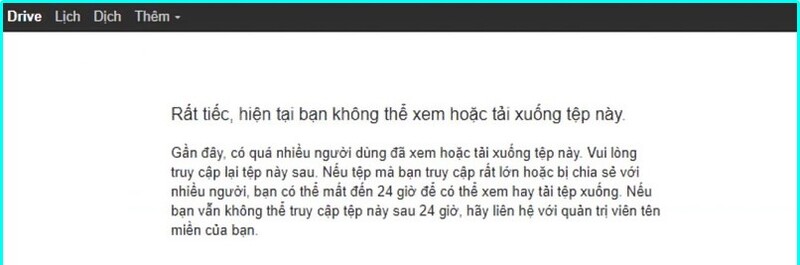
You are trying to download an important file from Google Drive but receive the error message “Sorry, you can't view or download this file at this time”. Don't worry, Google Drive is just applying download limits to ensure quality of service for all users. However, this can be difficult when you need to access an urgent file. Join AnonyViet to find out how Download Google Drive files when limited to 24 hours now and forever!

Why are Google Drive files limited to 24 hours?

Google Drive imposes file download and viewing limits to ensure quality of service for all users. When a file receives too much traffic in a short period of time, the system will automatically activate protection mode, temporarily restricting access to that file.

To fix this situation, you can make a copy of the file. This copy will be considered a new file, unaffected by the original file's download limitations.
Why are Google Drive files limited to 24 hours?

See more: De digger: Tool to find other people's files on Google Drive

How to download Google Drive files when limited to 24 hours

When downloading a file with a large amount of traffic, Google Drive may display an error message “Sorry, you can't view or download this file at this time.” (rough translation: Sorry, you cannot view or download this file at this time). Users will have to wait up to 24 hours to be able to access the file again. Don't worry, instead of waiting, you can apply the following steps to download files immediately:

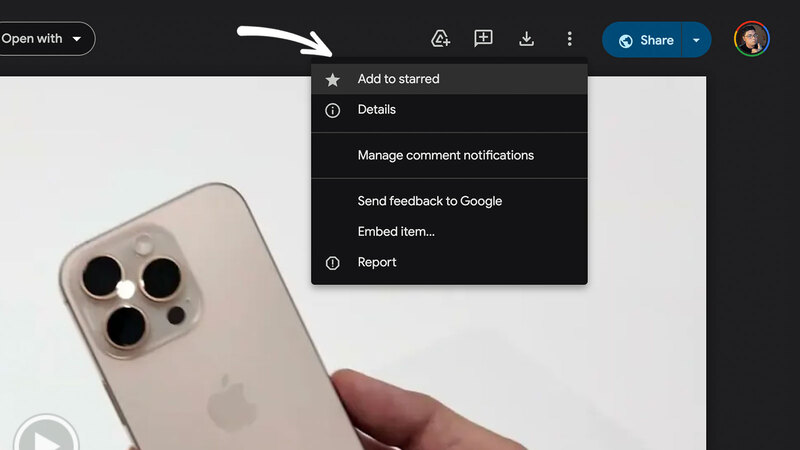
Step 1: TGo to the file download page on Google Drive, click the three-dot icon in the upper right corner, then select “Add to Starred”.
Select "Add to Starred"
Select “Add to Starred”

Step 2: Open your personal Google Drive at drive.google.com, next, in the left menu, select “Starred”.

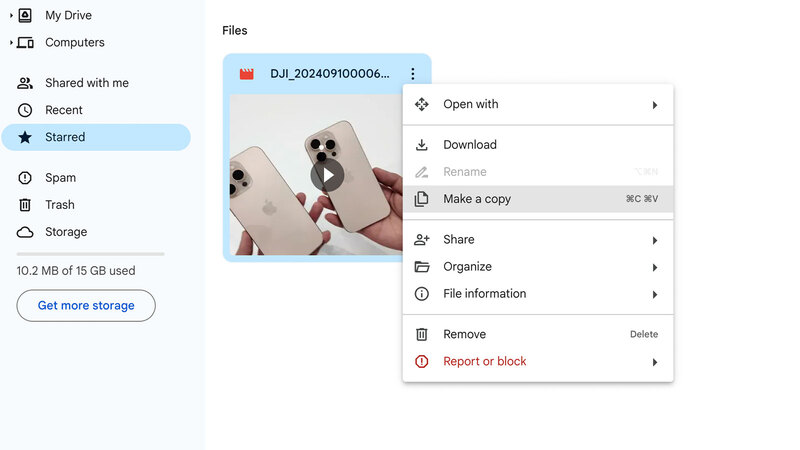
Step 3: Find the file that was just marked with a star, click the three-dot icon next to it and select “Make a copy”.
Select "Make a copy"
Select “Make a copy”

Step 4: Once the copy has been created, simply click on the file and select “Download”.
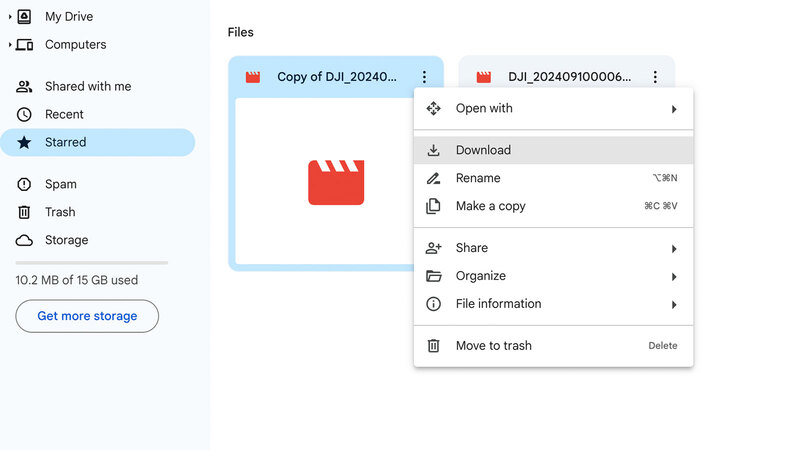
Select "Download"
Select “Download”

On mobile devices, the steps are similar. You simply add the file to the starred folder, make a new copy, and download it.
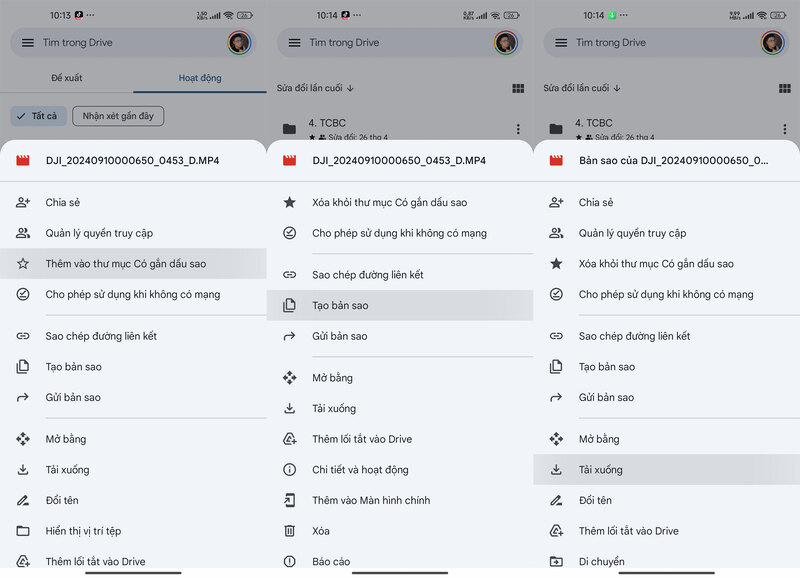
How to download Google Drive files when limited to 24 hours on your phone

Compared to other storage services, Google Drive often has a limit on file downloads and views per day. Therefore, if any file has a sudden increase in traffic, the system will automatically block the download within 24 hours. By using this trick, users create a new copy from the original file, and this copy is no longer limited, allowing you to download it immediately without waiting. Too easy, right!

Note

This trick only applies to files whose downloads are limited due to high traffic.
The copy of the file will be stored in your Google Drive as a new file, independent of the original file.
You can delete the file copy after a successful download.
The trick only applies to files that are limited due to high traffic

See more: How to recover permanently deleted files on Google Drive

Conclusion

With the detailed instructions above, you can Download Google Drive files when limited to 24 hours easily. Remember, making file copies is a simple and effective solution so you can access the information you need at any time. Wish you success!


Tags: DownloadingdrivefilesGooglehoursInstructionsLimited
Previous Post

How to get Google Team Drive for unlimited storage latest 2022

Next Post

Windows 10 patch KB4556799 causes loss of sound and user data

AnonyViet

AnonyViet

Related Posts

Instructions to receive Claude Fable 5 for free for 30 days
Tips

Instructions to receive Claude Fable 5 for free for 30 days

June 15, 2026
Delete all Event Logs on Windows to remove traces of activity
Tips

Delete all Event Logs on Windows to remove traces of activity

June 15, 2026
Instructions for creating Minecraft-style food photos
Tips

Instructions for creating Minecraft-style food photos

June 9, 2026
Get free Cambridge courses to prepare for IELTS, Starters, Movers
Tips

Get free Cambridge courses to prepare for IELTS, Starters, Movers

June 4, 2026
How to record reaction videos with Android phones, no app needed
Tips

How to record reaction videos with Android phones, no app needed

June 1, 2026
Instructions on how to get Google AI Pro 1 year for free for new accounts
Tips

Instructions on how to get Google AI Pro 1 year for free for new accounts

June 1, 2026
Next Post
Windows 10 patch KB4556799 causes loss of sound and user data

Windows 10 patch KB4556799 causes loss of sound and user data

0 0 votes
Article Rating
Subscribe
Login
Notify of
guest

guest

0 Comments
Oldest
Newest Most Voted
Inline Feedbacks
View all comments

Recent News

Hướng dẫn cài đặt iOS 27 Developer Beta

Hướng dẫn cài đặt iOS 27 Developer Beta

June 17, 2026
How to handle locked SIMs due to lack of standardization

How to handle locked SIMs due to lack of standardization

June 17, 2026
Instructions to receive Claude Fable 5 for free for 30 days

Instructions to receive Claude Fable 5 for free for 30 days

June 15, 2026
Instructions on how to activate the new Siri on iOS 27

Instructions on how to activate the new Siri on iOS 27

June 15, 2026
Hướng dẫn cài đặt iOS 27 Developer Beta

Hướng dẫn cài đặt iOS 27 Developer Beta

June 17, 2026
How to handle locked SIMs due to lack of standardization

How to handle locked SIMs due to lack of standardization

June 17, 2026
Instructions to receive Claude Fable 5 for free for 30 days

Instructions to receive Claude Fable 5 for free for 30 days

June 15, 2026
AnonyViet - English Version

AnonyViet

AnonyViet is a website share knowledge that you have never learned in school!

We are ready to welcome your comments, as well as your articles sent to AnonyViet.

Follow Us

Contact:

Email: anonyviet.com[@]gmail.com

Main Website: https://anonyviet.com

Recent News

Hướng dẫn cài đặt iOS 27 Developer Beta

Hướng dẫn cài đặt iOS 27 Developer Beta

June 17, 2026
How to handle locked SIMs due to lack of standardization

How to handle locked SIMs due to lack of standardization

June 17, 2026
  • Home
  • Home 2
  • Home 3
  • Home 4
  • Home 5
  • Home 6
  • Next Dest Page
  • Sample Page

6789 kv999

No Result
View All Result
  • Home
  • News
  • Software
  • Knowledge
  • MMO
  • Tips
  • Security
  • Network
  • Office

6789 kv999

wpDiscuz
0
0
Would love your thoughts, please comment.x
()
x
| Reply