• Home
  • News
  • Software
  • Knowledge
  • MMO
  • Tips
  • Security
  • Network
  • Office
AnonyViet - English Version
  • Home
  • News
  • Software
  • Knowledge
  • MMO
  • Tips
  • Security
  • Network
  • Office
No Result
View All Result
  • Home
  • News
  • Software
  • Knowledge
  • MMO
  • Tips
  • Security
  • Network
  • Office
No Result
View All Result
AnonyViet - English Version
No Result
View All Result

Instructions for recording calls on iPhone iOS 18.1

AnonyViet by AnonyViet
November 1, 2024
in Software
0

With iOS 18.1, Apple officially brings the built-in Call Recording feature, helping you save important conversations more easily and conveniently than ever. No need to fiddle with third-party applications or manually turn on the speakerphone anymore, everything is now packaged right on your device. Join AnonyViet to immediately explore the features Record calls on iPhone iOS 18.1 please!

Join the channel Telegram belong to AnonyViet 👉 Link 👈

Instructions for turning on and using Call Recording on iPhone iOS 18.1

Step 1: First, to use the new Call Recording feature, you need to update your device to iOS 18.1. To do this, go to Settings > General > Software Update. If an update is available, follow the instructions to download and install it.

After updating, the Call Recording feature will automatically appear in the call interface. Although Apple only advertises this feature exclusively for iPhone 15 Pro and above, in reality, it can be used on iPhone XS and newer models. Please check your device to see if this feature is available.

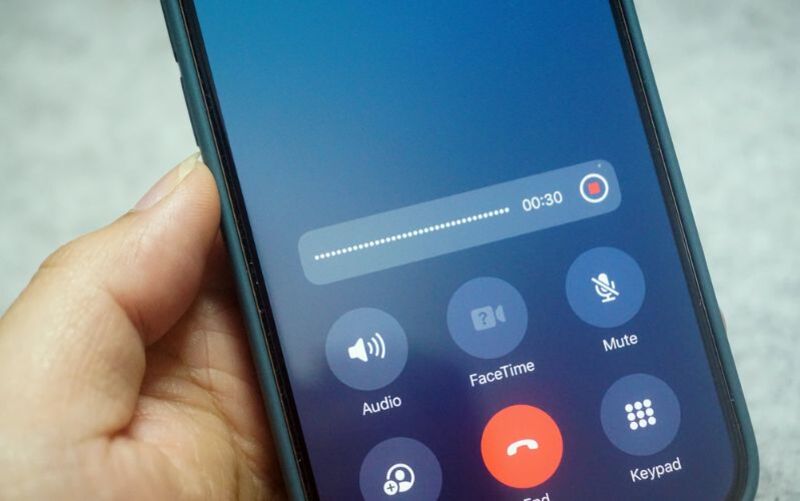
Step 2: When receiving or making calls, make sure the call screen is in full screen mode. If the call appears as a small window, tap it to expand it. The recording icon will appear top left corner call interface.
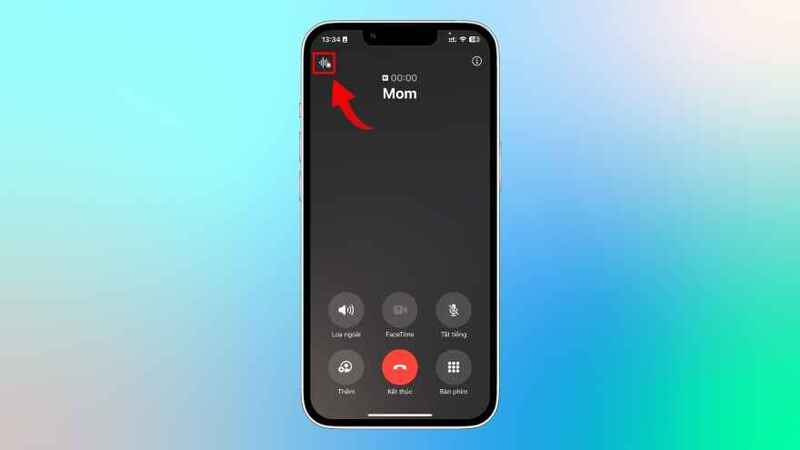
Recording icon
Recording icon

Step 3: To start recording, Click this icon. iPhone plays an audio notification to notify all parties involved in the call that the call is being recorded. This is to ensure transparency and compliance with legal regulations regarding call recording.

After the notification, the recording process will take place automatically.
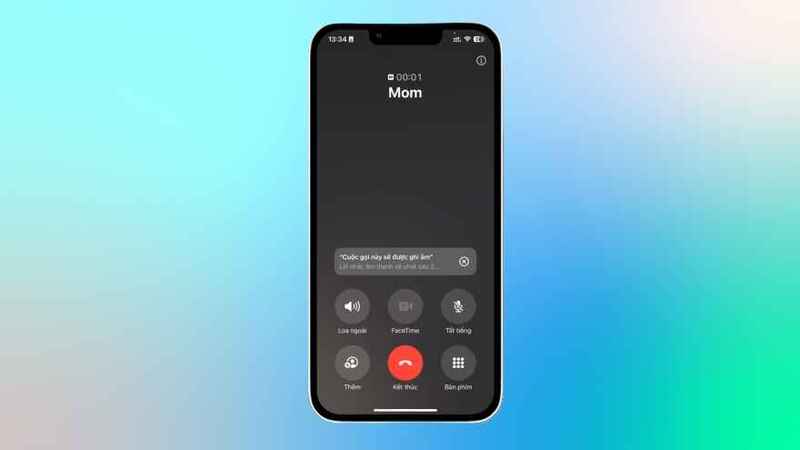
The recording process will take place automatically

See more: Reasons to upgrade to iOS 18.1 with iPhones that do not support AI

Instructions to stop call recording on iPhone

There are two ways to stop call recording:

  • End call: The recording will automatically stop and save when the call ends.
  • Press the button to stop recording: If you want to stop recording before the call ends, just tap the recording icon on the screen to stop.
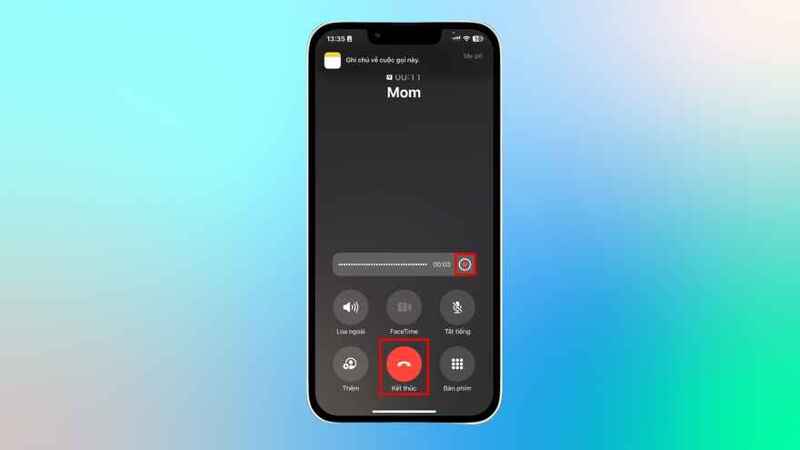
Instructions to stop call recording on iPhone

How to view and manage call recordings

After the call ends, you'll see a notification that the recording has been saved. To review, you can click on the notification or open the app Note on iPhone. All call recordings will be saved in a separate folder in the Notes app.

Note: iPhone models that support Apple Intelligence will be automatically created call summary text thanks to AIhelping you easily search for call content without having to listen to the entire call again.
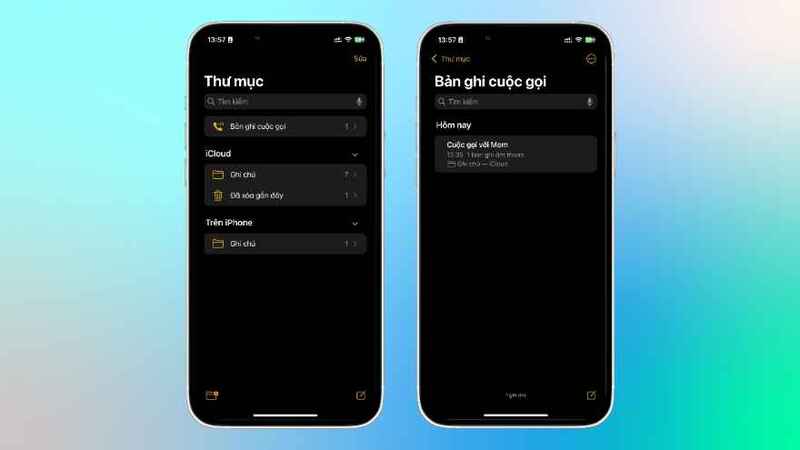
How to view and manage call recordings

How to share call recordings on iPhone

To share a call recording, open the Notes app and navigate to the desired recording, you can do so in two ways:

  • Long press on the audio file: Select Share Audio from the menu that appears.
  • Tap the share icon in the upper right corner: Select the sharing method from the application list.

The recording file will be stored as .m4a – format optimizes storage capacity and sound quality.
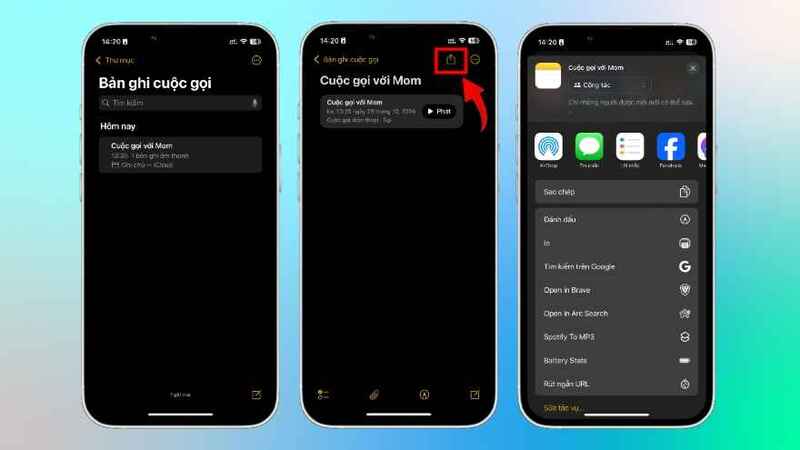
How to share call recordings on iPhone

Notes on legality when recording calls

  • Notice to participating parties: Even if there is an audio notification from your iPhone, you should separately notify the other person that the call is being recorded.
  • Check local laws: The laws of each country and region will be different. Some places require all parties participating in the call to agree, but there are also places where only one party needs to agree.
Notes on legality when recording calls

See more: How to always enable stickers on iPhone iOS 18

Conclusion

Features Record calls on iPhone iOS 18.1 marks a new step forward for Apple in user support, especially useful for storing and looking up call information officially and conveniently. With the instructions above, you can easily update and use this new feature on your iPhone. Don't forget to comply with legal regulations and check security settings when using the call recording feature. Hope you experience the new features on iPhone to the fullest!


Tags: callsInstructionsiOSiPhonerecording
Previous Post

How to use ChatGPT Search to find content using AI

Next Post

How to Watch Movies on Netflix Premium Without an Account Latest 2020

AnonyViet

AnonyViet

Related Posts

Receive copyright for 3 Halloween software worth 0
Software

Receive copyright for 3 Halloween software worth $150

October 23, 2026
Instructions for receiving 3 months of MultCloud Premium for free with 200GB data
Software

Instructions for receiving 3 months of MultCloud Premium for free with 200GB data

October 17, 2026
Instructions for receiving pension through VNeID without going to the ward
Software

Instructions for receiving pension through VNeID without going to the ward

October 16, 2026
Record first, choose focus later: how to use 4K 60 fps Cinema mode on iPhone 18 Pro
Software

Record first, choose focus later: how to use 4K 60 fps Cinema mode on iPhone 18 Pro

October 15, 2026
How to receive 22k from Viettel Tammi on the occasion of 22nd birthday
Software

How to receive 22k from Viettel Tammi on the occasion of 22nd birthday

October 15, 2026
3 valuable upgrades on Samsung Galaxy A08 compared to its predecessor A07
Software

3 valuable upgrades on Samsung Galaxy A08 compared to its predecessor A07

October 12, 2026
Next Post
How to Watch Movies on Netflix Premium Without an Account Latest 2020

How to Watch Movies on Netflix Premium Without an Account Latest 2020

0 0 votes
Article Rating
Subscribe
Login
Notify of
guest

guest

0 Comments
Oldest
Newest Most Voted

Recent News

How are Windows 11 Pro and Windows 10 Pro different?

How are Windows 11 Pro and Windows 10 Pro different?

October 23, 2026
Instructions for using CleanYourTV: Remove ads on Android TV, Google TV

Instructions for using CleanYourTV: Remove ads on Android TV, Google TV

October 23, 2026
Receive copyright for 3 Halloween software worth 0

Receive copyright for 3 Halloween software worth $150

October 23, 2026
How to use Messenger without a Facebook account

How to use Messenger without a Facebook account

October 22, 2026
How are Windows 11 Pro and Windows 10 Pro different?

How are Windows 11 Pro and Windows 10 Pro different?

October 23, 2026
Instructions for using CleanYourTV: Remove ads on Android TV, Google TV

Instructions for using CleanYourTV: Remove ads on Android TV, Google TV

October 23, 2026
Receive copyright for 3 Halloween software worth 0

Receive copyright for 3 Halloween software worth $150

October 23, 2026
AnonyViet - English Version

AnonyViet

AnonyViet is a website share knowledge that you have never learned in school!

We are ready to welcome your comments, as well as your articles sent to AnonyViet.

Follow Us

Contact:

Email: anonyviet.com[@]gmail.com

Main Website: https://anonyviet.com

Recent News

How are Windows 11 Pro and Windows 10 Pro different?

How are Windows 11 Pro and Windows 10 Pro different?

October 23, 2026
Instructions for using CleanYourTV: Remove ads on Android TV, Google TV

Instructions for using CleanYourTV: Remove ads on Android TV, Google TV

October 23, 2026
  • Home
  • Home 2
  • Home 3
  • Home 4
  • Home 5
  • Home 6
  • Next Dest Page
  • Sample Page

say88 tỷ lệ kèo nhà cái kèo nhà cái 5 febet

No Result
View All Result
  • Home
  • News
  • Software
  • Knowledge
  • MMO
  • Tips
  • Security
  • Network
  • Office

say88 tỷ lệ kèo nhà cái kèo nhà cái 5 febet

wpDiscuz
0
0
Would love your thoughts, please comment.x
()
x
| Reply