• Home
  • News
  • Software
  • Knowledge
  • MMO
  • Tips
  • Security
  • Network
  • Office
AnonyViet - English Version
  • Home
  • News
  • Software
  • Knowledge
  • MMO
  • Tips
  • Security
  • Network
  • Office
No Result
View All Result
  • Home
  • News
  • Software
  • Knowledge
  • MMO
  • Tips
  • Security
  • Network
  • Office
No Result
View All Result
AnonyViet - English Version
No Result
View All Result

GDSCRIPT – Basic Godot Engine

AnonyViet by AnonyViet
November 1, 2024
in Tips
0

Hello friends! Continuing with the Ultimate Guide series Godot Engine. In today's article I will share with you about Godot Engine's GDScript. The article includes 2 parts: Basic GDScript and Object Orientation in GDScript. Before getting into part 1, let's start with a brief understanding of GDScript!

Join the channel Telegram belong to AnonyViet 👉 Link 👈

BRIEF ABOUT GDSCRIPT

GDScript is a high-level programming language. It uses similar syntax to Python (blocks are based on indentation and many keywords are similar). It is optimized and tightly integrated with Godot Engine, allowing great flexibility for creating and integrating game content. If you are familiar with Python, coding with GDScript is extremely easy!

GDSCRIPT - Basic Godot Engine

BASIC GDSCRIPT

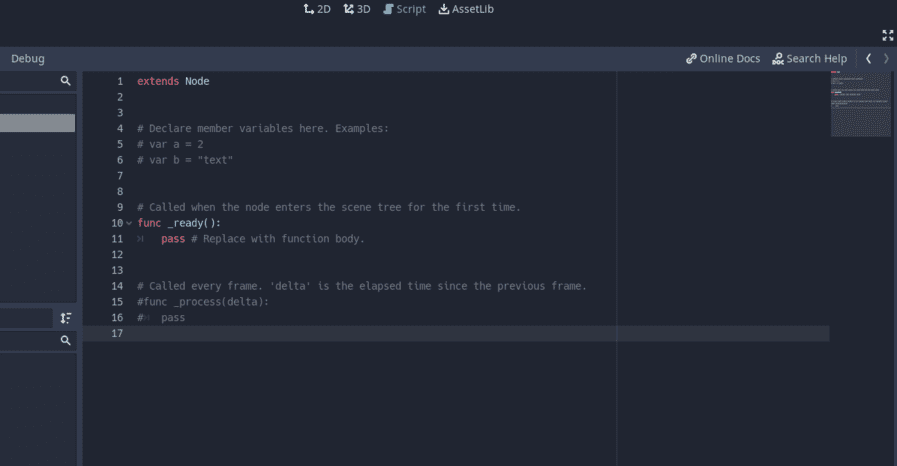
1. Structure of a script.gd
GDSCRIPT – Basic Godot Engine

extends Node # Khai báo kế thừa. Phải kế thừa đúng tên lớp (tên Node) mà bạn sử dụng.

var a = 0 # Biến toàn cục

var b = 0 # Biến toàn cục

func _ready(): # Hàm

.     var c = a + b # Biến cục bộ

2. BASIC GDSCRIPT

Main functions on GDScript

extends Node

func _init(): #Thực thi một lần duy nhất khi khởi chạy chương trình.

.     pass

func _ready(): #Thực thi một lần duy nhất khi Node sẵn sàng hoạt động.

.     pass

func _process(delta): #Hàm luôn thực thi lặp lại trong mỗi thời gian delta bằng nhau (không phùhợp cho các hoạt động vật lí)

.     pass

func _physics_process(delta): #Hàm thực thi lặp lại trong mỗi thời gian delta tăng dần (thích hợpcho hoạt động vật lí)

.     pass

Debug print command on Console window

func _ready():

.     var a = 4

.     print(a);

.     print("\nHello World")

Output:

4

Hello Word

Data types, variables, constants and declarations

Data types on GDScript are similar to those on Python, with two types: primitive types (without capitalizing the first letter) and class types (with the first letter capitalized).

extends Node

#var : [kiểu dữ liệu] (có thể "=" để gán giá trị trực tiếp mà không cần khai báo kiểu dữ kiệu (ép kiểu ngầm))

var a = 4

var a: int = 4

var a

a = 4

#các kiểu khai báo trên là tương tự như nhau. Ngoài ra ta còn có thể khai báo var a:=4.

const a = 4 #khai báo hằng. Lưu ý phải gán giá trị cho hằng.

var ab = Vecto2(0,0) # Biến kiểu lớp

var arr = [1, 2, 3] #khai báo mảng

var d = {2: 3, 4: "Hello"} #khai báo từ điển

Conditional structure IF…THEN…ELSE

func _ready():

#     if(<điều kiện>):

#          [tập lệnh phía sau dấu tab phải thẳng hàng]

#     else:

#          [tập lệnh phía sau dấu tab phải thẳng hàng]

.     var a = false

.     var b = 0

.     if(a):

.          b = 1

.     else:

.          b = 2

Match structure

func _ready():

.     var a = 0

.     Match(a):

.          1:

.               [tập lệnh phía sau dấu tab phải thẳng hàng]

.          2:

.               [tập lệnh phía sau dấu tab phải thẳng hàng]

For loop

func _ready():

.     for i in 5:

.          [tập lệnh phía sau dấu tab phải thẳng hàng]

.     for i in range(5):

.          [tập lệnh phía sau dấu tab phải thẳng hàng]

#i chạy từ 0 đến 5-1

While loop

func _ready():

.     while(<điều kiện>):

.          [tập lệnh phía sau dấu tab phải thẳng hàng]

OBJECT ORIENTATION IN GDSCRIPT

Creating and using classes are two essential tasks in object-oriented programming. Below is the formula for creating and using the class on GDScript.

Create class

Build properties (variables) and methods (initialization functions for objects)

class Math: #tên lớp

.      var total #thuộc tính

.      static func _sum(a: int, b: int) -> int: #phương thức

.          return a+b

Use class (create object corresponding to class)

#var = preload("đường dẫn script")

var MathGD = preload("Math.gd")

func _ready():

#     var = ..new()

.     var a = MathGD.Math.new()

.     print(a.sum(1,2))

Output: 3

In addition, we can also use classes using inheritance with extends. Note: If you create a class that inherits the default class in Godot, there is script uses class must be assigned Node has the same type as the class you previously instantiated and used.

In today's article, I introduced and shared with you basic GDScript on Godot Engine. If you have any questions, please leave a comment or suggestion! To better understand, you can refer to the basic videos at https://www.youtube.com/playlist?list=PLOk8LhtEwUVn8e3RUfk-rX_RB3f9_ulYg. Thank you for following the article! ?


Previous Post

7 reasons why sales staff become an indispensable part of businesses

Next Post

How to skip the Microsoft login step when installing Windows 11

AnonyViet

AnonyViet

Related Posts

Instructions for creating Minecraft-style food photos
Tips

Instructions for creating Minecraft-style food photos

June 9, 2026
Get free Cambridge courses to prepare for IELTS, Starters, Movers
Tips

Get free Cambridge courses to prepare for IELTS, Starters, Movers

June 4, 2026
How to record reaction videos with Android phones, no app needed
Tips

How to record reaction videos with Android phones, no app needed

June 1, 2026
Instructions on how to get Google AI Pro 1 year for free for new accounts
Tips

Instructions on how to get Google AI Pro 1 year for free for new accounts

June 1, 2026
Top free AI tools to help write, test and optimize content
Tips

Top free AI tools to help write, test and optimize content

June 1, 2026
Instructions for receiving Lovable Pro 12 months for free
Tips

Instructions for receiving Lovable Pro 12 months for free

May 29, 2026
Next Post
How to skip the Microsoft login step when installing Windows 11

How to skip the Microsoft login step when installing Windows 11

0 0 votes
Article Rating
Subscribe
Login
Notify of
guest

guest

0 Comments
Oldest
Newest Most Voted
Inline Feedbacks
View all comments

Recent News

Instructions for creating Minecraft-style food photos

Instructions for creating Minecraft-style food photos

June 9, 2026
How to buy in-game items for free on iPhone

How to buy in-game items for free on iPhone

June 8, 2026
Practical use of Xiaomi 17T Pro: This is a good phone in 2026

Practical use of Xiaomi 17T Pro: This is a good phone in 2026

June 8, 2026
Instructions to receive 6 months of IObit Malware Fighter 13 Pro for free

Instructions to receive 6 months of IObit Malware Fighter 13 Pro for free

June 7, 2026
Instructions for creating Minecraft-style food photos

Instructions for creating Minecraft-style food photos

June 9, 2026
How to buy in-game items for free on iPhone

How to buy in-game items for free on iPhone

June 8, 2026
Practical use of Xiaomi 17T Pro: This is a good phone in 2026

Practical use of Xiaomi 17T Pro: This is a good phone in 2026

June 8, 2026
AnonyViet - English Version

AnonyViet

AnonyViet is a website share knowledge that you have never learned in school!

We are ready to welcome your comments, as well as your articles sent to AnonyViet.

Follow Us

Contact:

Email: anonyviet.com[@]gmail.com

Main Website: https://anonyviet.com

Recent News

Instructions for creating Minecraft-style food photos

Instructions for creating Minecraft-style food photos

June 9, 2026
How to buy in-game items for free on iPhone

How to buy in-game items for free on iPhone

June 8, 2026
  • Home
  • Home 2
  • Home 3
  • Home 4
  • Home 5
  • Home 6
  • Next Dest Page
  • Sample Page

6789 kv999

No Result
View All Result
  • Home
  • News
  • Software
  • Knowledge
  • MMO
  • Tips
  • Security
  • Network
  • Office

6789 kv999

wpDiscuz
0
0
Would love your thoughts, please comment.x
()
x
| Reply