• Home
  • News
  • Software
  • Knowledge
  • MMO
  • Tips
  • Security
  • Network
  • Office
AnonyViet - English Version
  • Home
  • News
  • Software
  • Knowledge
  • MMO
  • Tips
  • Security
  • Network
  • Office
No Result
View All Result
  • Home
  • News
  • Software
  • Knowledge
  • MMO
  • Tips
  • Security
  • Network
  • Office
No Result
View All Result
AnonyViet - English Version
No Result
View All Result

How to check car and motorbike fines online is extremely useful

AnonyViet by AnonyViet
August 10, 2024
in Tips
0

In the digital age, check fine no longer a worry. Let's explore the most convenient methods for you to check and understand your traffic violations anytime, anywhere.

Join the channel Telegram belong to AnonyViet 👉 Link 👈

5 super simple ways to check traffic fines online

Method 1: Through Kgo application
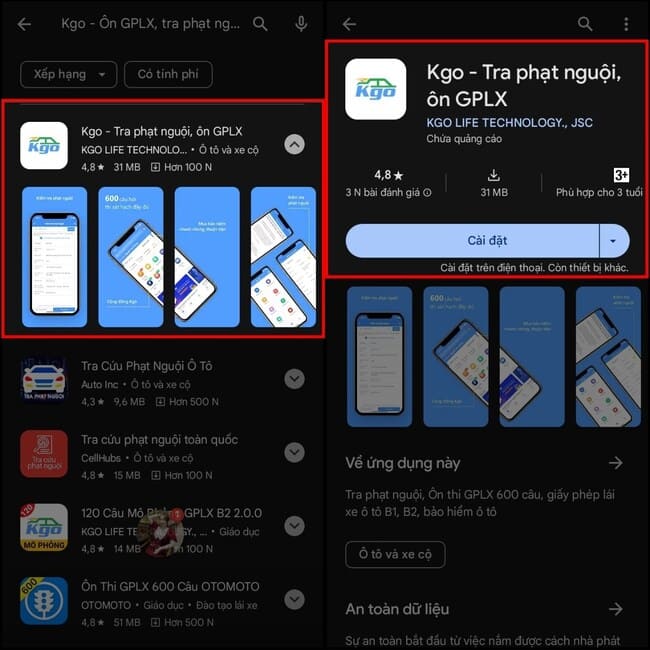
Check traffic fines online with Kgo app

Kgo application is a useful tool for traffic participants, not only supporting learning and taking the driving license test but also reminding about the time of vehicle inspection and insurance; at the same time helping to find gas stations, parking spaces, garages, battery charging points, tire repair, rescue and information about fines according to Decree 100 such as alcohol concentration fines, prohibition signs, etc.

Step 1: Download Kgo application to your phone

Step 2: Once downloaded, open the app and register or log in to your account, you can also use your Google or Facebook account to log in quickly > On the homepage, select the Fines section to start checking.
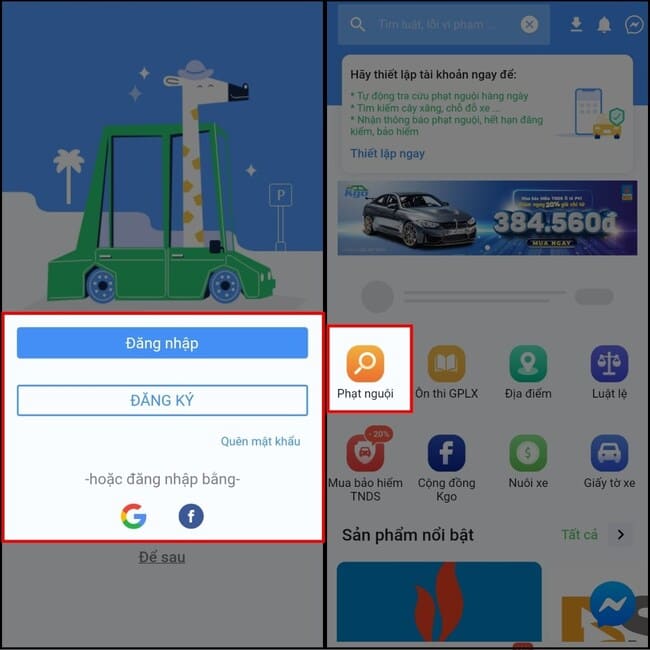
Select the Fines section to start the check.

Step 3: In the Search section, enter the license plate number, no dashes or dots needed > Click 'Search' > The application will display detailed information such as License Plate Number, Violation, Time, Location, Status so you can pay the fine in time.
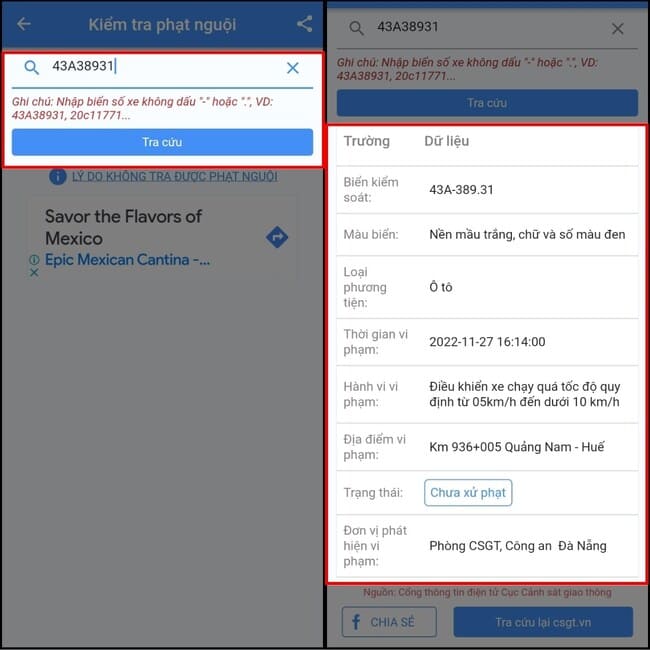
Enter license plate number > Click Search” width=”650″ height=”650″ srcset=”https://anonyviet.com/wp-content/uploads/2024/05/cach-kiem-tra-phat-nguoi-3.jpg 650w, https://anonyviet.com/wp-content/uploads/2024/05/cach-kiem-tra-phat-nguoi-3-300×300.jpg 300w, https://anonyviet.com/wp-content/uploads/2024/05/cach-kiem-tra-phat-nguoi-3-150×150.jpg 150w, https://anonyviet.com/wp-content/uploads/2024/05/cach-kiem-tra-phat-nguoi-3-75×75.jpg 75w, https://anonyviet.com/wp-content/uploads/2024/05/cach-kiem-tra-phat-nguoi-3-350×350.jpg 350w” sizes=”(max-width: 650px) 100vw, 650px”/><figcaption id=Enter license plate number > Click Search

Method 2: Through the National Traffic Fine Lookup application

Another method to check the exact fines on a large scale is to use the National Fine Lookup application. You need to download this application to your phone by clicking on the link above.

Then open the application, select the vehicle type and enter the license plate number > Click Search > Information about the violation and the expected fine amount will be displayed in detail.
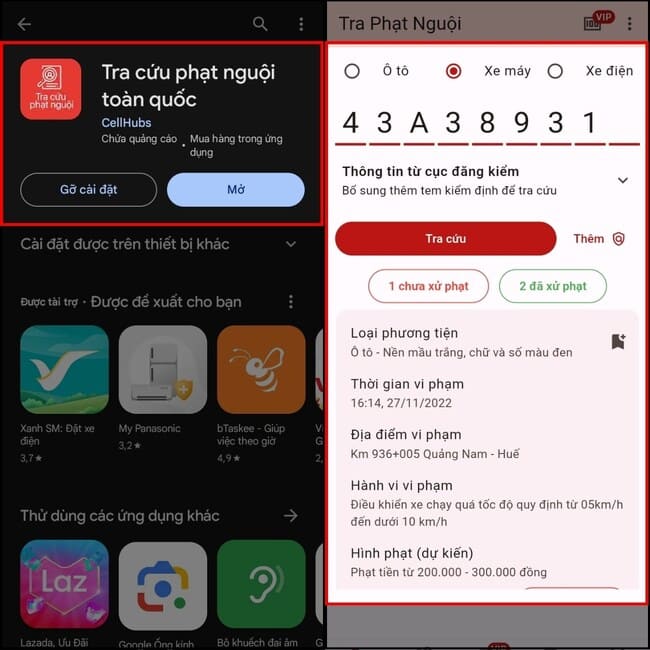
National Fine Lookup Application

Method 3: Through the Traffic Police Department website

The Traffic Police Department website also provides a feature to check traffic violations through images. To look up information, please follow these steps:

Step 1: Access the Traffic Police Department website via the link HERE and enter full information about License Plate, Vehicle Type (Car, Motorcycle, Electric Bicycle) and Security Code.

Step 2: Click Lookup to check if you have committed a traffic violation > Information about the violation, time and contact phone number to pay the fine will be displayed.

Check fines via the Traffic Police Department website

Method 4: Through the website of the Vietnam Register

To know if you have been fined for a traffic violation, you need to visit the website of the Vietnam Register at the link HERE

Then you enter the necessary information including registration plate, stamp number, current certificate and security code > Click 'Search' > The system will provide information about the violation and contact phone number.
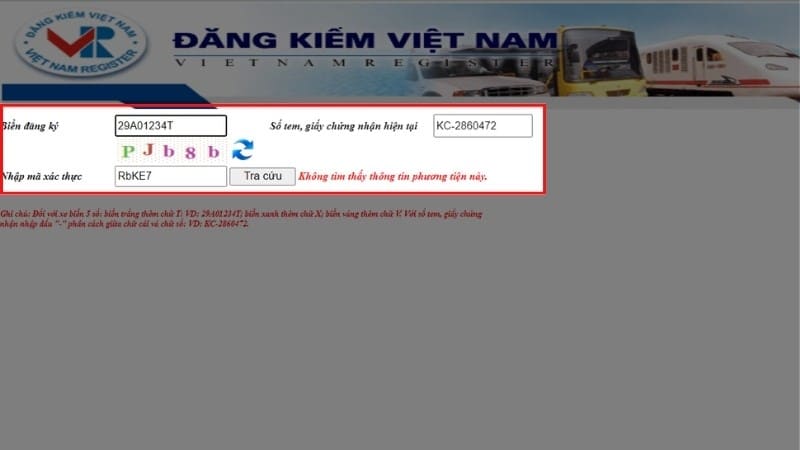
Check fines via the website of the Vietnam Register

Method 5: Through the website of the Department of Transport

This method can be applied to the website of the Department of Transport in provinces and cities that have the function of looking up traffic fines such as Hanoi, Ho Chi Minh City, Ba Ria – Vung Tau, etc.

You access the website via the link HERE> Fill in all required information and click Search > The system will provide violation results and details of your violations.
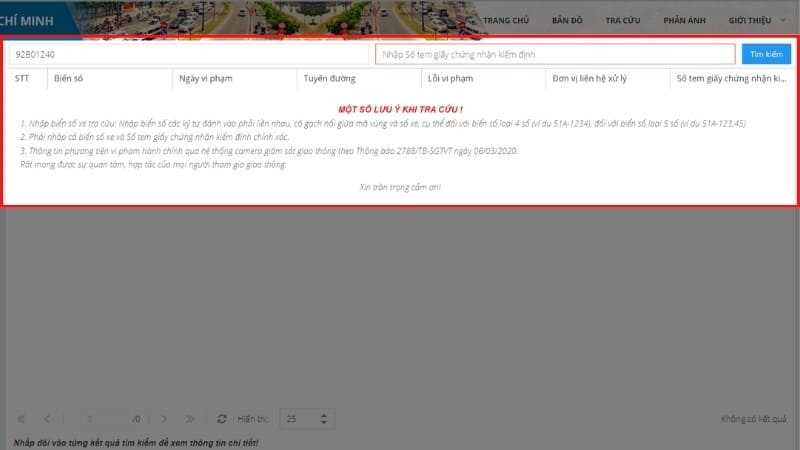
Check fines via the Department of Transport website

Conclusion

With the ways check fine but AnonyViet has guided, hope you will easily manage and solve problems related to fines. Always obey traffic laws to ensure safety for yourself and the community. Good luck!


Tags: carcheckextremelyfinesmotorbikeonline
Previous Post

TikTok launches Sound Search feature to easily find songs

Next Post

Puma Browser: Smart web browser with integrated AI

AnonyViet

AnonyViet

Related Posts

8 quick tips for learning Excel that anyone can learn
Tips

8 quick tips for learning Excel that anyone can learn

June 25, 2026
How to quickly compare the content of 2 Excel files
Tips

How to quickly compare the content of 2 Excel files

June 24, 2026
How to create funny selfies with pets for your pets
Tips

How to create funny selfies with pets for your pets

June 19, 2026
Chrome extension not working error and the fastest way to fix it
Tips

Chrome extension not working error and the fastest way to fix it

June 19, 2026
Instructions to receive Claude Fable 5 for free for 30 days
Tips

Instructions to receive Claude Fable 5 for free for 30 days

June 15, 2026
Delete all Event Logs on Windows to remove traces of activity
Tips

Delete all Event Logs on Windows to remove traces of activity

June 15, 2026
Next Post
Puma Browser: Smart web browser with integrated AI

Puma Browser: Smart web browser with integrated AI

0 0 votes
Article Rating
Subscribe
Login
Notify of
guest

guest

0 Comments
Oldest
Newest Most Voted
Inline Feedbacks
View all comments

Recent News

8 quick tips for learning Excel that anyone can learn

8 quick tips for learning Excel that anyone can learn

June 25, 2026
How to create luxurious portrait photos using the Dola app

How to create luxurious portrait photos using the Dola app

June 24, 2026
How to quickly compare the content of 2 Excel files

How to quickly compare the content of 2 Excel files

June 24, 2026
How to get a free domain for 1 year from Gravatar

How to get a free domain for 1 year from Gravatar

June 23, 2026
8 quick tips for learning Excel that anyone can learn

8 quick tips for learning Excel that anyone can learn

June 25, 2026
How to create luxurious portrait photos using the Dola app

How to create luxurious portrait photos using the Dola app

June 24, 2026
How to quickly compare the content of 2 Excel files

How to quickly compare the content of 2 Excel files

June 24, 2026
AnonyViet - English Version

AnonyViet

AnonyViet is a website share knowledge that you have never learned in school!

We are ready to welcome your comments, as well as your articles sent to AnonyViet.

Follow Us

Contact:

Email: anonyviet.com[@]gmail.com

Main Website: https://anonyviet.com

Recent News

8 quick tips for learning Excel that anyone can learn

8 quick tips for learning Excel that anyone can learn

June 25, 2026
How to create luxurious portrait photos using the Dola app

How to create luxurious portrait photos using the Dola app

June 24, 2026
  • Home
  • Home 2
  • Home 3
  • Home 4
  • Home 5
  • Home 6
  • Next Dest Page
  • Sample Page

6789 kv999

No Result
View All Result
  • Home
  • News
  • Software
  • Knowledge
  • MMO
  • Tips
  • Security
  • Network
  • Office

6789 kv999

wpDiscuz
0
0
Would love your thoughts, please comment.x
()
x
| Reply