• Home
  • News
  • Software
  • Knowledge
  • MMO
  • Tips
  • Security
  • Network
  • Office
AnonyViet - English Version
  • Home
  • News
  • Software
  • Knowledge
  • MMO
  • Tips
  • Security
  • Network
  • Office
No Result
View All Result
  • Home
  • News
  • Software
  • Knowledge
  • MMO
  • Tips
  • Security
  • Network
  • Office
No Result
View All Result
AnonyViet - English Version
No Result
View All Result

How to add units of calculation to Excel without incorrect formulas

AnonyViet by AnonyViet
December 23, 2023
in Office
0

Excel is a useful software for processing and analyzing numerical data. However, sometimes you need to add some additional information to the data, such as the unit of measure. How to do this quickly and easily? In this article, AnonyViet will guide you How to add units of measure to Excel data with just a few simple steps.

Join the channel Telegram belong to AnonyViet 👉 Link 👈

Benefits of adding units to Excel data

When you add units to your data, you get the following benefits:

  • Easily understand and differentiate different metrics
  • Avoid confusion and errors when entering, processing and calculating data
  • More consistent and professional when presenting and reporting data
  • Save time and effort when working with data

How to add units of measure to Excel data

Step 1: Highlight the data area that needs additional units of calculation
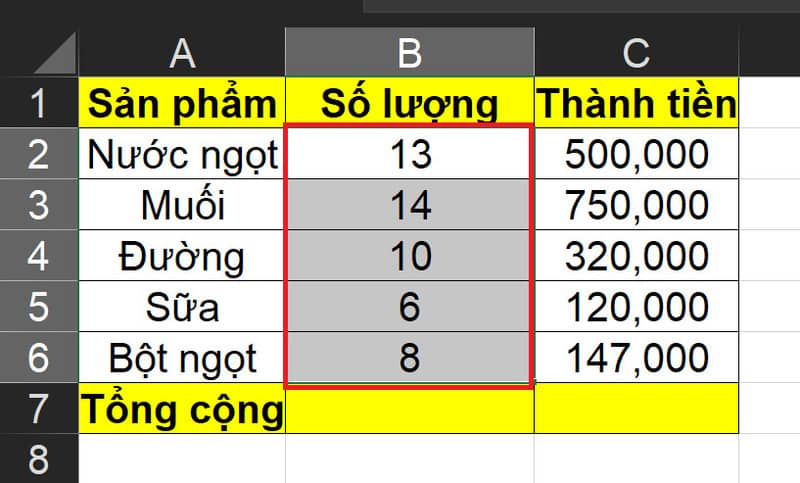
How to add units of measure to Excel data
Highlight the data area that needs additional units of calculation

Step 2: Press Ctrl + 1 to open the Format Cells dialog box

Step 3: Select Custom, in the Type General section, add spacing and type “[đơn vị tính]”

For example, if I want to add the unit of measurement as “product”, I will type as shown:
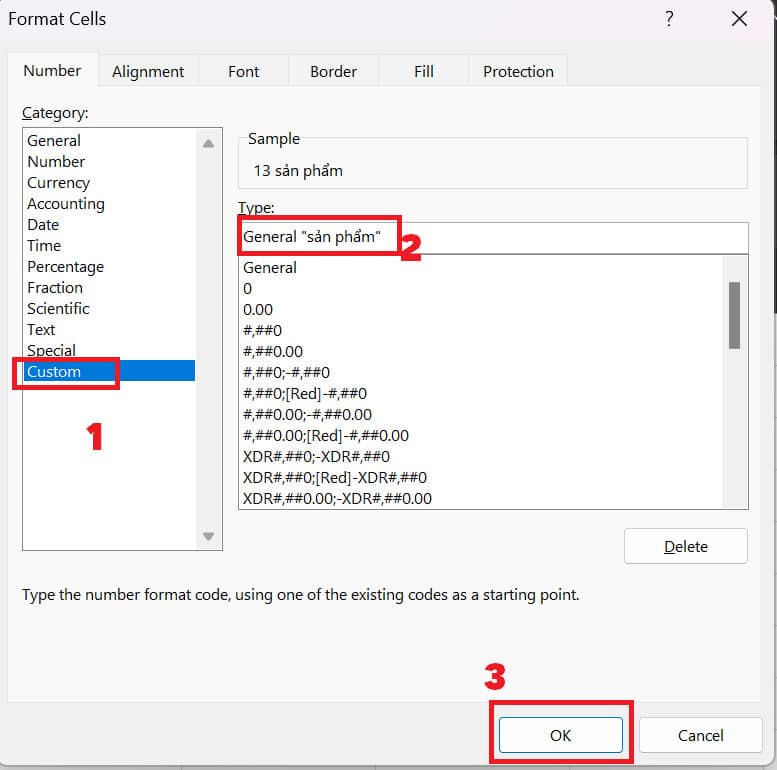
How to add units of measure to Excel data
Follow the instructions as shown

You can apply these methods to any type of unit, such as volume, length, area, time, currency, etc.

Then click OK and you're done
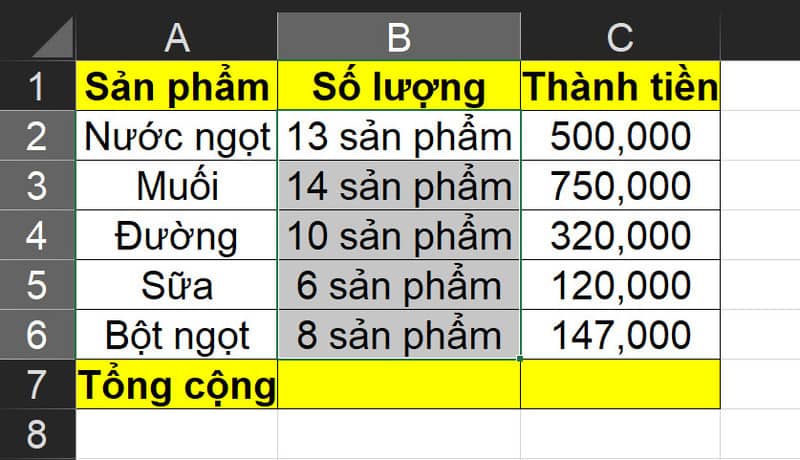
How to add units of measure to Excel data
Result

So the data you just selected has been suffixed! Extremely simple, right! You can perform computational operations on this data without fear of errors. The system will treat it as normal digital data.
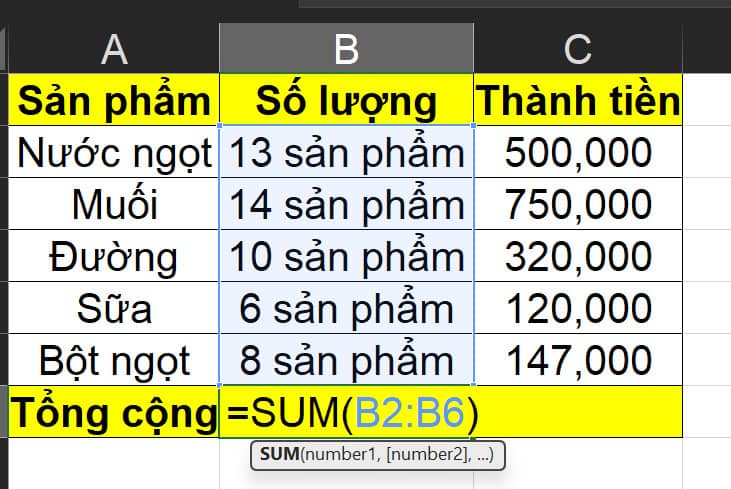
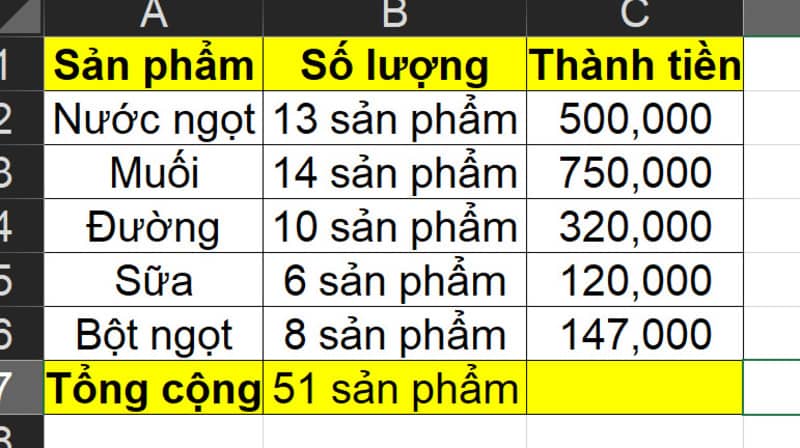
How to add units of measure to Excel data
You can perform computational operations on this data
How to add units of measure to Excel data
Calculate normally

Epilogue

So I have guided you How to add units of measure to Excel data with just three simple steps. You can apply this method to any type of unit, such as kg, m, USD, etc. Hope this article will help you in working with Excel. Good luck!

The article scored: 5/5 – (100 votes)

Tags: AddcalculationExcelformulasincorrectunits
Previous Post

Screenbox Media Player – Free Vietnamese video and music playing application

Next Post

How to download ebooks on Scribd for free, no account required

AnonyViet

AnonyViet

Related Posts

Instructions on how to convert text into QR codes in Word
Office

Instructions on how to convert text into QR codes in Word

October 5, 2026
Tool to adjust the format of administrative documents according to Decree 30
Office

Tool to adjust the format of administrative documents according to Decree 30

October 1, 2026
How to add Watermark to Google Docs to protect copyright
Office

How to add Watermark to Google Docs to protect copyright

April 19, 2026
Instructions on how to hide formulas in Excel to secure data
Office

Instructions on how to hide formulas in Excel to secure data

February 6, 2026
Top who creates the most beautiful presentation slide today
Office

Top who creates the most beautiful presentation slide today

September 23, 2025
Automatically check and correct spelling errors on Google Docs
Office

Automatically check and correct spelling errors on Google Docs

February 23, 2025
Next Post
How to download ebooks on Scribd for free, no account required

How to download ebooks on Scribd for free, no account required

0 0 votes
Article Rating
Subscribe
Login
Notify of
guest

guest

0 Comments
Oldest
Newest Most Voted

Recent News

Besides the 7500 mAh battery and 6.9 inch screen, what else does the POCO C95 Pro 4G have to make it a secondary device worth buying?

Besides the 7500 mAh battery and 6.9 inch screen, what else does the POCO C95 Pro 4G have to make it a secondary device worth buying?

November 5, 2026
App fixes printer errors automatically, effective immediately with 1 click

App fixes printer errors automatically, effective immediately with 1 click

November 5, 2026
What to do when your company opening information is stolen?

What to do when your company opening information is stolen?

November 4, 2026
How to get 0 in Docker credits to run AI Agent for free

How to get $250 in Docker credits to run AI Agent for free

November 3, 2026
Besides the 7500 mAh battery and 6.9 inch screen, what else does the POCO C95 Pro 4G have to make it a secondary device worth buying?

Besides the 7500 mAh battery and 6.9 inch screen, what else does the POCO C95 Pro 4G have to make it a secondary device worth buying?

November 5, 2026
App fixes printer errors automatically, effective immediately with 1 click

App fixes printer errors automatically, effective immediately with 1 click

November 5, 2026
What to do when your company opening information is stolen?

What to do when your company opening information is stolen?

November 4, 2026
AnonyViet - English Version

AnonyViet

AnonyViet is a website share knowledge that you have never learned in school!

We are ready to welcome your comments, as well as your articles sent to AnonyViet.

Follow Us

Contact:

Email: anonyviet.com[@]gmail.com

Main Website: https://anonyviet.com

Recent News

Besides the 7500 mAh battery and 6.9 inch screen, what else does the POCO C95 Pro 4G have to make it a secondary device worth buying?

Besides the 7500 mAh battery and 6.9 inch screen, what else does the POCO C95 Pro 4G have to make it a secondary device worth buying?

November 5, 2026
App fixes printer errors automatically, effective immediately with 1 click

App fixes printer errors automatically, effective immediately with 1 click

November 5, 2026
  • Home
  • Home 2
  • Home 3
  • Home 4
  • Home 5
  • Home 6
  • Next Dest Page
  • Sample Page

say88 tỷ lệ kèo nhà cái kèo nhà cái 5 febet

No Result
View All Result
  • Home
  • News
  • Software
  • Knowledge
  • MMO
  • Tips
  • Security
  • Network
  • Office

say88 tỷ lệ kèo nhà cái kèo nhà cái 5 febet

wpDiscuz
0
0
Would love your thoughts, please comment.x
()
x
| Reply