• Home
  • News
  • Software
  • Knowledge
  • MMO
  • Tips
  • Security
  • Network
  • Office
AnonyViet - English Version
  • Home
  • News
  • Software
  • Knowledge
  • MMO
  • Tips
  • Security
  • Network
  • Office
No Result
View All Result
  • Home
  • News
  • Software
  • Knowledge
  • MMO
  • Tips
  • Security
  • Network
  • Office
No Result
View All Result
AnonyViet - English Version
No Result
View All Result

Instructions for putting faces into cartoon Tet photos

AnonyViet by AnonyViet
January 20, 2023
in Tips
0

Another spring is coming, everyone is eager to welcome them all and buy themselves beautiful clothes to take spring photos with friends. Currently, there is a movement to put faces into animated Tet photos that are quite beautiful and have folk traditions such as ao dai, closed scarf, apricot branches, peaches…

Join the channel Telegram of the AnonyViet 👉 Link 👈

If you already have the frames, you just need to know Photoshop a little to be able to put your face into the Tet image. But if you are not tech-savvy, you can stitch your photos yourself with software on your phone like Picsart or other photo editing software.

Pattern of face collage on cartoon Tet photo

First you need a collection of photos that have been blanked out so you can stitch them together. I have collected some photos below, you can download to put your face in.


Instructions for putting faces into cartoon Tet photos 18 Instructions on how to put faces into animated Tet photos 19 Instructions for stitching faces into animated Tet photos 20 Instructions for stitching faces into animated Tet photos 21 Instructions for stitching faces into animated New Year photos 22 Instructions for pairing faces into cartoon Tet photos 23 Instructions for stitching faces into animated New Year photos 24 Instructions for stitching faces into animated Tet photos Instructions for stitching faces into animated Tet photos

Also you can use some pictures from previous years as shown uncle, couple riding bicycles….

uncle's face transplant

Instructions for stitching faces into animated Tet photos with Picsart

If you use a phone, you can use the Picsart App to cut out your face and stitch it into the pattern I shared above. Proceed as follows:

Step 1: Install Picsart on your phone Android | iOSthen open the app and tap the . sign + below to choose the Tet photo frame to be face transplanted.
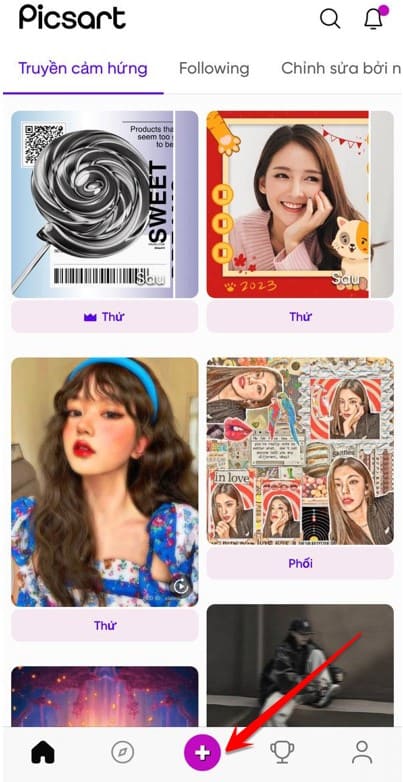
Tet photo collage

Step 2: In the Photo Album on your phone, select the photo you want to put your face on, for example, I will choose the photo below.

At the menu bar below, drag to the right to find More Photos
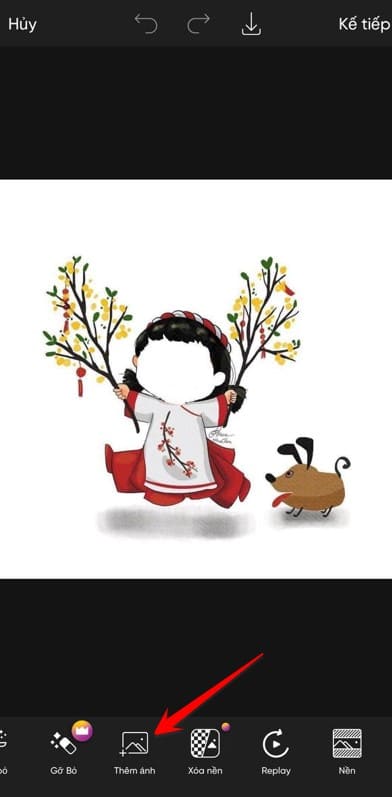
Instructions for stitching faces into cartoon Tet photos

Step 3: At the photo is your face, continue to select Cut
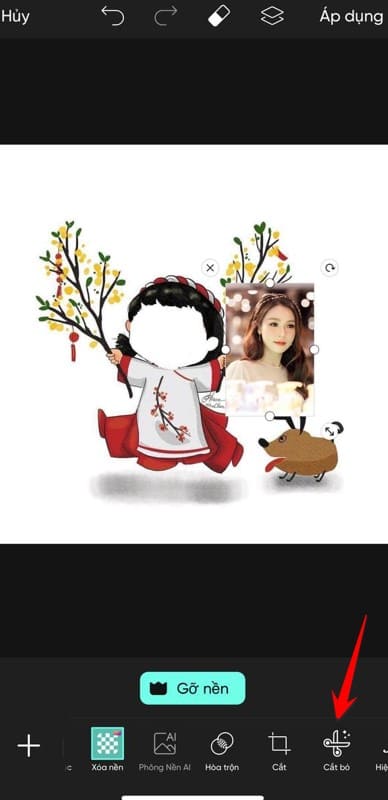
Instructions for stitching faces into animated New Year photos 28

Step 3: Select Face

Instructions for putting faces into animated Tet photos

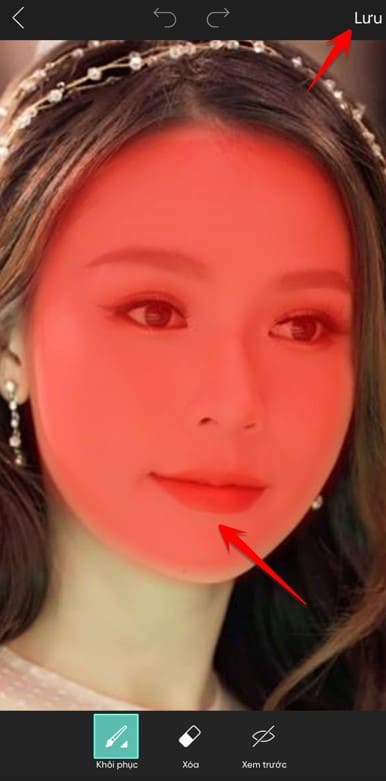
Step 4: At this time, artificial intelligence will automatically select your face, the red area is the area that will be kept, you can choose to add an area or delete the excess area of ​​the face to make it beautiful.

Instructions for grafting faces into 30 animated Tet photos

Step 5: Now that you have your face in the picture, drag it out, rotate the image so that the face matches the background image, then press Apply and you have a beautiful Tet face collage.
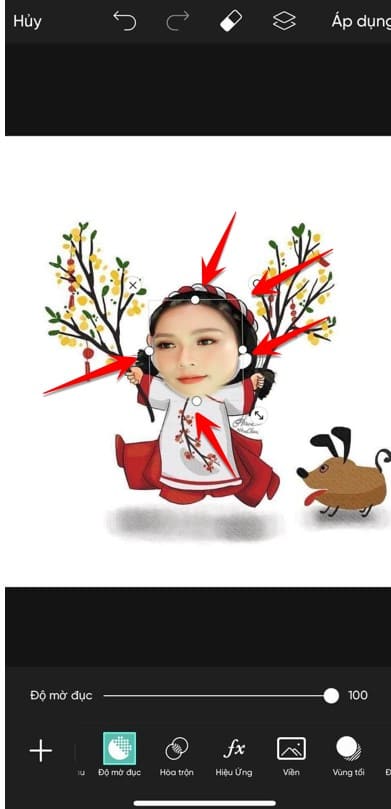

Instructions for stitching faces into animated Tet photos 31

The article achieved: 5/5 – (1 vote)

Tags: cartoonfacesInstructionsphotosputtingTết
Previous Post

What is borderline? What is Lesbian in LGBT?

Next Post

What is laziness? What is the form of torture?

AnonyViet

AnonyViet

Related Posts

How to change the default font on Windows 10
Tips

How to change the default font on Windows 10

April 13, 2026
5 tips for using a Browser to replace an App (helps save RAM, time and money)
Tips

5 tips for using a Browser to replace an App (helps save RAM, time and money)

April 13, 2026
How to make funny MeMe photos without Photoshop within 10 seconds
Tips

How to make funny MeMe photos without Photoshop within 10 seconds

April 11, 2026
How to quickly design your own Logo without Photoshop
Tips

How to quickly design your own Logo without Photoshop

April 10, 2026
How to convert Website into App on Windows
Tips

How to convert Website into App on Windows

April 9, 2026
Instructions for getting 3 months of Adobe Express Pro for free
Tips

Instructions for getting 3 months of Adobe Express Pro for free

April 9, 2026
Next Post
What is laziness?  What is the form of torture?

What is laziness? What is the form of torture?

0 0 votes
Article Rating
Subscribe
Login
Notify of
guest

guest

0 Comments
Oldest
Newest Most Voted
Inline Feedbacks
View all comments

Recent News

Japanese Watch Week: Choose the color that suits your destiny, start the new year well at Mobile World

Japanese Watch Week: Choose the color that suits your destiny, start the new year well at Mobile World

April 20, 2026
4K Video Downloader Plus – Tool to download YouTube videos on macOS

4K Video Downloader Plus – Tool to download YouTube videos on macOS

April 20, 2026
How to add Watermark to Google Docs to protect copyright

How to add Watermark to Google Docs to protect copyright

April 19, 2026
How to intercept traffic using Burp Suite to analyze HTTP/HTTPS

How to intercept traffic using Burp Suite to analyze HTTP/HTTPS

April 18, 2026
Japanese Watch Week: Choose the color that suits your destiny, start the new year well at Mobile World

Japanese Watch Week: Choose the color that suits your destiny, start the new year well at Mobile World

April 20, 2026
4K Video Downloader Plus – Tool to download YouTube videos on macOS

4K Video Downloader Plus – Tool to download YouTube videos on macOS

April 20, 2026
How to add Watermark to Google Docs to protect copyright

How to add Watermark to Google Docs to protect copyright

April 19, 2026
AnonyViet - English Version

AnonyViet

AnonyViet is a website share knowledge that you have never learned in school!

We are ready to welcome your comments, as well as your articles sent to AnonyViet.

Follow Us

Contact:

Email: anonyviet.com[@]gmail.com

Main Website: https://anonyviet.com

Recent News

Japanese Watch Week: Choose the color that suits your destiny, start the new year well at Mobile World

Japanese Watch Week: Choose the color that suits your destiny, start the new year well at Mobile World

April 20, 2026
4K Video Downloader Plus – Tool to download YouTube videos on macOS

4K Video Downloader Plus – Tool to download YouTube videos on macOS

April 20, 2026
No Result
View All Result
  • Home
  • News
  • Software
  • Knowledge
  • MMO
  • Tips
  • Security
  • Network
  • Office

wpDiscuz
0
0
Would love your thoughts, please comment.x
()
x
| Reply