Pay for bus tickets by QR Code is a modern, convenient and safe form of payment for users. Instead of having to carry cash or a bus card, users can simply scan a QR code on their smartphone to pay for tickets quickly and easily. This is one of the solutions to apply digital technology in the field of public transport, contributing to improving service quality and saving costs for people.
| Join the channel Telegram belong to AnonyViet ???? Link ???? |
What is BusMap?
It is the number 1 public transport application in Vietnam, supporting users to find directions, look up routes, view real-time bus locations and evaluate service quality. BusMap has been trusted and used by millions of users every day.
And recently, BusMap took a new step forward in improving the user experience and promoting the development of public transport in Vietnam. That is the launch of the QR Code bus ticket payment feature, which helps users buy tickets online and scan the QR code to get on and off the bus conveniently, quickly and safely.
This feature was first implemented in Ho Chi Minh City, with the cooperation of the Department of Transport, Saigon Passenger Car Joint Stock Company and BusMap Technology Co., Ltd. This is a breakthrough initiative, bringing many benefits to users, garages and regulators.
How to pay for bus tickets with QR Code
Step 1: You download the app BusMap about phone
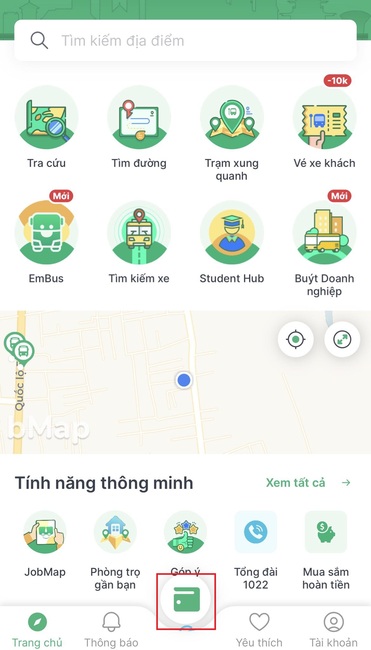
Step 2: Tap the blue bWallet wallet icon in the bottom center of the Busmap app screen.
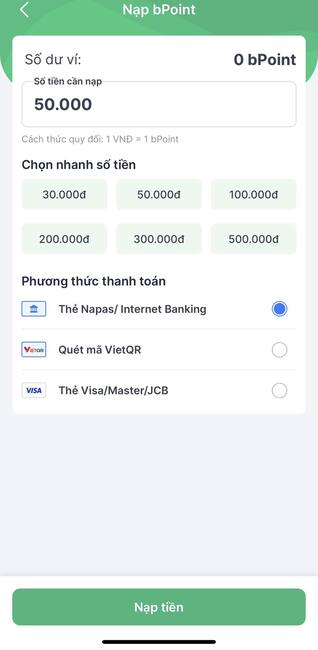
Step 3: Now, your wallet balance is 0 bPoint, to top up you choose “Deposit bPoint”
Step 4: Enter the amount you want to deposit > Select the payment method as:
- Napas Card/ Internet Banking
- Scan code VietQR
- Visa/Master/JBC
Step 5: Wait for the processing to complete, then you can use QR Code with Busmap to pay for bus tickets.
Note
- 1 bPoint is equivalent to 1 VND.
- When getting on and off the bus, you just need to open the BusMap app, select the bWallet wallet and scan the QR code on the bus staff’s device to confirm.
- Currently, this payment method is only applied on buses No. 01 and No. 65. Other bus routes will be deployed soon in the near future.
What are the benefits of paying for bus tickets by QR Code?
Save time
Do you ever have to queue for tickets on the bus? Do you ever have to wait for a cashier or pay change? Do you ever have to worry about not having enough cash to buy tickets? If yes, then you will find it very annoying and time consuming.
But with the QR Code bus ticket payment feature, you won’t have to worry about that anymore. You just need to open the BusMap application, select the bus route and number of tickets to buy, pay via e-wallet or bank card and receive a QR code. When getting on and off the bus, you just need to scan the QR code on the bus staff’s device to confirm. So simple and fast right?
Cost savings
Did you know that when you buy tickets online through the BusMap app, you will be able to buy tickets at a more favorable price than buying tickets directly on the bus? You will save from 10% to 20% of the cost of each trip.
In addition, you can also accumulate bonus points and receive incentives from BusMap’s partners, such as discounts when shopping online, when booking hotel rooms, when traveling…
Protect health
When you come into contact with cash or paper tickets, you can be infected with bacteria or viruses that cause disease, So it is very necessary and important to use the QR Code bus ticket payment feature.
Environmental protection
You will find it very meaningful to use the QR Code bus ticket payment feature because there will be no need to use paper tickets, reducing the amount of waste generated from public transport activities, contributing to reducing air pollution. and save energy.
Epilogue
With feature pay for bus tickets by QR Code, you will no longer have to worry about buying tickets, contacting cash or paper tickets, but simply scanning the QR code to get on and off the bus. From there, you can save costs, enjoy incentives from BusMap’s partners, and protect your health and the environment. And you, how do you see this feature?