• Home
  • News
  • Software
  • Knowledge
  • MMO
  • Tips
  • Security
  • Network
  • Office
AnonyViet - English Version
  • Home
  • News
  • Software
  • Knowledge
  • MMO
  • Tips
  • Security
  • Network
  • Office
No Result
View All Result
  • Home
  • News
  • Software
  • Knowledge
  • MMO
  • Tips
  • Security
  • Network
  • Office
No Result
View All Result
AnonyViet - English Version
No Result
View All Result

Undervolt CPU – How to effectively reduce Desktop and Laptop temperatures

AnonyViet by AnonyViet
February 19, 2023
in Tips
0

If you regularly use the computer on Desktop and Laptop, it will often get very hot, reducing the life of your beloved PC, besides removing the machine for cleaning, we should use more Software to cool it down. computer, how? Please read the instructions below

Join the channel Telegram belong to AnonyViet 👉 Link 👈

Frequently asked Questions:

Undervolt CPU - How to effectively reduce Desktop and Laptop temperatures 6

1. What is Undervolt?

* Undervolt is to reduce the voltage to the CPU by software.

2. Undervolt for what?

* According to my personal experience, this is the most effective way to reduce the temperature of the laptop.
* In addition, it helps to save power, increase battery life, increase component life, increase gaming performance (because it does not throttle cpu due to heat)

3. How many degrees can be reduced?

* Size 5-15 degrees.

4. Why can undervolt cpu?

* Because Intel cannot sit and test each of its CPUs to set the lowest and most suitable voltage for each child; So Intel has set voltage standards that are much higher than the actual voltage that the cpu needs. (With the thought that it is better to have more than to lack)

5. Does Undervolt reduce chip performance?

* Are not.

6. Is Undervolt safe? Is there any risk?

* No, it’s very safe. However:
* There is a risk of blue screen of death if you reduce Vcore too much.

7. Is Undervolt easy?

* Very easy, anyone can do it

Using software:

1. Software to undervolt cpu:

Intel Extreme Tuning Utility

2. Software to measure CPU temperature:

3. CPU stress test software:

Brief instructions how to Undervolt:

Step 1:

You go to Intel XTU, you will see ~Core Voltage Offset~ : This will be where we change the voltage of the CPU.

Undervolt CPU - How to effectively reduce Desktop and Laptop temperatures 7

Step 2:

Let’s start with settings -50mV (for intel U chip) or -80mV (for intel HQ chip). Click apply to save these settings.

Step 3:

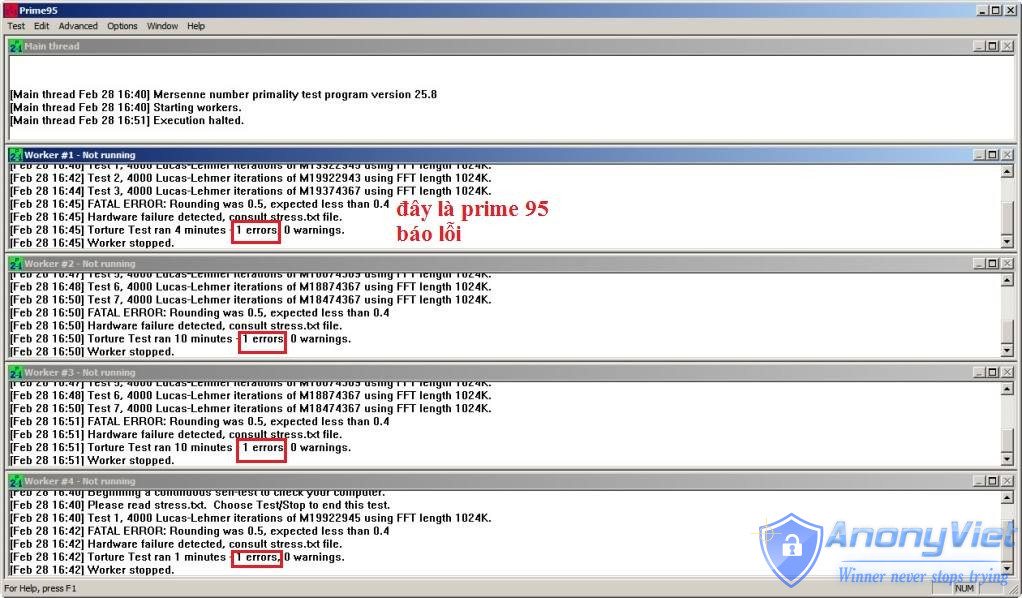
Let Prime95 run the Small FFTs test for 20-30 minutes. This test will make your CPU run at full load to test. If Prime95 does not report any errors, it means that your settings are safe. Note that during the test you can use Hwmonitor to observe the CPU temperature.

Step 4:

If your settings are safe, then boldly reduce another 20mV and then repeat steps 3, 4.

Step 5:

When Prime95 reports an error, add 20mV to the final settings.
Undervolt CPU - How to effectively reduce Desktop and Laptop temperatures 8

Result:

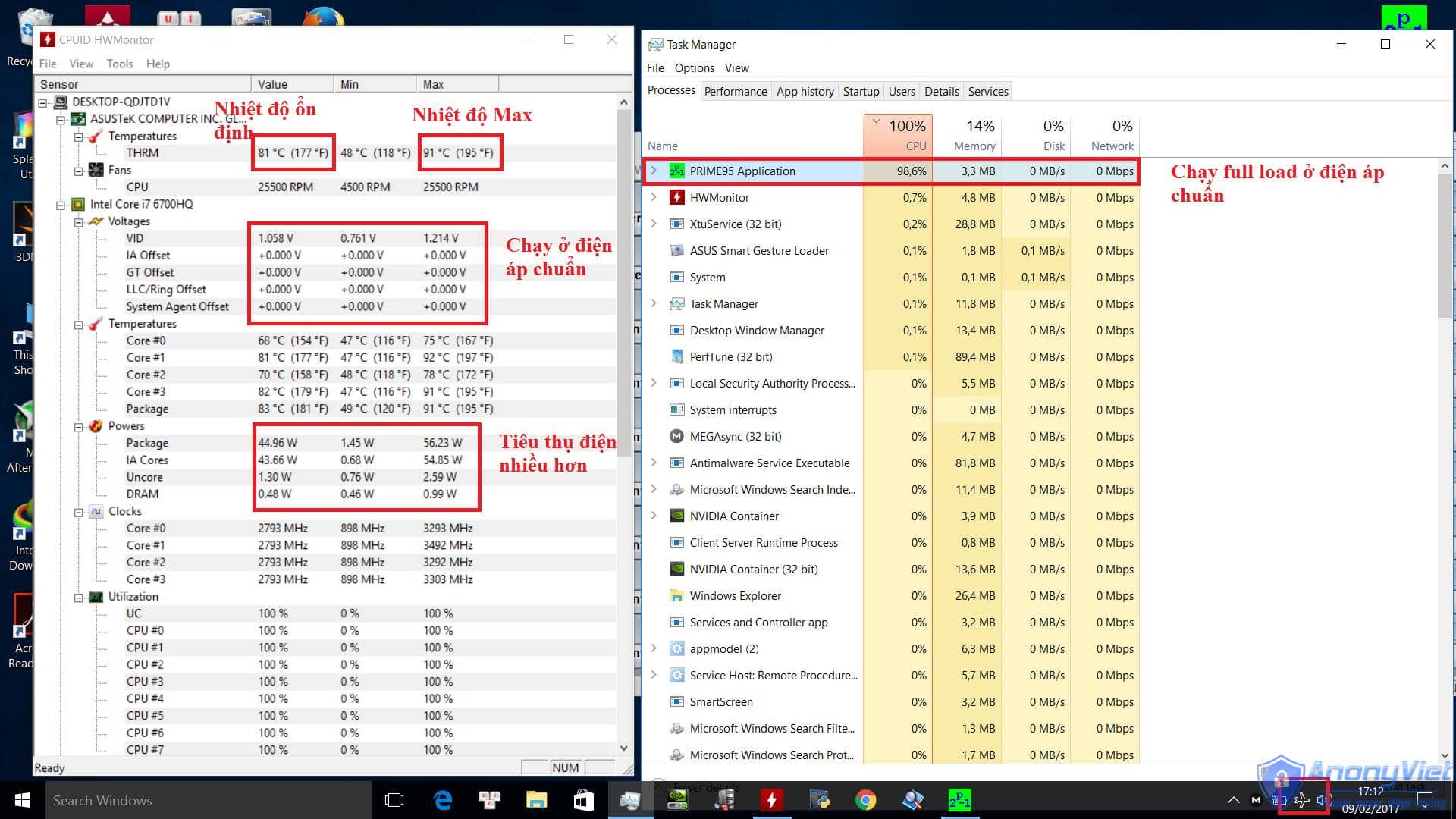
Test laptop running Full cpu at original voltage for 7 minutes.
Undervolt CPU - How to effectively reduce Desktop and Laptop temperatures 9

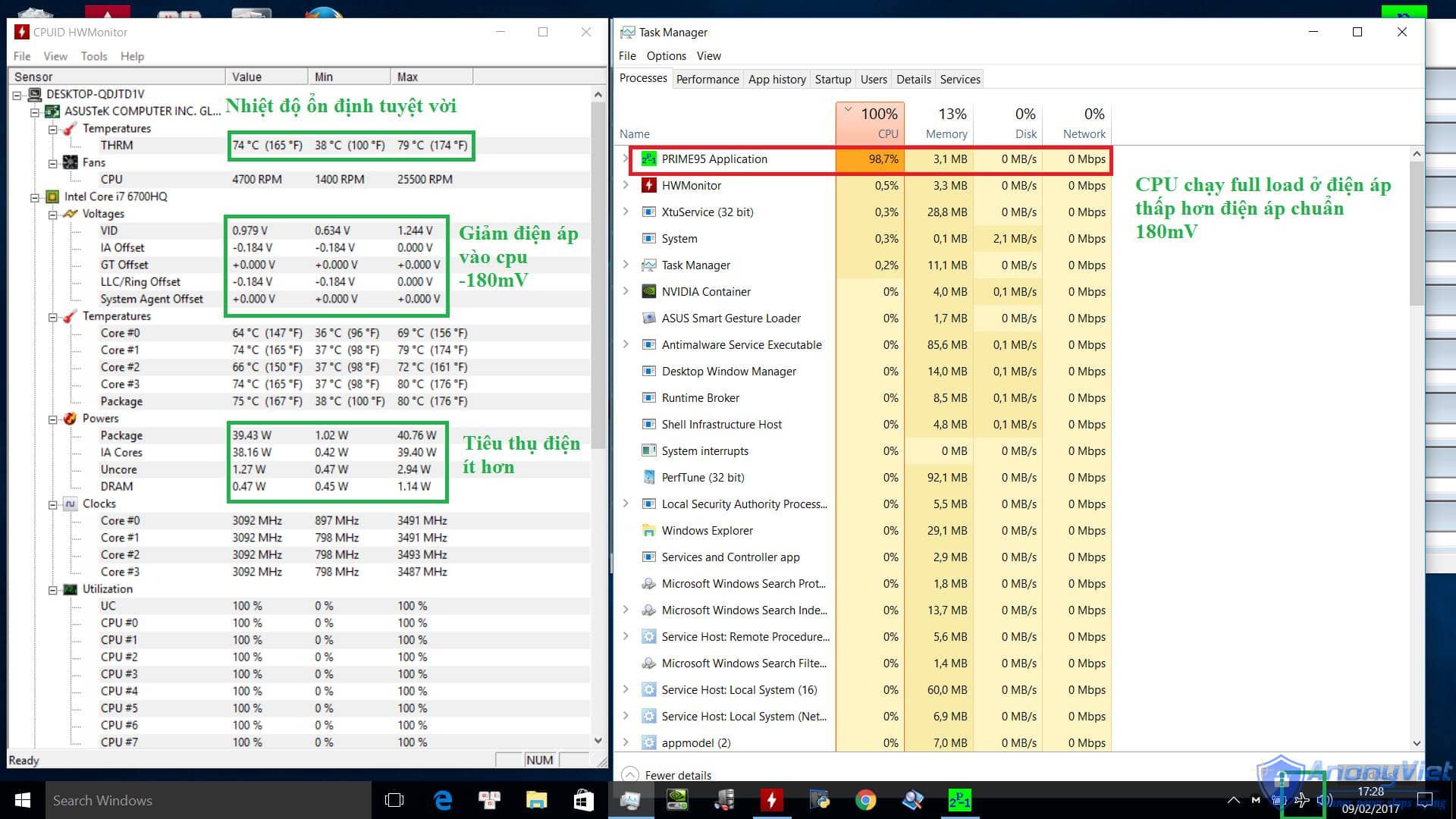
Test laptop running Full cpu at -180mV voltage for 7 minutes.
Undervolt CPU - How to effectively reduce Desktop and Laptop temperatures by 10

The results are extremely positive:

1. CPU runs 7 degrees Celsius cooler (74 vs. 81).
2. CPU Max is 12 degrees cooler (79 vs. 91).
3. Excellent stable CPU temperature.

Note (Important):

1. Actually, you should test (in step 3) for more than 30 minutes (about a few hours) to check the stability of the cpu, but because I think the cpu rarely gets 100% full in the game, so, session a little bit is okay.

2. Do not reduce Vcore too much: For example, my machine is core i7 6700hq, I tested it at -180mV to be safe, but then I just let it -170mV to heal. The U chip should reduce more modestly, about less than 100mV.

3. If your cpu is weak, or gets 100% full load, you shouldn’t reduce it much.

4. Reducing too much risks the machine running unstable and getting the “legendary blue screen”.

5. Absolutely do not increase V-core.

6. Do at your own risk ^^.

7. Many of you using U chips have reflected that you can’t Undervolt, guys.

From: Ngoc Long

The article achieved: 5/5 – (100 votes)

Previous Post

Send Free SMS – Unlimited

Next Post

Tut RIP Facebook FAQ impersonating 808

AnonyViet

AnonyViet

Related Posts

How to add sliders to Facebook Stories to easily rewind videos
Tips

How to add sliders to Facebook Stories to easily rewind videos

April 21, 2026
How to change the default font on Windows 10
Tips

How to change the default font on Windows 10

April 13, 2026
5 tips for using a Browser to replace an App (helps save RAM, time and money)
Tips

5 tips for using a Browser to replace an App (helps save RAM, time and money)

April 13, 2026
How to make funny MeMe photos without Photoshop within 10 seconds
Tips

How to make funny MeMe photos without Photoshop within 10 seconds

April 11, 2026
How to quickly design your own Logo without Photoshop
Tips

How to quickly design your own Logo without Photoshop

April 10, 2026
How to convert Website into App on Windows
Tips

How to convert Website into App on Windows

April 9, 2026
Next Post
Tut RIP Facebook FAQ impersonating 808

Tut RIP Facebook FAQ impersonating 808

0 0 votes
Article Rating
Subscribe
Login
Notify of
guest

guest

0 Comments
Oldest
Newest Most Voted
Inline Feedbacks
View all comments

Recent News

Create an avatar to celebrate April 30 with a beautiful red flag shirt with yellow stars

Create an avatar to celebrate April 30 with a beautiful red flag shirt with yellow stars

April 30, 2026
How to get 2 months of Super Duolingo for free worth 300k

How to get 2 months of Super Duolingo for free worth 300k

April 30, 2026
How to create a Face Sticker Collection using ChatGPT

How to create a Face Sticker Collection using ChatGPT

April 29, 2026
How to install the cute Bongo Cat mouse pointer for Windows

How to install the cute Bongo Cat mouse pointer for Windows

April 29, 2026
Create an avatar to celebrate April 30 with a beautiful red flag shirt with yellow stars

Create an avatar to celebrate April 30 with a beautiful red flag shirt with yellow stars

April 30, 2026
How to get 2 months of Super Duolingo for free worth 300k

How to get 2 months of Super Duolingo for free worth 300k

April 30, 2026
How to create a Face Sticker Collection using ChatGPT

How to create a Face Sticker Collection using ChatGPT

April 29, 2026
AnonyViet - English Version

AnonyViet

AnonyViet is a website share knowledge that you have never learned in school!

We are ready to welcome your comments, as well as your articles sent to AnonyViet.

Follow Us

Contact:

Email: anonyviet.com[@]gmail.com

Main Website: https://anonyviet.com

Recent News

Create an avatar to celebrate April 30 with a beautiful red flag shirt with yellow stars

Create an avatar to celebrate April 30 with a beautiful red flag shirt with yellow stars

April 30, 2026
How to get 2 months of Super Duolingo for free worth 300k

How to get 2 months of Super Duolingo for free worth 300k

April 30, 2026
No Result
View All Result
  • Home
  • News
  • Software
  • Knowledge
  • MMO
  • Tips
  • Security
  • Network
  • Office

wpDiscuz
0
0
Would love your thoughts, please comment.x
()
x
| Reply