• Home
  • News
  • Software
  • Knowledge
  • MMO
  • Tips
  • Security
  • Network
  • Office
AnonyViet - English Version
  • Home
  • News
  • Software
  • Knowledge
  • MMO
  • Tips
  • Security
  • Network
  • Office
No Result
View All Result
  • Home
  • News
  • Software
  • Knowledge
  • MMO
  • Tips
  • Security
  • Network
  • Office
No Result
View All Result
AnonyViet - English Version
No Result
View All Result

Instructions to change the description of information in Properties Computer

AnonyViet by AnonyViet
February 19, 2023
in Tips
0

Today AnonyViet will guide you to change the description of information in Properties Computer, help you personalize your computer, or simply when you go to install Win, you can leave your information on that computer, to When you need help they can call you

Join the channel Telegram belong to AnonyViet 👉 Link 👈

In changing computer information, there will be 2 steps, you can do 1 of 2 steps, or you can do both.

  • Add Personal Logo
  • More information Support

Usually when you Right click on Computer and select Properties then there will be no information like in the image below, with a few simple steps, you will be able to do the same as in the picture.

Instructions to change the description of information in Properties Computer

Add Logo to Properties Computer

You choose 1 picture with size 100×150with the extension *.bmp

  • Use http://resizeimage.net/ to resize photos online
  • Use Paint in Windows –> Save as to chase the tail *.bmp

Name the image as: oemlogo.bmp

Copy File oemlogo.bmp go to folder C:\Windows\System32

Instructions to change the description of information in Properties Computer 6

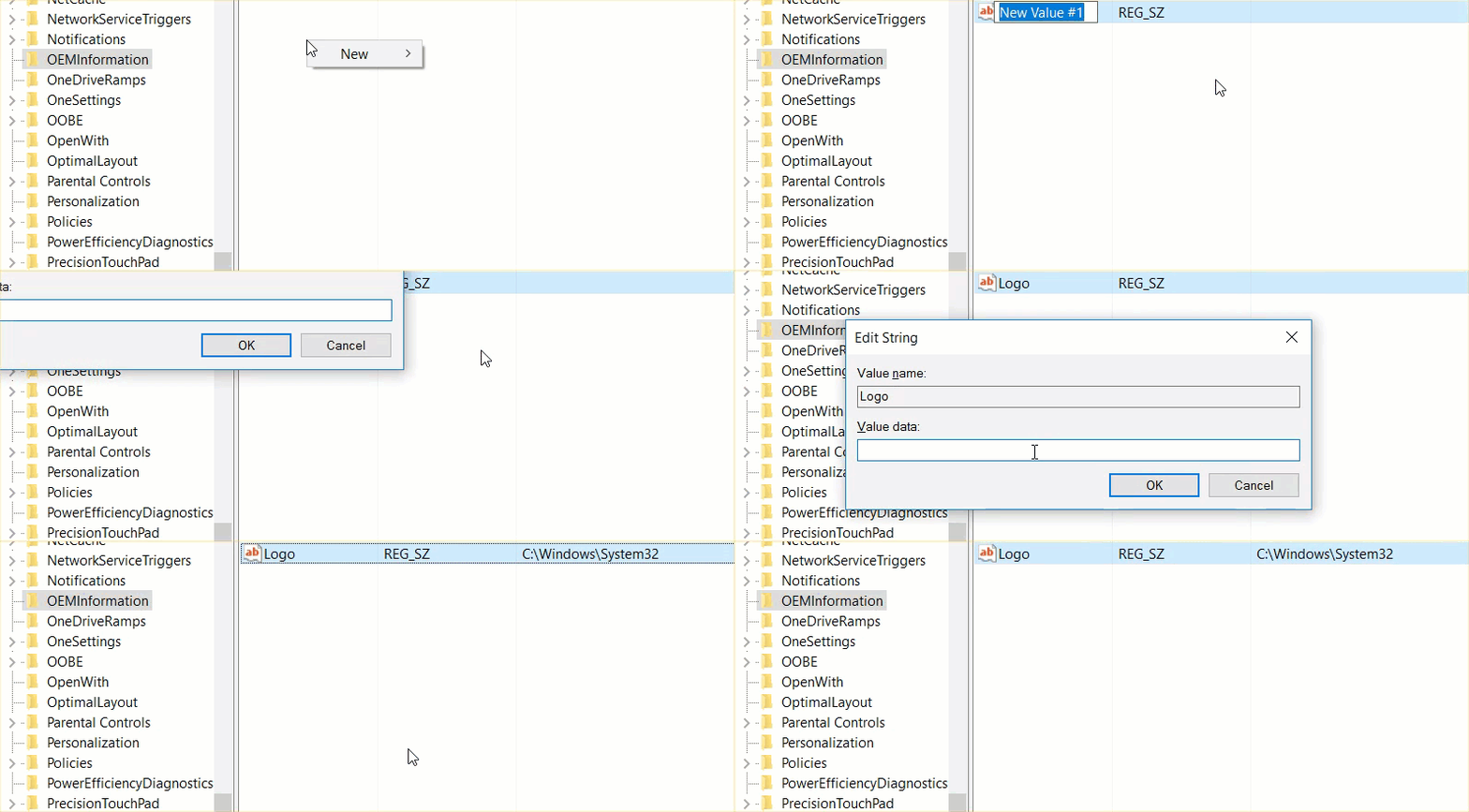
Go to Run (or press the . key) Windows + CHEAP), type the command Regedit

to open the Registry Editor window, then navigate to the key

HKEY_LOCAL_MACHINE\SOFTWARE\Microsoft\Windows\CurrentVerision\OEMinformation

Next, right-click on the right pane and select String Value to create a new item, name it Logo and then assign the value in the Value data box to: C:\Windows\System32\oemlogo.bmp
Instructions to change the description of information in Properties Computer 7

Add support information to Properties Computer

You can leave your phone number or Website, company name at Properties Computer by below.

Similar to making Logo:

Go to Run (or press the . key) Windows + CHEAP), type the command Regedit

to open the Registry Editor window, then navigate to the key

HKEY_LOCAL_MACHINE\SOFTWARE\Microsoft\Windows\CurrentVerision\OEMinformation

You also right-click in the right pane and select String Value: named

  • Manufacturer : assign it the value of the company name.
  • SupportPhone : assign it the value of your phone number
  • SupportURL : assign it the value of your Website address

Instructions to change the description of information in Properties Computer 8

Done, close the Registry Editor window. Finally, right-click Computer and select Properties to see the results.


The article achieved: 5/5 – (100 votes)

Previous Post

How to pretend to be a hacker

Next Post

Send Free SMS – Unlimited

AnonyViet

AnonyViet

Related Posts

Windows 7/8.1/10 users will be upgraded to Windows 11 for free
Tips

Windows 7/8.1/10 users will be upgraded to Windows 11 for free

July 30, 2026
Instructions for receiving ChatGPT Plus for 1 month for free in 2026
Tips

Instructions for receiving ChatGPT Plus for 1 month for free in 2026

July 28, 2026
Some reasons I don’t like Windows 11
Tips

Some reasons I don’t like Windows 11

July 27, 2026
Instructions on how to get free Facebook white ticks
Tips

Instructions on how to get free Facebook white ticks

July 27, 2026
Collection of Windows 11 wallpapers for computers and phones
Tips

Collection of Windows 11 wallpapers for computers and phones

July 26, 2026
Don’t install leaked Windows 11
Tips

Don’t install leaked Windows 11

July 25, 2026
Next Post
Send Free SMS – Unlimited

Send Free SMS - Unlimited

0 0 votes
Article Rating
Subscribe
Login
Notify of
guest

guest

0 Comments
Oldest
Newest Most Voted

Recent News

Hướng dẫn dùng Uneed.vn để đánh giá kiến thức Online miễn phí cho học sinh

Hướng dẫn dùng Uneed.vn để đánh giá kiến thức Online miễn phí cho học sinh

September 22, 2026
Windows 7/8.1/10 users will be upgraded to Windows 11 for free

Windows 7/8.1/10 users will be upgraded to Windows 11 for free

July 30, 2026
Instructions for receiving the free Certified LLM Security Expert certificate

Instructions for receiving the free Certified LLM Security Expert certificate

July 30, 2026
MSI laptops are not just for gamers: Which line is suitable for students, office workers and creative people?

MSI laptops are not just for gamers: Which line is suitable for students, office workers and creative people?

July 29, 2026
Hướng dẫn dùng Uneed.vn để đánh giá kiến thức Online miễn phí cho học sinh

Hướng dẫn dùng Uneed.vn để đánh giá kiến thức Online miễn phí cho học sinh

September 22, 2026
Windows 7/8.1/10 users will be upgraded to Windows 11 for free

Windows 7/8.1/10 users will be upgraded to Windows 11 for free

July 30, 2026
Instructions for receiving the free Certified LLM Security Expert certificate

Instructions for receiving the free Certified LLM Security Expert certificate

July 30, 2026
AnonyViet - English Version

AnonyViet

AnonyViet is a website share knowledge that you have never learned in school!

We are ready to welcome your comments, as well as your articles sent to AnonyViet.

Follow Us

Contact:

Email: anonyviet.com[@]gmail.com

Main Website: https://anonyviet.com

Recent News

Hướng dẫn dùng Uneed.vn để đánh giá kiến thức Online miễn phí cho học sinh

Hướng dẫn dùng Uneed.vn để đánh giá kiến thức Online miễn phí cho học sinh

September 22, 2026
Windows 7/8.1/10 users will be upgraded to Windows 11 for free

Windows 7/8.1/10 users will be upgraded to Windows 11 for free

July 30, 2026
  • Home
  • Home 2
  • Home 3
  • Home 4
  • Home 5
  • Home 6
  • Next Dest Page
  • Sample Page

say88 tỷ lệ kèo nhà cái kèo nhà cái 5 febet

No Result
View All Result
  • Home
  • News
  • Software
  • Knowledge
  • MMO
  • Tips
  • Security
  • Network
  • Office

say88 tỷ lệ kèo nhà cái kèo nhà cái 5 febet

wpDiscuz
0
0
Would love your thoughts, please comment.x
()
x
| Reply