• Home
  • News
  • Software
  • Knowledge
  • MMO
  • Tips
  • Security
  • Network
  • Office
AnonyViet - English Version
  • Home
  • News
  • Software
  • Knowledge
  • MMO
  • Tips
  • Security
  • Network
  • Office
No Result
View All Result
  • Home
  • News
  • Software
  • Knowledge
  • MMO
  • Tips
  • Security
  • Network
  • Office
No Result
View All Result
AnonyViet - English Version
No Result
View All Result

FastForward: Fast File Download at Link shortener pages

AnonyViet by AnonyViet
February 18, 2023
in Tips
0

Are you tired of waiting for 10 to 15 seconds, even 60 seconds in the ad page to be downloaded or redirected to the landing page? This is quite annoying and a waste of time. So for you to save yourself time, I will introduce you to the FastForward extension, it helps you block advertising sites there and go straight to the landing page in no time at all.

FastForward: Fast File Download at Link shortener pages


What is FastForward?

FastForward is a successor to Universal Bypass, an extension created for Chromium, Edge and Firefox that can skip time-consuming link shortening pages, so you don’t have to waste time accessing them. destination link.

FastForward will avoid sites that make you wait 5 to 60 seconds to show ads (like adf.ly). Bypass sites that force you to do something like subscribe to a youtube channel, find a code, or follow someone on social media (examples: show.co and sub2unlock.com). Block sites from tracking information about you (such as bit.ly and t.co). It also helps prevent your IP address from being tracked by websites.

FastForward: Download without going to the ad page

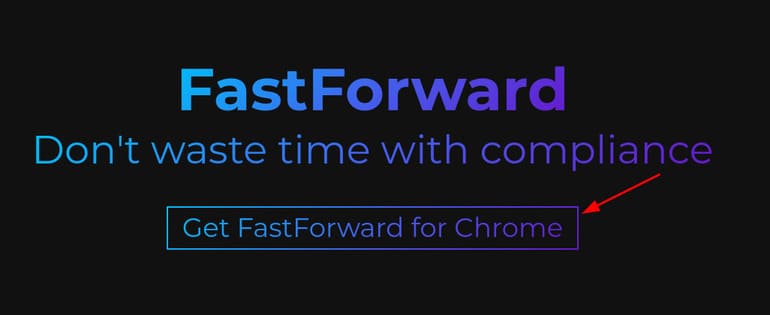
Step 1: First you visit the website of FastForward. Then press “Get FastForward for Chrome”.
FastForward: Download files quickly at shortened pages Link 7

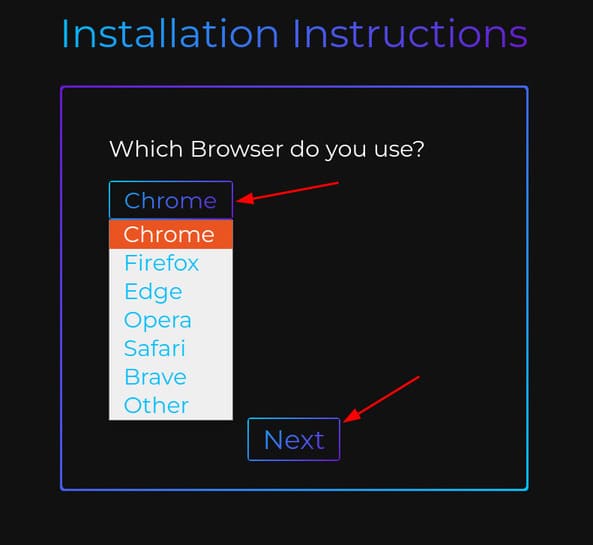
Step 2: Select the browser you are using. If you use Edge or Firefox, FastForward is available on the Store, you just need to install it like any other extension. But I will guide you guys who are using Chrome.
FastForward: Download files quickly at shortened pages Link 8

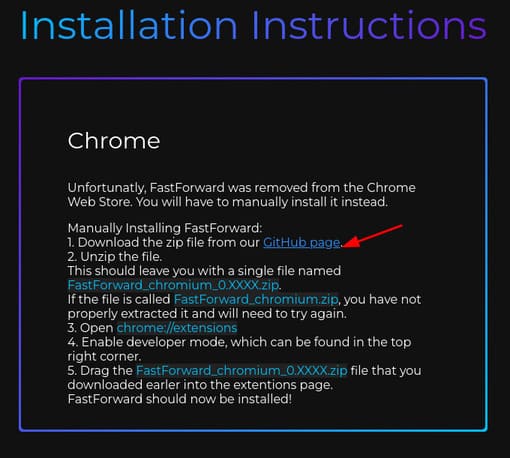
Step 3: Click on the text “GitHub page” to download the FastForward file to your computer.
FastForward: Download files quickly at shortened pages Link 9

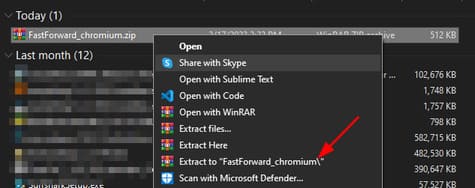
Step 4: Unzip the downloaded file.

FastForward: Download files quickly at shortened pages Link 10

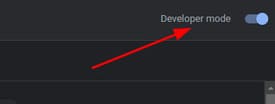
Step 5: Next, visit the Chrome extension settings page or visit this link chrome://extensions. Then you turn on the mode Developer mode at the top right.
FastForward: Download files quickly at shortened pages Link 11

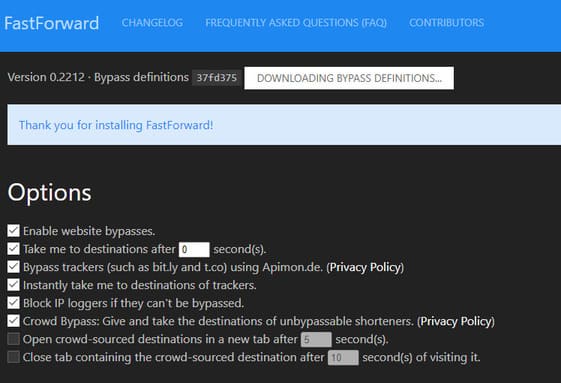
Step 6: Finally, drag and drop the extracted file into the Chrome extension page.
FastForward: Download files quickly at shortened pages Link 12

So it’s done. Now when you want to download or access something, there is no need to go to an advertising website anymore.


Tags: DownloadFastFastForwardfilelinkpagesshortener
Previous Post

How to enable GodMode (Full features) on Windows 10

Next Post

How to chat with Microsoft Support to Activate Windows and Office copyrights

AnonyViet

AnonyViet

Related Posts

8 quick tips for learning Excel that anyone can learn
Tips

8 quick tips for learning Excel that anyone can learn

June 25, 2026
How to quickly compare the content of 2 Excel files
Tips

How to quickly compare the content of 2 Excel files

June 24, 2026
How to create funny selfies with pets for your pets
Tips

How to create funny selfies with pets for your pets

June 19, 2026
Chrome extension not working error and the fastest way to fix it
Tips

Chrome extension not working error and the fastest way to fix it

June 19, 2026
Instructions to receive Claude Fable 5 for free for 30 days
Tips

Instructions to receive Claude Fable 5 for free for 30 days

June 15, 2026
Delete all Event Logs on Windows to remove traces of activity
Tips

Delete all Event Logs on Windows to remove traces of activity

June 15, 2026
Next Post
How to chat with Microsoft Support to Activate Windows and Office copyrights

How to chat with Microsoft Support to Activate Windows and Office copyrights

0 0 votes
Article Rating
Subscribe
Login
Notify of
guest

guest

0 Comments
Oldest
Newest Most Voted
Inline Feedbacks
View all comments

Recent News

8 quick tips for learning Excel that anyone can learn

8 quick tips for learning Excel that anyone can learn

June 25, 2026
How to create luxurious portrait photos using the Dola app

How to create luxurious portrait photos using the Dola app

June 24, 2026
How to quickly compare the content of 2 Excel files

How to quickly compare the content of 2 Excel files

June 24, 2026
How to get a free domain for 1 year from Gravatar

How to get a free domain for 1 year from Gravatar

June 23, 2026
8 quick tips for learning Excel that anyone can learn

8 quick tips for learning Excel that anyone can learn

June 25, 2026
How to create luxurious portrait photos using the Dola app

How to create luxurious portrait photos using the Dola app

June 24, 2026
How to quickly compare the content of 2 Excel files

How to quickly compare the content of 2 Excel files

June 24, 2026
AnonyViet - English Version

AnonyViet

AnonyViet is a website share knowledge that you have never learned in school!

We are ready to welcome your comments, as well as your articles sent to AnonyViet.

Follow Us

Contact:

Email: anonyviet.com[@]gmail.com

Main Website: https://anonyviet.com

Recent News

8 quick tips for learning Excel that anyone can learn

8 quick tips for learning Excel that anyone can learn

June 25, 2026
How to create luxurious portrait photos using the Dola app

How to create luxurious portrait photos using the Dola app

June 24, 2026
  • Home
  • Home 2
  • Home 3
  • Home 4
  • Home 5
  • Home 6
  • Next Dest Page
  • Sample Page

6789 kv999

No Result
View All Result
  • Home
  • News
  • Software
  • Knowledge
  • MMO
  • Tips
  • Security
  • Network
  • Office

6789 kv999

wpDiscuz
0
0
Would love your thoughts, please comment.x
()
x
| Reply