• Home
  • News
  • Software
  • Knowledge
  • MMO
  • Tips
  • Security
  • Network
  • Office
AnonyViet - English Version
  • Home
  • News
  • Software
  • Knowledge
  • MMO
  • Tips
  • Security
  • Network
  • Office
No Result
View All Result
  • Home
  • News
  • Software
  • Knowledge
  • MMO
  • Tips
  • Security
  • Network
  • Office
No Result
View All Result
AnonyViet - English Version
No Result
View All Result

How to measure the running time of 1 command in AutoIT

AnonyViet by AnonyViet
February 17, 2023
in Tips
0

For programmers, it is very important to use a certain command and ask it to run according to the time given by the programmer, for example: a coder writes an auto game program and then when the code operations are complete and when he runs the test, it does not work as he wants (runs in a messy way and the timeout, the execution time is not in the right order) and forces the coder to do repeat the steps and estimate the time. So how do we accurately measure each time (milliseconds) that a command runs? Specifically Autoit

Join the channel Telegram belong to AnonyViet 👉 Link 👈

AutoIT is not a powerful programming language, but it has proven itself to be a useful language right on the command line itself. Therefore, we need to measure and know how much time an instruction in a programming language takes and give a reasonable timeout.

I will guide in detail the code steps for you to understand easily:

The structure of the time measurement code is as follows:

Local $time = TimerInit() ; Lấy thời gian của hệ thống, tính bằng mili giây

; Các lệnh cần đo được chèn ở đây

Local $timedo = TimerDiff($time)
MsgBox(0, "Thời gian đo được", "Thời gian đo được là :" & @CRLF & $timedo)

Example 1: Measure the duration of the Sleep(5000) instruction

Code :

Local $time = TimerInit()
Sleep(5000)
Local $timedo = TimerDiff($time)
MsgBox(0, "Thời gian đo được", "Thời gian đo được là :" & @CRLF & $timedo)

Measured results:
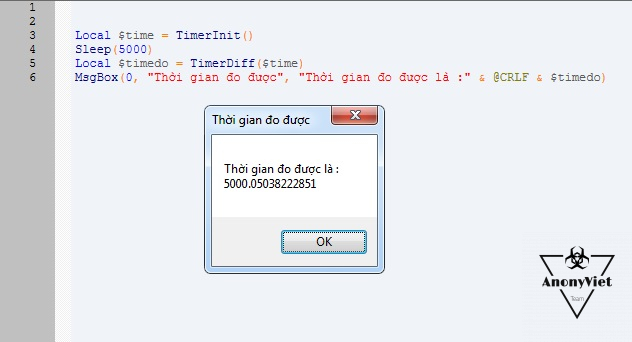
How to measure the running time of 1 instruction in AutoIT 4

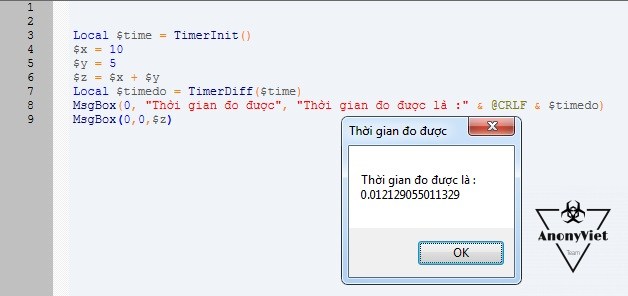
Example 2: Measure the time to do the math

Code :

Local $time = TimerInit()
$x = 10
$y = 5
$z = $x + $y
Local $timedo = TimerDiff($time)
MsgBox(0, "Thời gian đo được", "Thời gian đo được là :" & @CRLF & $timedo)
MsgBox(0,0,$z)

Measured results:

How to measure the running time of 1 command in AutoIT 5

Note: If you want to output the results after calculating, you must put Msgbox after the sample frame code to measure the time, if it is in the sample frame, it will also measure the time you click OK. In case you want to export the results before exporting the measured time, you must set Msgbox to output the results before Msgbox reports the measured time.

After successfully measuring an instruction, we can estimate the waiting time for the program most accurately. For example: You want to let the user wait for a certain command, but do not know how long it takes to wait, we can apply this code to measure first and use Sleep() in the most reasonable way 🙂

In addition to the above 2 code examples, you can completely measure other commands such as: measure the time to read a .txt file, measure the time to get the source code of a website, measure the time to create or delete a necessary file, …

Like Fanpage or in home page regularly to update good articles in the near future.

AnonyViet wishes you success !!

N1412

The article achieved: 5/5 – (100 votes)

Previous Post

Share Javascript programming course from basic to advanced

Next Post

Share C# programming course with Winform worth 600K

AnonyViet

AnonyViet

Related Posts

How to add sliders to Facebook Stories to easily rewind videos
Tips

How to add sliders to Facebook Stories to easily rewind videos

April 21, 2026
How to change the default font on Windows 10
Tips

How to change the default font on Windows 10

April 13, 2026
5 tips for using a Browser to replace an App (helps save RAM, time and money)
Tips

5 tips for using a Browser to replace an App (helps save RAM, time and money)

April 13, 2026
How to make funny MeMe photos without Photoshop within 10 seconds
Tips

How to make funny MeMe photos without Photoshop within 10 seconds

April 11, 2026
How to quickly design your own Logo without Photoshop
Tips

How to quickly design your own Logo without Photoshop

April 10, 2026
How to convert Website into App on Windows
Tips

How to convert Website into App on Windows

April 9, 2026
Next Post
Share C# programming course with Winform worth 600K

Share C# programming course with Winform worth 600K

0 0 votes
Article Rating
Subscribe
Login
Notify of
guest

guest

0 Comments
Oldest
Newest Most Voted
Inline Feedbacks
View all comments

Recent News

Instructions for looking up prescriptions on VNeID instead of paper medical books

Instructions for looking up prescriptions on VNeID instead of paper medical books

April 26, 2026
Tips to completely turn off CAPTCHA codes on iPhone and Mac are super simple

Tips to completely turn off CAPTCHA codes on iPhone and Mac are super simple

April 25, 2026
Compare Poco X8 Pro and Poco X7 Pro: A new step for the “king” of mid-range performance

Compare Poco X8 Pro and Poco X7 Pro: A new step for the “king” of mid-range performance

April 24, 2026
How to compress online videos for free without losing quality

How to compress online videos for free without losing quality

April 24, 2026
Instructions for looking up prescriptions on VNeID instead of paper medical books

Instructions for looking up prescriptions on VNeID instead of paper medical books

April 26, 2026
Tips to completely turn off CAPTCHA codes on iPhone and Mac are super simple

Tips to completely turn off CAPTCHA codes on iPhone and Mac are super simple

April 25, 2026
Compare Poco X8 Pro and Poco X7 Pro: A new step for the “king” of mid-range performance

Compare Poco X8 Pro and Poco X7 Pro: A new step for the “king” of mid-range performance

April 24, 2026
AnonyViet - English Version

AnonyViet

AnonyViet is a website share knowledge that you have never learned in school!

We are ready to welcome your comments, as well as your articles sent to AnonyViet.

Follow Us

Contact:

Email: anonyviet.com[@]gmail.com

Main Website: https://anonyviet.com

Recent News

Instructions for looking up prescriptions on VNeID instead of paper medical books

Instructions for looking up prescriptions on VNeID instead of paper medical books

April 26, 2026
Tips to completely turn off CAPTCHA codes on iPhone and Mac are super simple

Tips to completely turn off CAPTCHA codes on iPhone and Mac are super simple

April 25, 2026
No Result
View All Result
  • Home
  • News
  • Software
  • Knowledge
  • MMO
  • Tips
  • Security
  • Network
  • Office

wpDiscuz
0
0
Would love your thoughts, please comment.x
()
x
| Reply