
• Home
  • News
  • Software
  • Knowledge
  • MMO
  • Tips
  • Security
  • Network
  • Office
AnonyViet - English Version
  • Home
  • News
  • Software
  • Knowledge
  • MMO
  • Tips
  • Security
  • Network
  • Office
No Result
View All Result
  • Home
  • News
  • Software
  • Knowledge
  • MMO
  • Tips
  • Security
  • Network
  • Office
No Result
View All Result
AnonyViet - English Version
No Result
View All Result

Instructions for creating Virtual Tokens Buff Sub Tit Ga

AnonyViet by AnonyViet
February 16, 2023
in Tips
0

If you want to have a lot of Facebook followers, you must have a sufficient amount of Tokens and be alive to be able to buff sub (Hack tracking). First of all, I will briefly explain what Token is for those of you who do not know. Then how to create virtual Token to buffs the sub sucks all the time.

Join the channel Telegram belong to AnonyViet 👉 Link 👈

What are Facebook tokens?

We can understand Facebook Token is a piece of code generated by Facebook for each specific user (For example, 1 individual, 1 Fanpage or 1 application). This code can help you do many actions for that object without having to directly manage it (no need to know the password).

To put it more simply, Token is a person’s identification code like an ID card number. Each person needs a code for Facebook to distinguish each other from each other. Two people can have the same Facebook name but the Token is different.

How is the buff Sub?

Buff Sub is the term for increasing the number of followers on your personal page. The fact that Buff sub uses the Token code to silently increase the sub without having to give a password, so it is very safe.

Steps to make Virtual Token

Facebook has just launched a Facebook White system for users to find bugs with a test account. When you create an account above, it will give you an Account and password created by Facebook itself.

You can use those virtual Token accounts to Get Token and conduct buff sub for you.

Instructions for buffing sub with Virtual Token

My Whitehat Facebook link is below.

Link Facebook White

Remember to skip the ad to support me.

After accessing the link, the Facebook White interface will appear.
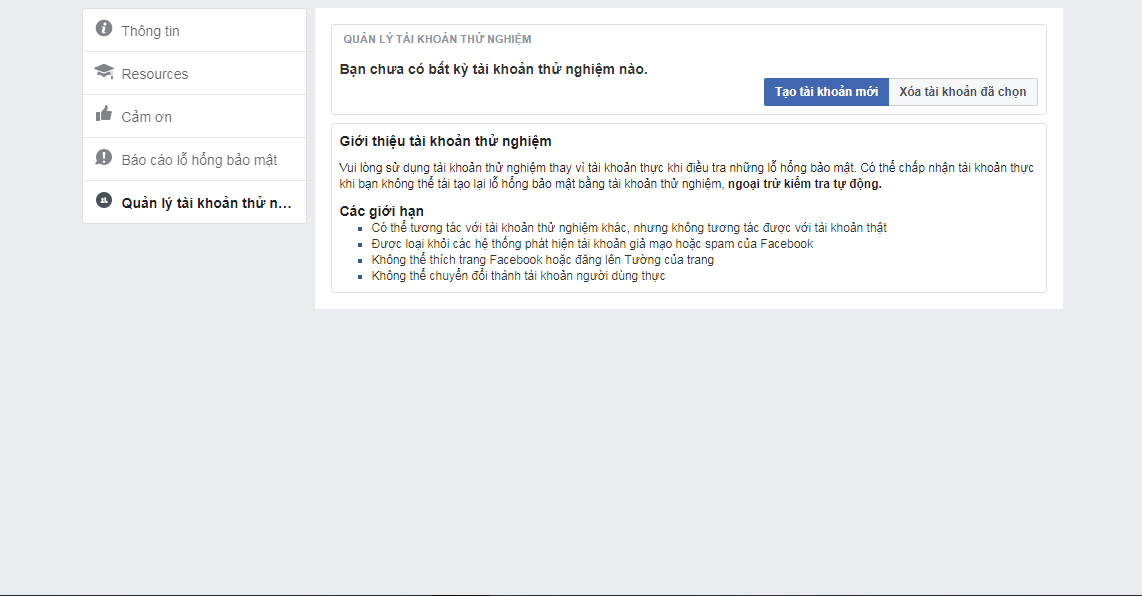
test1

Next, click on the “Create New Account” section to proceed with creating it.
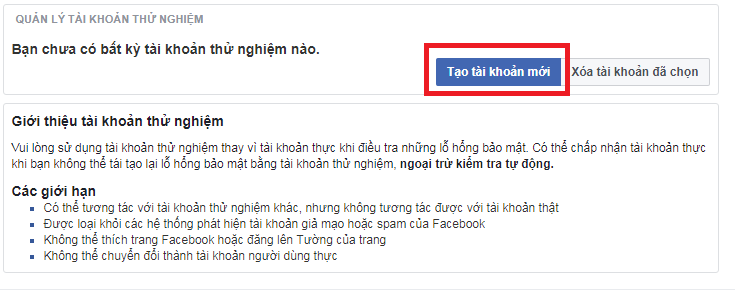
test2

Then wait about 10 seconds, it’s done for us.

Below is the information about the test Facebook account after creating it.
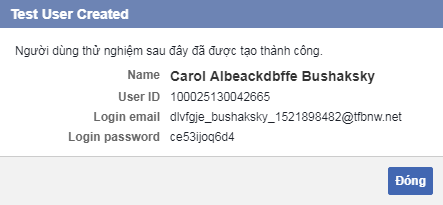
login

After you have your personal information including Email and Password, all you need to do is Get Token and Buff Sub.

Currently, there are only 2 websites that support Get Token and buffs on test accounts. Please click on the link below to access it.

Link Get Token

Link Buff Sub

(Skip the ad to support Anonyviet)

You go to the Get Token link above and then enter the Email and Password of the test account and then click Login.
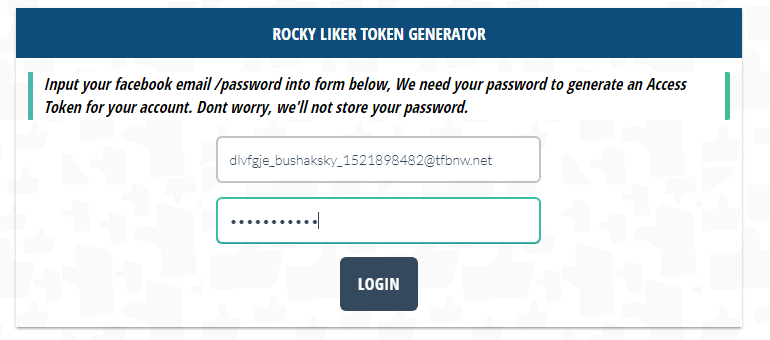
token

Scroll down to see a piece of code. In it will have our token in quotes. You proceed to copy that token.
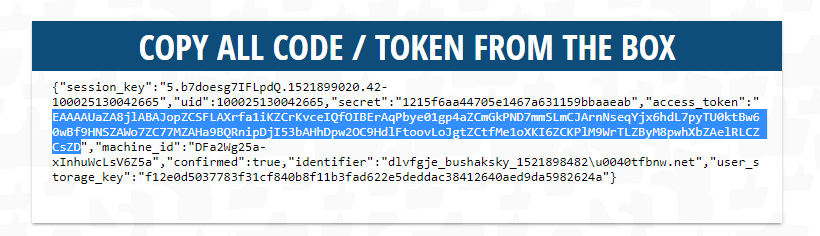
get

Switch to the Buff sub link and paste the token in and enjoy the results.
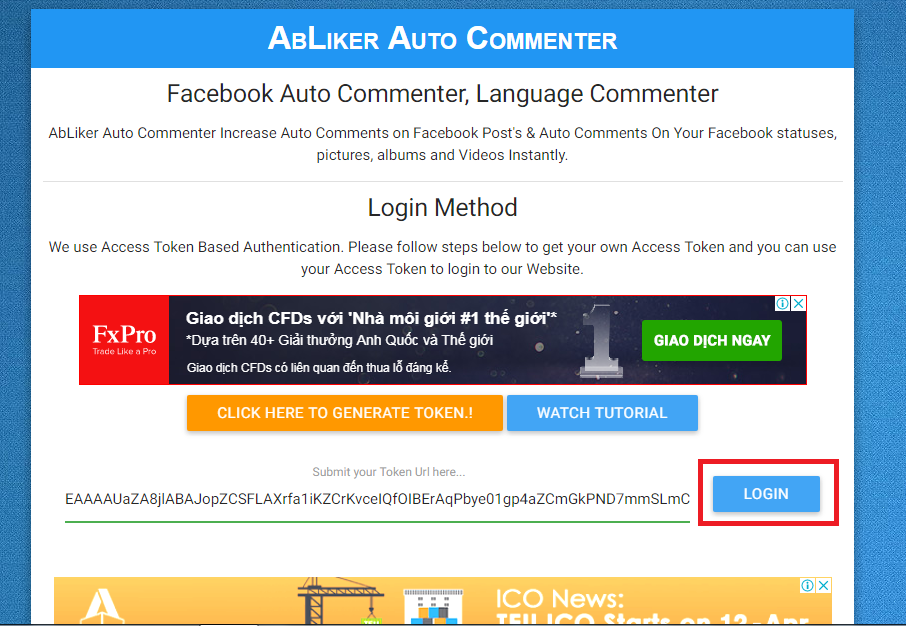
Instructions for creating Virtual Tokens Buff Sub Tit Ga

Each time you finish buffing, you Delete that account and create a new one and then buff it again. As long as your arm is broken, it’s okay ^^

Like Fanpage or follow website for early updates of good articles.

Good luck
TMQ.

The article achieved: 5/5 – (100 votes)

Previous Post

Summary of ways to download videos quickly and with quality

Next Post

How to create a virtual MasterCard for international online payments

AnonyViet

AnonyViet

Related Posts

How to add sliders to Facebook Stories to easily rewind videos
Tips

How to add sliders to Facebook Stories to easily rewind videos

April 21, 2026
How to change the default font on Windows 10
Tips

How to change the default font on Windows 10

April 13, 2026
5 tips for using a Browser to replace an App (helps save RAM, time and money)
Tips

5 tips for using a Browser to replace an App (helps save RAM, time and money)

April 13, 2026
How to make funny MeMe photos without Photoshop within 10 seconds
Tips

How to make funny MeMe photos without Photoshop within 10 seconds

April 11, 2026
How to quickly design your own Logo without Photoshop
Tips

How to quickly design your own Logo without Photoshop

April 10, 2026
How to convert Website into App on Windows
Tips

How to convert Website into App on Windows

April 9, 2026
Next Post

How to create a virtual MasterCard for international online payments

0 0 votes
Article Rating
Subscribe
Login
Notify of
guest

guest

0 Comments
Oldest
Newest Most Voted
Inline Feedbacks
View all comments

Recent News

How to turn off password suggestions on iPhone: Prevent Safari from auto-filling passwords

How to turn off password suggestions on iPhone: Prevent Safari from auto-filling passwords

April 27, 2026
Instructions for looking up prescriptions on VNeID instead of paper medical books

Instructions for looking up prescriptions on VNeID instead of paper medical books

April 26, 2026
Tips to completely turn off CAPTCHA codes on iPhone and Mac are super simple

Tips to completely turn off CAPTCHA codes on iPhone and Mac are super simple

April 25, 2026
Compare Poco X8 Pro and Poco X7 Pro: A new step for the “king” of mid-range performance

Compare Poco X8 Pro and Poco X7 Pro: A new step for the “king” of mid-range performance

April 24, 2026
How to turn off password suggestions on iPhone: Prevent Safari from auto-filling passwords

How to turn off password suggestions on iPhone: Prevent Safari from auto-filling passwords

April 27, 2026
Instructions for looking up prescriptions on VNeID instead of paper medical books

Instructions for looking up prescriptions on VNeID instead of paper medical books

April 26, 2026
Tips to completely turn off CAPTCHA codes on iPhone and Mac are super simple

Tips to completely turn off CAPTCHA codes on iPhone and Mac are super simple

April 25, 2026
AnonyViet - English Version

AnonyViet

AnonyViet is a website share knowledge that you have never learned in school!

We are ready to welcome your comments, as well as your articles sent to AnonyViet.

Follow Us

Contact:

Email: anonyviet.com[@]gmail.com

Main Website: https://anonyviet.com

Recent News

How to turn off password suggestions on iPhone: Prevent Safari from auto-filling passwords

How to turn off password suggestions on iPhone: Prevent Safari from auto-filling passwords

April 27, 2026
Instructions for looking up prescriptions on VNeID instead of paper medical books

Instructions for looking up prescriptions on VNeID instead of paper medical books

April 26, 2026
No Result
View All Result
  • Home
  • News
  • Software
  • Knowledge
  • MMO
  • Tips
  • Security
  • Network
  • Office

wpDiscuz
0
0
Would love your thoughts, please comment.x
()
x
| Reply





