• Home
  • News
  • Software
  • Knowledge
  • MMO
  • Tips
  • Security
  • Network
  • Office
AnonyViet - English Version
  • Home
  • News
  • Software
  • Knowledge
  • MMO
  • Tips
  • Security
  • Network
  • Office
No Result
View All Result
  • Home
  • News
  • Software
  • Knowledge
  • MMO
  • Tips
  • Security
  • Network
  • Office
No Result
View All Result
AnonyViet - English Version
No Result
View All Result

Make SMS and Facebook Comments without Photoshop

AnonyViet by AnonyViet
February 15, 2023
in Tips
0

He has a good sense of humor and has many interesting stories. You want to share funny stories into Facebook chats. But you don’t know how to use Photoshop to make photos.

Join the channel Telegram belong to AnonyViet 👉 Link 👈

Today AnonyViet Instructions on how to make photos of Status, Sms, Comments of the largest social networks today. You don’t need to use Photoshop, you can still do it. With just a few taps, you will get a picture of chat content that is 100% lifelike.

You can use F12 to edit each chat and then take a picture. But this doesn’t work on phones. I have a better web tool that can help you complete a photo montage in 1p30s.

The website below supports fake messages and chats like Facebook, Twitter, iPhone SMS, Android SMS, Whatsapp and Snapchat. You have many options on the Menu bar to choose from.

Visit the website to fake the message.

The example below I will edit the comment conversation on Facebook.

Crafting SMS, Facebook Comments without Photoshop

There will be 3 tabs

  • Tab 1: Information of the 1st person.
  • Tab 2: Second person information.
  • Finally, Tab 3: Information about conversation time.

You just

The content below corresponds to the ordinal numbers in the image above.

  1. Upload first person avatar
  2. Enter the first person’s name
  3. Time of the 1st person’s dialogue of the 1st sentence
  4. Choose the type of message is comment or chat (Messenger)
  5. Message: Enter the content of the chat and press Add messenger to add chat content.

Download photos when finished

After completing the first person’s information. You click on the tab Person 2 to fill in the information for the second person (green area on the photo). Finally, switch 2 tabs back and forth to chat with each other.

Once done, click on the . button Download Facebook Full Chat as Image below the image to download the image. If the case cannot be downloaded, use Snipping Tool of Windows screen capture for quick.

Snipping Tool is a built-in screen capture tool on Windows 10. You just need to press the key combination Windows + WILL and search for “Snipping Tool” will see (As picture below).
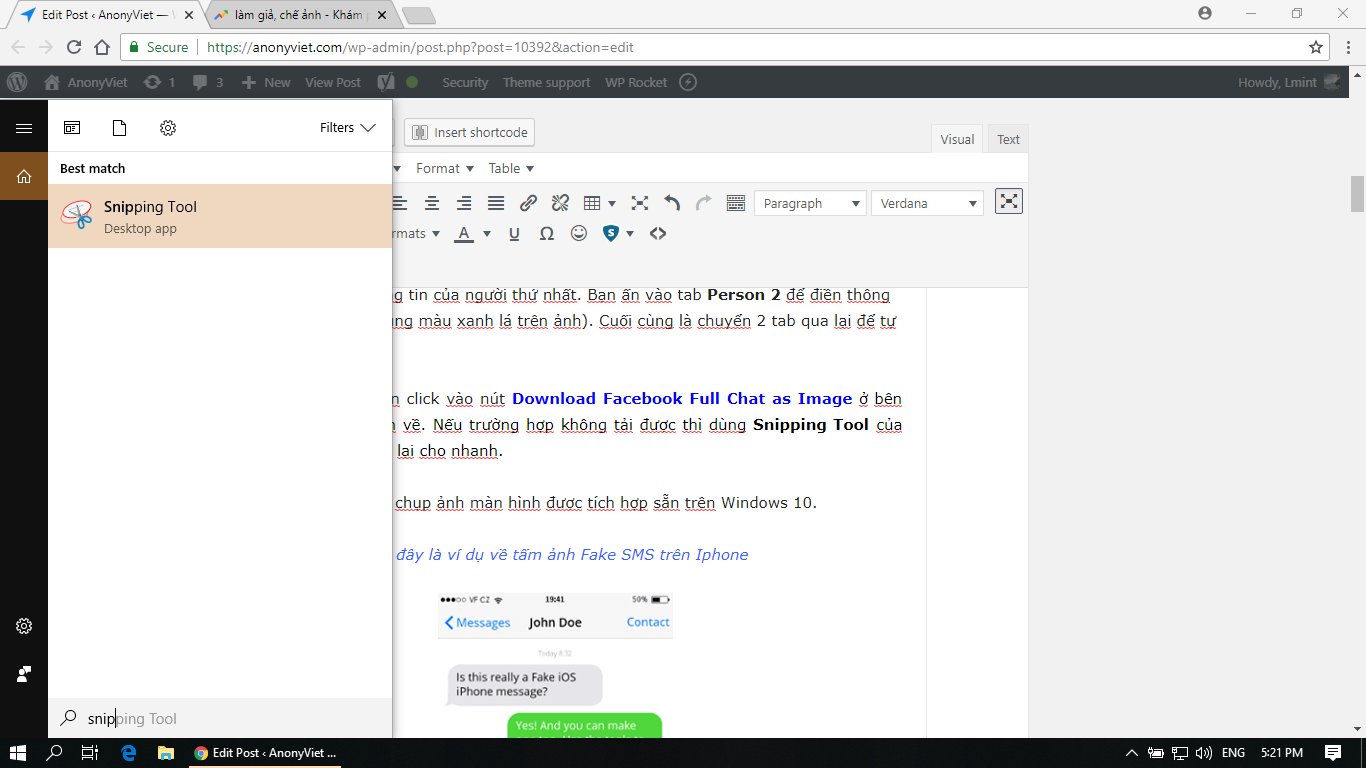
Make SMS and Comment Facebook photos without Photoshop 3

Below is the result after Spoofing SMS on Iphone.

Make SMS and Facebook Comments without Photoshop

If you have any questions, please leave a comment below for me to answer. Like Fanpage or follow the website to quickly update good articles.

Good luck
Lmint.

The article achieved: 5/5 – (100 votes)

Previous Post

Free Share Ebook to learn JavaScript from basic to advanced

Next Post

Create your own Avatar in the style of PornHub

AnonyViet

AnonyViet

Related Posts

How to add sliders to Facebook Stories to easily rewind videos
Tips

How to add sliders to Facebook Stories to easily rewind videos

April 21, 2026
How to change the default font on Windows 10
Tips

How to change the default font on Windows 10

April 13, 2026
5 tips for using a Browser to replace an App (helps save RAM, time and money)
Tips

5 tips for using a Browser to replace an App (helps save RAM, time and money)

April 13, 2026
How to make funny MeMe photos without Photoshop within 10 seconds
Tips

How to make funny MeMe photos without Photoshop within 10 seconds

April 11, 2026
How to quickly design your own Logo without Photoshop
Tips

How to quickly design your own Logo without Photoshop

April 10, 2026
How to convert Website into App on Windows
Tips

How to convert Website into App on Windows

April 9, 2026
Next Post
Create your own Avatar in the style of PornHub

Create your own Avatar in the style of PornHub

0 0 votes
Article Rating
Subscribe
Login
Notify of
guest

guest

0 Comments
Oldest
Newest Most Voted
Inline Feedbacks
View all comments

Recent News

Create an avatar to celebrate April 30 with a beautiful red flag shirt with yellow stars

Create an avatar to celebrate April 30 with a beautiful red flag shirt with yellow stars

April 30, 2026
How to get 2 months of Super Duolingo for free worth 300k

How to get 2 months of Super Duolingo for free worth 300k

April 30, 2026
How to create a Face Sticker Collection using ChatGPT

How to create a Face Sticker Collection using ChatGPT

April 29, 2026
How to install the cute Bongo Cat mouse pointer for Windows

How to install the cute Bongo Cat mouse pointer for Windows

April 29, 2026
Create an avatar to celebrate April 30 with a beautiful red flag shirt with yellow stars

Create an avatar to celebrate April 30 with a beautiful red flag shirt with yellow stars

April 30, 2026
How to get 2 months of Super Duolingo for free worth 300k

How to get 2 months of Super Duolingo for free worth 300k

April 30, 2026
How to create a Face Sticker Collection using ChatGPT

How to create a Face Sticker Collection using ChatGPT

April 29, 2026
AnonyViet - English Version

AnonyViet

AnonyViet is a website share knowledge that you have never learned in school!

We are ready to welcome your comments, as well as your articles sent to AnonyViet.

Follow Us

Contact:

Email: anonyviet.com[@]gmail.com

Main Website: https://anonyviet.com

Recent News

Create an avatar to celebrate April 30 with a beautiful red flag shirt with yellow stars

Create an avatar to celebrate April 30 with a beautiful red flag shirt with yellow stars

April 30, 2026
How to get 2 months of Super Duolingo for free worth 300k

How to get 2 months of Super Duolingo for free worth 300k

April 30, 2026
No Result
View All Result
  • Home
  • News
  • Software
  • Knowledge
  • MMO
  • Tips
  • Security
  • Network
  • Office

wpDiscuz
0
0
Would love your thoughts, please comment.x
()
x
| Reply