• Home
  • News
  • Software
  • Knowledge
  • MMO
  • Tips
  • Security
  • Network
  • Office
AnonyViet - English Version
  • Home
  • News
  • Software
  • Knowledge
  • MMO
  • Tips
  • Security
  • Network
  • Office
No Result
View All Result
  • Home
  • News
  • Software
  • Knowledge
  • MMO
  • Tips
  • Security
  • Network
  • Office
No Result
View All Result
AnonyViet - English Version
No Result
View All Result

3 ways to check email is real or fake

AnonyViet by AnonyViet
January 28, 2023
in Tips
0

Have you ever come across any email that looks like it’s from a company, but it looks suspicious? There are many ways that scammers use to spoof email addresses. So in this article, I will show you 3 ways to check if an email is real or fake.

Join the channel Telegram of the AnonyViet 👉 Link 👈

3 ways to check email is real or fake

3 ways to check if an email is real or fake

1. Check the “From” address
3 ways to check email is real or fake 9

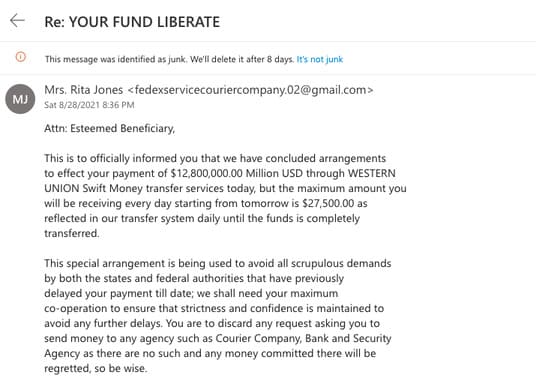
Often you will find that fake emails have a “from” address that looks similar to a real email address,

Take the example of Apple. If you receive an email from Apple, you will see that the email address is [email protected]. Scammers will use email addresses similar to [email protected] to try and fool recipients.

Another example is how scammers name reputable companies to scam users. For example, they might misspelled Microsoft by using ‘r’ and ‘n’ to make it sound like an ‘m’.

Additionally, scammers can use various fake websites and software to show you the real email address. In this case, it is difficult to tell if the email is real or not. A sign to be careful is seeing any typos in emails or suspicious links.

2. Check the “Reply To” address
3 ways to check email is real or fake 10

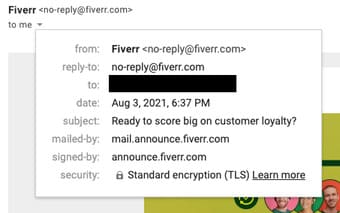
When you receive an email from someone, you usually reply to the same email address, unless instructed otherwise. When scammers send fake emails using someone else’s email address, they don’t have access to the victim’s email account that they use.

If a phishing email needs you to reply, you’ll see a “Reply To” section with a different email address than the one that was actually sent to you.

Scammers use this technique to get replies by tricking you into reading and replying to emails they send using the names of reputable brands, companies, government organizations, etc.

3. Check email headers
3 ways to check email is real or fake 11

There are three main email security technologies used: SPF, DKIM, and DMARC. These technologies help email recipients check whether it is really from the recipient or a scammer.

Most major websites and companies use these three security measures correctly, as it allows your mail client to detect and block spoofed emails. It should be noted that some companies may not use these technologies or do not implement them properly.

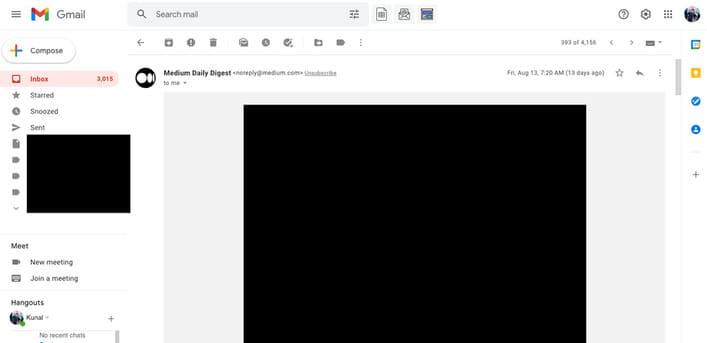
To check the security of an email, click the three dots in the top right corner of any suspicious email and click Show Original. Here you will be able to see each security check and see if the email passed or not.
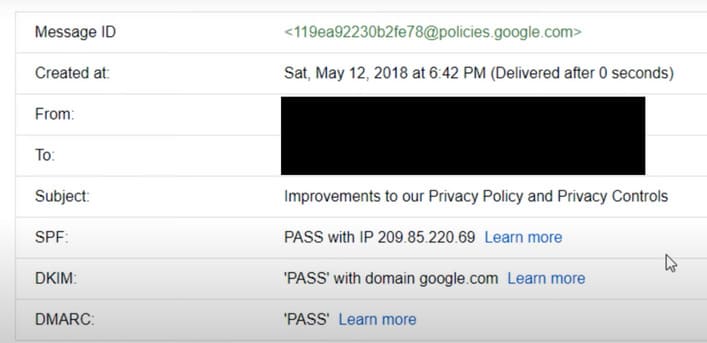
3 ways to check email is real or fake 12

While the status can’t tell you explicitly whether the email is real or not, it certainly gives a bit of confidence. If you see a fail or soft fail result, then you should probably be careful with that email.

Why should you check your email?

You may be wondering why your email doesn’t automatically check and filter out spam and spoofed emails with so many layers of checks, firewalls, and security. The answer to this question is that of the 140 million domains checked by SPF recently, 80% do not have an SPF claim.

Without SPF confirmation, there’s no way for your email account to correctly filter spam. That’s why you sometimes find important emails in your junk folder and weird spam emails in your inbox.

No test or indication can tell you that an email is definitely fake. You may have to do a lot of email checking if the email is real or not.

In addition, you can also use Ghunt to find email sender information here.

The article achieved: 5/5 – (100 votes)

Tags: checkemailfakeRealways
Previous Post

Should choose KeePass, LastPass or 1Password to manage Password

Next Post

Instructions to install Vietnamese percussion on the latest Kali Linux with ibus-unikey

AnonyViet

AnonyViet

Related Posts

Instructions to receive Claude Fable 5 for free for 30 days
Tips

Instructions to receive Claude Fable 5 for free for 30 days

June 15, 2026
Delete all Event Logs on Windows to remove traces of activity
Tips

Delete all Event Logs on Windows to remove traces of activity

June 15, 2026
Instructions for creating Minecraft-style food photos
Tips

Instructions for creating Minecraft-style food photos

June 9, 2026
Get free Cambridge courses to prepare for IELTS, Starters, Movers
Tips

Get free Cambridge courses to prepare for IELTS, Starters, Movers

June 4, 2026
How to record reaction videos with Android phones, no app needed
Tips

How to record reaction videos with Android phones, no app needed

June 1, 2026
Instructions on how to get Google AI Pro 1 year for free for new accounts
Tips

Instructions on how to get Google AI Pro 1 year for free for new accounts

June 1, 2026
Next Post
Instructions to install Vietnamese percussion on the latest Kali Linux with ibus-unikey

Instructions to install Vietnamese percussion on the latest Kali Linux with ibus-unikey

0 0 votes
Article Rating
Subscribe
Login
Notify of
guest

guest

0 Comments
Oldest
Newest Most Voted
Inline Feedbacks
View all comments

Recent News

Instructions to receive Claude Fable 5 for free for 30 days

Instructions to receive Claude Fable 5 for free for 30 days

June 15, 2026
Instructions on how to activate the new Siri on iOS 27

Instructions on how to activate the new Siri on iOS 27

June 15, 2026
Delete all Event Logs on Windows to remove traces of activity

Delete all Event Logs on Windows to remove traces of activity

June 15, 2026
Instructions on how to get the latest 200GB MultCloud for free in 2026

Instructions on how to get the latest 200GB MultCloud for free in 2026

June 14, 2026
Instructions to receive Claude Fable 5 for free for 30 days

Instructions to receive Claude Fable 5 for free for 30 days

June 15, 2026
Instructions on how to activate the new Siri on iOS 27

Instructions on how to activate the new Siri on iOS 27

June 15, 2026
Delete all Event Logs on Windows to remove traces of activity

Delete all Event Logs on Windows to remove traces of activity

June 15, 2026
AnonyViet - English Version

AnonyViet

AnonyViet is a website share knowledge that you have never learned in school!

We are ready to welcome your comments, as well as your articles sent to AnonyViet.

Follow Us

Contact:

Email: anonyviet.com[@]gmail.com

Main Website: https://anonyviet.com

Recent News

Instructions to receive Claude Fable 5 for free for 30 days

Instructions to receive Claude Fable 5 for free for 30 days

June 15, 2026
Instructions on how to activate the new Siri on iOS 27

Instructions on how to activate the new Siri on iOS 27

June 15, 2026
  • Home
  • Home 2
  • Home 3
  • Home 4
  • Home 5
  • Home 6
  • Next Dest Page
  • Sample Page

6789 kv999

No Result
View All Result
  • Home
  • News
  • Software
  • Knowledge
  • MMO
  • Tips
  • Security
  • Network
  • Office

6789 kv999

wpDiscuz
0
0
Would love your thoughts, please comment.x
()
x
| Reply