When Microsoft released Windows Subsystem for Linux (WSL) in 2016, everyone was disappointed. Because everyone’s dream is to run Linux and Windows applications in parallel without having to reboot (boot back and forth between the two operating systems). But unfortunately, WSL can only run command line applications using Terminal.
📢 Join the channel Telegram belong to AnonyViet
Update new articles, cool tools and IT tips fastest
If you want to install WSL on Windows 10 then you can read this article.

Last year, Microsoft started trying to revolutionize the Windows application ecosystem again. This time, they replaced the old emulator kernel with a real Linux kernel. This change allows you to run Linux applications in Windows, making a four-year dream of users finally come true.
Initial Demo of GUI applications for WSL
Technically, you already have support for Linux GUI applications on WSL, but only when using a third-party X server. They are often buggy, slow, difficult to set up, and affect privacy.
The result was a small group of Linux enthusiasts who had the skills and knowledge to set up an X server. These people were then extremely disappointed by the fact that it had no hardware acceleration. So the best choice is still to use command line tools on WSL.
But all this has now changed. Microsoft is officially supporting Linux GUI applications, you’ll get hardware acceleration, along with a bunch of other improvements in WSL.
WSLg – Supports Linux GUI applications
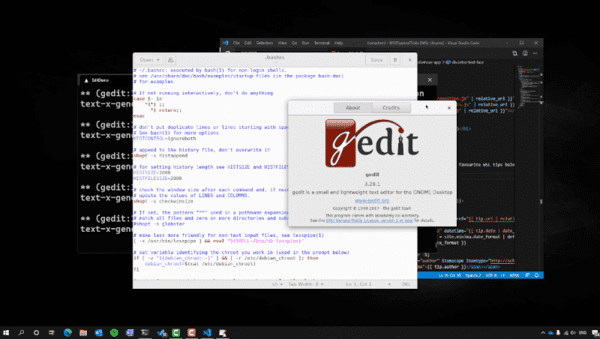
With official support from Microsoft in WSL, there are many improvements that have been updated such as:
- GPU hardware acceleration
- Supports WSL external audio and microphone
- Automatically start X server and PulseAudio
And, they nicknamed this feature “WSLg”.
These features will make running Linux applications on WSL as easy as running native applications, and with minimal performance impact.
So you can try running your favorite IDE and many other applications like CAD software.
GPU hardware acceleration on Linux applications
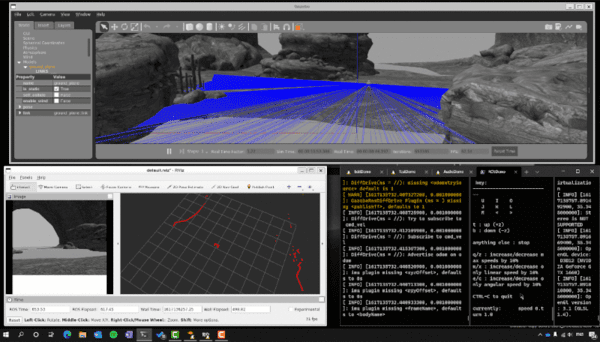
One of the biggest problems with running Linux GUI applications on Windows is that they cannot use hardware acceleration. This makes all GPU-related operations slow and difficult.
According to announcement from Microsoft:
As part of this feature, we’ve also added support for 3D graphics acceleration on the GPU! Thanks to the work done in Mesa 21.0, any application that is doing complex 3D rendering can take advantage of OpenGL for acceleration using the GPU on your Windows 10 machine.
This is a very useful addition and will help anyone who wants to run GPU-intensive applications through WSL.
Supports WSL external audio and microphone
One of the important factors for a better experience with Linux applications is sound. With the new WSL update, sound is supported from the beginning thanks to the PulseAudio server being started at the same time as the X server. Anyone who uses external speakers on Linux will understand this. When turning the computer back on, Linux will use the sound of the main system, such as a laptop, so you have to switch the sound output to the external speaker.
Microsoft explains:
Linux GUI applications on WSL will also include audio and microphone support out of the box. This will allow your app to play sound and use the microphone, great for building, testing or using movie players, telecommunication applications, etc.
If we want Linux applications to become more popular, this is a must-have feature. This will also allow Windows application developers to better support porting their applications to Linux.
Automatically start all required servers
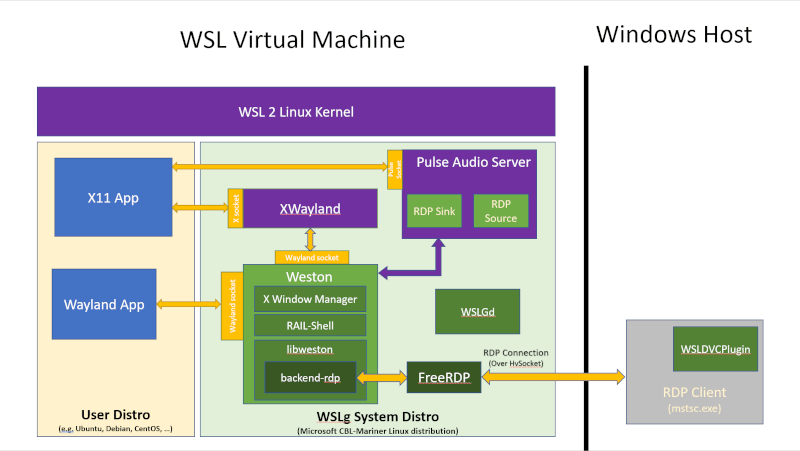
Previously, you had to manually start the PulseAudio and X server before you could actually run anything. Now, Microsoft has implemented a service that checks if a Linux application is running, then automatically starts the requested servers.
This makes launching and using Linux applications on Windows much easier.
Microsoft claims this will improve user experience significantly:
With this feature, we will automatically start the companion system distribution, which contains the Wayland, X server, sound server, and everything else needed to make Linux GUI applications communicate with Windows. After you finish using the GUI applications and end your WSL session, the system distribution will automatically end its session as well.
These components combine to help run Linux GUI applications alongside regular Windows applications.
Conclude
With all these new features, it seems like Microsoft is trying its best to get Linux apps working on Windows. And by allowing Linux applications to run on Windows, we can see more Linux users starting to migrate to Windows. Especially since the apps they are used to will still work fine.
Frequently asked questions
What Linux applications can I run on Windows now?
With the new Windows Subsystem for Linux (WSL) update, you can now run Linux applications with a graphical user interface (GUI), including more complex applications such as IDEs and CAD software.
What is WSLg and how does it improve the experience?
WSLg (Windows Subsystem for Linux GUI) is a new feature of WSL that allows running Linux GUI applications on Windows with support for GPU hardware acceleration, sound, microphone and automatic startup of necessary servers, making the experience much smoother than before.
Is it difficult to install and use WSLg?
Installing and using WSLg has been significantly simplified compared to before thanks to official support from Microsoft. Automatically starting the necessary servers makes the usage process much easier.