

You should turn off your phone Mac Or go to Sleep mode? This is one of the most common questions you may hear from Mac users.
| Join the channel Telegram of the AnonyViet 👉 Link 👈 |

Many people don’t mind putting their device to Sleep or resting for a few minutes or hours. But most people asking this question are deciding what to do when they’re not using their Mac for a day or two, or even more.
To help you with that, the short answer to this question is that you’re better off putting your Mac to Sleep. Here are four reasons why.
1. Your Mac Can Do More When It’s Sleep
When your Mac is in Sleep mode, it automatically uses a feature called Power Nap that allows your Mac to wake up from anywhere to sync your devices and keep the Mail, Calendar, and other apps up to date. Notes, Photos, and Contacts plus iCloud Documents. It also updates your location for Find My Maca useful feature if your device is lost.
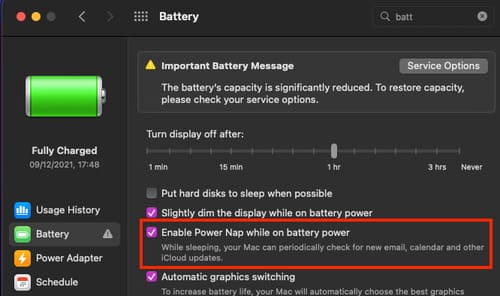
When plugged in, your Mac can do more with Power Nap, like update your computer’s software and schedule Time Machine backups.
Note that while Intel-powered Macs give you the option to turn off Power Nap, Macs running on the M1 chip have it always on, integrating Power Nap features into the system’s operation. This means there is no option to turn off functions like automatic syncing.
2. You can resume work immediately
A Mac put to Sleep can be woken up instantly and let you go back to where you left off. You’ll see your Mac light up as soon as you open the lid or tap the trackpad if you’re using a MacBook, or after you press any key or move the Magic Mouse if you’re using an iMac.
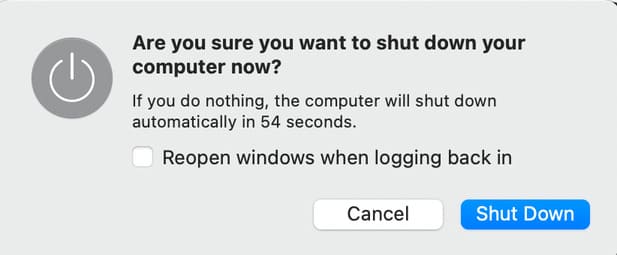
Conversely, if you shut down your Mac, it closes all running programs and applications. This means that when you restart your Mac, you need to reopen all of these apps and programs one after another.
That is unless you turn on Reopen windows at sign-in again on the prompt that appears before you shut down or restart your Mac. But even if you do, it will take some time for your Mac to reopen all of these apps.
3. Energy saving from Shutdown
People don’t like to put their Mac in Sleep mode for fear of consuming a lot of power.
However, Macs consume very little power when they are in Sleep mode. For example, the Mac M1 consumes only 0.18W per hour when in Sleep mode, while the 27-inch Mac with Retina 5K display consumes only about 1.44W for an hour.
Meanwhile, your Mac consumes more power when left idle. The Mac M1 when idle consumes 3.22W an hour while the 27-inch Mac with Retina 5K display consumes 31.1W. It can even consume more when you shut down and restart. This is because more power is required to start the device.
More importantly, your Mac doesn’t use as much power as it does maintenance tasks while in Sleep mode. Therefore, keeping it in Sleep mode to run maintenance tasks is not a cause for concern.
4. Sleep mode doesn’t wear out your Mac
In the old days, computers used many mechanical parts such as hard disk drives (HDDs). This is why many people choose to turn off their device rather than allow it to continue running, which can damage it.
However, Macs and most modern laptops have replaced HDDs with solid state drives (SSDs). Since SSDs have no physically moving parts, they are less prone to wear. They are also faster and have more memory. So keeping them running while in Sleep mode is no longer a problem.
When to turn off your Mac instead of putting it to sleep
Sometimes, shutting down your Mac can also be beneficial. Turning it off completely allows your computer to detect problems and issues so it can run much smoother the next time you use it.
This is why restarting or shutting down your Mac is the first thing you should do when your Mac freezes, slows, or other problems appear. Restarting your Mac once a week or even once a month can help fix these problems early.
It’s best to turn off your Mac if you don’t plan to use it for an extended period of time, like more than a week. Shutdown also allows your machine to cool down if it gets too hot.
If you plan on not using your Mac for a long time, it’s important to let it down to 50% before shutting it down to maintain its battery health. Make sure you store it in an environment with no humidity below 32°C that is not too cold. If you plan to store it longer, fully charge the battery to 50% every six months.
So Sleep or Shutdown when using Mac
Turning off your Mac and putting it to sleep both benefits your Mac. However, if the question arises which is better for everyday use — that is, if you only plan to stop using your Mac for a few hours or during the night — then putting your Mac to Sleep is the way to go. choose the best.
This battery saver mode does more for your Mac than when you turn it off. It also saves you time, lets you use your Mac almost instantly, saving the windows you’re using so you can continue working.







