Automatic timer off Youtube Is the perfect solution for those who often fall asleep while watching videos. This feature not only helps you protect your sleep but also manage time more effectively. Let’s explore the simple way to set up right here.
|
Join the channel Telegram belong to Anonyviet 👉 Link 👈 |
Why should you automatically turn off Youtube?
The establishment of a time counter for YouTube Not merely turn off the application. It brings practical benefits that you may never think about, positive impact on physical, mental and “health” of the phone.
Protect your golden sleep
This is the most obvious and important benefit. A lot of people have a habit of listening to music, podcast or ASMR on YouTube for easy sleep. However, the application of running overnight can cause many consequences. Blue light from the screen (despite reducing brightness) can still inhibit melatonin production, hormone causing drowsiness. More importantly, the automatic video afterwards with unexpected sound and content can interrupt the deep sleep cycles, making you wake up tired and tired.
By the timer automatically turning off Youtube, you make sure that when you have fallen asleep, the surrounding space will be completely quiet, returning you a full sleep and not bothered.

Regain time control
YouTube’s algorithm is designed to keep you as long as possible. This video leads to another video, forming a “black hole” that you can hardly escape. Setting a specific time limit will act as an effective reminder.
At the end of the timer, it forced you to stop and be aware of the time when you were spending entertainment. This helps you avoid falling into watching bluff, spending time for other important jobs, with family, friends and yourself.
“Savior” for phone batteries and data
Let Youtube run background for hours, especially when playing videos, is one of the leading causes of battery drain. The next morning when you wake up, you will face an energy exhausted phone.
Moreover, if you accidentally use mobile data, the invoice at the end of the month may be a uncomfortable surprise. The application shutdown is a small action but helps you save significant battery, extend the device life and protect your wallet.

Timer guide automatically turn off Youtube on Android
User Android There are quite a lot of flexible options, from the features available in the application to specialized third -party software.
Method 1: Use the built -in integrated feature
This is the simplest and fastest way, you don’t need to install anything.
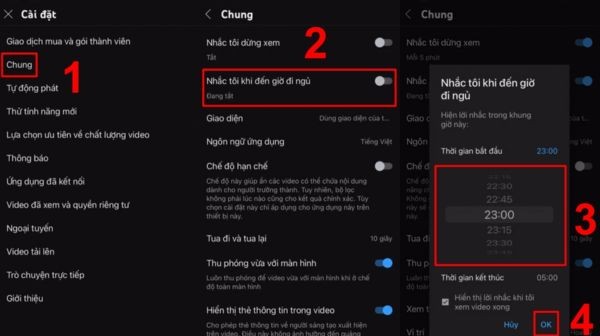
Step 1: Start the YouTube app. At the main interface, click on your avatar (Avatar) in the top right corner of the screen.
Step 2: In the menu appears, select the item Settingthen find and click on the item Shared.
Step 3: Here, you will find a very useful option: Remind me when I go to bed. Put the switch to turn on this feature.
Step 4: A dialog box will appear allowing you to set the starting time and end. For example, you can place from 11 pm to 7 am. After selecting, press OK. When you watch Youtube during this time, the application will display a friendly reminder for you to turn off and rest.
Method 2: Use COzy Timer application
Cozy Timer is an application that not only shuts off the music but also can turn off the screen, very ideal when you listen to music before bed.
Step 1: Download and install applications Cozy Timer From Google Play.
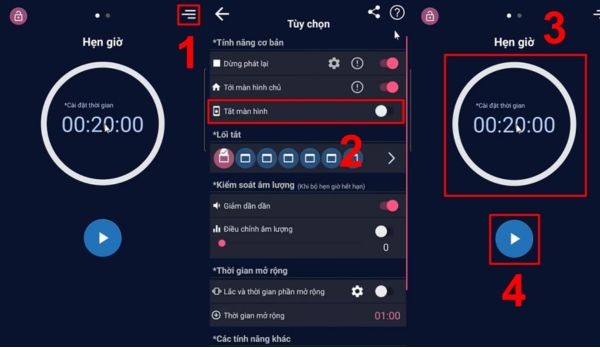
Step 2: Open the application. Click on the icon 3 dashes in the left corner to enter the settings menu. Here, look for the screen and turn it on it (switch to ON).
Step 3: Return to the main screen of Cozy Timer. You will see a timer interface. Pull to select the time you want YouTube to play (for example: 30 minutes).
Step 4: Click the Play button to start counting. After the installation period, the application will automatically stop Youtube and turn off your phone screen.
Method 3: Use Sleep Timer
Sleep Timer is another popular option, standing out with the feature of reducing the volume before turning off, helping you not to be startled.
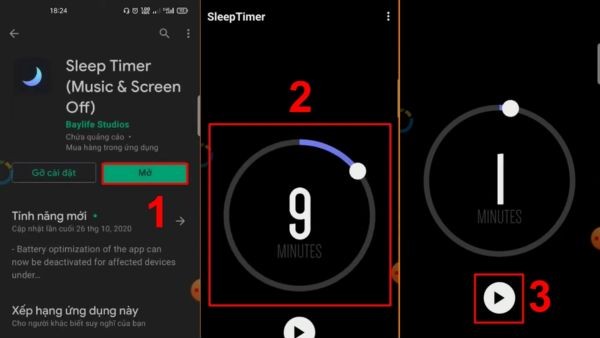
Step 1: Download application Sleep Timer Back to the device and open.
Step 2: The main interface is an visual timer circle. You only need to pull the dots on the ring to set the desired time.
Step 3: Click the button Play And the counterpart will begin. A special feature is that when almost the end of the hour (about the last 15-30 seconds), the application will slowly reduce the volume of YouTube and then turn it off, creating a smooth transition to sleep.
The secret to automatically turn off Youtube for iPhone
The iPhone user is no less competitive with the powerful tools built into the operating system.
Method 1: Take advantage of YouTube
Similar to Android, the YouTube app for iOS also has the feature to remind sleep time.
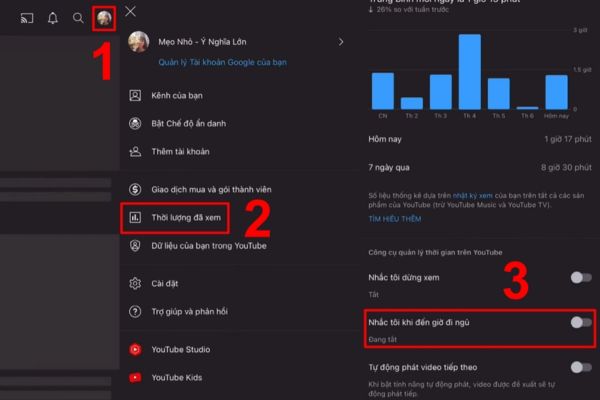
Step 1: Open the YouTube app and click on your avatar in the upper right corner.
Step 2: Select the item Time has been seen.
Step 3: Scroll down and you will see the option Remind me when I go to bed. Turn on this feature and set the time frame you want to accept the rest.
Method 2: Use the default watch
This is a great tip that not everyone knows. You can use the iPhone’s clock application itself to turn off any Media application, including YouTube.
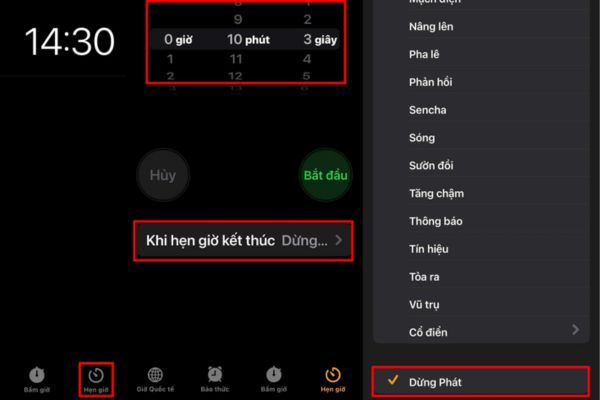
Step 1: Open application Clock Available on your iPhone.
Step 2: Switch to tab Timer In the bottom right corner.
Step 3: Set the time you want to watch YouTube (for example: 45 minutes, 1 hour).
Step 4: Click on the item When the timer ends. Instead of choosing an alarm type, roll down and choose the option Stop.
Now you can switch to YouTube and enjoy the video. When the time is over, the iPhone will automatically stop everything that is playing and locking the screen.
Conclusion
Automatic timer off Youtube It is the “switch” that helps you disconnect with the virtual world to regenerate energy. A full sleep and a wake -awake morning is a reward worthy of setting this habit. Turn it into a part of your daily rest cycle!