Google Assistant is a powerful tool that can make your life easier in many ways. However, it’s not just about productivity and practicality. Here are some fun things you might not have known about Google Assistant like listening to jokes, playing games, and finding easter eggs.
| Join the channel Telegram of the AnonyViet 👉 Link 👈 |

How to launch Google Assistant
These commands will work on a variety of Google Assistant-enabled devices, including iPhones, iPads, Androids, smart speakers, and smart displays. You don’t need devices like Nest Home or Google Home to launch Google Assistant, simply use your phone or tablet.
To get started, simply launch Google Assistant and say the commands below whenever the device is listening. For speakers and screens, just say “Hey, Google” to call up the Assistant.
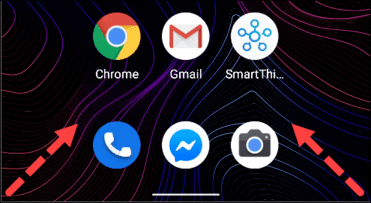
On Android, there are several ways you can launch Google Assistant. The simplest way is to say “OK, Google” or “Hey, Google”. On newer devices, you can launch Google Assistant by swiping up from the bottom left or right corner of the screen.
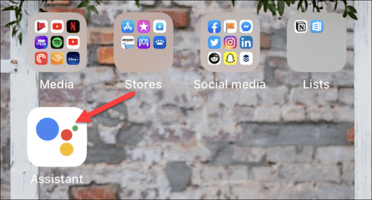
On iPhone and iPad, you must install the Google Assistant app, then launch it from the home screen. After you open the app, say “OK, Google” or tap the microphone icon and Google Assistant will start listening to you. If you don’t know how activate Google Assistant in Vietnamese Please follow the instructions in the previous post.
Now, I’m going to show you some cool things you can do with Google Assistant right now.
Play with Google Assistant
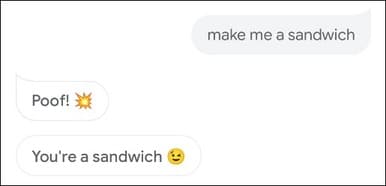
You can ask or say the following jokes to get funny answers from Google:
- What goes up, but never comes down? What goes up, but never goes down?
- Do you know the muffin man?
- Why did the chicken cross the road? / Why chickens cross the road?
- Who let the dogs out? / Who let the dog out?
- What is your favorite dessert? / What is your favorite dessert?
- Do you like to exercise? / Do you like to exercise?
- Make me a sandwich. / Make me a sandwich.
You can also ask Google Assistant to tell you jokes. If you ask for a joke on a particular topic, Google will tell you.
Here are a few different ways you can ask:
- Tell me a joke. / Tell me a joke.
- Tell me a kid’s joke. / Tell me a children’s joke.
- Tell me a dad joke. / Tell me a joke from your father.
- Tell me a knock-knock joke. / Tell me a funny story.
- Tell me a pun. / Tell me a pun.
- Read poetry to me
Play with Google Assistant
If you can’t joke around with Google Assistant, there are also some games you can play. Google also doesn’t require downloading any apps, you just need to use your voice.
Here are some options:
- Are You Feeling Lucky?: Just say, “Hey, Google, I’m feeling lucky,” and a game of trivia will begin. You can play with one person or another group.

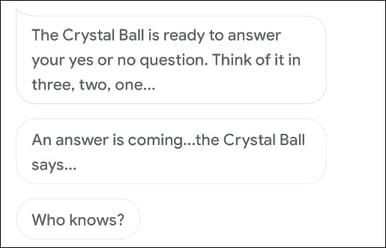
- Crystal Balls: Say “Hey, Google Crystal Ball” and be like Magic 8-Ball, then you can ask a yes or no question. Then Google will give you a cryptic response.
- Mad Libs: Say “Hey, Google, Play” Mad Libs,” and Google Assistant will ask you to choose a category, which you can do via voice or touch. The game will guide you to fill in the blanks and then will read you the final answer.

- Ding Dong Coconut: If you say, “Hey, Google, Play Ding Dong Coconut,” you can play a memory game that requires you to associate words with sounds. You have to remember which words go with which sounds and more words are added the longer you play.
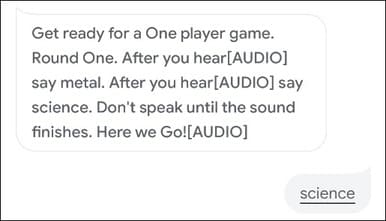
To find more games, just explore game section of Google Assistant. There’s a ton to choose from, and they only require a Google Assistant-enabled device to play.
Google Assistant Easter Eggs
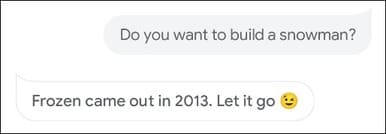
Google loves Easter Eggs, and Assistant is no exception. These aren’t actually jokes in the traditional sense, but there are some that are still very funny.
Try asking or saying any of the following:
- Do you like the iPhone?
- Do you like Android?
- Use the Force.
- May the Force be with you.
- Aren’t you a little short for a stormtrooper?
- I am your father.
- Talk like Yoda.
- Where in the world is Carmen Sandiego?
- Open the pod bay door.
- Do you know Hal 9000?
- How much wood would a woodchuck chuck if a woodchuck could chuck wood?
- How many roads must a man walk down?
- Where is Waldo?
- Who’s on first?
- You want the truth?
- What is the airspeed velocity of an unladen swallow?
- To be, or not to be?
- Mirror, mirror on the wall, who’s the fairest of them all?
- Do you want to build a snowman?
- What do you mean I’m funny?
- Are you afraid of the dark?
- Wherefore art thou, Romeo?
- What would you do for a Klondike bar?
- How many licks does it take to get to the center of a Tootsie Pop?
- Show me the money.
- Can you rap?
- Do you speak Morse code?
Don’t forget the Google assistant helps you too find songs by melody there.
The beauty of Google Assistant is that there’s so much it can do. I only give you typical commands. You need to chat or search for more Google Assistant jokes if you want to know all about it. You can also search for same cool thing on Chrome.