
• Home
  • News
  • Software
  • Knowledge
  • MMO
  • Tips
  • Security
  • Network
  • Office
AnonyViet - English Version
  • Home
  • News
  • Software
  • Knowledge
  • MMO
  • Tips
  • Security
  • Network
  • Office
No Result
View All Result
  • Home
  • News
  • Software
  • Knowledge
  • MMO
  • Tips
  • Security
  • Network
  • Office
No Result
View All Result
AnonyViet - English Version
No Result
View All Result

Review deleted messages on Facebook with History Remove Messenger

AnonyViet by AnonyViet
February 1, 2023
in Tips
0

History Remove Messenger is an extension to recover deleted messages on Messenger. Recently, Facebook has added a feature to delete messages when sent. This feature is quite interesting because it can remove messages that you last hit enter without letting others know. However, if your message is removed by the other party, you will lose your proof of purchase or be scammed. Therefore, removing Facebook messages also causes quite a bit of confusion regarding viewing these deleted messages.

So today I will share with you how to review the deleted message content. with a utility called History Remove Messenger do KB2A Team (Vietnam) develop.

Review deleted messages on Facebook with History Remove Messenger

History Remove Messenger Deleted messages on Messenger can only be restored when previously installed. Messages before installing History Remove Messenger will not be restored. So you need to install this extension as soon as possible

Step 1 : You need to download the utility file to your computer and extract it. My link is below.
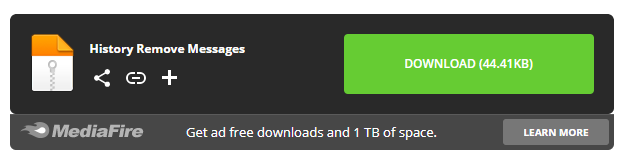
Download History Remove Messenger

After successfully downloading and unzipping, there will be a folder like the image below.
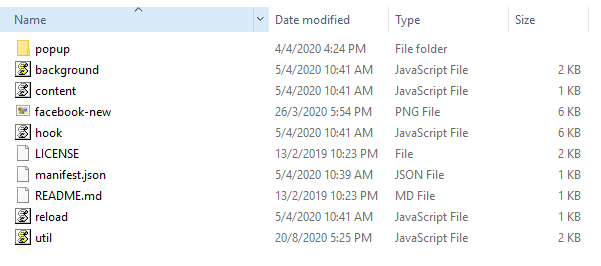
Install History Remove Messenger to see deleted messages

Step 2: You open Google Chrome > and access the address: chrome://extensions > Then turn on the mode Chế độ chế độ dành cho nhà phát triển ( Developer mode ).
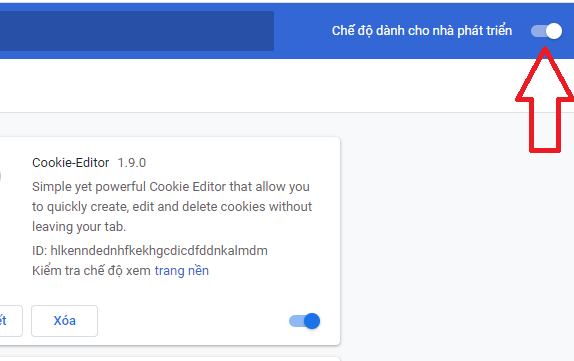
How to use the extension History Remove Messenger

Step 3: Next, you click Tải tiện ích đã giải nén > and then navigate to the utilities folder History Remove Messages just unzipped and selected Select Folder to add the extension to Chrome.
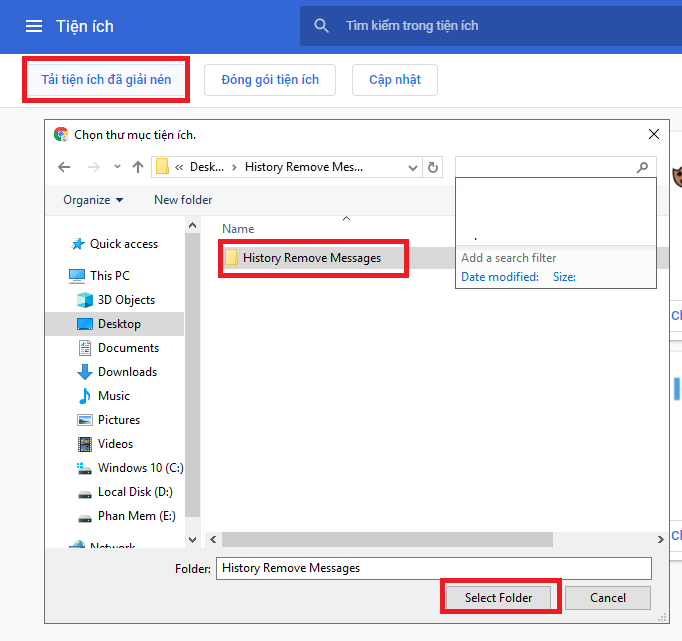
Review deleted messages on Facebook with History Remove Messenger 9

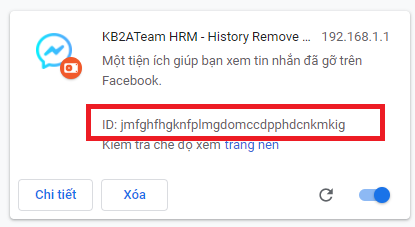
Step 4: After installing the utility successfully. Please copy the ID of the utility as shown below.
Review deleted messages on Facebook with History Remove Messenger 10

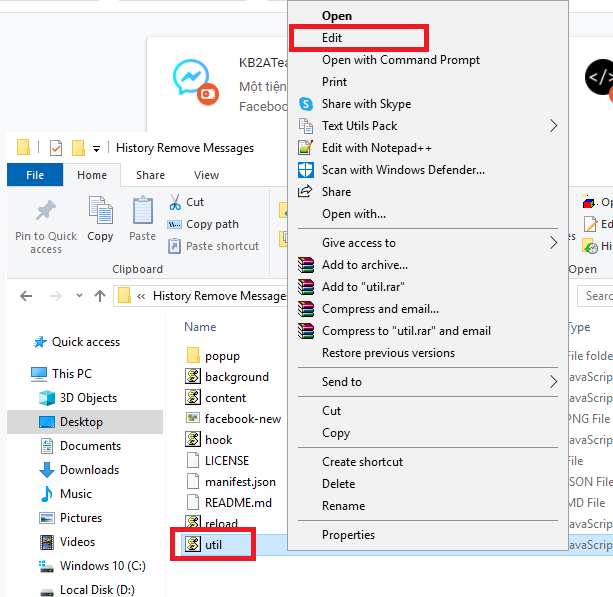
Step 5: You find File util.js in the utility folder History Remove Messages unzipped, click it and right click to select Edit.
Review deleted messages on Facebook with History Remove Messenger 11

Step 6: Please paste ID that you just copied in the extension to the Util as shown below. Remember to proceed to save this changed file.

Review deleted messages on Facebook with History Remove Messenger 12

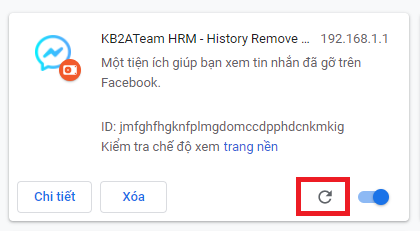
Step 7: Go back to the add-ons manager and tap the circle Refresh to restart the utility.
Review deleted messages on Facebook with History Remove Messenger 13

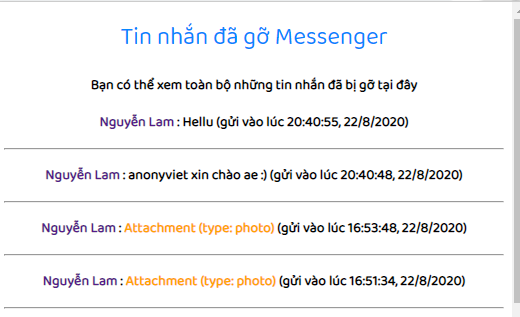
Now I access the installed utility as shown below and see a message that I have removed before.
Review deleted messages on Facebook with History Remove Messenger

So I have finished showing you how to review deleted Facebook messages 100% success already.

Good luck
TMQ.

Tags: deletedFacebookhistorymessagesMessengerremovereview
Previous Post

Download 15 copyrighted software worth $550 of WonderFox

Next Post

Business Card Designer 5 – Professional Card Visit design software

AnonyViet

AnonyViet

Related Posts

How to use CMD environment variables in Windows
Tips

How to use CMD environment variables in Windows

January 18, 2026
How to add or remove columns in File Explorer Windows 11
Tips

How to add or remove columns in File Explorer Windows 11

January 17, 2026
Sign up for Pluralsight One for 1 year of free access to Online courses
Tips

Sign up for Pluralsight One for 1 year of free access to Online courses

January 16, 2026
How to schedule a Batch file (CMD) to run on Windows
Tips

How to schedule a Batch file (CMD) to run on Windows

January 15, 2026
Instructions for downloading Facebook Videos with new interface 2021
Tips

Instructions for downloading Facebook Videos with new interface 2021

January 14, 2026
How to get ChatGPT K-12 Teacher for free
Tips

How to get ChatGPT K-12 Teacher for free

January 13, 2026
Next Post
Business Card Designer 5 – Professional Card Visit design software

Business Card Designer 5 - Professional Card Visit design software

0 0 votes
Article Rating
Subscribe
Login
Notify of
guest

guest

0 Comments
Oldest
Newest Most Voted
Inline Feedbacks
View all comments

Recent News

How to use automatic verification bot to register for ChatGPT K12, Spotify Student,…

How to use automatic verification bot to register for ChatGPT K12, Spotify Student,…

January 18, 2026
Instructions on how to create head-grabbing photos – New trend causing TikTok storm

Instructions on how to create head-grabbing photos – New trend causing TikTok storm

January 18, 2026
How to use CMD environment variables in Windows

How to use CMD environment variables in Windows

January 18, 2026
Instructions for installing the application “Are you dead yet” – Demumu

Instructions for installing the application “Are you dead yet” – Demumu

January 17, 2026
How to use automatic verification bot to register for ChatGPT K12, Spotify Student,…

How to use automatic verification bot to register for ChatGPT K12, Spotify Student,…

January 18, 2026
Instructions on how to create head-grabbing photos – New trend causing TikTok storm

Instructions on how to create head-grabbing photos – New trend causing TikTok storm

January 18, 2026
How to use CMD environment variables in Windows

How to use CMD environment variables in Windows

January 18, 2026
AnonyViet - English Version

AnonyViet

AnonyViet is a website share knowledge that you have never learned in school!

We are ready to welcome your comments, as well as your articles sent to AnonyViet.

Follow Us

Contact:

Email: anonyviet.com[@]gmail.com

Main Website: https://anonyviet.com

Recent News

How to use automatic verification bot to register for ChatGPT K12, Spotify Student,…

How to use automatic verification bot to register for ChatGPT K12, Spotify Student,…

January 18, 2026
Instructions on how to create head-grabbing photos – New trend causing TikTok storm

Instructions on how to create head-grabbing photos – New trend causing TikTok storm

January 18, 2026
  • Home
  • Home 2
  • Home 3
  • Home 4
  • Home 5
  • Home 6
  • Next Dest Page
  • Sample Page

https://sun52.network

No Result
View All Result
  • Home
  • News
  • Software
  • Knowledge
  • MMO
  • Tips
  • Security
  • Network
  • Office

https://sun52.network

wpDiscuz
0
0
Would love your thoughts, please comment.x
()
x
| Reply





