
• Home
  • News
  • Software
  • Knowledge
  • MMO
  • Tips
  • Security
  • Network
  • Office
AnonyViet - English Version
  • Home
  • News
  • Software
  • Knowledge
  • MMO
  • Tips
  • Security
  • Network
  • Office
No Result
View All Result
  • Home
  • News
  • Software
  • Knowledge
  • MMO
  • Tips
  • Security
  • Network
  • Office
No Result
View All Result
AnonyViet - English Version
No Result
View All Result

Revealing the latest way to tag friends in your Facebook profile

AnonyViet by AnonyViet
November 2, 2023
in Tips
0

How to tag friends in Facebook profile is one of the social networking tips that many people are interested in. This way, you can let your friends know that you’re thinking about them, or want to share interesting things about your life with them. However, not everyone knows how to perform this operation correctly and quickly.

Join the channel Telegram belong to AnonyViet 👉 Link 👈

How to tag friends in Facebook profile

To tag others on the profile above Facebookyou need to follow these steps:

Step 1: First, you need to make sure that the Facebook app on your phone has been updated to the latest version. You can check and update the Facebook app at app stores like the App Store or Google Play Store.

How to tag friends in Facebook profile

Step 2: Get the account ID of the person you want to tag

An account ID is a unique string of numbers assigned to each Facebook user. You can find the account ID in the person’s account information. If you don’t have one, you can copy the link to that person’s personal page and then access the link The following

How to tag friends in Facebook profile
Get the account ID of the person you want to tag

You just need to paste the person’s profile link into the blank box, then click the Lookup button. Soon, you will receive that person’s account ID.

Step 3: Open your personal Facebook application > Select ‘Edit personal page’
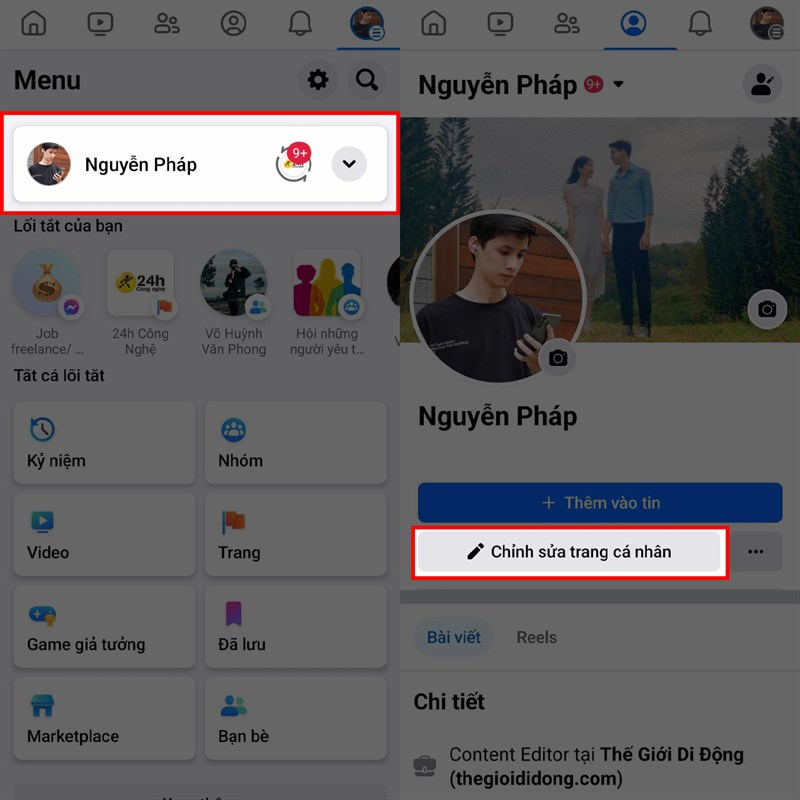
How to tag friends in Facebook profile
Select ‘Edit profile’

Step 4: In the Biography section, add the following code:

[ID tài khoản:999:nội dung tiểu sử]

In there:

  • Account ID is the account ID of the person you want to tag, which you got in step 2.
  • 999 is the number that displays the name of the person you tag. You can change this number to your liking, but you should leave it as 999 so the full name is displayed.
  • Bio content is the content you want to write about yourself and the person you tag. You can write whatever you want, as long as it doesn’t violate Facebook’s policies.

For example: If I want to tag the name of a friend whose account ID is 123456789, and I want to write the bio as “love”, then I will add the following code to the bio box:

[123456789:999:love]
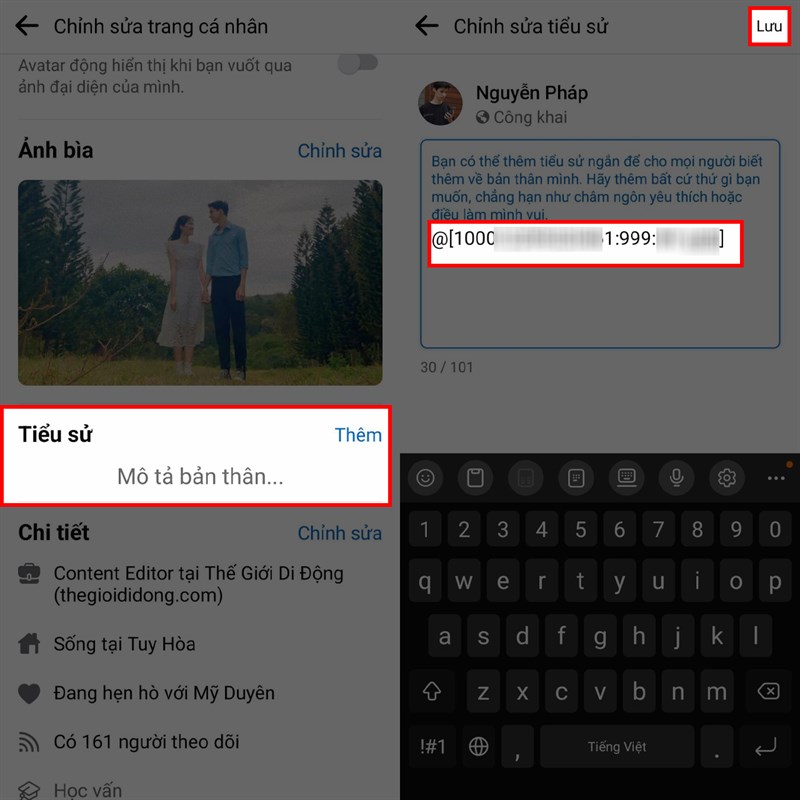
How to tag friends in Facebook profile

Once you have finished adding, click the Save button to save the changes. You can double-check the results by turning on View in your profile’s options menu. You’ll see the name of the person you tagged displayed on your profile, and when someone taps on that name, they’ll be taken to that friend’s profile.
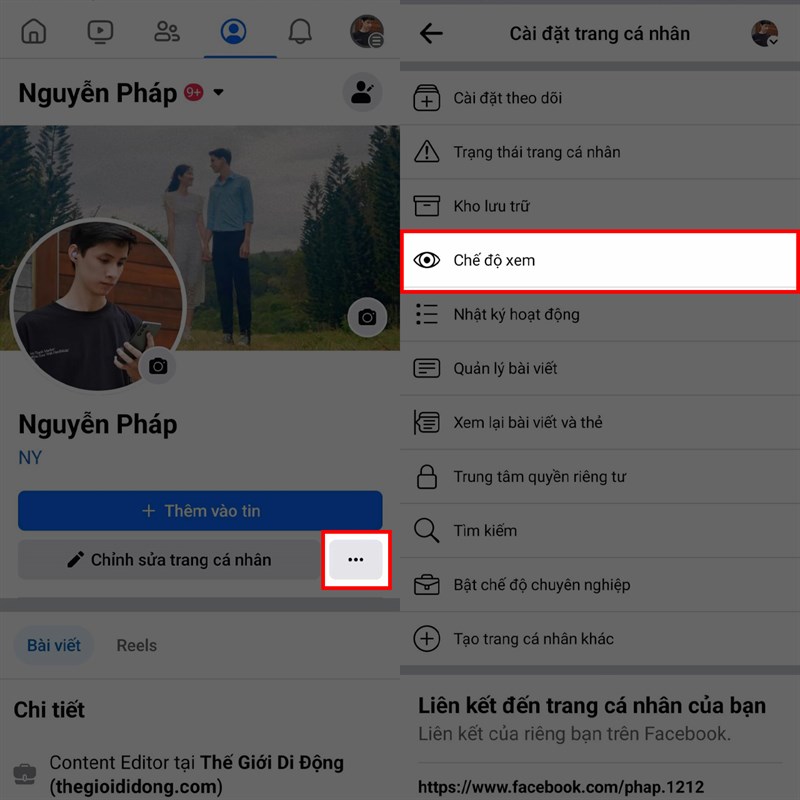
How to tag friends in Facebook profile
Turn on View

Epilogue

How to tag friends in Facebook profile is a simple way to increase interaction and engagement with friends on social networks. You just need to follow the steps I have instructed above, and you will have an impressive Facebook profile for your friend or lover. Wishing you a successful application!


Rate this post

Tags: FacebookfriendslatestprofileRevealingtag
Previous Post

How to turn off advertising notifications on MoMo to avoid being bothered

Next Post

Tinder’s Matchmaker feature: When friends suddenly become… Cupid

AnonyViet

AnonyViet

Related Posts

How to write Shell Script in Linux/Unix
Tips

How to write Shell Script in Linux/Unix

December 6, 2025
How to completely uninstall WSL on Windows 11?
Tips

How to completely uninstall WSL on Windows 11?

December 6, 2025
Kinh nghiệm mua Laptop cho sinh viên nhóm ngành kế toán, kinh tế, xã hội…
Tips

Kinh nghiệm mua Laptop cho sinh viên nhóm ngành kế toán, kinh tế, xã hội…

December 5, 2025
8 tips for more successful PowerPoint presentations
Tips

8 tips for more successful PowerPoint presentations

December 4, 2025
Chrome extensions to improve productivity in 2021
Tips

Chrome extensions to improve productivity in 2021

December 2, 2025
How to create photos that run KPIs while crying using Gemini for the 12 zodiac animals
Tips

How to create photos that run KPIs while crying using Gemini for the 12 zodiac animals

December 1, 2025
Next Post
Tinder’s Matchmaker feature: When friends suddenly become… Cupid

Tinder's Matchmaker feature: When friends suddenly become... Cupid

0 0 votes
Article Rating
Subscribe
Login
Notify of
guest

guest

0 Comments
Oldest
Newest Most Voted
Inline Feedbacks
View all comments

Recent News

How to transfer music from other services to Apple Music, no app required

How to transfer music from other services to Apple Music, no app required

December 8, 2025
How to create Mind Map and Flowchart using ChatGPT is super simple

How to create Mind Map and Flowchart using ChatGPT is super simple

December 7, 2025
Free Gemini Google certification exam guide and Answers

Free Gemini Google certification exam guide and Answers

December 6, 2025
How to write Shell Script in Linux/Unix

How to write Shell Script in Linux/Unix

December 6, 2025
How to transfer music from other services to Apple Music, no app required

How to transfer music from other services to Apple Music, no app required

December 8, 2025
How to create Mind Map and Flowchart using ChatGPT is super simple

How to create Mind Map and Flowchart using ChatGPT is super simple

December 7, 2025
Free Gemini Google certification exam guide and Answers

Free Gemini Google certification exam guide and Answers

December 6, 2025
AnonyViet - English Version

AnonyViet

AnonyViet is a website share knowledge that you have never learned in school!

We are ready to welcome your comments, as well as your articles sent to AnonyViet.

Follow Us

Contact:

Email: anonyviet.com[@]gmail.com

Main Website: https://anonyviet.com

Recent News

How to transfer music from other services to Apple Music, no app required

How to transfer music from other services to Apple Music, no app required

December 8, 2025
How to create Mind Map and Flowchart using ChatGPT is super simple

How to create Mind Map and Flowchart using ChatGPT is super simple

December 7, 2025
  • Home
  • Home 2
  • Home 3
  • Home 4
  • Home 5
  • Home 6
  • Next Dest Page
  • Sample Page

trang chủ f168 nhà cái 78win https://www.qq8827.com/

No Result
View All Result
  • Home
  • News
  • Software
  • Knowledge
  • MMO
  • Tips
  • Security
  • Network
  • Office

trang chủ f168 nhà cái 78win https://www.qq8827.com/

wpDiscuz
0
0
Would love your thoughts, please comment.x
()
x
| Reply




