NordVPN – Popular VPN Service Provider, Just Launched File Checkera new free tool to scan suspicious files. Whether it's an email attachment, software downloaded from an unknown source, or a document shared by a co-worker, this tool can help you avoid unnecessary risks.
| Join the channel Telegram belong to AnonyViet 👉 Link 👈 |
What is NordVPN File Checker and how does it work?
File Checker is a completely free online tool, designed to scan any file to check if it contains malware or viruses.
The way it works is simple: You upload a suspicious file to the tool and it tells you whether it's safe to open or shows signs of being malicious.
When you upload a file, File Checker calculates the hash of the file in your browser and sends it to the NordLabs backends. This hash is then compared to a huge database of hashes of collected malicious files. This database is constantly updated using machine learning and artificial intelligence (AI), ensuring accurate and reliable results.
See also: How to enable secure mode when sending emails with self-destructing capability
Why do you need File Checker?
Today, cybercriminals are getting creative in hiding malware in seemingly harmless files. The advent of AI and large language models has only exacerbated this problem, allowing hackers to create and distribute threats faster and easier than ever before.
With the rise of these online threats, tools like File Checker are quickly becoming essential. They provide us with an extra layer of defense, allowing us to check the security of files before opening them on our devices.

Benefits of File Checker
Free of charge
One of the main benefits of File Checker is that it is free. You do not need to register or subscribe to any service plan to use it. Therefore, anyone can use this tool.
Security
NordVPN designed File Checker with maximum respect for your privacy. The file you send for analysis never leaves your computer during the scan. Only hashes of the file are sent to NordLabs, ensuring the security of your data.
Update
Using cutting-edge technologies such as machine learning and artificial intelligence, NordLabs' malicious file hash database is constantly updated. This constant updating ensures optimal protection against the latest threats.
How to use File Checker
Using File Checker is simple. To check a file, follow these steps:
Step 1: Visit the NordVPN website at HERE
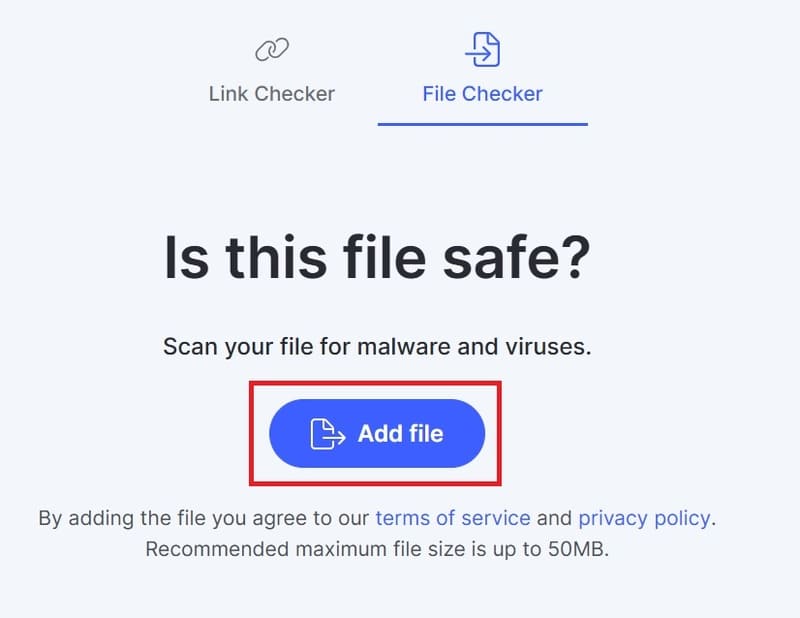
Step 2: Click on the 'Add File' button and click on it to select the file you want to analyze. Note that the file should not exceed 50MB.
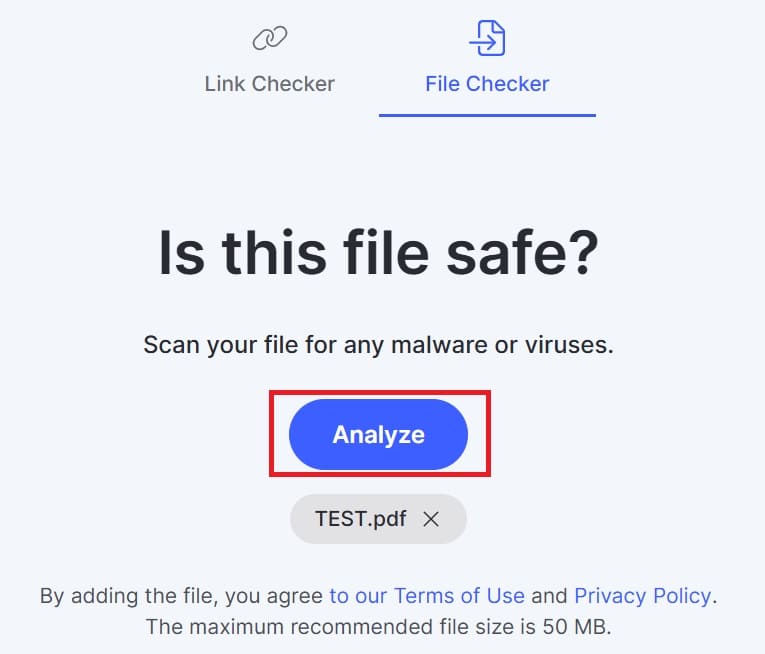
Step 3: Click the 'Analyze' button to start the scanning process. File Checker will thoroughly review your files.
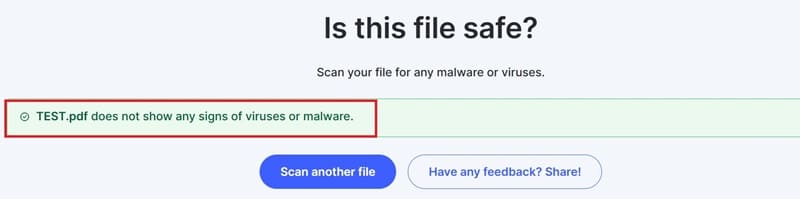
Step 4: After a few seconds, you will get the result:
- If your file is safe, you will see a green message '[Tên file] shows no signs of a virus or malware signatures'.
- On the other hand, if File Checker detects something suspicious, it will warn you with a red message: '[Tên file’] was identified as malicious. It could potentially infect your device with malware'.
File Checker in the NordVPN ecosystem
File Checker is not a standalone tool. It is part of a suite of testing tools developed by NordLabs, the cybersecurity arm of NordVPN. This arm focuses on exploring emerging technologies and creating new tools and services to improve online security.
In addition to File Checker, NordLabs offers a number of other tools, including:
Link Checker
This tool is designed to protect users from malicious websites. It works by analyzing URLs and warning users about potentially dangerous websites.
AI Phishing Assistant
This is an AI-powered browser extension that detects phishing emails. It uses machine learning techniques to analyze email content and headers, identify potential phishing signs, and alert users.
See also: How to turn off Recall on Windows to protect privacy
Conclusion
With the launch File CheckerNordVPN has taken another step forward in its mission to make the internet safer for everyone. This free and easy-to-use tool provides us with protection against increasingly sophisticated digital threats. So the next time you open a suspicious file, take a few seconds to check it with File Checker. Good luck!