• Home
  • News
  • Software
  • Knowledge
  • MMO
  • Tips
  • Security
  • Network
  • Office
AnonyViet - English Version
  • Home
  • News
  • Software
  • Knowledge
  • MMO
  • Tips
  • Security
  • Network
  • Office
No Result
View All Result
  • Home
  • News
  • Software
  • Knowledge
  • MMO
  • Tips
  • Security
  • Network
  • Office
No Result
View All Result
AnonyViet - English Version
No Result
View All Result

Lesson 179: How to generate random numbers in Excel

AnonyViet by AnonyViet
January 24, 2023
in Office
0

Excel There are two functions that are very useful when generating random numbers. RAND and RANDBETWEEN.

Join the channel Telegram of the AnonyViet 👉 Link 👈

How to generate random numbers in Excel

Rand

The RAND function generates a random decimal number from 0 to 1.

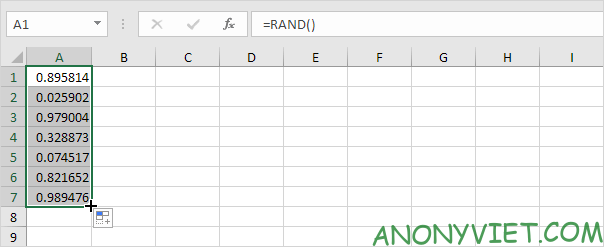
1. Select cell A1.

2. Type RAND() and press Enter. The RAND function has no parameters.

Lesson 179: How to generate random numbers in Excel

3. To generate a list of random numbers, select cell A1, click the lower right corner of cell A1 and drag it down.
Lesson 179: How to generate random numbers in Excel 12

Notice that cell A1 has changed. That’s because the random numbers change every time a cell on the sheet changes.

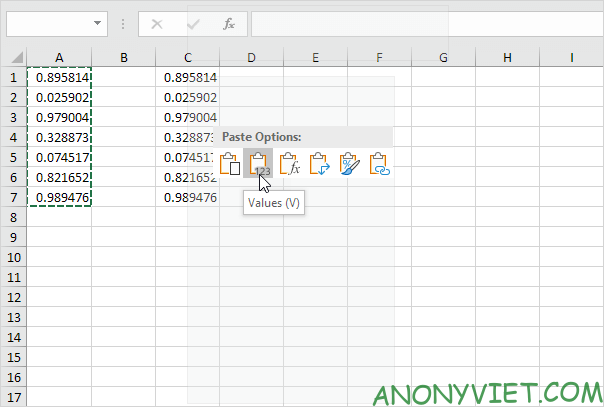
4. If you don’t want this, just copy the random numbers and paste them as Values.
Lesson 179: How to generate random numbers in Excel 13

5. Select cell C1 and look at the formula bar. This cell now holds a value, not the RAND function.

Lesson 179: How to generate random numbers in Excel 14

RandBetween

The RANDBETWEEN function generates a random integer between two values.

1. Select cell A1.

2. Type RANDBETWEEN (50,75) and press Enter.

Lesson 179: How to generate random numbers in Excel 15

3. If you want to generate random decimal numbers from 50 to 75, modify the RAND function as follows:

Lesson 179: How to generate random numbers in Excel 16

RandArray

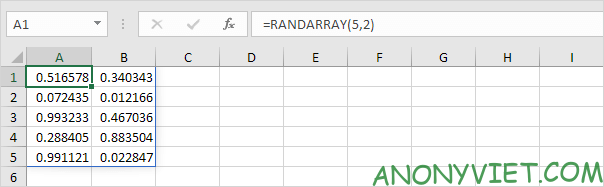
If you are using Excel 365, you can use the RANDARRAY function.

1. By default, the RANDARRAY function generates random decimal numbers from 0 to 1.
Lesson 179: How to generate random numbers in Excel 17

2. The RANDARRAY function below creates an array of integers, 10 rows x 1 column, from 20 to 80.

Lesson 179: How to generate random numbers in Excel 18

Note: The Boolean TRUE (fifth parameter) of the RANDARRAY function returns an array of integers. Use FALSE to return an array of decimals from 20 to 80.

In addition, you can also view many other excel articles here.

The article achieved: 5/5 – (100 votes)

Tags: ExcelgenerateLessonnumbersrandom
Previous Post

5 ways to send anonymous emails

Next Post

How I hacked a school’s website

AnonyViet

AnonyViet

Related Posts

Instructions on how to hide formulas in Excel to secure data
Office

Instructions on how to hide formulas in Excel to secure data

February 6, 2026
Top who creates the most beautiful presentation slide today
Office

Top who creates the most beautiful presentation slide today

September 23, 2025
Automatically check and correct spelling errors on Google Docs
Office

Automatically check and correct spelling errors on Google Docs

February 23, 2025
Instructions for downloading Google Docs files easily on any device
Office

Instructions for downloading Google Docs files easily on any device

December 18, 2024
Launching AI image creation feature on Google Docs
Office

Launching AI image creation feature on Google Docs

November 20, 2024
Instructions for using Google Docs without internet
Office

Instructions for using Google Docs without internet

November 2, 2024
Next Post
How I hacked a school’s website

How I hacked a school's website

0 0 votes
Article Rating
Subscribe
Login
Notify of
guest

guest

0 Comments
Oldest
Newest Most Voted
Inline Feedbacks
View all comments

Recent News

Windows can now run Linux applications

Windows can now run Linux applications

March 17, 2026
How to install extension to remind office workers to drink water

How to install extension to remind office workers to drink water

March 17, 2026
Why are iPhones and MacBooks still the number 1 “weapons” of the technology world?

Why are iPhones and MacBooks still the number 1 “weapons” of the technology world?

March 16, 2026
New features of Windows 10 21H1 are coming soon

New features of Windows 10 21H1 are coming soon

March 16, 2026
Windows can now run Linux applications

Windows can now run Linux applications

March 17, 2026
How to install extension to remind office workers to drink water

How to install extension to remind office workers to drink water

March 17, 2026
Why are iPhones and MacBooks still the number 1 “weapons” of the technology world?

Why are iPhones and MacBooks still the number 1 “weapons” of the technology world?

March 16, 2026
AnonyViet - English Version

AnonyViet

AnonyViet is a website share knowledge that you have never learned in school!

We are ready to welcome your comments, as well as your articles sent to AnonyViet.

Follow Us

Contact:

Email: anonyviet.com[@]gmail.com

Main Website: https://anonyviet.com

Recent News

Windows can now run Linux applications

Windows can now run Linux applications

March 17, 2026
How to install extension to remind office workers to drink water

How to install extension to remind office workers to drink water

March 17, 2026
No Result
View All Result
  • Home
  • News
  • Software
  • Knowledge
  • MMO
  • Tips
  • Security
  • Network
  • Office

wpDiscuz
0
0
Would love your thoughts, please comment.x
()
x
| Reply