

Have you ever needed to send a completely anonymous email? Maybe you want to reveal your love to someone secretly. Or perhaps you are a journalist or an informant and need to send information to someone undetected.
| Join the channel Telegram of the AnonyViet 👉 Link 👈 |
There are many good reasons to send an anonymous email. There are free online services that allow you to send emails anonymously. Alternatively, you can also use a temporary email account and a VPN to protect your identity.
In short, it is very easy to send an email without revealing your identity. Here are ways to send anonymous emails.
5 ways to send anonymous emails
1. Use Temporary Email Accounts and VPN
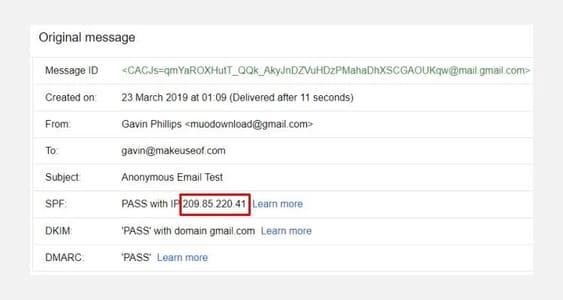
Using a webmail account like Gmail to send emails anonymously is a great option. You can sign up for a Gmail account without providing any identifying information. You can then use that email address as a temporary account.
Furthermore, when you send an anonymous email from Gmail, the original IP address (where the email was sent) in the email header is the Google server address, not your IP address. Changing your IP address gives you another level of anonymity.
If someone tracks the IP address in the email header, it will only reveal the Google server location. Google servers are also not near your location.
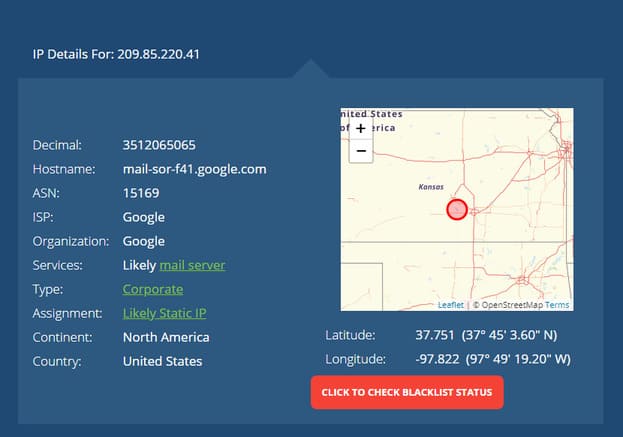
As mentioned above, your real IP address is stored on Google’s system. So if the government or any other authority asks for your location, Google will probably provide it.
Increase your email anonymity with a VPN
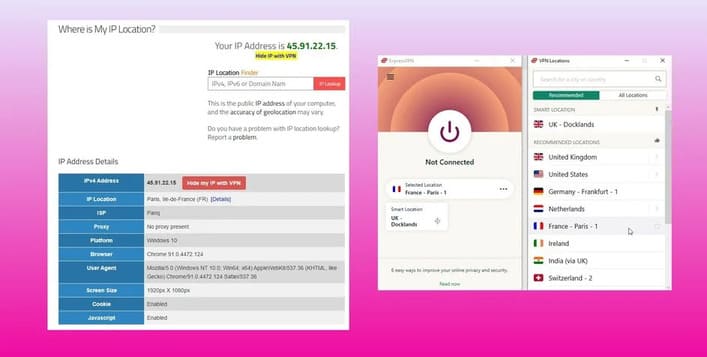
You can increase your privacy by using a virtual private network (VPN). If you don’t know what a VPN is, maybe read this post to know more about how it works.
I highly recommend paying for a reputable VPN service instead of relying on free VPNs.
Once you connect to the VPN, your IP address will be secured. When you send email from your Gmail account, there are two differences:
- If you monitor the IP address, the Google server will not appear near your location and
- If the government asks for your IP address, Google cannot provide your IP address, but only the IP address of the VPN service.
Regarding the second point, the most important thing about using a paid VPN service is that it doesn’t keep a log of your connection details. Free VPNs are more likely to keep a log of your activity.
However, you should note that temporary email accounts are not the same as disposable email accounts!
2. Use Email and VPN Apps
The second method to send anonymous emails is to use the email client installed on your system. There are three steps to take to ensure you remain anonymous:
- Sign up for a convenient email address (like Gmail, Yahoo Mail, GMX or similar)
- Install Thunderbird or an alternative email client
- Install and connect to a VPN service
All you have to do is enable the VPN and make sure that your computer is using the VPN IP address. Then, send an email through your email client with a temporary account. The email header will show your VPN IP address instead of your original IP address in the email header.
3. AnonEmail
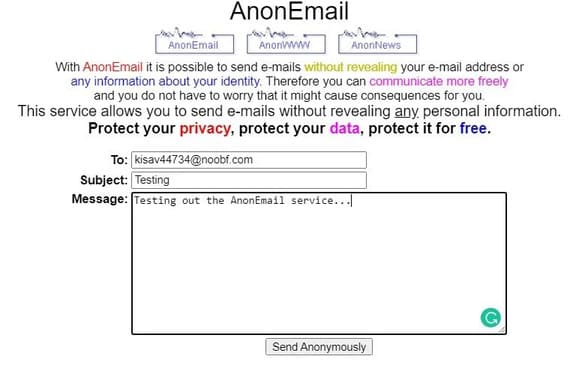
AnonEmail is an anonymous email service of AnonyMouse. The AnonEmail service allows you to send anonymous emails using a series of nodes. When you send your email using the service, it gets sent through a random number of nodes, making it impossible to trace your IP address back.
AnonEmail is very easy to use. You fill in the recipient, subject and a short simple text message, then click “Send Anonymously”. Contrary to many other services, AnonEmail does not (apparently) record your IP address. When tested, it doesn’t show or track your IP address. However, I strongly advise against sending anything sensitive or illegal.
As an added security measure, AnonEmail will wait an indefinite amount of time before sending your email. The reason is that it takes you further away from the email, separating you from the time it was sent, where it was sent, and any potential geographic assumptions based on time zones.
4. Cyber Atlantis
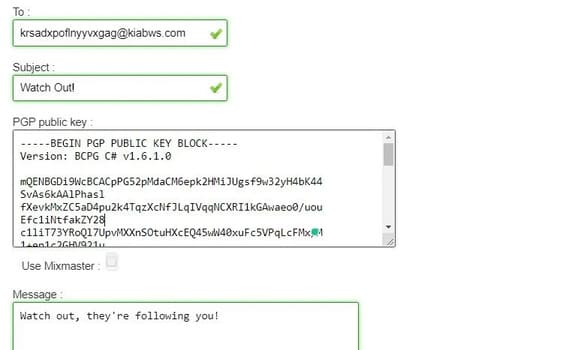
Cyber Atlantis is another free anonymous email service that strips your IP address. The Cyber Atlantis service also offers PGP encryption. This means that, just like sending your email without an IP address, you can also encrypt the content of the email before sending it.
The content of the email is then completely secure. Only the owner of the public key can unlock the message content with the private key. However, using public key encryption can have undesirable consequences. For example, if the encryption key is not widely used and is only distributed to a small number of people, an anonymous email recipient can try to figure out the sender.
5. ProtonMail
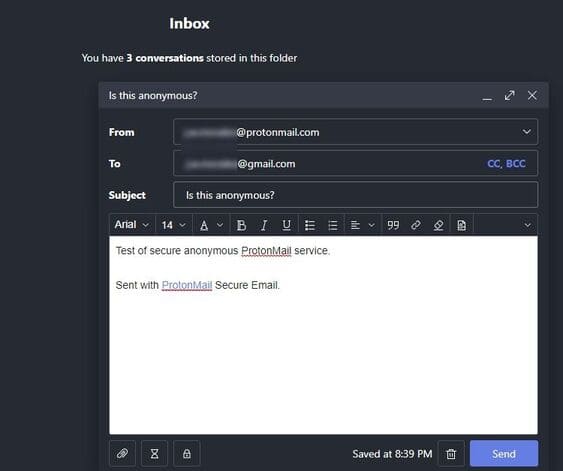
If you need a two-way, anonymous and completely secure email service, then ProtonMail is the answer. ProtonMail has a long history of providing secure email services, and millions of people rely on them to communicate privately and anonymously at all times.
Some of ProtonMail’s key features include:
- End-to-end encryption: Not only are messages encrypted when they are sent from the ProtonMail server, but all stored messages are also encrypted. Without access to the appropriate ProtonMail account, no one can access your messages.
- Private user data: ProtonMail’s encryption process uses an encryption key on your computer, which means that not even the system administrator at ProtonMail can access your email. Otherwise, this means they can’t recover your account. On the other hand, that means they can’t make your messages available to any regulatory authority either.
- Open source code: Since ProtonMail uses open source cryptographic libraries, you can be sure that there are no “back doors” available to anyone to access your email. That includes system administrators or hackers.
If you regularly send two-way encrypted email, you should consider signing up for a ProtonMail account and using that as your primary address.








