• Home
  • News
  • Software
  • Knowledge
  • MMO
  • Tips
  • Security
  • Network
  • Office
AnonyViet - English Version
  • Home
  • News
  • Software
  • Knowledge
  • MMO
  • Tips
  • Security
  • Network
  • Office
No Result
View All Result
  • Home
  • News
  • Software
  • Knowledge
  • MMO
  • Tips
  • Security
  • Network
  • Office
No Result
View All Result
AnonyViet - English Version
No Result
View All Result

Instructions to receive 2 years of Figma copyright for free

AnonyViet by AnonyViet
January 24, 2023
in Tips
0

So after Adoble acquired Figma, many of you were worried about the price of Figma going up, so you should look for Alternative Website Figma for UI/UX design. However, there is a concern that when using free sites you will risk your design being exposed. But today I will show you how to create a 2-year copyright Figma account without spending money and without paying anything.

Join the channel Telegram of the AnonyViet 👉 Link 👈

What is Figma?

Figma is a vector graphics design, editing and editing tool based on Web browsers or software installed on computers to design interfaces for Websites, mobile applications, software, etc. by directly interacting with objects. Members of the group. Although many people work on the same design file, the performance remains unchanged but also increases significantly, but many people interact with the same drawing.

Figma has a very easy to use design interface with a multifunctional toolkit, drag and drop, code generation… user-friendly. If you often use Photoshop, using Figma to design really doesn’t take much time, you will even feel that Figma manipulation is simpler and easier to use. Figma costs 12$/month, but I will guide you Create a Figma account for 2 years for free.

Instructions to receive 2 years of Figma copyright for free

To register for Fimga 2 years of free copyright, you only need 01 Gmail account and follow these instructions:

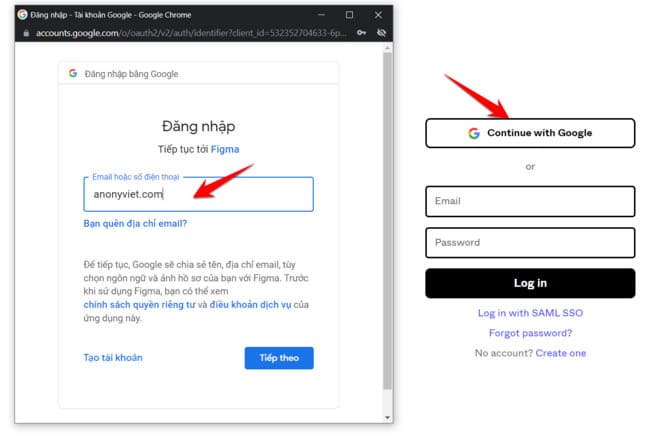
Visit the page Figma Edu then press the . button Get Verified. You will be redirected to the login page, next you choose Continue with Google.
ky key figma 2 south africa

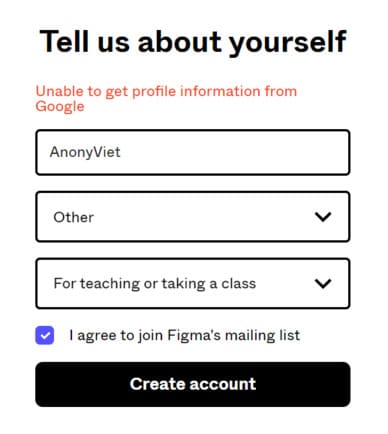
Continue to fill in some information about you, in the last box select For teaching or taking a class
I'm acc. 2 male movies

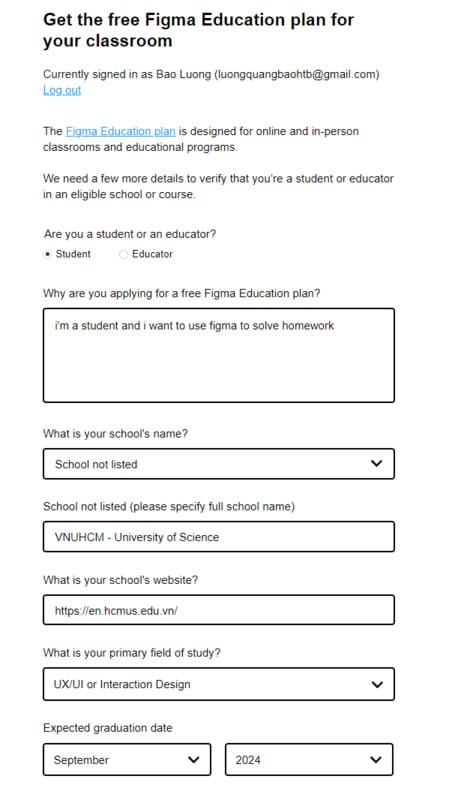
To create a free Figma Edu account with 2 years license you need to confirm you are a student. Please follow the steps in the picture

  • Are you a student or an educator? choose Studen
  • Why are applying for a free Figma Education plan: You should type in Vietnamese, you can write anything, I need acc figma for the exercises
  • School name: School not listed
  • Full school name: enter the English name of any university
  • Enter the website address of the school you have declared above
  • Why is your primary field of study: enter anything
  • Expected graduation date: choose any month, 2024 onwards
create acc figma free

Through this step, you will automatically be approved for your account immediately, if you see it appear You’ve been approved then you have succeeded. Press the button Go to Figma
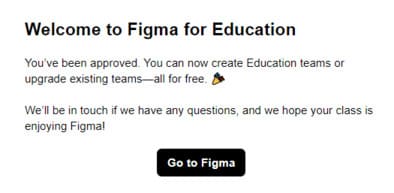
figma 2year license

Now that you have entered the Fimga tools page, in the left menu, select Choose team
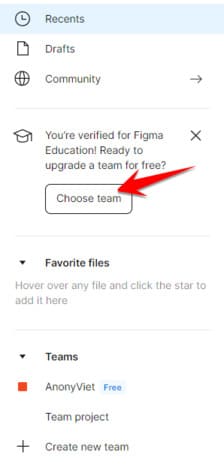
create a figma 2 male account for free

You will see the account information just created, this is also your Team Edu, select next.
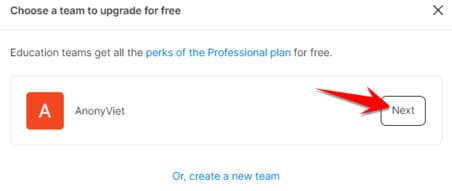
create team figma edu

Then you will see the payment section Figma design editor, FIgJam editor for $0. Press Complete upgrade it’s done
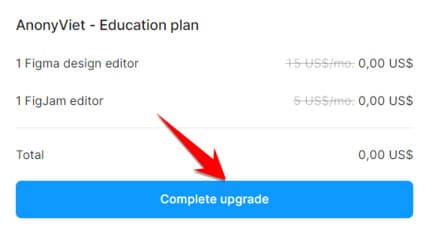
create figma edu for free

So you have created a 2-year free Figma license account. Now you can invite your friends to Teams to co-design application interfaces, Websites and real-time interactions. With a Free 2-year Figma Edu account, you can use all the design and drawing features of Figma like a Figma Pro account without feature limitations.


The article achieved: 5/5 – (100 votes)

Tags: CopyrightFigmafreeInstructionsreceiveyears
Previous Post

How to use Hack-Tools on the browser to Hack Server/Website

Next Post

Sự khác nhau giữa VPN và Proxy là gì?

AnonyViet

AnonyViet

Related Posts

How to record reaction videos with Android phones, no app needed
Tips

How to record reaction videos with Android phones, no app needed

June 1, 2026
Instructions on how to get Google AI Pro 1 year for free for new accounts
Tips

Instructions on how to get Google AI Pro 1 year for free for new accounts

June 1, 2026
Top free AI tools to help write, test and optimize content
Tips

Top free AI tools to help write, test and optimize content

June 1, 2026
Instructions for receiving Lovable Pro 12 months for free
Tips

Instructions for receiving Lovable Pro 12 months for free

May 29, 2026
Instructions for receiving 1 month of ElevenLabs Creator for free worth
Tips

Instructions for receiving 1 month of ElevenLabs Creator for free worth $22

May 25, 2026
How to create beautiful studio-like preschool graduation photos for your child
Tips

How to create beautiful studio-like preschool graduation photos for your child

May 21, 2026
Next Post
Sự khác nhau giữa VPN và Proxy là gì?

Sự khác nhau giữa VPN và Proxy là gì?

0 0 votes
Article Rating
Subscribe
Login
Notify of
guest

guest

0 Comments
Oldest
Newest Most Voted
Inline Feedbacks
View all comments

Recent News

How to record reaction videos with Android phones, no app needed

How to record reaction videos with Android phones, no app needed

June 1, 2026
Instructions on how to get Google AI Pro 1 year for free for new accounts

Instructions on how to get Google AI Pro 1 year for free for new accounts

June 1, 2026
Top free AI tools to help write, test and optimize content

Top free AI tools to help write, test and optimize content

June 1, 2026
TruyenDrive: Turn Google Drive into a professional manga reader

TruyenDrive: Turn Google Drive into a professional manga reader

May 31, 2026
How to record reaction videos with Android phones, no app needed

How to record reaction videos with Android phones, no app needed

June 1, 2026
Instructions on how to get Google AI Pro 1 year for free for new accounts

Instructions on how to get Google AI Pro 1 year for free for new accounts

June 1, 2026
Top free AI tools to help write, test and optimize content

Top free AI tools to help write, test and optimize content

June 1, 2026
AnonyViet - English Version

AnonyViet

AnonyViet is a website share knowledge that you have never learned in school!

We are ready to welcome your comments, as well as your articles sent to AnonyViet.

Follow Us

Contact:

Email: anonyviet.com[@]gmail.com

Main Website: https://anonyviet.com

Recent News

How to record reaction videos with Android phones, no app needed

How to record reaction videos with Android phones, no app needed

June 1, 2026
Instructions on how to get Google AI Pro 1 year for free for new accounts

Instructions on how to get Google AI Pro 1 year for free for new accounts

June 1, 2026
No Result
View All Result
  • Home
  • News
  • Software
  • Knowledge
  • MMO
  • Tips
  • Security
  • Network
  • Office

wpDiscuz
0
0
Would love your thoughts, please comment.x
()
x
| Reply