How to receive martyr’s identity on VNeID is an extremely humane and useful feature. Thanks to that, relatives can quickly confirm and store information about their grandparents, parents, and uncles. Let’s go together AnonyViet Learn how to do it specifically through this article!
📢 Join the channel Telegram belong to AnonyViet
Update new articles, cool tools and IT tips fastest
Convenience when looking up martyr information via VNeID
In the past, whenever we mentioned finding or verifying information about fallen heroes, we often immediately thought of thick stacks of documents or long trips to the authorities. This not only takes time but also requires a lot of travel for families. Instead, the birth of electronic identification applications VNeID has truly created a major turning point.
Thanks to the synchronous integration of national data, all information is now digitized, transparent and clear. Therefore, people anywhere, whether urban or remote areas, just need to have a smartphone to be able to look up information themselves. Understanding how to recognize martyrs’ identities on VNeID not only helps you save effort but also shows respect and preservation of the nation’s heroic historical values right on the digital platform.
Instructions on how to receive martyrs’ identities on VNeID
Below are specific instructions on how to receive a martyr’s identity on VNeID that you can follow immediately:
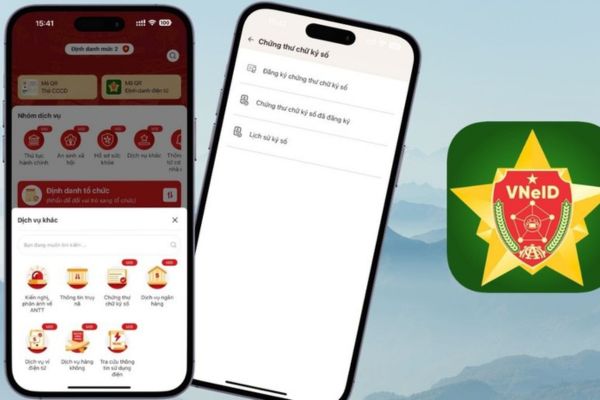
Step 1: First, open it VNeID application on your phone and log in to your account. At the main screen interface, browse and select the item Other services. Next, click on the section Connecting relatives of martyrs.
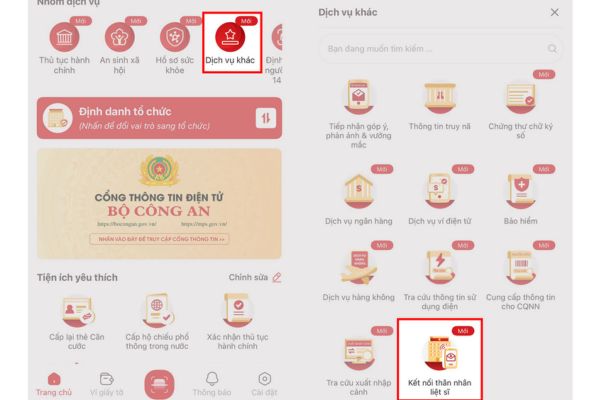
Step 2: At this time, the screen will switch to a new interface. Please select the item List of martyrs. Then, the system will ask you to fill in relevant information. You just need to enter complete and accurate information of the martyr in the corresponding blank boxes, then press the button Search.
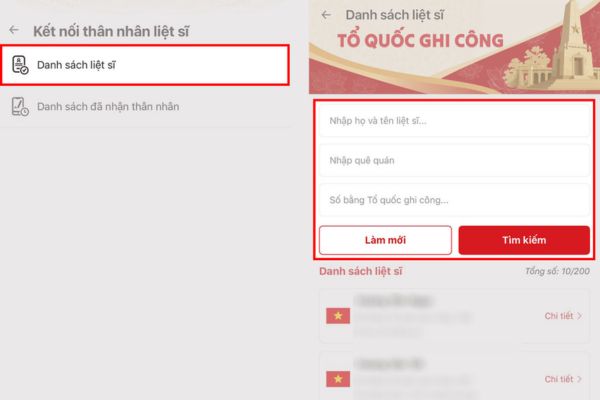
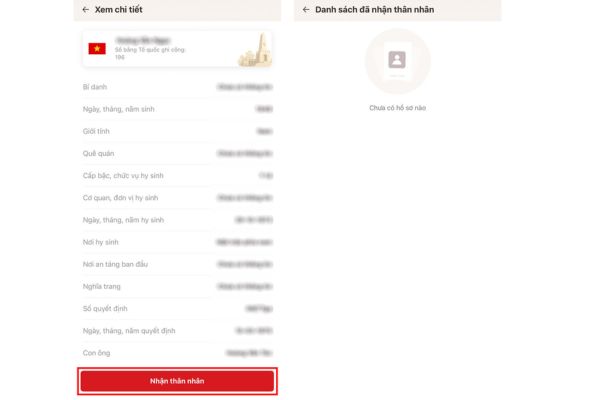
Step 3: The system will scan the data in a few seconds. If the information about martyrs you just entered matches the national database, the results will appear. At this point, you just need to click the button Get identity and follow the few small on-screen instructions to complete the receipt.
After that, information about the martyr who has been identified by you will be clearly displayed in the application list.
Some small notes
Although the way to receive a martyr’s identity on VNeID is very simple, sometimes we can still encounter a few small problems if we don’t pay attention.
Therefore, before starting, make sure your phone has a stable internet connection (Wifi or 4G). Instead of rushing, enter slowly and carefully check each letter and number in the martyr information section to avoid the system not finding results.
Besides, your VNeID application should be updated to the latest version from the app store (App Store or CH Play). Thanks to that, new features such as looking up people with meritorious services will operate smoothly and encounter fewer errors.
Conclusion
Knowing How to receive martyr’s identity on VNeID It is truly an extremely meaningful utility, helping to connect the past and present quickly and accurately. Hopefully this article has brought you truly useful information, helping you easily find information about your loved ones. Don’t forget to share this guide with your friends and relatives so everyone can know and use this great utility!
Frequently Asked Questions (Q&A)
1. Is there a fee for the martyr lookup feature on VNeID?
Completely free. You only need a valid VNeID account and a phone connected to the internet to use this feature.
2. What should I do if I enter incorrect martyr information?
You don’t need to worry, just delete the old information, re-enter it accurately and press the “Search” button again.
3. After receiving identification, where will the information be displayed?
The information will be saved and displayed immediately in the list of martyrs who have received identification on your VNeID application.