How to recover old photos with Ai Gemini Nano Banana It is a wonderful solution to help you revive precious memories that have faded over time. Instead of complex manual editing steps, you can now use a smart AI statement to turn an old photo into a professional portrait. Let’s learn more about this process to bring the old moments back vividly and brilliantly.
| Join the channel Telegram belong to Anonyviet 👉 Link 👈 |
How to recover old photos with Ai Gemini Nano Banana
Step 1: First, please visit the platform Google Ai Studio and select items Try nano banana.

Step 2: Next, you upload the old picture to restore by clicking the + Upload the file.
Step 3: Shortly thereafter, copy and paste the entire command (prompt) provided in the input box and click Tremble.
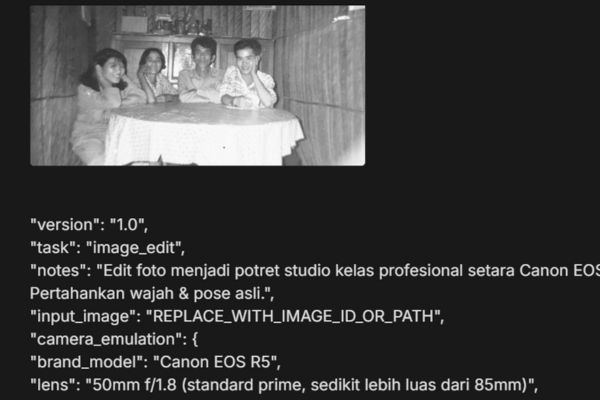
"version": "1.0",
"task": "image_edit",
"notes": "Edit foto menjadi potret studio kelas profesional setara Canon EOS R5. Pertahankan wajah & pose asli.",
"input_image": "REPLACE_WITH_IMAGE_ID_OR_PATH",
"camera_emulation": {
"brand_model": "Canon EOS R5",
"lens": "50mm f/1.8 (standard prime, sedikit lebih luas dari 85mm)",
"look": "ultra sharp, rich micro-contrast, natural color science"
},
"composition": {
"framing": "three-quarter body (from mid-thigh up)",
"arms": "both arms sepenuhnya terlihat",
"orientation": "portrait",
"crop_policy": "do_not_crop_face_or_hands",
"keep_pose": true,
"zoom": "slight zoom-out for wider context"
},
"subject_constraints": {
"keep_identity": true,
"lock_features": ["eyes", "nose", "lips", "eyebrows", "jawline", "face_shape"],
"expression_policy": "preserve_original"
},
"retouching": {
"skin": {
"tone": "keep original color",
"finish": "smooth, healthy, radiant",
"texture": "retain fine pores; avoid plastic look",
"blemishes": "lightly reduce temporary blemishes only",
"frequency_separation_strength": 0.4,
"clarity_microcontrast": 0.15
},
"hair": {
"finish": "clean, neat, shiny",
"flyaways": "reduce but keep natural strands"
},
"eyes": {
"whites_desaturation": 0.1,
"iris_clarity": 0.2,
"avoid_overwhitening": true
},
"teeth": {
"natural_whiten": 0.08,
"avoid_pure_white": true
},
"clothing": {
"policy": "upgrade quality while keeping same/similar style, cut, and color",
"fabric_look": "premium, fine weave, crisp edges",
"wrinkle_reduction": "moderate",
"texture_enhancement": 0.2
},
"lighting": {
"setup": "bright, soft, even front light",
"key": "beauty dish or ring light straight-on",
"fill": "broad soft fill to remove harsh shadows",
"shadow_control": "minimal, no deep shadows",
"specular_highlights": "subtle, flattering",
"white_balance": "neutral daylight",
"exposure_target": "ETTR without clipping"
},
"background": {
"type": "solid",
"color": "navy blue (#0f2a4a)",
"environment": "clean professional photo studio",
"gradient": "very subtle center vignette",
"separation": "gentle rim lift if needed"
},
"color_tone": {
"overall": "natural, true-to-life skin tones",
"saturation": "moderate",
"contrast": "medium with soft roll-off",
"vibrance": 0.1
},
"detail_sharpness": {
"method": "edge-aware sharpening",
"amount": 0.35,
"radius": 0.8,
"threshold": 0.02,
"noise_reduction": {
"luminance": 0.2,
"chroma": 0.25,
"preserve_details": 0.8
},
"clean_up": {
"remove_noise": true,
"remove_artifacts": true,
"banding_fix_on_background": true
"output": {
"resolution": "6000x4000",
"dpi": 300,
"format": "PNG",
"color_space": "sRGB IEC61966-2.1",
"bit_depth": "16-bit if supported, else 8-bit",
"background_alpha": "opaque"
"safety_bounds": {
"do_not": [
"change face geometry or identity",
"change pose",
"alter clothing style drastically",
"add heavy makeup",
"over-smooth or plastic skin",
"over-sharpen halos
"negative_prompt": [
"plastic skin",
"over-whitened eyes/teeth",
"harsh shadows",
"color casts",
"halo artifacts",
"muddy blacks",
"posterization/banding",
"oversaturated skin",
"blotchy NR"
"face_identity_lock": 0.95,
"pose_lock": 0.95,
"background_replace_strength": 0.9,
"clothes_style_lock": 0.85
},
"seed": 142857,
"metadata": {
"locale": "id-ID",
"creator": "professional photo editor style",
"purpose": "masterpiece studio portrait upgrade with zoom-out framing"
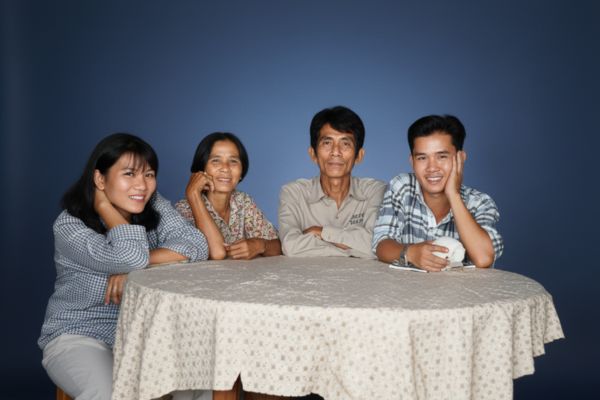
Decode the meaning of the command
So what does the long statement mean? It is a detailed plan, ordering AI to perform each task correctly. Here are the core requirements that who will do:
Regenerate image substances like a professional camera
The command requires AI to accurately simulate image quality from the camera Canon EOS R5 and lenses 50mm f/1.8. This ensures the final image will have high definition, true colors and impressive micro contrast, helping the smallest details become vivid.
Maintain charisma and original layout
Who is ordered to completely lock the identity characteristics such as eyes, nose, lips, face lines and expressive. Your original pose is also okay keep 100% the samemake sure the photo after restoration is still yourself, not changed to another person.
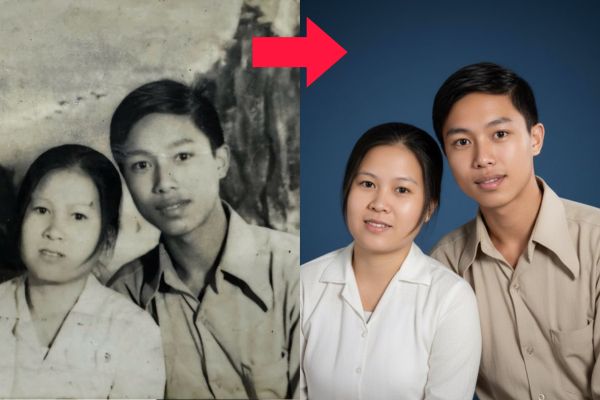
Delicate editing, honoring natural beauty
The beauty process is made in a sophisticated manner. The skin will be smooth, healthy but still retain the natural skin structure to avoid the feeling of “plastic”. Hair and clothes are also “taken care of” to become more neat, sharp and more advanced without changing the original design.
Staple of light and standard studio background
Who will automatically Eliminate old background And replaced with a luxurious navy blue backdrop. At the same time, it will set up a virtual light system, lighting the subject softly and evenly, completely eliminating the harsh darkness, helping the face become radiant and deep.
Optimize output quality for all purposes
Finally, the indicator command for anyone to produce a PNG image file with super large resolution (6000 × 4000 Pixels, 300 dpi). With this quality, you can freely print large -sized photos, post on social networks or digital storage without worrying about breaking or reducing quality.
Conclusion
Through the above steps, you can see How to recover old photos with Ai Gemini Nano Banana Not just imaging, but also a professional art regeneration process. Apply today to revive the invaluable memories of you and your family.