• Home
  • News
  • Software
  • Knowledge
  • MMO
  • Tips
  • Security
  • Network
  • Office
AnonyViet - English Version
  • Home
  • News
  • Software
  • Knowledge
  • MMO
  • Tips
  • Security
  • Network
  • Office
No Result
View All Result
  • Home
  • News
  • Software
  • Knowledge
  • MMO
  • Tips
  • Security
  • Network
  • Office
No Result
View All Result
AnonyViet - English Version
No Result
View All Result

Instructions for creating Music Bot in Discord

AnonyViet by AnonyViet
January 28, 2023
in Tips
0

Currently, the two top Discord Bots, Rythm and Groovy, have been warned because they have been warned by the big Google that they have violated the behavior. Under that pressure, these two bots had to stop working and now, Discord is using other bots whose sound quality is not so good. And today, I will guide you to create Music Bot in Discord.

Join the channel Telegram of the AnonyViet 👉 Link 👈

Groovy and Rythim were forced to stop by Google

Groovy is one of those bots that are indispensable in Discord servers. This bot allows to play music on youtube using google API. As of August 30, Groovy is currently on 17 million servers on discord. Groovy was forced to stop on August 30 for violating the community standards of Google or Youtube.

Rythm is the second bot searched by the big man in the village right after Groovy. With equally impressive features, Rythm went home with Groovy on September 15. Currently, there are more than 560 million users with more than 20 million servers using Rythm to listen to music.

With a situation like this, Google is now tightening its grip on community standards. With this situation, the other Music bots are scared and some have retreated.

Instructions for creating Music Discord bot

Download java

For Windows, you download java here.

For linux, run the following command:

sudo apt-get update && sudo apt-get install latest-jre -y

Download Bot to your device

Step 1: You can download the bot here or use the following command to install for linux:

wget https://github.com/jagrosh/MusicBot/releases/download/0.3.5/JMusicBot-0.3.5.jar

Step 2: Create a file named Playlists and 1 file is config.txt in the same folder as the downloaded file

In the discord file

Setup bot on Discord

Step 1: Go to discord, go to settings>advance and turn on deverloper mode
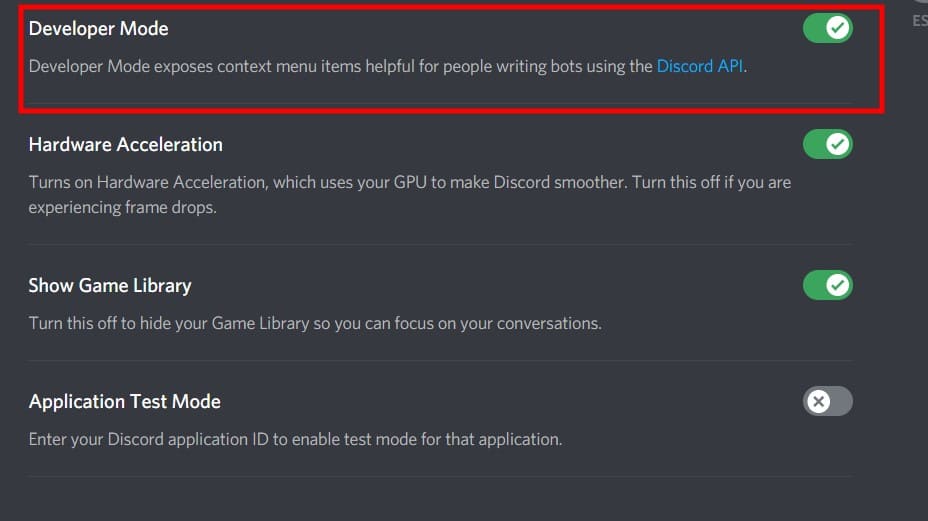
Turn on Deverloper mode

Step 2: Go to Discord deverloper portal here

Step 3: Click on new application and name your application
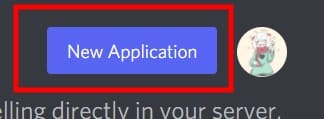
New Application

Step 4: Go to the bot section on the left sidebar and click Add bot

add new bot for discord

Step 5: You go back to your computer and go to the config.txt file and copy the code here

Step 6: Go back to the deverloper portal and copy the bot’s token
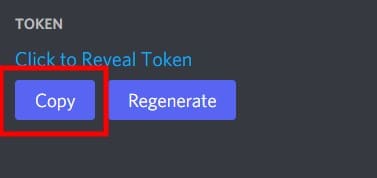
Copy token code

Step 7: You go to the config file and replace the token = the token you just copied

Step 8: Go to discord chat and write the following: \@ your discord name. It will show you the user id

find discord user id

Step 9: You paste the user id into the owner = 

Step 10: Save the config.txt file again

Start the bot and invite to the server\

start bots

After saving the config file, you run the following command to start

java -Dnogui=true -jar JMusicBot-0.3.5.jar

For those of you to let the bot run more than 2 servers, run the following command

java -Dnogui=true -Xmx1G -Xms1G -jar JMusicBot-0.3.5.jar

Invite bots to the server

Step 1: You go to the Oauth2 section in the left sidebar
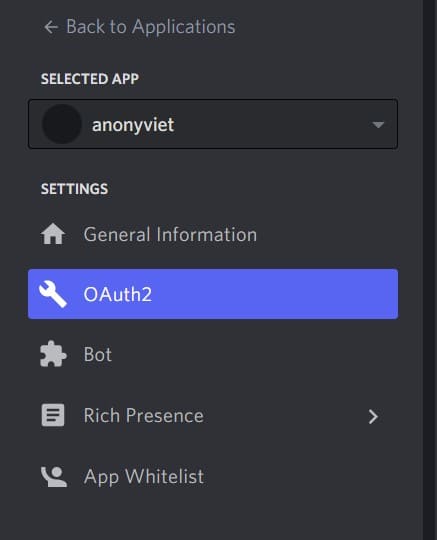
Go to Oauth2

Step 2: You choose bot -> Administration and copy the link for the bot to join. You can see more articles this for more information on how to invite bots
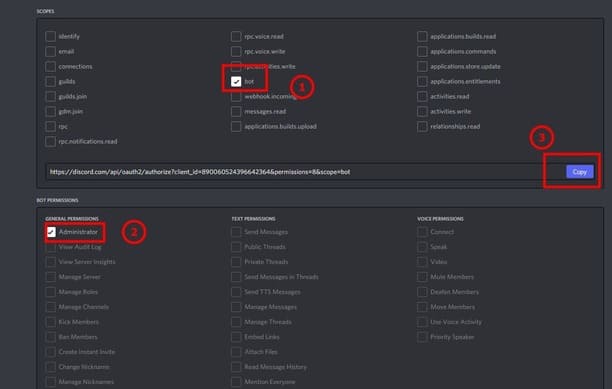
create discord invite link

My music bot

Currently I am hosting 1 of my music bots so everyone can use it for free. You can invite the bot in by this spirit: Link to invite bots. Hope you guys have a good time listening to music!

So you have finished setting up your own music bot. This bot not only plays music on youtube but also on soundcloud. You can join anonyviet’s Discord server here so you can listen to music and communicate!


The article achieved: 5/5 – (100 votes)

Tags: BotcreatingDiscordInstructionsmusic
Previous Post

What is Zoom-Bombing? How to protect Zoom from being hacked when learning Online

Next Post

Live Migration with SMB 3.0 Shared Storage in Windows Server 2012 R2

AnonyViet

AnonyViet

Related Posts

How to add sliders to Facebook Stories to easily rewind videos
Tips

How to add sliders to Facebook Stories to easily rewind videos

April 21, 2026
How to change the default font on Windows 10
Tips

How to change the default font on Windows 10

April 13, 2026
5 tips for using a Browser to replace an App (helps save RAM, time and money)
Tips

5 tips for using a Browser to replace an App (helps save RAM, time and money)

April 13, 2026
How to make funny MeMe photos without Photoshop within 10 seconds
Tips

How to make funny MeMe photos without Photoshop within 10 seconds

April 11, 2026
How to quickly design your own Logo without Photoshop
Tips

How to quickly design your own Logo without Photoshop

April 10, 2026
How to convert Website into App on Windows
Tips

How to convert Website into App on Windows

April 9, 2026
Next Post
Live Migration with SMB 3.0 Shared Storage in Windows Server 2012 R2

Live Migration with SMB 3.0 Shared Storage in Windows Server 2012 R2

0 0 votes
Article Rating
Subscribe
Login
Notify of
guest

guest

0 Comments
Oldest
Newest Most Voted
Inline Feedbacks
View all comments

Recent News

Tips to completely turn off CAPTCHA codes on iPhone and Mac are super simple

Tips to completely turn off CAPTCHA codes on iPhone and Mac are super simple

April 25, 2026
Compare Poco X8 Pro and Poco X7 Pro: A new step for the “king” of mid-range performance

Compare Poco X8 Pro and Poco X7 Pro: A new step for the “king” of mid-range performance

April 24, 2026
How to compress online videos for free without losing quality

How to compress online videos for free without losing quality

April 24, 2026
Top 5 apps to view good days 2026 for free on iOS and Android

Top 5 apps to view good days 2026 for free on iOS and Android

April 23, 2026
Tips to completely turn off CAPTCHA codes on iPhone and Mac are super simple

Tips to completely turn off CAPTCHA codes on iPhone and Mac are super simple

April 25, 2026
Compare Poco X8 Pro and Poco X7 Pro: A new step for the “king” of mid-range performance

Compare Poco X8 Pro and Poco X7 Pro: A new step for the “king” of mid-range performance

April 24, 2026
How to compress online videos for free without losing quality

How to compress online videos for free without losing quality

April 24, 2026
AnonyViet - English Version

AnonyViet

AnonyViet is a website share knowledge that you have never learned in school!

We are ready to welcome your comments, as well as your articles sent to AnonyViet.

Follow Us

Contact:

Email: anonyviet.com[@]gmail.com

Main Website: https://anonyviet.com

Recent News

Tips to completely turn off CAPTCHA codes on iPhone and Mac are super simple

Tips to completely turn off CAPTCHA codes on iPhone and Mac are super simple

April 25, 2026
Compare Poco X8 Pro and Poco X7 Pro: A new step for the “king” of mid-range performance

Compare Poco X8 Pro and Poco X7 Pro: A new step for the “king” of mid-range performance

April 24, 2026
No Result
View All Result
  • Home
  • News
  • Software
  • Knowledge
  • MMO
  • Tips
  • Security
  • Network
  • Office

wpDiscuz
0
0
Would love your thoughts, please comment.x
()
x
| Reply