• Home
  • News
  • Software
  • Knowledge
  • MMO
  • Tips
  • Security
  • Network
  • Office
AnonyViet - English Version
  • Home
  • News
  • Software
  • Knowledge
  • MMO
  • Tips
  • Security
  • Network
  • Office
No Result
View All Result
  • Home
  • News
  • Software
  • Knowledge
  • MMO
  • Tips
  • Security
  • Network
  • Office
No Result
View All Result
AnonyViet - English Version
No Result
View All Result

Hyper-V Replica Chain in Windows Server 2012 R2

AnonyViet by AnonyViet
January 28, 2023
in Network
0

As mentioned in previous articles, Hyper-V Replica allows a Primary Site to replicate virtual machines to the Replica Site. When something goes wrong at the Primary Site, you can quickly process and recover virtual machines thanks to the Replica Site. Assuming that the Primary Site and the Replica Site both die, how do we handle it while the company is deploying an event or a project and needs virtual machines more than ever.

Join the channel Telegram of the AnonyViet 👉 Link 👈

Windows Server 2012 R2 adds the Hyper-V Replica Chain feature to solve the above problem. Now there will be more redundant Replica Sites and that depends on the needs of the business. Working in a “chain” chain, ie Primary Site will replicate virtual machines to Replica Site 1, Replica Site 1 will continue to replicate these virtual machines to Replica Sites 2,3,4,5….

Model Hyper-V Replica Chain
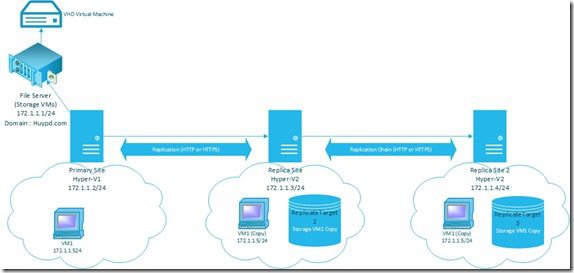
Hyper-V Replica Chain in Windows Server 2012 R2

· Machine Domain Controller/File-Server (172.1.1.1/24) : contains VHD of virtual machine

· Hyper-V1 machine (Primary Site): 172.1.1.2/24, perform Replicate virtual machine VM1 to Hyper-V2

· Hyper-V2 machine (Replica Site 1) : 172.1.1.3/24, will perform replicate chain with Hyper-V3

Hyper-V3 (Replica Site 2): 172.1..14/24

Steps to take

1. Create a virtual machine VM at Primary Site and VHD (Storage) of the virtual machine located at File Server, do it at this link : Link

2. Configure Hyper-V Replica feature for Primary Site and Replica Site, do at this link: Link

3. Configure Hyper-V Replica feature for Replica Site 2:

  • Hyper-V3 machine, right-click and select “Hyper-V Settings”
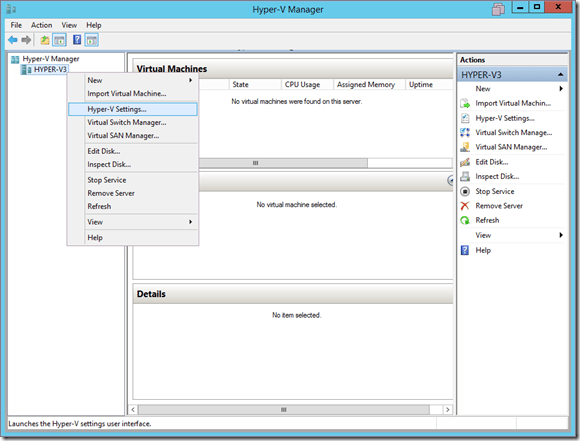
first

  • Go to the “Replication Configuration” tab -> Check the box “Enable this computer as a Replica Server” -> Select the HTTP protocol to communicate and select “Allow replication from any authenticated server”, now click Browse to point to the directory contains the virtual machine to be replicated to.
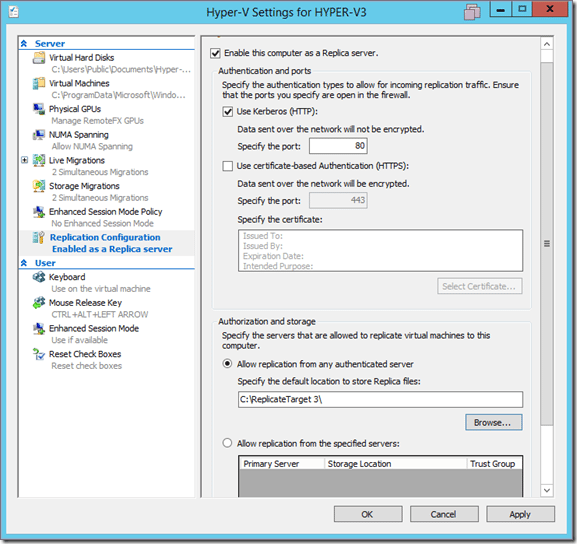
2

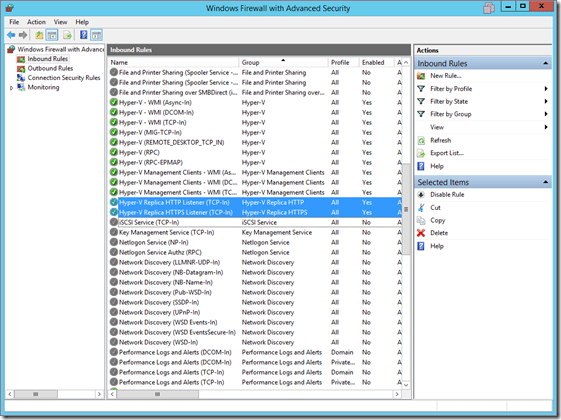
  • Click OK, Hyper-V will prompt you to open 2 firewall ports: “Hyper-V Replica HTTP/HTTPS Listener”
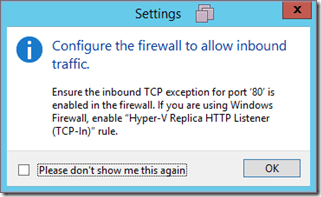
3

  • Go to Firewall -> Advanced Settings -> Inbound Rules -> Open these 2 ports
4

4. Configure Hyper-V Replication Chain for Replica Site 1 and Replica Site 2

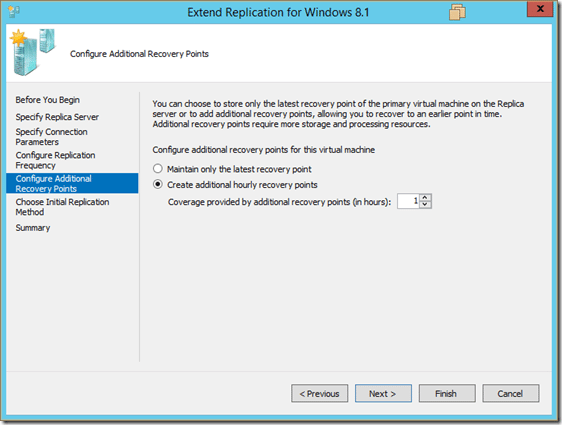
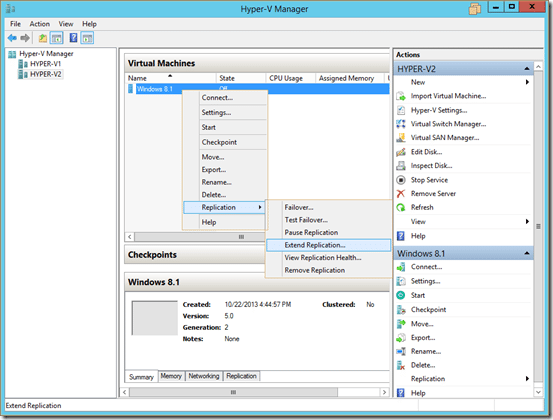
  • On the Hyper-V2 machine, right-click the virtual machine -> Replication -> Extend Replication…
13

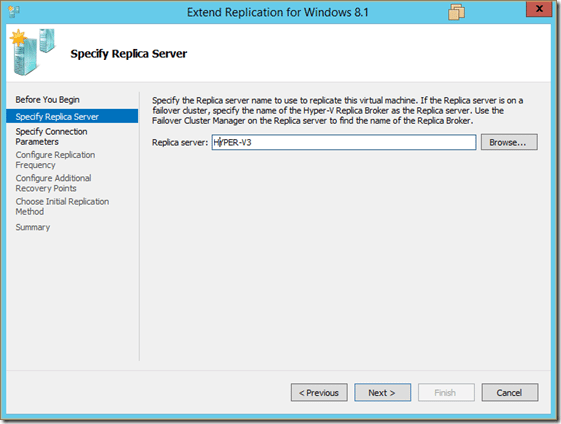
  • Select the server on the side of Replica Site 2 -> in the model is the server “Hyper-V3”
14

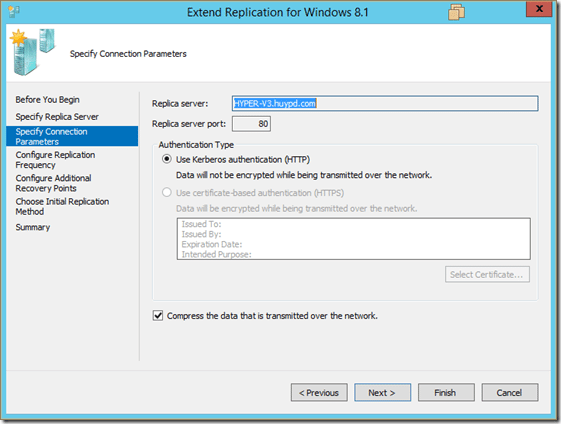
  • Select connection protocol -> Use Kerberos Authentication (HTTP) and compress before transmitting
15

  • Select replication time (default is 5 minutes)
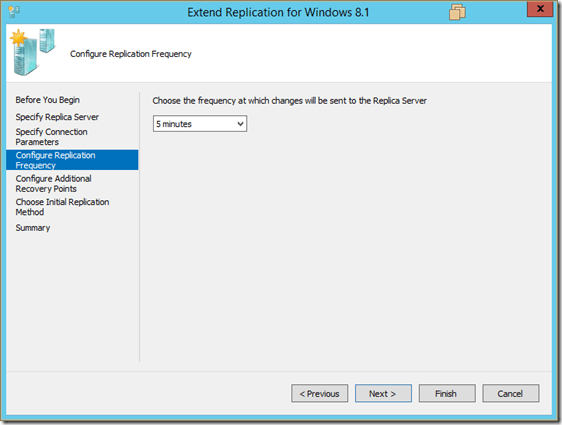
16

17

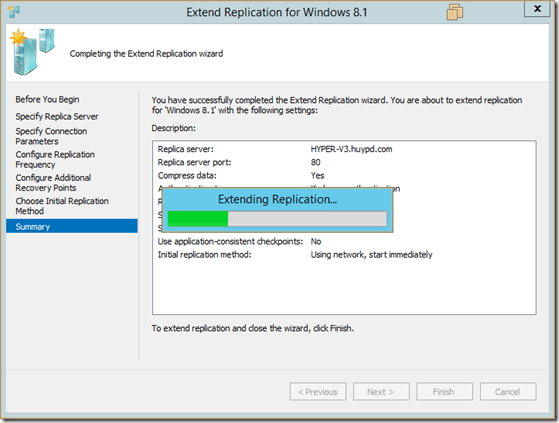
  • Do Replicate on the network and do the Replicate right away
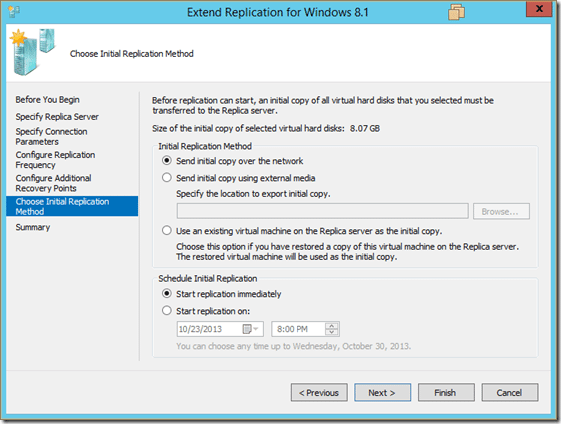
18

19

  • At this time, the virtual machine will be replicated by Replica Site 2 to Replica Site 3
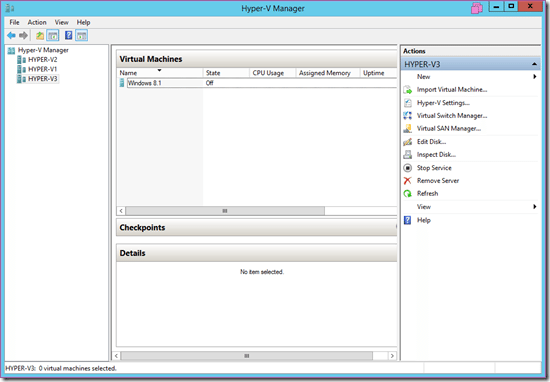
22

Note: Primary Site and Replica Site 2 must be Synchronize, then Replica Site 2 can continue to synchronize to Replica Site 3.


The article achieved: 5/5 – (100 votes)

Tags: ChainHyperVReplicaServerWindows
Previous Post

The best and free Windows 10 repair tools

Next Post

How to use PowerMemory to Hack Windows Login Password by accessing RAM

AnonyViet

AnonyViet

Related Posts

Cách hạn chế Synology NAS bị Ransomware .L0CK3D: Cách khắc phục
Network

Cách hạn chế Synology NAS bị Ransomware .L0CK3D: Cách khắc phục

October 30, 2026
Instructions for updating PHP to avoid PHP2Shell
Network

Instructions for updating PHP to avoid PHP2Shell

October 22, 2026
Instructions for detecting network vulnerabilities: How to check the system for data leaks (IP/DNS)
Network

Instructions for detecting network vulnerabilities: How to check the system for data leaks (IP/DNS)

October 9, 2026
Is Renting a Cheap VPS to Run Docker Really Effective?
Network

Is Renting a Cheap VPS to Run Docker Really Effective?

July 2, 2026
How to get a free domain for 1 year from Gravatar
Network

How to get a free domain for 1 year from Gravatar

June 23, 2026
Cloud Infrastructure Resilience: Mitigating Advanced Layer 7 Vulnerabilities and Securing High-Throughput Database Handshakes
Network

Cloud Infrastructure Resilience: Mitigating Advanced Layer 7 Vulnerabilities and Securing High-Throughput Database Handshakes

June 20, 2026
Next Post
How to use PowerMemory to Hack Windows Login Password by accessing RAM

How to use PowerMemory to Hack Windows Login Password by accessing RAM

0 0 votes
Article Rating
Subscribe
Login
Notify of
guest

guest

0 Comments
Oldest
Newest Most Voted

Recent News

Receive Driver Booster 14 license key immediately for free for 6 months

Receive Driver Booster 14 license key immediately for free for 6 months

November 1, 2026
Online pagoda game: Experience practice and relieve stress at home

Online pagoda game: Experience practice and relieve stress at home

November 1, 2026
Instructions for receiving Avira Prime 3 months for free, no credit card

Instructions for receiving Avira Prime 3 months for free, no credit card

October 31, 2026
Instructions for cleaning LG TV with Antigravity to help it run faster

Instructions for cleaning LG TV with Antigravity to help it run faster

October 30, 2026
Receive Driver Booster 14 license key immediately for free for 6 months

Receive Driver Booster 14 license key immediately for free for 6 months

November 1, 2026
Online pagoda game: Experience practice and relieve stress at home

Online pagoda game: Experience practice and relieve stress at home

November 1, 2026
Instructions for receiving Avira Prime 3 months for free, no credit card

Instructions for receiving Avira Prime 3 months for free, no credit card

October 31, 2026
AnonyViet - English Version

AnonyViet

AnonyViet is a website share knowledge that you have never learned in school!

We are ready to welcome your comments, as well as your articles sent to AnonyViet.

Follow Us

Contact:

Email: anonyviet.com[@]gmail.com

Main Website: https://anonyviet.com

Recent News

Receive Driver Booster 14 license key immediately for free for 6 months

Receive Driver Booster 14 license key immediately for free for 6 months

November 1, 2026
Online pagoda game: Experience practice and relieve stress at home

Online pagoda game: Experience practice and relieve stress at home

November 1, 2026
  • Home
  • Home 2
  • Home 3
  • Home 4
  • Home 5
  • Home 6
  • Next Dest Page
  • Sample Page

say88 tỷ lệ kèo nhà cái kèo nhà cái 5 febet

No Result
View All Result
  • Home
  • News
  • Software
  • Knowledge
  • MMO
  • Tips
  • Security
  • Network
  • Office

say88 tỷ lệ kèo nhà cái kèo nhà cái 5 febet

wpDiscuz
0
0
Would love your thoughts, please comment.x
()
x
| Reply