In this article, I will show you how to build a Chat Command Line application Python by socket library. If you don't know what the socket is, don't worry. I will explain it right away.
| Join the channel Telegram belong to Anonyviet 👉 Link 👈 |

What is socket?
Sockets are the two end points that can communicate with each other on the same computer or on wireless devices.
Socket is the backbone of the Internet system, deep in all the communication we see today are operating from one -point communication to another.
Socket programming is a way for two node On the internet communicating with each other. A socket listens on a specific port at an IP (server), while another socket connects to the other socket to create a connection (the customer).
The socket modules are all defaulted in Python's library. Therefore, you do not need to install any library anymore.
Project structure
As explained above, the socket is that the nodes can communicate with each other. And in this project, we will deploy 2 nodes using socket, one is server and one is Client.
Those two nodes will send each other a message as a normal chat application.
Introduction to Socket Programming
Open Command Prompt and test the commands below.
Python 3.5.3 (default, Sep 27 2018, 17:25:39)
[GCC 6.3.0 20170516] on linux
Type "help", "copyright", "credits" or "license" for more information.
>>> import socket
>>> socket.gethostname() #getting our local host name
'kalebu-PC'
>>> socket.gethostbyname('www.google.com') #getting IP of Google
'172.217.170.4'
As we can see in the above example, you can take your host name by method GethostName and get Google's IP address by method gethostbyname.
Create the first socket (Nodes)
There are many communication protocols used out there, depending on where it is being applied, such as Transmission Communication Protocol (TCP), User datagram protocol (UDP), File Transfer Protocol (FTP), …
To create a chat application, you will use the Transmission Communication Protocol (TCP). If you don't understand this protocol, it's okay.
To create a sockets (Nodes) in Python for TCP, we will need the following main parameters:
- socket.af_inet means socket of IPv4 ..
- socket.sock_stream means connection configured by TCP Protocol
Create a socket in Python:
>>> import socket
>>> node = socket.socket(socket.AF_INET, socket.SOCK_SaTREAM)
Nodes above act as client or server on our chat application, it all depends on how we configure it, because we will create two applications, first we need to create Nodes Server.
Create Nodes Server
I am an object -oriented programmer (OPP). Therefore, I will deploy Nodes Server as a class.
Because I am building this Nodes as a server, I will add some functions that allows this Nodes to listen to the connection request.
Create Server.py file
import socket
import threading

class ServerNode:
    def __init__(self):
        self.node = socket.socket(socket.AF_INET, socket.SOCK_STREAM)
        port_and_ip = ('127.0.0.1', 12345)
        self.node.bind(port_and_ip)
        self.node.listen(5)
        self.connection, addr = self.node.accept()

    def send_sms(self, SMS):
        self.connection.send(SMS.encode())

    def receive_sms(self):
        while True:
            data = self.connection.recv(1024).decode()
            print(data)

    def main(self):
        while True:
            message = input()
            self.send_sms(message)

server = ServerNode()
always_receive = threading.Thread(target=server.receive_sms)
always_receive.daemon = True
always_receive.start()
server.main()
Explain the code
Assign IP and port addresses
port_and_ip = ('127.0.0.1', 12345)
self.node.bind(port_and_ip)
The binding of our IP and port addresses with our Nodes is like we are using the IP key to enter the port of the port where the Node Server live. Therefore, the client needs this IP key to connect to the server.
This means that Node Client must access the IP Server and Port exactly to connect to the Nodes Server. In this demo, I will make a connection on a device but you can also perform in the network that is connected by changing the IP address.
Listen to the connection
self.node.listen(5)
self.connection, addr = self.node.accept()
Nodes Server will listen to the connection and then accept this connection.
Send_sms () function
def send_sms(self, SMS):
    self.connection.send(SMS.encode())
This method is used to send messages when connected, the message must be in the form of bytes during the transmission process, so why do we use the encode () method on the chain.
Receive_sms () function
def receive_sms(self):
    while True:
        data = self.connection.recv(1024).decode()
        print(data)
This function is used to receive notifications from the client during the program, it will be divided to prevent the application/lag.
Main () function
def receive_sms(self):
    while True:
        data = self.connection.recv(1024).decode()
        print(data)
This function is used to display messages from the server and send it to the client.
Call
server = ServerNode()
always_receive = threading.Thread(target=server.receive_sms)
always_receive.daemon = True
always_receive.start()
server.main()
The above 5 codes are to create a server and then run it by dividing the receiving functions (the recipive_sms function).
Create nodes client
Most things on node client are similar to the node server except the fact that the client node is connected to the server instead of listening to the connection.
Create client.py file
import socket
import threading

class ClientNode:
    def __init__(self):
        self.node = socket.socket(socket.AF_INET, socket.SOCK_STREAM)
        port_and_ip = ('127.0.0.1', 12345)
        self.node.connect(port_and_ip)

    def send_sms(self, SMS):
        self.node.send(SMS.encode())

    def receive_sms(self):
        while True:
            data = self.node.recv(1024).decode()
            print(data)

    def main(self):
        while True:
            message = input()
            self.send_sms(message)

Client = ClientNode()
always_receive = threading.Thread(target=Client.receive_sms)
always_receive.daemon = True
always_receive.start()
Client.main()
That's it. To run the chat application, you need to run the file server.py first before running the client.py file.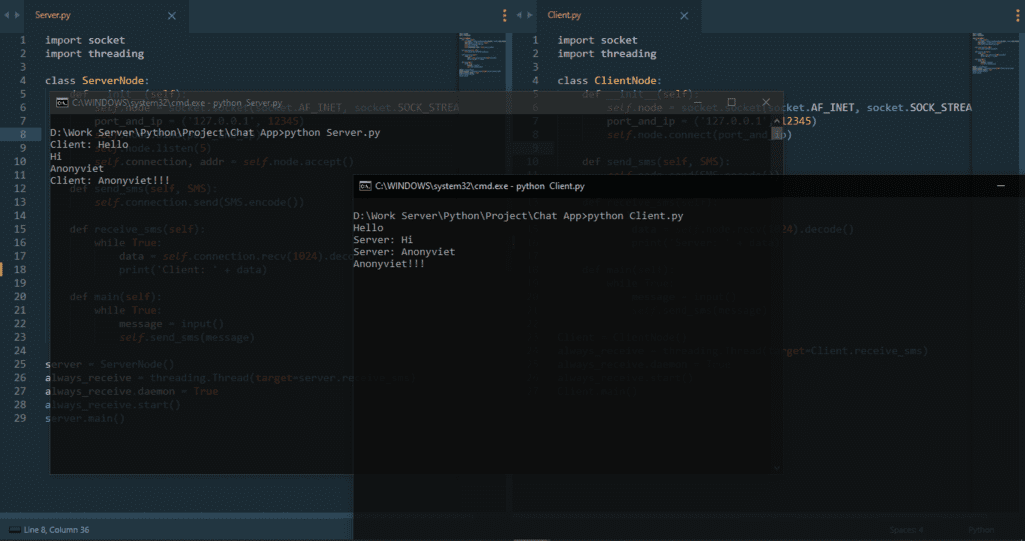
In addition to creating chat applications, you can also view the tutorial What country to create phone number applications is equal to Python Anonyviet's too.