How to work and watch movies at the same time is the need of many people in the modern office environment. Combining light entertainment helps you relax and work more effectively. Let’s explore this trick with AnonyViet.
📢 Join the channel Telegram belong to AnonyViet
Update new articles, cool tools and IT tips fastest
Instructions on how to work and watch movies on the computer at the same time
In today’s digital age, sitting in front of a computer screen for hours to handle work is inevitable. However, to avoid boredom and maintain creativity, many people have sought ways to work at the same time watch a movie as an elegant entertainment solution. This not only helps you relieve pressure from dry numbers or documents, but also creates a more “chill” working space, helping your mind relax right at the office.
To apply the method of working while watching movies, follow these steps:
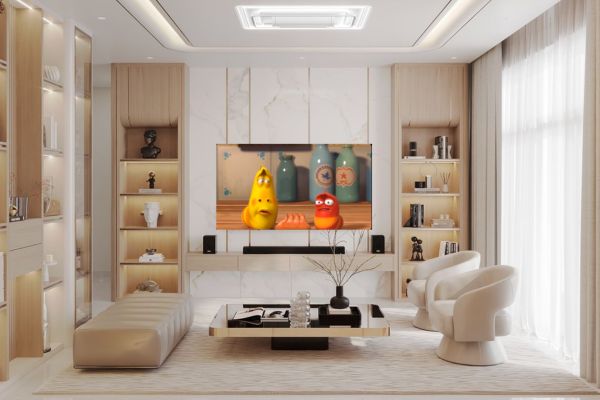
Step 1: Search “Interior background” and select a high quality image, remember to choose an image with a large TV so it’s easy to put the video in > Set that image as your computer wallpaper. For example, the image below:
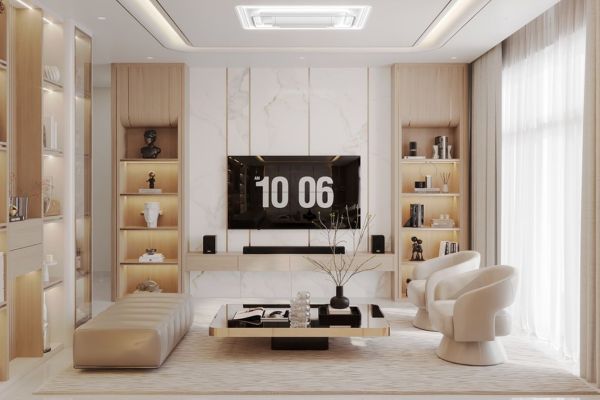
Step 2: Open your web browser and access it Youtube to open your favorite movie.
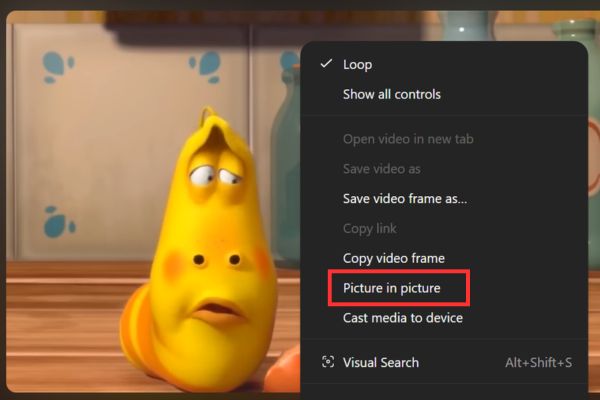
Step 3: Right-click anywhere on the first playing video.
Step 4: Continue right-clicking again on the video to display the options menu.
Step 5: Select feature “Picture within picture” (Picture-in-Picture) to automatically shrink the video.
Step 6: Move and adjust the video frame size to match the TV frame of the wallpaper.
Compare methods of watching movies while working
| Criteria | Use Picture-in-Picture | Split Screen |
| Convenience | Very tall, easy to move | Average, fixed position |
| Work space | Does not take up space | Narrowed working space |
| Concentration | Easy to adjust | Difficulty focusing on a window |
Conclusion
Above are all the instructions How to work and watch movies at the same time which you can easily do. Hopefully this tip will help you better balance work and entertainment. Thank you for following the article.
Frequently Asked Questions (Q&A)
1. Is this feature available for all browsers?
Most modern browsers such as Chrome, Edge, Coc Coc all support this feature.
2. Is it possible to change the video frame size?
Yes, you can completely drag and drop the corners of the frame to zoom out or zoom in as desired.
3. Is working and watching movies a distraction?
This depends on your ability to concentrate, choose light entertainment content that does not affect your work.