How to view the list of National Assembly candidates on VNeID allows you to clearly understand information about the people who represent your voice at the highest authority. Thoroughly learning about a candidate’s qualifications, capabilities and action program is the responsibility of every voter. Join AnonyViet to immediately explore the simple steps on your phone.
📢 Join the channel Telegram belong to AnonyViet
Update new articles, cool tools and IT tips fastest
The 2026 election and the digital transformation role of VNeID
The election of XVI National Assembly deputies and People’s Council deputies at all levels for the 2026-2031 term is expected to take place on Sunday March 15, 2026is a political event of particular importance. This is an opportunity for all citizens to demonstrate their right to mastery, to choose excellent representatives, representing the will and aspirations of the people.
In the context of strong digital transformation, the VNeID application is not only an electronic identification tool but also becomes an official information channel, helping the election process become transparent, convenient and reach more people. Instead of having to wait for information from traditional media, each voter can now proactively look up all necessary information right on their smartphone.

Instructions for looking up voting areas on VNeID
To know exactly where you will vote, you don’t have to go far. Just a few simple steps above VNeID All information will be displayed clearly.
Step 1: Open VNeID application on your phone and log in to your eID account.
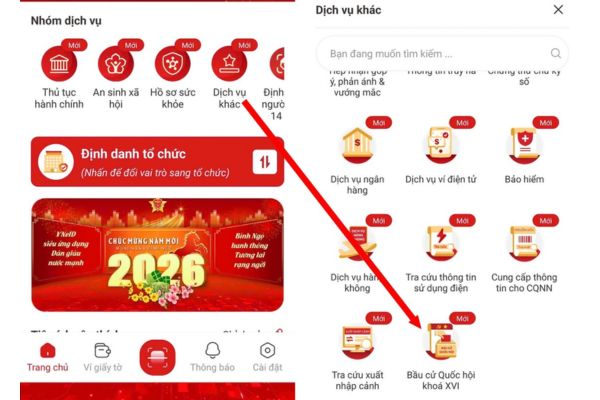
Step 2: On the main screen, find and select “Other services“. Scroll down and tap on features “.Election of the 16th National Assembly“.
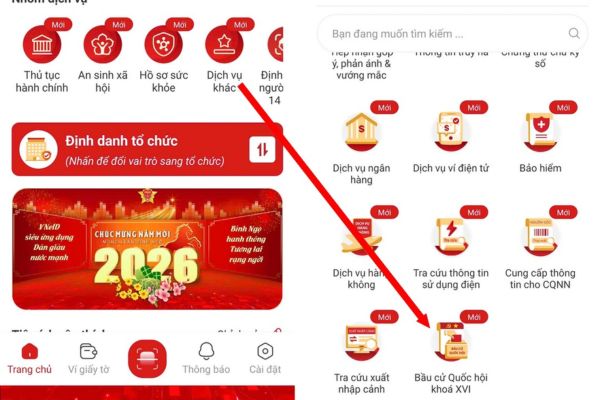
Step 3: The system may ask you to re-enter your password for security authentication. After authentication, select “Voting area of voters“.
Step 4: All information about the voting area, including polling station name and specific address, will be displayed in detail on the screen.
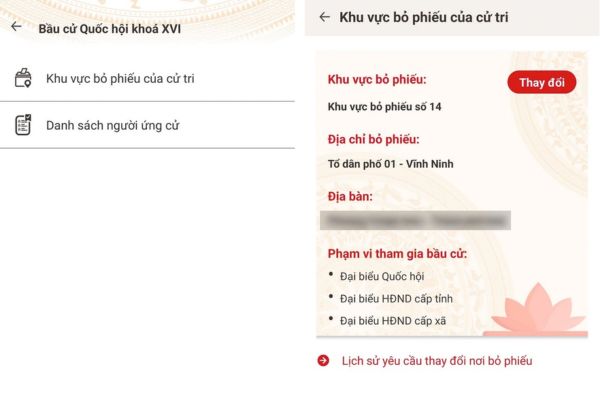
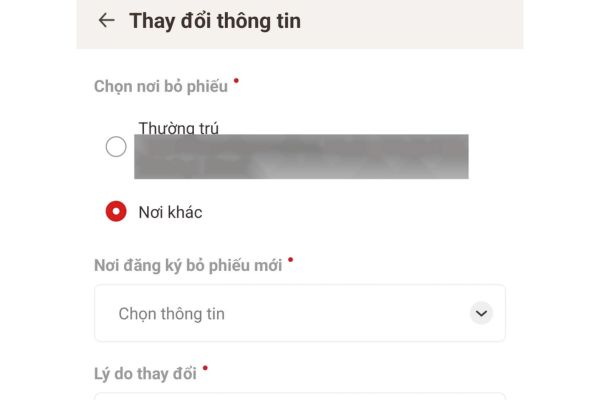
In particular, if you have a legitimate reason for not being able to be present at your residence on election day, VNeID also provides the feature “Change” for you to submit a request to be transferred to another more suitable polling station.
How to view the list of National Assembly candidates on VNeID
Learning thoroughly about the candidates is an important step to getting your vote in the right place. VNeID provides a complete list for your reference.
Step 1: Similar to above, you need to log in to your VNeID account.
Step 2: Visit “Other services” and select “Election of the 16th National Assembly“.
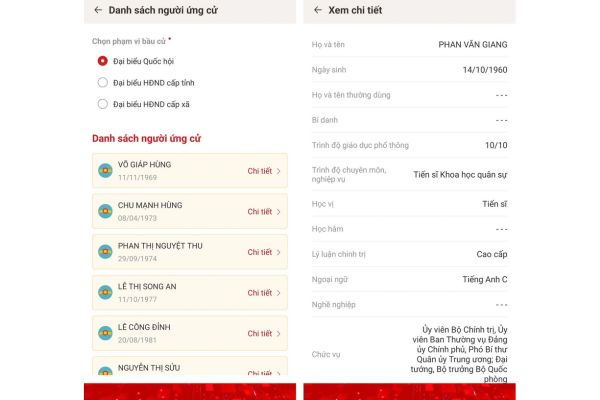
Step 3: In the new interface, select “List of candidates“, then select “continue”National Assembly Delegate“.
Step 4: The full list of National Assembly candidates will appear. To view a specific candidate’s biography, qualifications, positions and work history, simply click the “Details” button next to their name.
A small note is that this feature does not currently support filters by province/city or name search tools, which may cause a bit of inconvenience when you want to quickly find candidates in your locality.
Comparing election information lookup: VNeID and traditional methods
| Criteria | Look up on VNeID | Traditional methods (Bulletin boards, ward loudspeakers) |
| Convenience | Look up anytime, anywhere with just your smartphone. | Must go directly to public posting points. |
| Update speed | Information is updated quickly and synchronously. | There may be a delay, depending on printing and listing. |
| Level of detail | Provide detailed biography and work history. | Usually there is only basic, summary information. |
| Interoperability | You can request to change your polling place online. | No, only one-way information reception. |
| Information security | Voters’ personal information is kept confidential. | Information is posted publicly for everyone. |
Conclusion
The integration of election service features on VNeID is a great step forward, helping people easily access information and exercise their civil rights. Understanding how to view the list of National Assembly candidates on VNeID and voting locations not only helps you save time but also demonstrates the role of a responsible voter in the digital age.
Answering frequently asked questions (Q&A)
1. What level of VNeID account is needed to view election information?
You only need to have a VNeID level 1 account that has been successfully activated to be able to use basic election information lookup features.
2. Besides the National Assembly, can I see the list of People’s Council candidates?
Have. In the “List of candidates” section, in addition to the “National Assembly” option, the application will also provide a list of People’s Council candidates at all levels (province, district, commune) for you to look up.
3. What should I do if the voting area information on my VNeID is wrong?
In this case, you should contact directly the Commune/Ward/Town Police where you registered permanent residence or the local Election Steering Committee for timely inspection, comparison and adjustment.