• Home
  • News
  • Software
  • Knowledge
  • MMO
  • Tips
  • Security
  • Network
  • Office
AnonyViet - English Version
  • Home
  • News
  • Software
  • Knowledge
  • MMO
  • Tips
  • Security
  • Network
  • Office
No Result
View All Result
  • Home
  • News
  • Software
  • Knowledge
  • MMO
  • Tips
  • Security
  • Network
  • Office
No Result
View All Result
AnonyViet - English Version
No Result
View All Result

How to use Windows 3.1/95/98/Me with Emupedia

AnonyViet by AnonyViet
January 29, 2023
in Tips
0

The purpose of Emupedia is to serve as a community and non-profit super-resource center for those interested primarily in game preservation and computer history for the purpose of collecting, archiving, and preserving games and software. Allows users to have online access to these data on some classic operating systems reimagined for educational purposes.

Join the channel Telegram of the AnonyViet 👉 Link 👈

Emupedia primarily collects content from:

  • Many types of systems are no longer being developed
  • Abandoned software, shareware or freeware
  • Open source of old games emulated to work in modern web browsers
  • New games and software developed using modern web technology using classic style graphics

In general, Emupedia uses EmuOS to emulate outdated operating systems such as Windows 95, Windows 98, Windows Me and provide users with many classic games and software.

How to access old operating systems using Emupedia

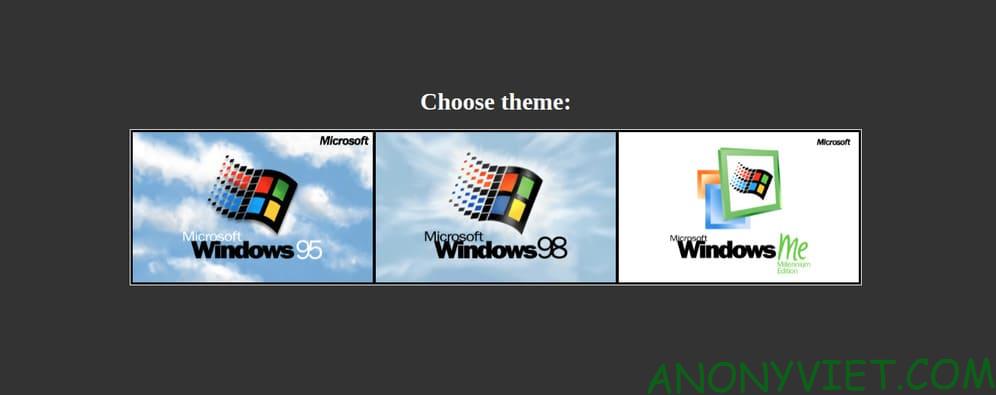
To use Emupedia or to be more precise, EmuOS, first you need to visit the website emupedia. When you first visit the website, you will be able to choose between 3 operating systems: Windows 95, Windows 98, and Windows Me.
How to use Windows 3.1/95/98/Me with Emupedia 6

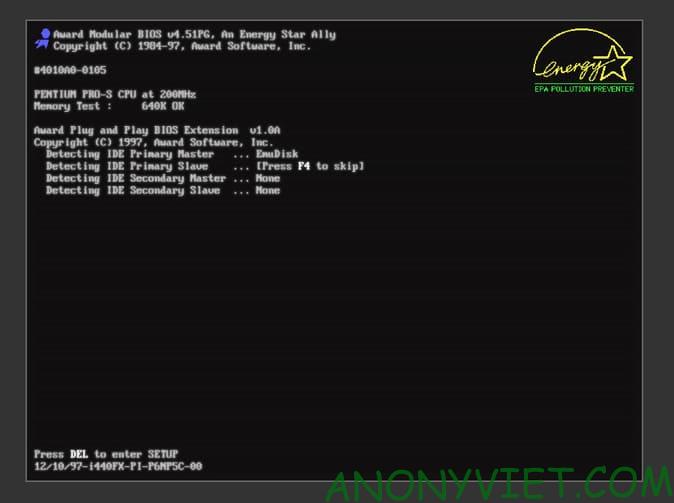
I choose Windows 98, you can see the boot interface of Windows 98 too, really cool. Not only the startup interface, but also the startup sound of Windows 98 when booting, really good.
How to use Windows 3.1/95/98/Me with Emupedia 7

And this is the interface of Windows 98.
How to use Windows 3.1/95/98/Me with Emupedia

When you look at it, you can see that childhood is rushing back. At that time, I didn’t have money to buy a computer, so I ran over to your house to play, every time my parents came to your house to pull me back. Technology is now more and more advanced, so you can enjoy that feeling again. If you do not like the interface of Windows 98, you can right-click on the wallpaper and switch to other interfaces.
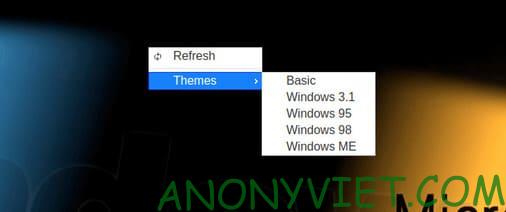
How to use Windows 3.1/95/98/Me with Emupedia 8

There are many nostalgic games on here, you guys are free to play. Which game do you like the most, please comment to let everyone know. If you don’t know, Windows 98 is on the list Top 10 best Microsoft operating systems aquí.


The article achieved: 5/5 – (100 votes)

Tags: 3.19598MeEmupediaWindows
Previous Post

Video appeared causing TikTok to crash on the phone

Next Post

Hack CS:GO 2020.19.12 – Aimbot, Wall Hack, Skin Changer, Fake Prime, Anti Vac Ban

AnonyViet

AnonyViet

Related Posts

How to see your email account creation date
Tips

How to see your email account creation date

November 11, 2025
Microsoft’s ranking of the 10 best Windows versions
Tips

Microsoft’s ranking of the 10 best Windows versions

November 11, 2025
Recover deleted data on Windows 10 with Windows File Recovery
Tips

Recover deleted data on Windows 10 with Windows File Recovery

November 10, 2025
Tips

Why hasn’t your computer been updated to Windows 10 2004?

November 9, 2025
3 OCR Tools Extract Text from Images without Retyping
Tips

3 OCR Tools Extract Text from Images without Retyping

November 8, 2025
Ways hackers use to hack your Facebook and how to fix it
Tips

Ways hackers use to hack your Facebook and how to fix it

November 7, 2025
Next Post
Hack CS:GO 2020.19.12 – Aimbot, Wall Hack, Skin Changer, Fake Prime, Anti Vac Ban

Hack CS:GO 2020.19.12 - Aimbot, Wall Hack, Skin Changer, Fake Prime, Anti Vac Ban

0 0 votes
Article Rating
Subscribe
Login
Notify of
guest

guest

0 Comments
Oldest
Newest Most Voted
Inline Feedbacks
View all comments

Recent News

How to install Anh Hai’s Pho Shop on MacBook is super easy

How to install Anh Hai’s Pho Shop on MacBook is super easy

November 11, 2025
How to turn off ads on Yoosee app in just 1 minute

How to turn off ads on Yoosee app in just 1 minute

November 11, 2025
Windows 11 and MS Office 2021 lifetime license, genuine from  during Keysoff’s 11.11 sale

Windows 11 and MS Office 2021 lifetime license, genuine from $14 during Keysoff’s 11.11 sale

November 11, 2025
How to see your email account creation date

How to see your email account creation date

November 11, 2025
How to install Anh Hai’s Pho Shop on MacBook is super easy

How to install Anh Hai’s Pho Shop on MacBook is super easy

November 11, 2025
How to turn off ads on Yoosee app in just 1 minute

How to turn off ads on Yoosee app in just 1 minute

November 11, 2025
Windows 11 and MS Office 2021 lifetime license, genuine from  during Keysoff’s 11.11 sale

Windows 11 and MS Office 2021 lifetime license, genuine from $14 during Keysoff’s 11.11 sale

November 11, 2025
AnonyViet - English Version

AnonyViet

AnonyViet is a website share knowledge that you have never learned in school!

We are ready to welcome your comments, as well as your articles sent to AnonyViet.

Follow Us

Contact:

Email: anonyviet.com[@]gmail.com

Main Website: https://anonyviet.com

Recent News

How to install Anh Hai’s Pho Shop on MacBook is super easy

How to install Anh Hai’s Pho Shop on MacBook is super easy

November 11, 2025
How to turn off ads on Yoosee app in just 1 minute

How to turn off ads on Yoosee app in just 1 minute

November 11, 2025
  • Home
  • Home 2
  • Home 3
  • Home 4
  • Home 5
  • Home 6
  • Next Dest Page
  • Sample Page

new88 trang chủ shbet trang chủ f168 trang chủ qq88 nhà cái 78win

No Result
View All Result
  • Home
  • News
  • Software
  • Knowledge
  • MMO
  • Tips
  • Security
  • Network
  • Office

new88 trang chủ shbet trang chủ f168 trang chủ qq88 nhà cái 78win

wpDiscuz
0
0
Would love your thoughts, please comment.x
()
x
| Reply