• Home
  • News
  • Software
  • Knowledge
  • MMO
  • Tips
  • Security
  • Network
  • Office
AnonyViet - English Version
  • Home
  • News
  • Software
  • Knowledge
  • MMO
  • Tips
  • Security
  • Network
  • Office
No Result
View All Result
  • Home
  • News
  • Software
  • Knowledge
  • MMO
  • Tips
  • Security
  • Network
  • Office
No Result
View All Result
AnonyViet - English Version
No Result
View All Result

How to use prompts to turn Play Together characters into real people

AnonyViet by AnonyViet
March 2, 2026
in Tips
0

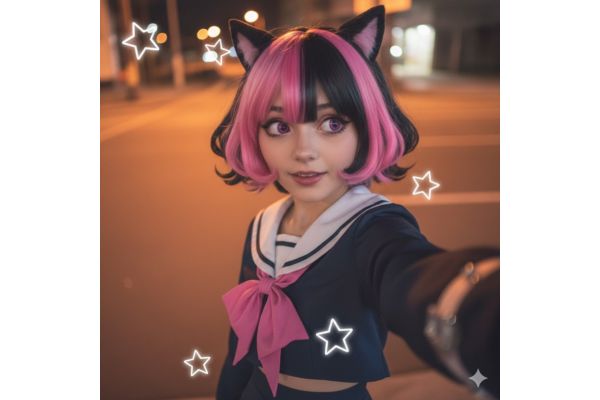
Prompt turns Play Together characters into real people Helps players see the “flesh” version of their favorite character. Instead of familiar chibi images, AI will recreate an extremely emotional photo taken under a streetlight. Let’s explore this photo-creating formula that is causing a stir.

📢 Join the channel Telegram belong to AnonyViet


👉 Go to Telegram AnonyViet

Update new articles, cool tools and IT tips fastest

Prepare before creating photos

The trend of “time travel” from the virtual world to real life is making waves in the community Play Together. No need for complicated photoshop skills, just an AI tool and accurate commands, you can create extremely “artistic” selfies.

For AI to work effectively, input image preparation plays a decisive role. You can’t just throw a command in and expect nice results right away. Go into the game, choose the outfit you like best and find a well-lit shooting angle.

Experience is to take close-up portraits, clearly showing the face and upper body. This helps AI easily analyze details such as hairstyle, shirt color or accessories, thereby recreating it more accurately in a real human version.
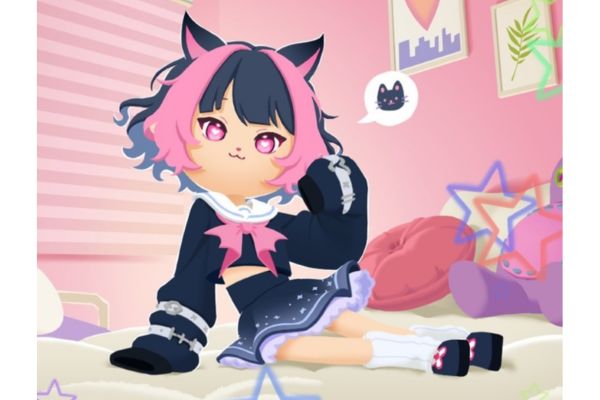
How to use prompts to turn Play Together characters into real people
Prepare before creating photos

Instructions for using prompts to turn Play Together characters into real people

To successfully implement this trend without errors, please follow the detailed 3-step process below.

Step 1: Upload sample images to the tool

First, let’s visit Google Gemini (or similar AI tools that support image analysis). At the chat interface, you upload the photo of the game character you just took. This will be the reference “raw material” (Reference Image) for AI to draw based on.

Step 2: Enter additional descriptions

Before pasting the main command, help the AI ​​understand better by typing a few more lines of brief descriptions about the character. For example: “Girl with pink hair tied in two sides, wearing a blue hoodie.” This helps guide the AI, avoiding cases where the returned image has too many color or outfit style deviations from the original.

Step 3: Paste the standard command

This is the most important step. Please copy the English paragraph below and paste it after the description. This command has been optimized to create a blurry, natural selfie effect like taken with a phone.

Turn an illustrated character into a real-life person. Create an image that feels like a selfie taken on an iPhone. There should be no obvious subject or intentional composition, just a natural, accidental moment. The photo should be slightly blurry due to movement and evenly lit by streetlights. The aspect ratio is 9:16. Overall, it must look like a real photo, not something generated by AI.
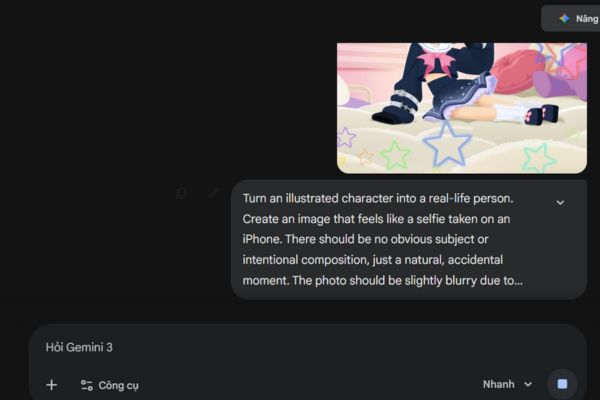
Step 3: Paste the standard command
Instructions for using prompts to turn Play Together characters into real people

Take note to get the best photo

Although today’s AI is very smart, it still sometimes has difficulty with the game’s specific body proportions. Below are a few tips to help you fix common errors.

Dealing with body proportion issues

Play Together uses Chibi graphics with a large head and small body. When switching to real-life style, the AI ​​can get confused and create photos with odd proportions. If you encounter this situation, try taking photos of the game from a closer angle of your face (only from the shoulders up) to eliminate disturbing factors related to body proportions.
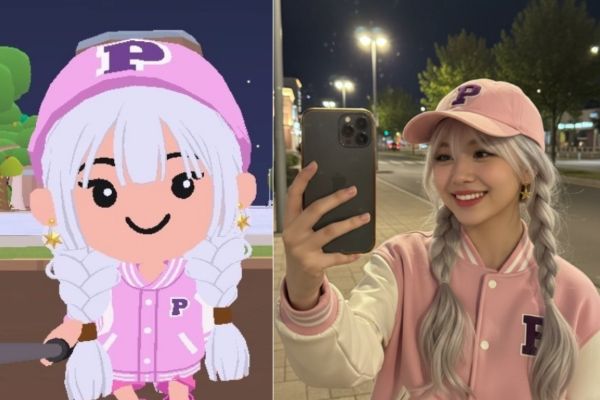
Dealing with body proportion issues

Patiently try again many times

Generative AI is highly random. If the first time the results are not the same or the face is defective, don’t be discouraged. Press the Regenerate button a few times or change the outfit description a bit. Sometimes, changing to a simpler outfit in the game also makes it easier for the AI ​​to recognize and transition to a real person more smoothly.
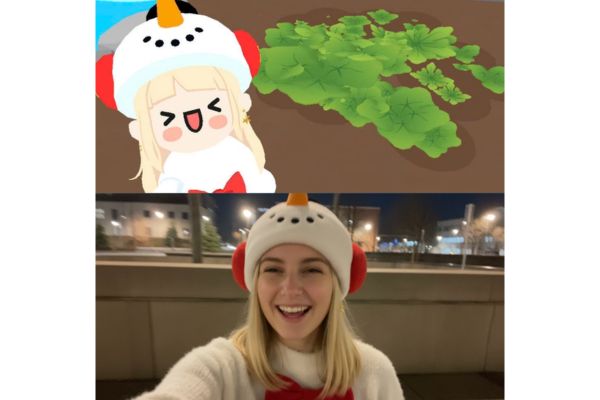
Take note to get the best photo

Conclusion

Application prompt turns Play Together characters into real people brings a very interesting experience, shortening the gap between games and real life. With just a little patience and ingenuity, you will immediately own great selfie photos.


Tags: characterspeopleplaypromptsRealturn
Previous Post

Synthesis of csc prompt to create beautiful studio-like food infographic

Next Post

How to limit YouTube Shorts viewing time for children

AnonyViet

AnonyViet

Related Posts

The easiest way to convert Word File to PowerPoint – Convert DOCX File to PTTX
Tips

The easiest way to convert Word File to PowerPoint – Convert DOCX File to PTTX

July 6, 2026
What is TPM 2.0 CHIP? Why is it required to have a TPM chip when installing Windows 11?
Tips

What is TPM 2.0 CHIP? Why is it required to have a TPM chip when installing Windows 11?

July 5, 2026
Windows 11 Download link and new interface appear
Tips

Windows 11 Download link and new interface appear

July 3, 2026
Tips

How to know if strangers are viewing your Story on Facebook

July 2, 2026
Tips

How to block any website on your computer and phone to avoid distraction

July 1, 2026
How to Insert Pictures into Text in Microsoft Word
Tips

How to Insert Pictures into Text in Microsoft Word

June 30, 2026
Next Post
How to limit YouTube Shorts viewing time for children

How to limit YouTube Shorts viewing time for children

0 0 votes
Article Rating
Subscribe
Login
Notify of
guest

guest

0 Comments
Oldest
Newest Most Voted
Inline Feedbacks
View all comments

Recent News

The easiest way to convert Word File to PowerPoint – Convert DOCX File to PTTX

The easiest way to convert Word File to PowerPoint – Convert DOCX File to PTTX

July 6, 2026
The simplest way to log out of Gmail on Huawei phones

The simplest way to log out of Gmail on Huawei phones

July 5, 2026
Receive a free 6-month Smart Game Booster VIP license

Receive a free 6-month Smart Game Booster VIP license

July 5, 2026
What is TPM 2.0 CHIP? Why is it required to have a TPM chip when installing Windows 11?

What is TPM 2.0 CHIP? Why is it required to have a TPM chip when installing Windows 11?

July 5, 2026
The easiest way to convert Word File to PowerPoint – Convert DOCX File to PTTX

The easiest way to convert Word File to PowerPoint – Convert DOCX File to PTTX

July 6, 2026
The simplest way to log out of Gmail on Huawei phones

The simplest way to log out of Gmail on Huawei phones

July 5, 2026
Receive a free 6-month Smart Game Booster VIP license

Receive a free 6-month Smart Game Booster VIP license

July 5, 2026
AnonyViet - English Version

AnonyViet

AnonyViet is a website share knowledge that you have never learned in school!

We are ready to welcome your comments, as well as your articles sent to AnonyViet.

Follow Us

Contact:

Email: anonyviet.com[@]gmail.com

Main Website: https://anonyviet.com

Recent News

The easiest way to convert Word File to PowerPoint – Convert DOCX File to PTTX

The easiest way to convert Word File to PowerPoint – Convert DOCX File to PTTX

July 6, 2026
The simplest way to log out of Gmail on Huawei phones

The simplest way to log out of Gmail on Huawei phones

July 5, 2026
  • Home
  • Home 2
  • Home 3
  • Home 4
  • Home 5
  • Home 6
  • Next Dest Page
  • Sample Page

6789 kv999

No Result
View All Result
  • Home
  • News
  • Software
  • Knowledge
  • MMO
  • Tips
  • Security
  • Network
  • Office

6789 kv999

wpDiscuz
0
0
Would love your thoughts, please comment.x
()
x
| Reply