• Home
  • News
  • Software
  • Knowledge
  • MMO
  • Tips
  • Security
  • Network
  • Office
AnonyViet - English Version
  • Home
  • News
  • Software
  • Knowledge
  • MMO
  • Tips
  • Security
  • Network
  • Office
No Result
View All Result
  • Home
  • News
  • Software
  • Knowledge
  • MMO
  • Tips
  • Security
  • Network
  • Office
No Result
View All Result
AnonyViet - English Version
No Result
View All Result

How to use MobaXterm to Remote VPS Linux from Windows

AnonyViet by AnonyViet
January 27, 2023
in Network
0

As you know, Linux VPS is often used command line to configure, few have Desktop interface like Ubuntu Desktop. But most administrators will use SSH tool to Remote to Linux Server. Currently, there are many popular SSH software such as: Putty, Bitvise SSH Client, MobaXterm… Of which AnonyViet finds MobaXterm the easiest to use. Therefore, this article will guide you in detail to use MobaXterm to Remote VPS Linux.

Join the channel Telegram of the AnonyViet 👉 Link 👈

What is MobaXterm?

MobaXterm is software that helps you communicate Windows with Linux. This is an essential tool for programmers, webmasters, and IT administrators who need to work on Linux, Unix or Mac. You will be provided with a command line interface to interact with the underlying system. In other words, you use MobaXterm to manage Linux systems. Let’s take a look at the features from MobaXterm:

Support multiple connections under separate Tab

MobaXterm Support multiple connections to multiple VPS at the same time. Each connection you will manage in a separate Tab. This is a feature that many people like because other tools don’t have it yet. Each tab can connect many different purposes.

Eg: Tab 1 you connect SSH to Server A, Tab 2 connects FTP to Server B.

How to use MobaXterm to Remote VPS Linux from Windows

Graphical Mode SFTP – File Management on Linux Easier

When you are connected to the remote server, the left panel will switch to display File Explorer of Windows. By default it points to the connected user’s home directory but you can change it to the terminal directory by checking the check-box for the terminal directory. This is really an interesting feature and saves a lot of time when managing files on Linux.

File explorer of MobaXterm

How to use MobaXterm to manage Linux VPS

MobaXterm There are 2 versions: free of charge and pay fees. For basic users, the free version is already fully featured. The paid version is only different in that the number of connections is unlimited. You just Download MobaXterm Home About the installation is fine.

The first screen of MobaXterm will look like the image below. You click on the icon Session to create a connection to the Linux VPS.

Session

For Linux VPS you will use SSH protocol to connect to the Server. Usually suppliers will give you information IP and Password Root of VPS.

The default user of a Linux VPS is usually: root

Eg: how to connect to Fastmako 1 month free VPS

The VPS account email I received from Fastmako is:
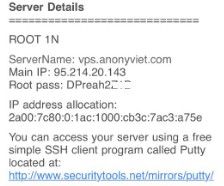
The VPS account email I received from Fastmako

You choose the protocol SSHwill appear fields to enter login information:

  • Remote host: 95.214.20.143
  • Check in ✓ into the Specify username: root
  • Press Ok

SSH protocol

The screen will now appear Terminal on the rightyou enter Password Root Enter to login.

Note: When entering the password on the screen will not display the character. You have to fill it correctly and then press Enter.

you enter Password Root

Upon successful login, you will see:

  • Left frame: is a folder browsing window, you can drag and drop files to Upload / Download
  • Right frame: is the Terminal command line tab. You use the Shell Linux command to configure the VPS.

successfully logged in MobaXterm

Now you can configure VPS using MobaXterm according to your needs. Can install Web Server, Set interface for VPS with VNCServer, View VPS parameters ….

If you do not know how to configure VPS, please comment so I can guide you in the following articles.


The article achieved: 5/5 – (100 votes)

Tags: LinuxMobaXtermRemoteVPSWindows
Previous Post

[Tạo 2D Platformer Game với Godot] Part 19: Designing UI with Custom Styles

Next Post

Top 10 Best Open World Games today

AnonyViet

AnonyViet

Related Posts

What is Direct Connect AWS? Benefits when businesses use Direct Connect AWS
Network

What is Direct Connect AWS? Benefits when businesses use Direct Connect AWS

October 29, 2025
Namecheap offers 3 Domains for alt=
Network

Namecheap offers 3 Domains for $0

October 7, 2025
Proxy vượt Cloudflare là gì? Giải pháp hạn chế Captcha Cloudflare bằng Proxy dân cư
Network

Proxy vượt Cloudflare là gì? Giải pháp hạn chế Captcha Cloudflare bằng Proxy dân cư

October 1, 2025
Renova Cloud – The leading AWS management service in Vietnam today
Network

Renova Cloud – The leading AWS management service in Vietnam today

August 26, 2025
Guide to self -creation socket5 on Ubuntu
Network

Guide to self -creation socket5 on Ubuntu

May 28, 2025
How to create a separate mtproto proxy to use Telegram when blocked
Network

How to create a separate mtproto proxy to use Telegram when blocked

May 25, 2025
Next Post
Top 10 Best Open World Games today

Top 10 Best Open World Games today

0 0 votes
Article Rating
Subscribe
Login
Notify of
guest

guest

0 Comments
Oldest
Newest Most Voted
Inline Feedbacks
View all comments

Recent News

How to install Anh Hai’s Pho Shop on MacBook is super easy

How to install Anh Hai’s Pho Shop on MacBook is super easy

November 11, 2025
How to turn off ads on Yoosee app in just 1 minute

How to turn off ads on Yoosee app in just 1 minute

November 11, 2025
Windows 11 and MS Office 2021 lifetime license, genuine from  during Keysoff’s 11.11 sale

Windows 11 and MS Office 2021 lifetime license, genuine from $14 during Keysoff’s 11.11 sale

November 11, 2025
How to see your email account creation date

How to see your email account creation date

November 11, 2025
How to install Anh Hai’s Pho Shop on MacBook is super easy

How to install Anh Hai’s Pho Shop on MacBook is super easy

November 11, 2025
How to turn off ads on Yoosee app in just 1 minute

How to turn off ads on Yoosee app in just 1 minute

November 11, 2025
Windows 11 and MS Office 2021 lifetime license, genuine from  during Keysoff’s 11.11 sale

Windows 11 and MS Office 2021 lifetime license, genuine from $14 during Keysoff’s 11.11 sale

November 11, 2025
AnonyViet - English Version

AnonyViet

AnonyViet is a website share knowledge that you have never learned in school!

We are ready to welcome your comments, as well as your articles sent to AnonyViet.

Follow Us

Contact:

Email: anonyviet.com[@]gmail.com

Main Website: https://anonyviet.com

Recent News

How to install Anh Hai’s Pho Shop on MacBook is super easy

How to install Anh Hai’s Pho Shop on MacBook is super easy

November 11, 2025
How to turn off ads on Yoosee app in just 1 minute

How to turn off ads on Yoosee app in just 1 minute

November 11, 2025
  • Home
  • Home 2
  • Home 3
  • Home 4
  • Home 5
  • Home 6
  • Next Dest Page
  • Sample Page

new88 trang chủ shbet trang chủ f168 trang chủ qq88 nhà cái 78win

No Result
View All Result
  • Home
  • News
  • Software
  • Knowledge
  • MMO
  • Tips
  • Security
  • Network
  • Office

new88 trang chủ shbet trang chủ f168 trang chủ qq88 nhà cái 78win

wpDiscuz
0
0
Would love your thoughts, please comment.x
()
x
| Reply