• Home
  • News
  • Software
  • Knowledge
  • MMO
  • Tips
  • Security
  • Network
  • Office
AnonyViet - English Version
  • Home
  • News
  • Software
  • Knowledge
  • MMO
  • Tips
  • Security
  • Network
  • Office
No Result
View All Result
  • Home
  • News
  • Software
  • Knowledge
  • MMO
  • Tips
  • Security
  • Network
  • Office
No Result
View All Result
AnonyViet - English Version
No Result
View All Result

How to unblock a domain blocked by Facebook

AnonyViet by AnonyViet
January 31, 2023
in Tips
0

You own a website, and you want to post an article on facebook, but when you press the Post button, Facebook won’t let you because the domain name has been blocked. The cause of the domain name being blocked by Facebook is that the link you share has the domain name on Facebook’s block list. There are many specific reasons for the website being blocked by Facebook.How to unblock a domain blocked by Facebook

Join the channel Telegram of the AnonyViet 👉 Link 👈

So in this article, I will list all the causes and solutions when Facebook blocks your website.

Reason

  • You spam your website link too much in groups, pages, or comments.
  • You violate Facebook’s content policy (adult content, reactionary, words that facebook blacklisted, …).
  • Websites linked to admin accounts violate advertising, run unpaid ads, etc.
  • Website is being reported by others too much.

Normally, Facebook will unlock after a period of time as follows:

  • 1st time: 3-7 days
  • 2nd time: 10-15 days
  • 3rd time: About 60 – 90 days

How to handle domains blocked by Facebook

If this is the case, you just need to take the initiative to contact Facebook directly.

The way of rich children:

You can run Facebook Ads for Fanpage, then Facebook will open for you the live chat feature with Facebook support, and ask for support to unlock the blocked domain name.

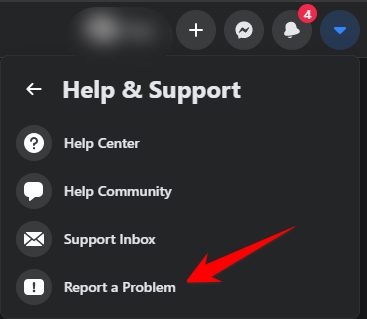
If the domain is locked due to spam, or involved in the temple explosion (non-paying advertising) … then you should pay off the debt and then unlock the domain, lest you lose your acc. If facebook confuses it as spam or is reported, you should do the following:

Method 1: Select “Report a problem”How to unlock domains blocked by Facebook 4
Method 2: Visit the link below and fill out the form

This way you need

  • Step 1: Go to the link this. At this step, if you are not logged in, you must enter your Email, then select Page and go to the step of entering content.
  • Step 2: Click: Page – Request related to My Page
  • Step 3: My Page Relevance Claims. Click to select: Other questions related to My Page
  • Step 4: What is the email address you usually use? Enter the email address of your FB account sending information
  • Step 5: What is your business name? You can also write your name
  • Step 6: Please let us know how we can assist you
    Provide as much detail as you can, e.g. Audience ID, Pixel ID, Tracking ID.

Fill in the following content:

Xin chào Facebook team!
Trang web [link trang web] của tôi là website chia sẻ những bài viết có ích. Tuy nhiên, vì một lý do gì đó đã bị hệ thống nhận nhầm là spam xin hãy vui lòng kiểm tra và giúp tôi bỏ chặn.
Xin cảm ơn!
Hello Facebook team! 
My website [website link] is a website for sharing useful articles. However, for some reason it was mistakenly recognized by the system as spam, please check and help me unblock. 
Thank you!

Then send the request.

Immediately after submission, you will receive an email notifying you of receiving the problem.
Normally, within 1, 2 days facebook will respond to your request. But it also depends on your character.

Method 3: Mobilize friends and relatives of 10-20 people to appeal by follow Instructions to Remove Domain Blocked Link on Facebook. The more people who appeal for your domain, the higher the chance that facebook will unlock the domain.

Advice

Here are some helpful tips for you:

  • Do not post website links in multiple pages/groups.
  • Do not post website links on the same page/group more than 5 times/day.
  • Note: Be careful with cheap ads running services.

The article achieved: 5/5 – (100 votes)

Tags: blockedDomainFacebookunblock
Previous Post

Push Video Wallpaper 4.49 Full – Get Video as desktop wallpaper

Next Post

Powerful Python 2016 DDOS Code Die Web in 30s

AnonyViet

AnonyViet

Related Posts

Instructions to Hide Secret Documents in Any Song
Tips

Instructions to Hide Secret Documents in Any Song

February 10, 2026
How to block Update to Windows 10 21H1 to avoid errors
Tips

How to block Update to Windows 10 21H1 to avoid errors

February 9, 2026
How to prioritize 5G Wifi reception on Laptop and PC
Tips

How to prioritize 5G Wifi reception on Laptop and PC

February 5, 2026
How to Get Grok AI for Free 7 Days
Tips

How to Get Grok AI for Free 7 Days

February 3, 2026
What are special characters? Learn from A to Z about hot trends of Gen Z and Gamers
Tips

What are special characters? Learn from A to Z about hot trends of Gen Z and Gamers

February 2, 2026
5 AI tools to make AI model videos – Create beautiful AI Tiktok female characters
Tips

5 AI tools to make AI model videos – Create beautiful AI Tiktok female characters

February 1, 2026
Next Post
Powerful Python 2016 DDOS Code Die Web in 30s

Powerful Python 2016 DDOS Code Die Web in 30s

0 0 votes
Article Rating
Subscribe
Login
Notify of
guest

guest

0 Comments
Oldest
Newest Most Voted
Inline Feedbacks
View all comments

Recent News

How to set up a private voice on iPhone that few people know

How to set up a private voice on iPhone that few people know

February 11, 2026
Instructions to Hide Secret Documents in Any Song

Instructions to Hide Secret Documents in Any Song

February 10, 2026
How to blur photos on iPhone after taking them is extremely simple

How to blur photos on iPhone after taking them is extremely simple

February 10, 2026
Dell SE2426: A “lifesaver” solution for office workers’ eyes.

Dell SE2426: A “lifesaver” solution for office workers’ eyes.

February 9, 2026
How to set up a private voice on iPhone that few people know

How to set up a private voice on iPhone that few people know

February 11, 2026
Instructions to Hide Secret Documents in Any Song

Instructions to Hide Secret Documents in Any Song

February 10, 2026
How to blur photos on iPhone after taking them is extremely simple

How to blur photos on iPhone after taking them is extremely simple

February 10, 2026
AnonyViet - English Version

AnonyViet

AnonyViet is a website share knowledge that you have never learned in school!

We are ready to welcome your comments, as well as your articles sent to AnonyViet.

Follow Us

Contact:

Email: anonyviet.com[@]gmail.com

Main Website: https://anonyviet.com

Recent News

How to set up a private voice on iPhone that few people know

How to set up a private voice on iPhone that few people know

February 11, 2026
Instructions to Hide Secret Documents in Any Song

Instructions to Hide Secret Documents in Any Song

February 10, 2026
  • Home
  • Home 2
  • Home 3
  • Home 4
  • Home 5
  • Home 6
  • Next Dest Page
  • Sample Page

https://sun52.network

No Result
View All Result
  • Home
  • News
  • Software
  • Knowledge
  • MMO
  • Tips
  • Security
  • Network
  • Office

https://sun52.network

wpDiscuz
0
0
Would love your thoughts, please comment.x
()
x
| Reply