• Home
  • News
  • Software
  • Knowledge
  • MMO
  • Tips
  • Security
  • Network
  • Office
AnonyViet - English Version
  • Home
  • News
  • Software
  • Knowledge
  • MMO
  • Tips
  • Security
  • Network
  • Office
No Result
View All Result
  • Home
  • News
  • Software
  • Knowledge
  • MMO
  • Tips
  • Security
  • Network
  • Office
No Result
View All Result
AnonyViet - English Version
No Result
View All Result

How to register for a Microsoft Edu Email account

AnonyViet by AnonyViet
January 25, 2023
in Tips
0

When you become a student of a particular university or college, you will enjoy one of the best student perks of having an edu email, you will have an .edu email account in your name. yours, for example: [email protected]. But if you are not a student and are in dire need of an .edu email to register for vip accounts on Canva, Zoom, then this article is for you. I will show you how to sign up for a Microsoft edu email account and of course this account also comes with Office 365 A1 and OneDrive 5TB or Google Workspace.

Join the channel Telegram of the AnonyViet 👉 Link 👈

How to register for a Microsoft Edu Email account

The A1 license includes Office 365 for the web with popular apps like Outlook, Word, PowerPoint, Excel, and OneNote so students, faculty, and staff can work together.

Licenses include:

  • 50 GB mailbox (accessible through Outlook on the web).
  • Online access to Word, Excel, PowerPoint and OneNote. The documents you create are stored in OneDrive, so you can access them from anywhere.
  • Access to popular Office 365 services like OneDrive, SharePoint, Teams, Sway, Forms, Stream, Power Automate, and Power Apps.

Features of A1 license users:

  • Work together with co-authorization, real-time autosave, and easy sharing in your favorite web apps like Word, PowerPoint, and Excel.
  • Leverage Microsoft Teams, integrating the meetings, chat, calls, content, and apps your school needs.
  • Stay organized with OneNote, the cloud note-taking service.
  • Inform and engage with communication sites and team sites on your intranet using SharePoint.
  • Create, manage, and share videos securely with an enterprise video service.
  • Develop apps without code to scale enterprise data quickly with custom web and mobile apps.
  • Use workflow automation across apps and services to automate business processes without writing code.
  • Communicate easily with HD video conferencing meetings.

Benefits of registering an Edu Email account

1. GitHub Student Developer Pack

The first and biggest benefit of having a .edu email address is the GitHub Student Developer Pack, the best free developer tools and services for students. This student bundle comes with 12 great deals and free services that might be useful to you, such as $15 Amazon AWS coupon, $50 Digital Ocean coupon and more another.

2. Amazon Student Pack

When you use a .edu email account and sign up for an Amazon Student account – you will be able to use this Edu email for Amazon Prime for free for six months, which has many benefits such as

  • Free TWO DAY shipping on many products on Amazon.
  • Get unlimited movies, TV shows and music online instantly.
  • Access exclusive features for students.
  • Unlimited photo storage with Amazon Prime Photos.

3. LastPass

LastPass offers six months of LastPass Premium to any user with a .edu email address.

5. Apple

You’ll save a lot of money by using your .edu email address to buy products from Apple. There are deals to save up to $200 on Apple computers.

6. Microsoft DreamSpark

Get Microsoft DreamSpark with lots of useful software and sign up for Microsoft Office 365 for free.

How to sign up for a Microsoft edu email account

Step 1: First, you access the website vnshare.top here. Next, click on “Sign Up”.
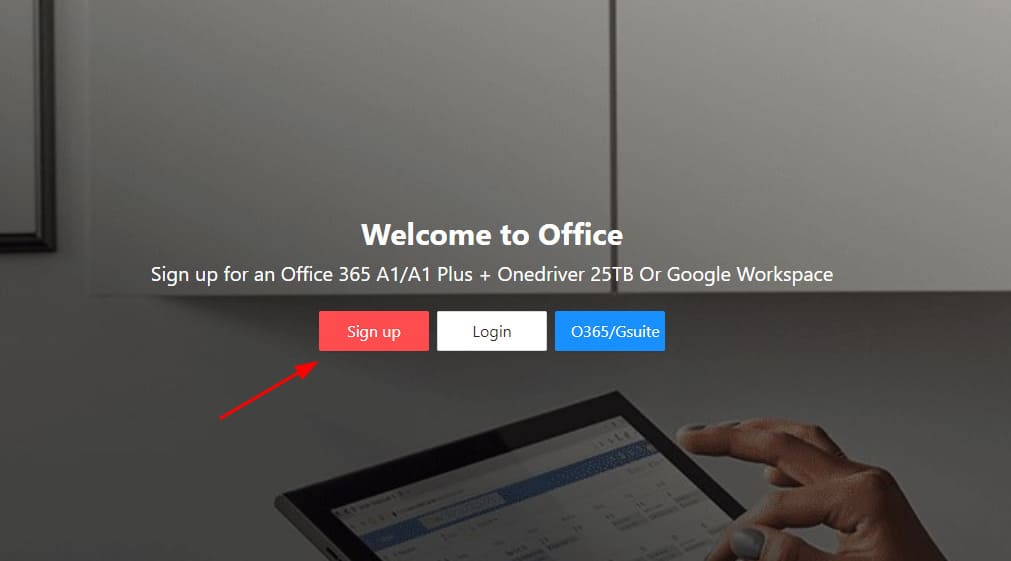
How to register for an Edu Email account of Microsoft 11

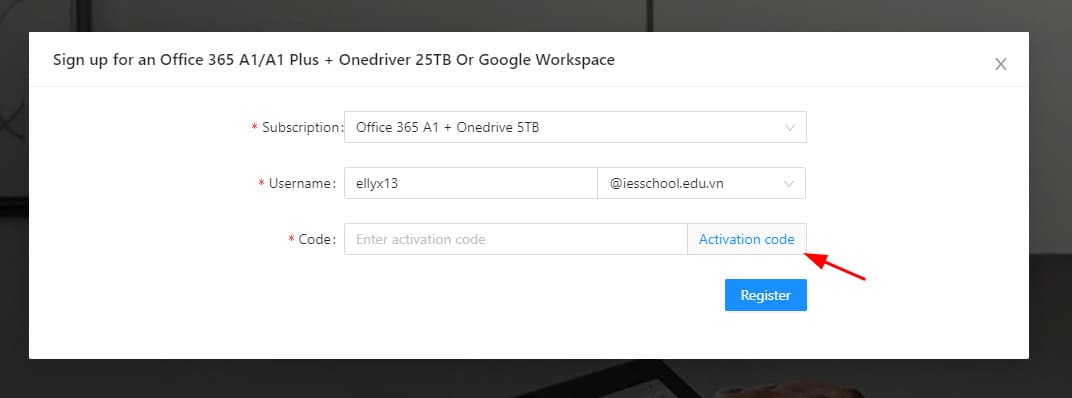
Step 2: Choose the Office 365 A1 + Ondrive 5TB plan. Enter the username you want and select email edu. Enter the Code: [email protected] (skip step 3), go to step 4
How to register for a Microsoft Edu Email account 12

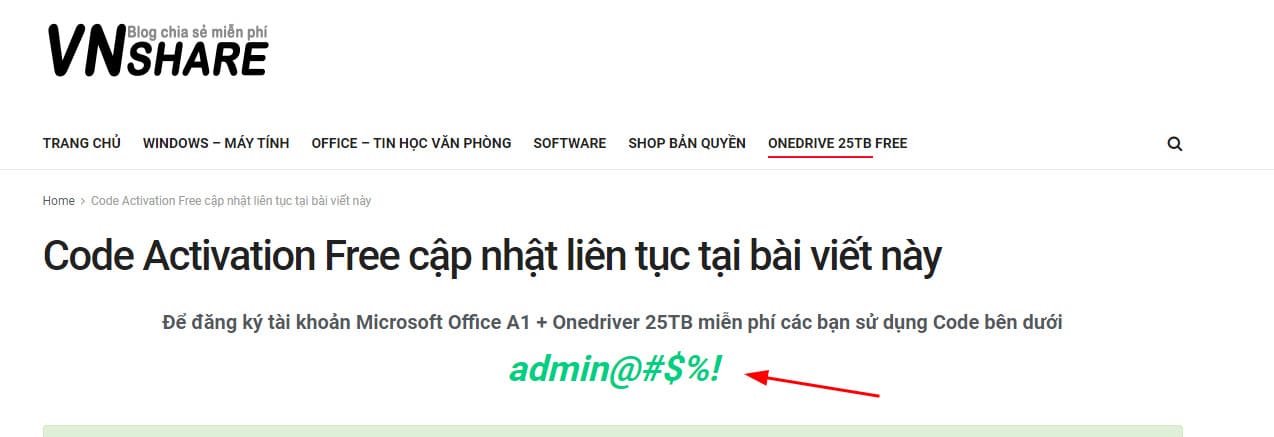
Step 3: Copy the code below.

How to register for a Microsoft Edu Email account 13

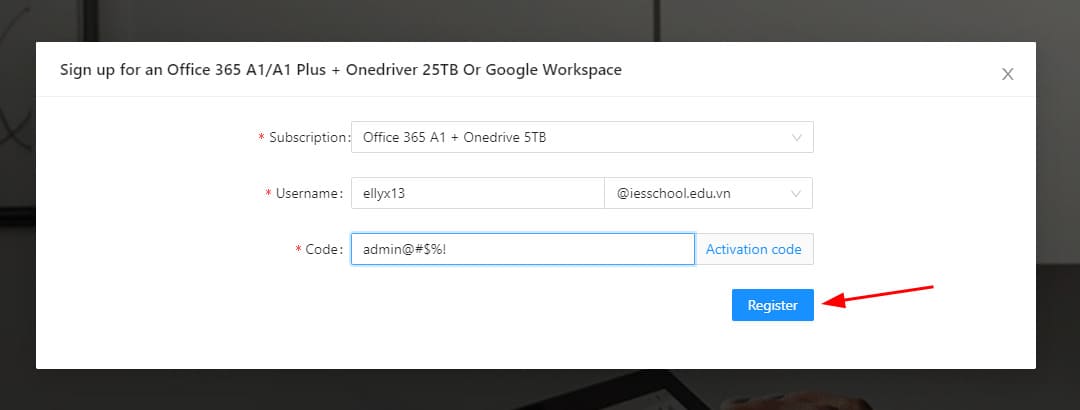
Step 4: Go back to the vnshare website, enter the code you just copied and press “Register”.
How to register for a Microsoft Edu Email account 14

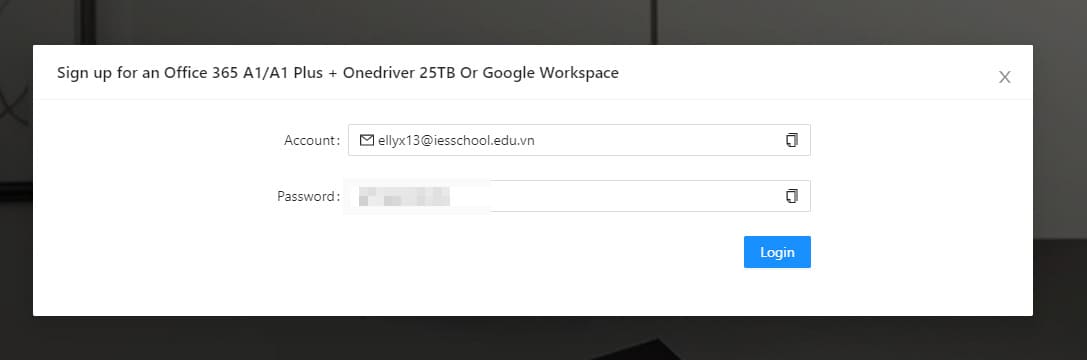
Step 5: The website will provide you with an edu email account and password.
How to register for a Microsoft Edu Email account 15

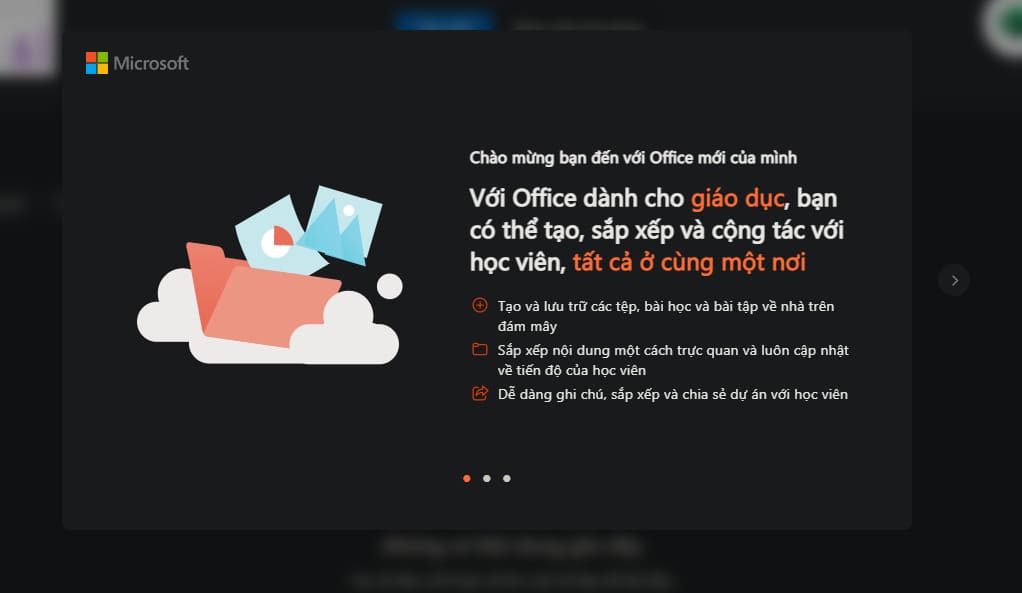
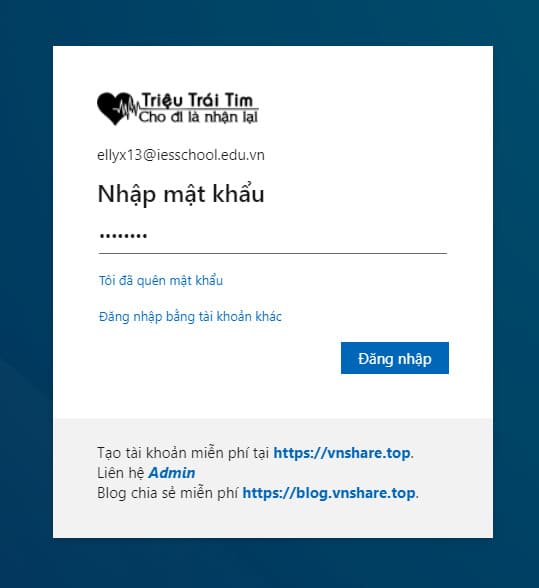
Step 6: Sign in to the Office website here.How to register for a Microsoft Edu Email account 16
Step 7: Change your edu account password.
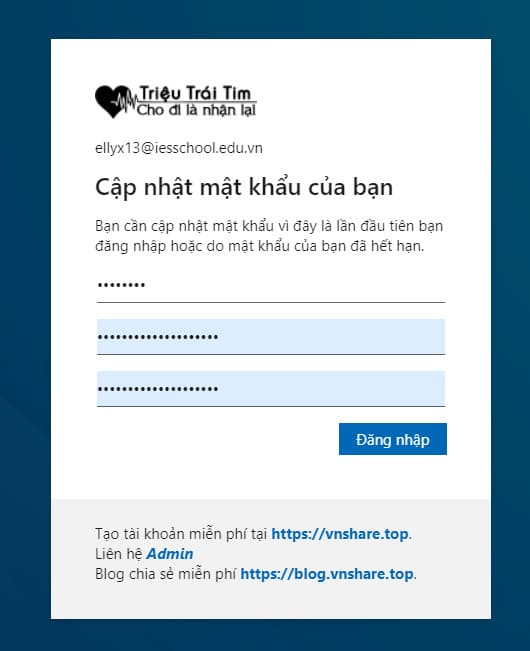
How to register for a Microsoft Edu Email account 17

Step 8: So it’s a success.

How to register for a Microsoft Edu Email account 18

If you access your Office account, you will see the A1 license.
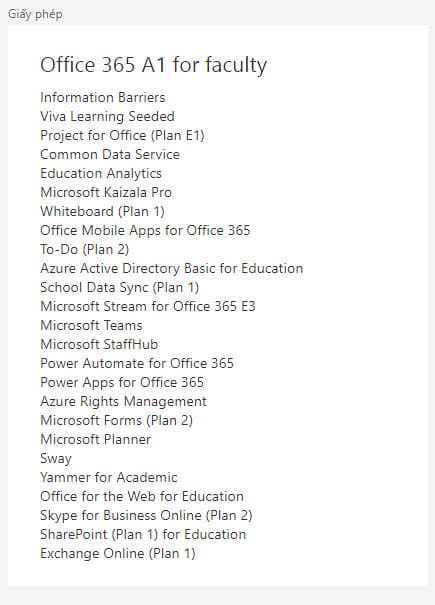
How to register for a Microsoft Edu Email account 19

When you sign up for an Edu Email account, you can use free Microsoft applications and 5TB Onedrive storage. But I advise not to save too important things in OneDrive.

Alternatively, you can also try another way to sign up for Office here.

The article achieved: 5/5 – (101 votes)

Tags: accountemailMicrosoftRegister
Previous Post

Top 10 most popular hacking techniques you should know

Next Post

Lesson 257: GetPivotData function in Excel

AnonyViet

AnonyViet

Related Posts

How to create funny selfies with pets for your pets
Tips

How to create funny selfies with pets for your pets

June 19, 2026
Chrome extension not working error and the fastest way to fix it
Tips

Chrome extension not working error and the fastest way to fix it

June 19, 2026
Instructions to receive Claude Fable 5 for free for 30 days
Tips

Instructions to receive Claude Fable 5 for free for 30 days

June 15, 2026
Delete all Event Logs on Windows to remove traces of activity
Tips

Delete all Event Logs on Windows to remove traces of activity

June 15, 2026
Instructions for creating Minecraft-style food photos
Tips

Instructions for creating Minecraft-style food photos

June 9, 2026
Get free Cambridge courses to prepare for IELTS, Starters, Movers
Tips

Get free Cambridge courses to prepare for IELTS, Starters, Movers

June 4, 2026
Next Post
Lesson 257: GetPivotData function in Excel

Lesson 257: GetPivotData function in Excel

0 0 votes
Article Rating
Subscribe
Login
Notify of
guest

guest

0 Comments
Oldest
Newest Most Voted
Inline Feedbacks
View all comments

Recent News

Instructions for creating Adam’s voice for million-view TikTok videos

Instructions for creating Adam’s voice for million-view TikTok videos

June 21, 2026
Cloud Infrastructure Resilience: Mitigating Advanced Layer 7 Vulnerabilities and Securing High-Throughput Database Handshakes

Cloud Infrastructure Resilience: Mitigating Advanced Layer 7 Vulnerabilities and Securing High-Throughput Database Handshakes

June 20, 2026
Cách hạ cấp iOS 27 xuống iOS 26 an toàn, không lo mất dữ liệu

Cách hạ cấp iOS 27 xuống iOS 26 an toàn, không lo mất dữ liệu

June 20, 2026
How to create funny selfies with pets for your pets

How to create funny selfies with pets for your pets

June 19, 2026
Instructions for creating Adam’s voice for million-view TikTok videos

Instructions for creating Adam’s voice for million-view TikTok videos

June 21, 2026
Cloud Infrastructure Resilience: Mitigating Advanced Layer 7 Vulnerabilities and Securing High-Throughput Database Handshakes

Cloud Infrastructure Resilience: Mitigating Advanced Layer 7 Vulnerabilities and Securing High-Throughput Database Handshakes

June 20, 2026
Cách hạ cấp iOS 27 xuống iOS 26 an toàn, không lo mất dữ liệu

Cách hạ cấp iOS 27 xuống iOS 26 an toàn, không lo mất dữ liệu

June 20, 2026
AnonyViet - English Version

AnonyViet

AnonyViet is a website share knowledge that you have never learned in school!

We are ready to welcome your comments, as well as your articles sent to AnonyViet.

Follow Us

Contact:

Email: anonyviet.com[@]gmail.com

Main Website: https://anonyviet.com

Recent News

Instructions for creating Adam’s voice for million-view TikTok videos

Instructions for creating Adam’s voice for million-view TikTok videos

June 21, 2026
Cloud Infrastructure Resilience: Mitigating Advanced Layer 7 Vulnerabilities and Securing High-Throughput Database Handshakes

Cloud Infrastructure Resilience: Mitigating Advanced Layer 7 Vulnerabilities and Securing High-Throughput Database Handshakes

June 20, 2026
  • Home
  • Home 2
  • Home 3
  • Home 4
  • Home 5
  • Home 6
  • Next Dest Page
  • Sample Page

6789 kv999

No Result
View All Result
  • Home
  • News
  • Software
  • Knowledge
  • MMO
  • Tips
  • Security
  • Network
  • Office

6789 kv999

wpDiscuz
0
0
Would love your thoughts, please comment.x
()
x
| Reply