How to refund personal income tax without documents is a topic of interest to many workers during the recent tax settlement period. Instead of having to wait in line or prepare a series of complicated documents, you can now complete the procedure right on your mobile phone. Let’s find out the detailed steps with AnonyViet below.
📢 Join the channel Telegram belong to AnonyViet
Update new articles, cool tools and IT tips fastest
Obstacles when performing tax finalization
Every tax settlement season comes, many workers feel tired with administrative processes. Collecting all deduction documents from the places I worked during the year is a big challenge. Many businesses are late in issuing paper documents, or worse yet, have dissolved, leaving workers in a dilemma.
Besides, having to manually calculate numbers and fill out complex forms by hand can easily lead to unnecessary errors that cause documents to be returned many times. Many workers often delay settlement because they are afraid to prepare documents, but knowing how personal income tax refund Not needing documents will help overcome this difficulty.

How do I know if I get a tax refund?
Before learning how to refund personal income tax without documents, determining whether you are eligible for a refund or not is an extremely important first step. Many workers often ignore this benefit because they do not know how to look up personal data. In fact, you can easily check the amount of overpaid tax through the following steps:
Step 1: Proceed to log in to the application eTax Mobile with personal account. You can use your tax code or citizen identification number registered with the tax authority to access the system.
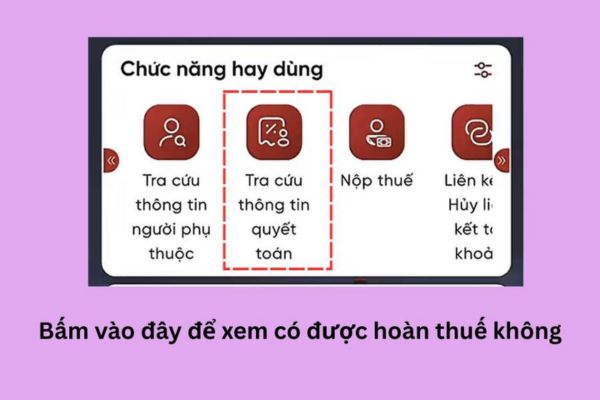
Step 2: At the main work screen, find and select the item Look up settlement information. Then, select the tax year you want to check the data for.
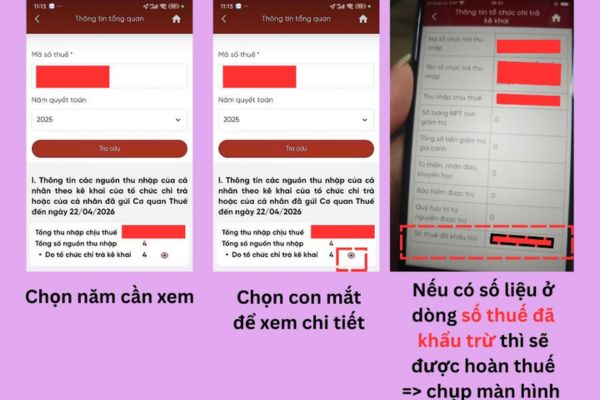
Step 3: The system will display a list of organizations paying you income that year. You click eye icon located right next to the income source name to see a detailed table of data.
Step 4: Please check the line carefully Deducted tax amount. If this section displays a specific amount and the total tax paid is greater than the actual tax payable after family deductions, you have a good chance of getting the difference refunded. For now, please Take a screenshot of your phone to save this information.
Instructions on how to refund personal income tax without documents
Below are detailed steps on how to refund personal income tax as shared by Tu Ha:
Step 1: Prepare a screenshot of detailed information about the deducted tax amount that was done in the previous lookup. This photo needs to clearly show the numbers and information about the agency paying the income.
Step 2: At the home page interface of the eTax Mobile application, find the section Support personal income tax finalization.
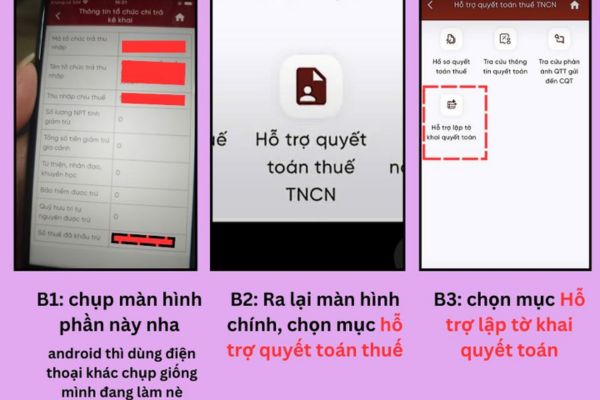
Step 3: Select next item Support in preparing settlement declarations and select the correct calendar year for which the refund procedure is required. Then, drag down to the bottom to press the button Create declaration 02/QTT-TNCN.
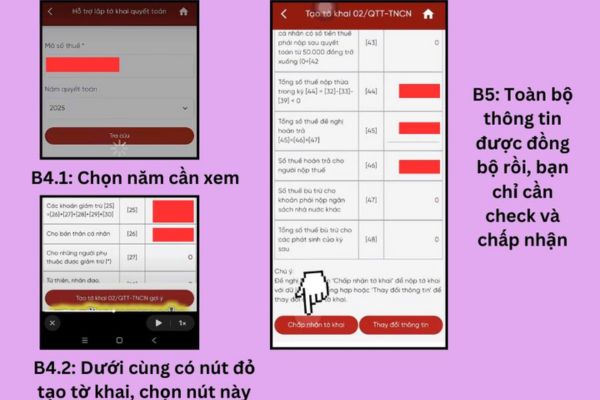
Step 4: The system will automatically display linked personal information and income data. Take the time to review the data lines to ensure there are no major discrepancies.
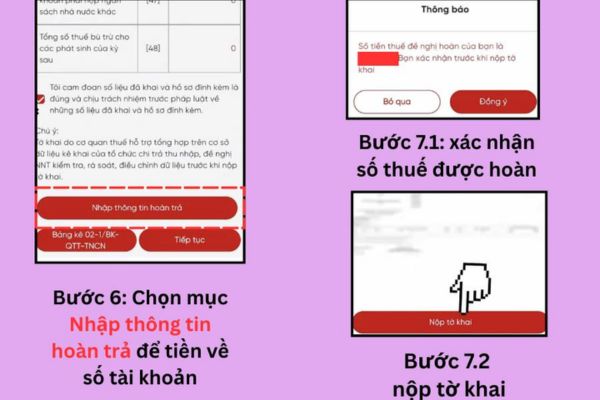
Step 5: Continue scrolling to the section Enter refund information to accurately fill in the bank account number, bank name and branch where you want to receive the beneficiary money.
Step 6: At section Attach appendixyou click to select Add new appendix then select type Deduction documents.
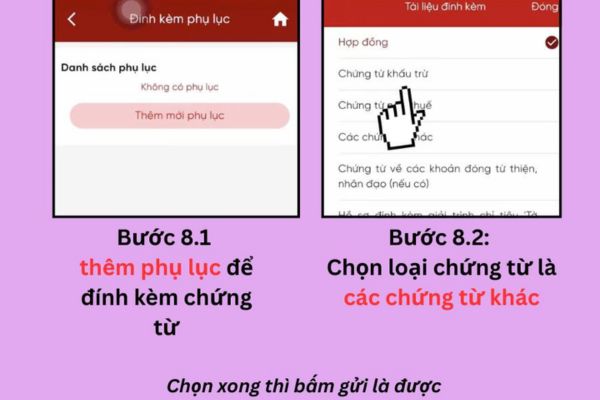
Then, upload the screenshot of the deduction information in Step 1 to the system and proceed to submit the declaration to complete the process.
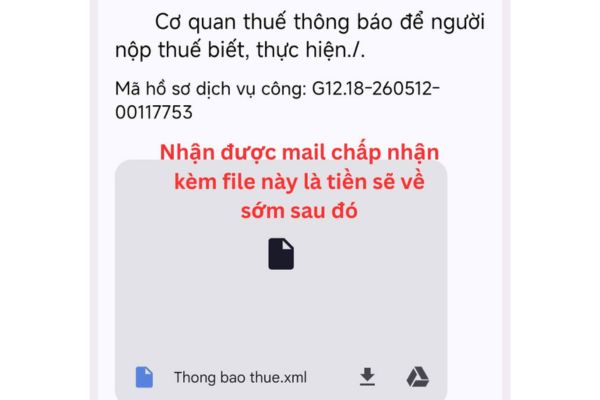
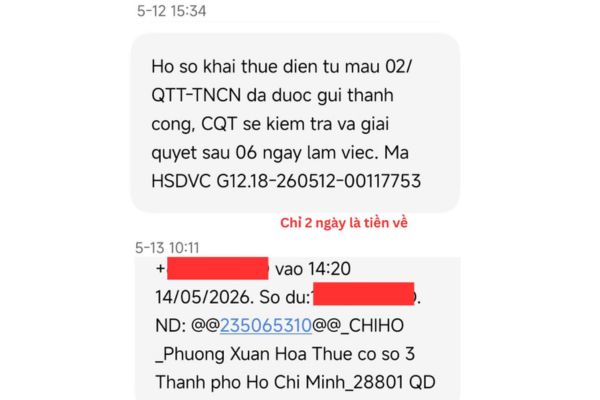
After completing the steps to submit online documents, you will receive emails and SMS messages from the Tax authority to update processing progress:
- First notification email: The system sends a confirmation message that the settlement documents have been successfully received and requires you to wait for the checking and confirmation process from the specialized staff.
- Second notification email: The Tax Authority sends a notice accepting valid documents. In case there is incorrect information or data that does not match, they will provide specific information for you to promptly supplement.
- Third notification email: Notice of acceptance of tax refund with decision in electronic document, now your application is complete and you just need to wait for the money to be transferred to the registered bank account.
Conclusion
Overall How to refund personal income tax without documents is a modern method and suitable for the current digital transformation trend. This procedure not only simplifies the steps for individuals but also reduces the burden of processing documents for management agencies. Let’s start working now to receive your overpayment back as quickly as possible!
Frequently asked questions
1. Can I apply this method to old tax years from 2022 and earlier?
For years from 2022 and earlier, you should make settlement on the e-Tax website using a computer to avoid data synchronization errors on the mobile application.
2. Will screenshots instead of original documents be rejected by tax authorities?
Even though the data is already available on the system, some tax departments may still require you to supplement original paper documents or XML files if discrepancies in data are detected.
3. How long does it take to receive a tax refund after filing this way?
The time to receive refunds usually ranges from a few days to a few weeks depending on the processing progress of each directly managed tax department.