How to make a Tet calendar with your own photos Helps you save on shopping costs and still have satisfactory home decoration items. A calendar printed with the “owner’s” photo not only helps to see the date but also creates happy laughter for guests coming to the house. This article will guide you step by step to do that.
| Join the channel Telegram belong to AnonyViet 👉 Link 👈 |
Design your own unique 2026 Tet calendar with AI
Every spring and Tet holiday, the need to decorate homes and desks increases. Instead of using boring pre-printed calendar templates, the current trend is to personalize every item. Owning a calendar with your own face printed on it, designed in the traditional Tet style with lucky red and yellow tones, will definitely be an interesting highlight.
Modern AI technology allows creating high-resolution calendar photos, sharp in every detail. You can absolutely take this photo file to a printing shop to make a wall calendar, a desk calendar or simply set it as your phone or computer wallpaper to get luck for the whole year.

Instructions on how to make a Tet calendar with your own photos
To create a calendar that is both beautiful and accurate in terms of dates while still preserving your natural facial expressions, we will use the Google Gemini tool. Below is the detailed process to do it:
Step 1: Visit the Google Gemini website (gemini.google.com) and log in with your account Google your.
Step 2: At the main interface, pay attention to the model selection section. You should convert to version “Pro“. This helps AI process images more intelligently and produce the best aesthetic results. Then go to the toolbar and select the feature “Create images“.

Step 3: In the input box, you need to paste the detailed prompt about the following scheduling request. Depending on whether you are Male or Female, you change it again at the inside text position square brackets okay:
Design a Vietnamese Lunar New Year 2026 calendar poster in a vertical 9:16 layout, ultra-high 8K resolution, featuring a luxurious, premium aesthetic. The dominant color palette is red and gold, with exceptionally sharp, photorealistic visuals suitable for professional printing.

The focal point is one [MALE] individual only, taken directly from the attached reference image. The subject must remain 100% true to the real person: no AI facial modification, no beautification, no reshaping of facial features, skin tone, expression, body proportions, or pixel integrity. He is dressed in a traditional Vietnamese men’s ao dai in [red/gold], standing upright with a forward gaze, expressing calm confidence and warmth, presented as a refined, high-end individual portrait.

The background setting is [Saigon Calligrapher Street / Hoi An Ancient Town], enriched with tall red lanterns, Vietnamese calligraphy couplets, blooming yellow apricot or peach flowers symmetrically placed on both sides, soft imperial cloud patterns, and warm golden sunset lighting. The scene should convey a vivid Vietnamese Tet atmosphere with cinematic depth and visual richness. Surrounding the composition is a gold-toned metal frame featuring swirling cloud motifs, enhancing the sense of elegance and opulence.

All typography on the poster must use a modern Vietnamese calligraphy font in gold, accented with a subtle glowing effect. The main headline at the top reads HAPPY NEW YEAR, followed by Spring of the Year of the Horse 2026 beneath it. The lower section displays the 2026 calendar, arranged in a clean 4×3 grid format. Month names appear in gold calligraphy; weekdays are shown as T2–T3–T4–T5–T6–T7–CN in small gold lettering; Sundays are marked with red numerals, while all remaining dates are displayed in white. All text must remain in Vietnamese, in the correct sequence, and must not be altered or substituted.

The calendar must be completely accurate:
– January 1 starts on Thursday
– February 1 starts on Sunday
– March 1 starts on Sunday
– April 1 starts on Wednesday
– May 1 starts on Friday
– June 1 starts on Monday
– July 1 starts on Wednesday
– August 1 starts on Saturday
– September 1 starts on Tuesday
– October 1 starts on Thursday
– November 1 starts on Sunday
– December 1 starts on Tuesday

The number of days per month is as follows: 31 – 28 – 31 – 30 – 31 – 30 – 31 – 31 – 30 – 31 – 30 – 31.

The overall composition must be highly detailed, premium in quality, unmistakably Vietnamese Tet-inspired, with rich red-and-gold tones, cinematic lighting, flawless clarity, no blur, distortion, or errors, and a polished, professional poster finish.
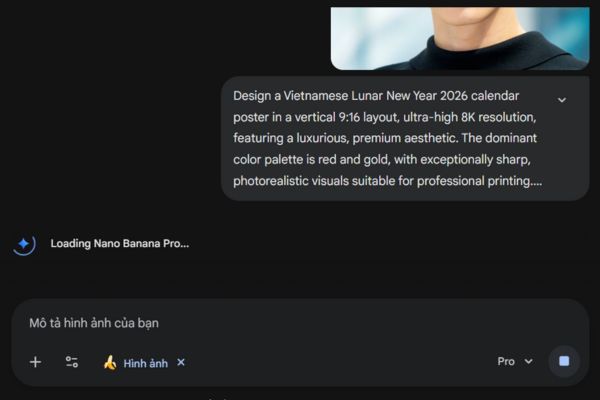
Step 4: Click on the icon plus (+) to upload a clear portrait photo of yourself. This is an important step for AI to recognize and match faces to the calendar.
Step 5: Press Enter and wait for a few seconds. The system will automatically process and return Tet calendar options with your face naturally integrated.

Take note to have the most satisfactory calendar
The results generated by AI will be different each time and will not always be perfect the first time. If you feel like the layout isn’t beautiful or your face doesn’t look the same, don’t be discouraged.
Please select the “Create new conversation” feature and repeat the above operations. Be patient and try again a few times until the AI returns the results that make you most satisfied. A clear, well-lit input photo will also help the AI work more effectively.

Conclusion
It only takes a few minutes to do, How to make a Tet calendar with your own photo Delivers extremely impressive and professional results. Don’t forget to share these unique calendar creations on social networks to show off to your friends.