• Home
  • News
  • Software
  • Knowledge
  • MMO
  • Tips
  • Security
  • Network
  • Office
AnonyViet - English Version
  • Home
  • News
  • Software
  • Knowledge
  • MMO
  • Tips
  • Security
  • Network
  • Office
No Result
View All Result
  • Home
  • News
  • Software
  • Knowledge
  • MMO
  • Tips
  • Security
  • Network
  • Office
No Result
View All Result
AnonyViet - English Version
No Result
View All Result

How to know how many TikTok videos you've watched so far

AnonyViet by AnonyViet
December 31, 2024
in Software
0

Have you ever wondered how much time you spend watching videos on TikTok? This article will show you how to know How many Tiktok videos have you watched? and time using the application easily and quickly. Let's follow along!

Join the channel Telegram belong to AnonyViet 👉 Link 👈

Why should you check the number of TikTok videos viewed?

TikTok is currently one of the most popular entertainment applications in the world with billions of diverse videos posted every day. However, you may not realize how much time you spend scrolling through hundreds, even thousands, of videos on this platform.

Checking the number of videos you have watched not only helps you become more aware of your TikTok usage habits, but is also an interesting way to evaluate your level of “addiction” to the application. So, try applying the instructions below to control your TikTok usage habits!

How to know how many TikTok videos you've watched so far
Why should you check the number of TikTok videos viewed?

See more: Create a chat group on TikTok: Have you tried it yet?

How to know how many TikTok videos you've watched

Step 1: Open the TikTok app and access your Profile section.

Step 2: In the right corner of the screen, click on the three lines icon and select 'Settings and privacy'
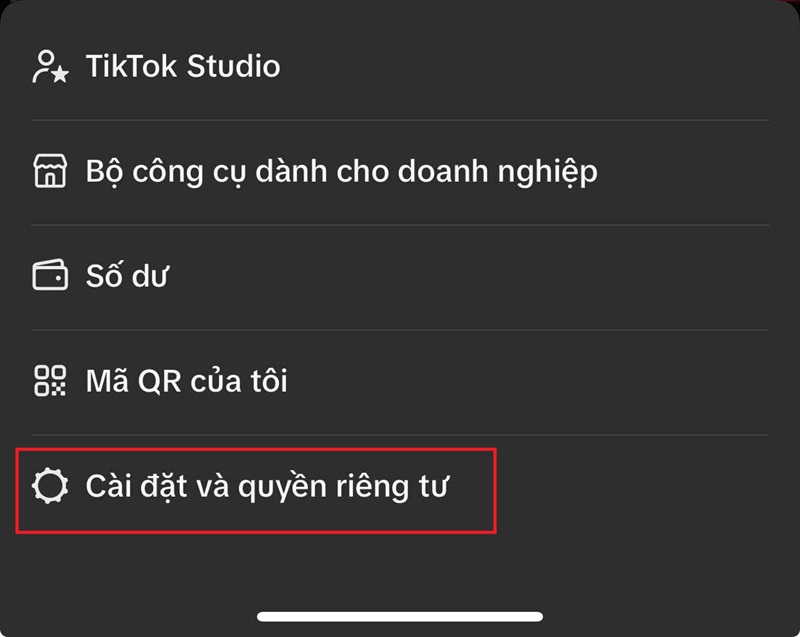
Select 'Settings and privacy'

Step 3: Continue clicking on Account > Select 'Download personal data'.
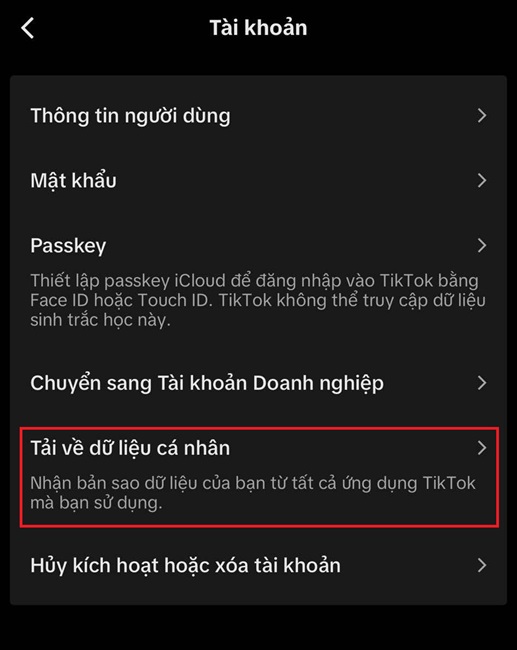
Select 'Download personal data'

Step 4: Select the file format as JSON, then click Done. Continue clicking 'Request Data' to request data download.
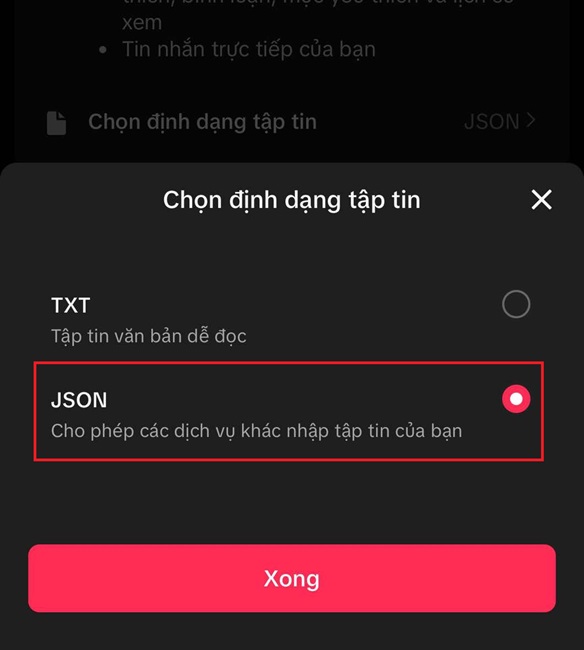
Select the file format as JSON

Step 5: Wait for TikTok to collect data for a period of time. Then go to 'Download data' and select Download to download the data file to your device.

Step 6: Open Safari or whatever web browser you're using and visit the Wrapped for TikTok page (or click the link HERE).

Step 7: Click on the words “I have my TikTok File”, then select Select File to download the previously downloaded file and wait for the system to display the results.
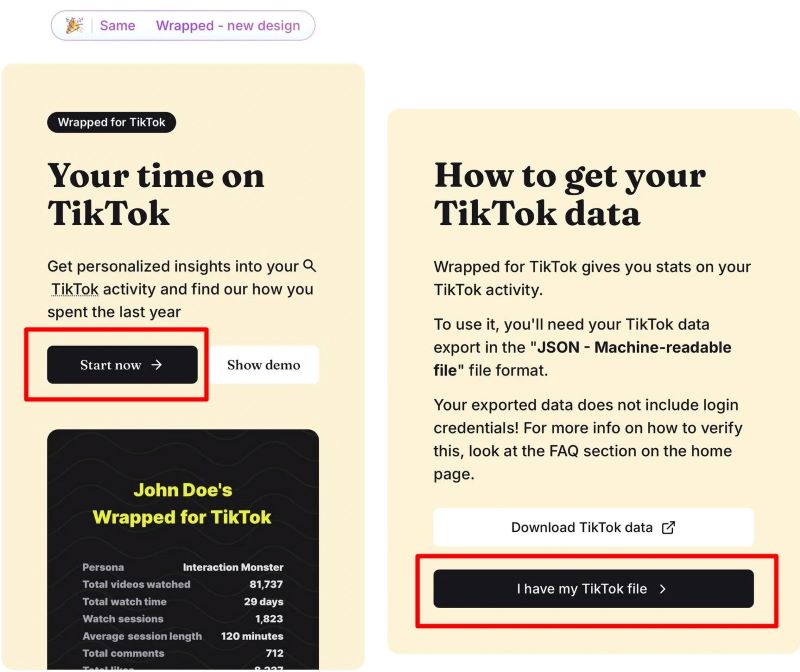
Click on the text "I have my TikTok File"
Click on the text “I have my TikTok File”

After completing the above steps, you will receive interesting information such as:

  • Total number of videos viewed: This number will tell you how many TikTok videos you have watched over the past time.
  • Time spent using TikTok: You will know how many hours and days you spent “glued” to TikTok.
  • Most viewed videos: Are you curious which video makes you “replay” the most?

See more: Instructions for turning off post notifications on TikTok

Conclusion

The inspection How many Tiktok videos have you watched? Not only does it make you more aware of the time spent on the app, but it's also a fun experience. Follow the steps above and discover your TikTok surfing habits now! If you find the article useful, don't forget to share it with your friends and relatives!


Tags: TikTokvideosWatchedyou39ve
Previous Post

How to use Deepseek V3: Chinese AI for free

Next Post

How to make your photos into Anime Waifu photos with Selfie 2 Waifu

AnonyViet

AnonyViet

Related Posts

Create an avatar to celebrate April 30 with a beautiful red flag shirt with yellow stars
Software

Create an avatar to celebrate April 30 with a beautiful red flag shirt with yellow stars

April 30, 2026
How to get 2 months of Super Duolingo for free worth 300k
Software

How to get 2 months of Super Duolingo for free worth 300k

April 30, 2026
How to create a Face Sticker Collection using ChatGPT
Software

How to create a Face Sticker Collection using ChatGPT

April 29, 2026
How to install the cute Bongo Cat mouse pointer for Windows
Software

How to install the cute Bongo Cat mouse pointer for Windows

April 29, 2026
Instructions for looking up prescriptions on VNeID instead of paper medical books
Software

Instructions for looking up prescriptions on VNeID instead of paper medical books

April 26, 2026
Compare Poco X8 Pro and Poco X7 Pro: A new step for the “king” of mid-range performance
Software

Compare Poco X8 Pro and Poco X7 Pro: A new step for the “king” of mid-range performance

April 24, 2026
Next Post
How to make your photos into Anime Waifu photos with Selfie 2 Waifu

How to make your photos into Anime Waifu photos with Selfie 2 Waifu

0 0 votes
Article Rating
Subscribe
Login
Notify of
guest

guest

0 Comments
Oldest
Newest Most Voted
Inline Feedbacks
View all comments

Recent News

Create an avatar to celebrate April 30 with a beautiful red flag shirt with yellow stars

Create an avatar to celebrate April 30 with a beautiful red flag shirt with yellow stars

April 30, 2026
How to get 2 months of Super Duolingo for free worth 300k

How to get 2 months of Super Duolingo for free worth 300k

April 30, 2026
How to create a Face Sticker Collection using ChatGPT

How to create a Face Sticker Collection using ChatGPT

April 29, 2026
How to install the cute Bongo Cat mouse pointer for Windows

How to install the cute Bongo Cat mouse pointer for Windows

April 29, 2026
Create an avatar to celebrate April 30 with a beautiful red flag shirt with yellow stars

Create an avatar to celebrate April 30 with a beautiful red flag shirt with yellow stars

April 30, 2026
How to get 2 months of Super Duolingo for free worth 300k

How to get 2 months of Super Duolingo for free worth 300k

April 30, 2026
How to create a Face Sticker Collection using ChatGPT

How to create a Face Sticker Collection using ChatGPT

April 29, 2026
AnonyViet - English Version

AnonyViet

AnonyViet is a website share knowledge that you have never learned in school!

We are ready to welcome your comments, as well as your articles sent to AnonyViet.

Follow Us

Contact:

Email: anonyviet.com[@]gmail.com

Main Website: https://anonyviet.com

Recent News

Create an avatar to celebrate April 30 with a beautiful red flag shirt with yellow stars

Create an avatar to celebrate April 30 with a beautiful red flag shirt with yellow stars

April 30, 2026
How to get 2 months of Super Duolingo for free worth 300k

How to get 2 months of Super Duolingo for free worth 300k

April 30, 2026
No Result
View All Result
  • Home
  • News
  • Software
  • Knowledge
  • MMO
  • Tips
  • Security
  • Network
  • Office

wpDiscuz
0
0
Would love your thoughts, please comment.x
()
x
| Reply