• Home
  • News
  • Software
  • Knowledge
  • MMO
  • Tips
  • Security
  • Network
  • Office
AnonyViet - English Version
  • Home
  • News
  • Software
  • Knowledge
  • MMO
  • Tips
  • Security
  • Network
  • Office
No Result
View All Result
  • Home
  • News
  • Software
  • Knowledge
  • MMO
  • Tips
  • Security
  • Network
  • Office
No Result
View All Result
AnonyViet - English Version
No Result
View All Result

How to Hack Azota on the phone when checking Online

AnonyViet by AnonyViet
January 25, 2023
in Security
0

In this article, I will show you how to hack Azota on your phone. Note in advance that this is not hacking the answer, but hacking the time to do the test. You will have more time to do the test and get high results when Hack Azota.

Join the channel Telegram of the AnonyViet 👉 Link 👈

How to Hack Azota on the phone when checking Online

What is Azota?

Azota is no longer too strange to students and students. This is an application to support completely new teachers in teaching, especially in assigning assignments and grading papers to students. Azota uses a Zalo account to sync content across all devices. However, Hack Azota is quite simple and anyone can do it.

Azota’s interface will help teachers assign assignments to students and manage students’ assignments quickly and conveniently. And also from this application, teachers also easily grade assignments and immediately give results. Azota also has a feature to track student learning, which is very useful for teachers. The following article will guide teachers to use the Azota application.

Advantage:

  • Help teachers create online exam questions easily with only PDF files of available questions
  • The system automatically marks the test and returns the results to parents and students
  • Teachers can easily view analysis and statistics of student learning scores
  • Students easily do homework, anytime and anywhere and can Hack Azota to add points.

Why should teachers use Azota?

Save time on assignment and grading

When studying directly, instead of collecting votes for grading, teachers can remind students and parents to submit assignments by taking pictures of assignments and sending them through the application, teachers can also grade and report grades directly on it. This can also be applied very effectively during the online learning phase.

Easy operation

The platform as well as the Azota software are designed to be simple, with an easy-to-use, easy-to-use interface that is suitable for everyone.

Statistics and tracking of learning results

Parents can also track student results through learning history. The system will save the score, the process of doing and submitting each student’s work. Teachers can also look up and download statistical reports to their computer for evaluation or storage on the system.

How to hack Azota

To Hack Azota when doing the test, you are only allowed to use Azota on the browser in the phone. Next, click on “Get Started”.
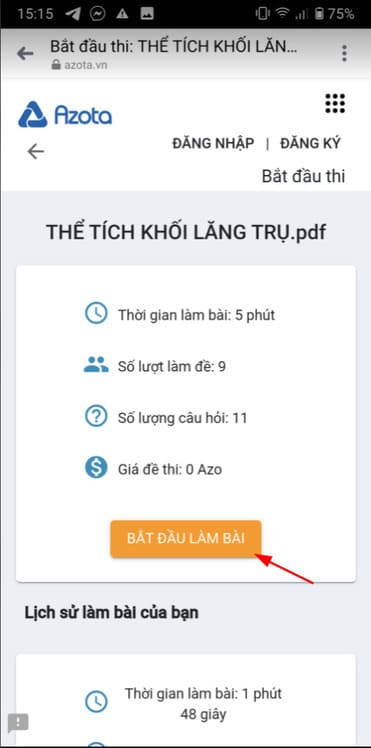
How to Hack Azota on the phone when checking Online 10

Please notice, this test is only 5 minutes and the current time is 15 hours 15 minutes.
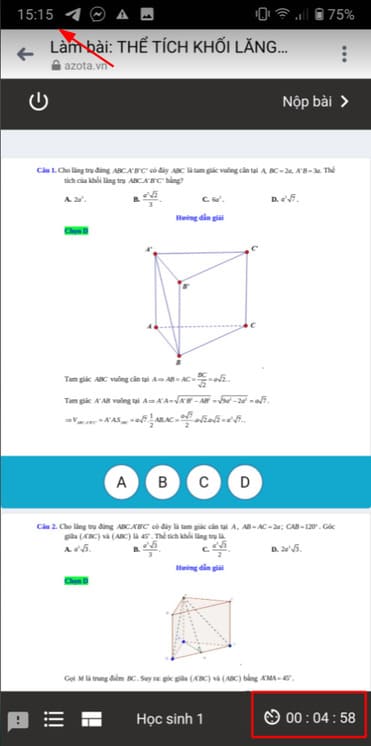
How to Hack Azota on the phone when checking Online 11

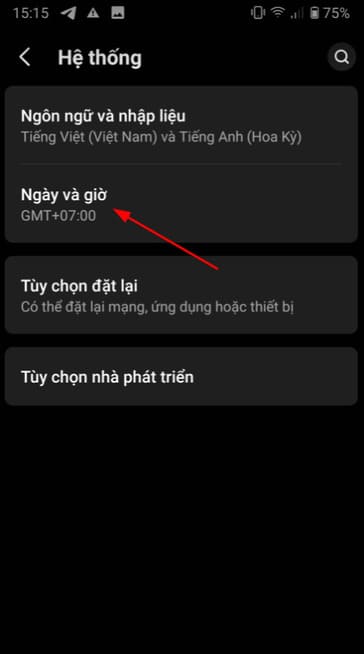
Then you enter Setting and scroll down and select System. Note that the open browser Azota is still running in the background. You also do not need to worry that when you go out, you will be warned by Azota because only when you install the Azota application, you will get it.
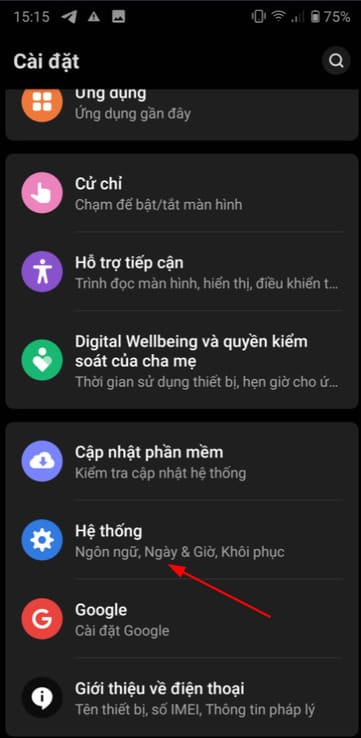
How to Hack Azota on the phone when checking Online 12

Next, enter “Date and Time”.

How to Hack Azota on the phone when checking Online 13

Then turn off the option “Use the time provided by the carrier”.
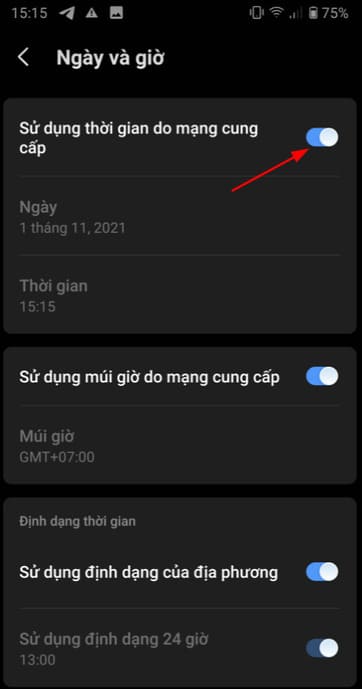
How to Hack Azota on the phone when checking Online 14

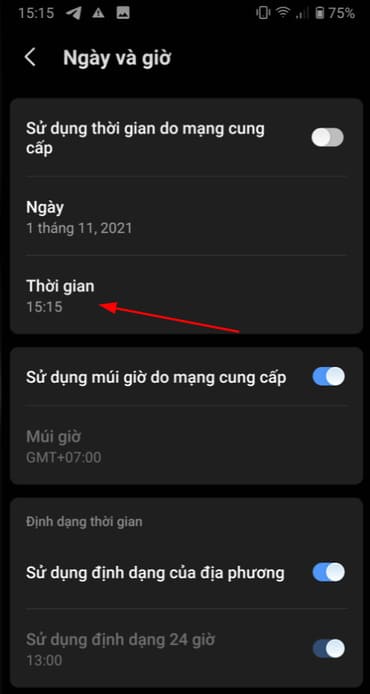
You click “Time” to reset the time.

How to Hack Azota on the phone when checking Online 15

I will move back 5 minutes from the current (15:15) at 15:10 and then press “Continue”.
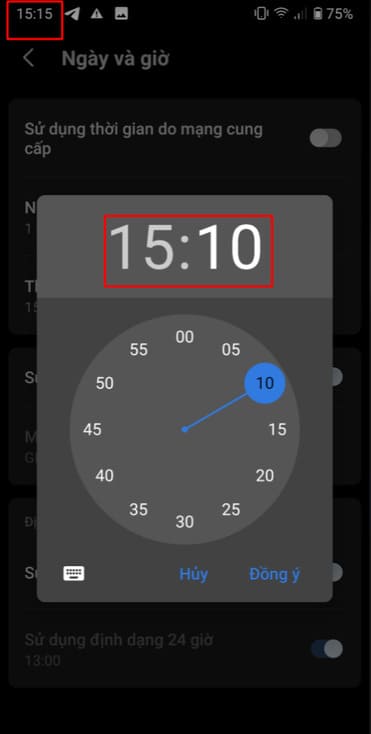
How to Hack Azota on the phone when checking Online 16

Finally, you return to the exam on Azota. As you can see in the picture below, the time has been pushed back 5 minutes to 15 hours and 10 minutes, but the time to do the test will be increased by 5 minutes, so the Azota Hack is successful.
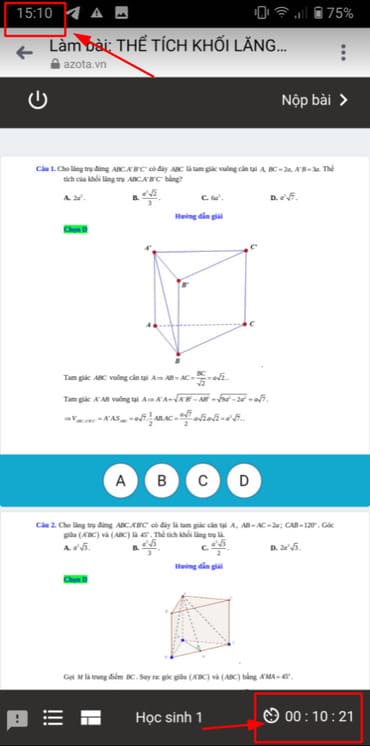
How to Hack Azota on the phone when checking Online 17

As for the issue of such an increase in time, whether it will be recorded when submitting the assignment, I guarantee that it will not. For example, when doing the test is 15:15, the time to do the test is 5 minutes, but when the time is increased, when submitting, the system will still report you to do the test 5 minutes and submit it at 15:20.

In addition, you can also see how to hack online exercise answers here.

The article achieved: 5/5 – (100 votes)

Tags: AzotaCheckingHackonlinephone
Previous Post

Microsoft explains why Windows 11 is faster than Windows 10

Next Post

How to test WiFi speed and 7 errors you often encounter

AnonyViet

AnonyViet

Related Posts

How to intercept traffic using Burp Suite to analyze HTTP/HTTPS
Security

How to intercept traffic using Burp Suite to analyze HTTP/HTTPS

April 18, 2026
How to use hackers use Splitfus to execute PowerShell malicious code
Security

How to use hackers use Splitfus to execute PowerShell malicious code

July 20, 2025
How to implement Shellcode Injection attack technique with Autoit
Security

How to implement Shellcode Injection attack technique with Autoit

March 14, 2025
How to exploit the holy hole of Hijacking on Windows
Security

How to exploit the holy hole of Hijacking on Windows

March 8, 2025
Hamamal: Shellcode execution technique from afar to overcome Antivirus's discovery
Security

Hamamal: Shellcode execution technique from afar to overcome Antivirus's discovery

February 10, 2025
Snov.io Email Finder: Search emails with only company name/domain name/LinkedIn profile
Security

Snov.io Email Finder: Search emails with only company name/domain name/LinkedIn profile

December 14, 2024
Next Post
How to test WiFi speed and 7 errors you often encounter

How to test WiFi speed and 7 errors you often encounter

0 0 votes
Article Rating
Subscribe
Login
Notify of
guest

guest

0 Comments
Oldest
Newest Most Voted
Inline Feedbacks
View all comments

Recent News

How to turn off Gemini Nano on Chrome to free up 4GB of memory

How to turn off Gemini Nano on Chrome to free up 4GB of memory

May 30, 2026
Instructions for receiving Lovable Pro 12 months for free

Instructions for receiving Lovable Pro 12 months for free

May 29, 2026
How to extract text from photos using Zalo is super simple

How to extract text from photos using Zalo is super simple

May 29, 2026
HONOR 600 in hand – High-end design, 200MP camera, not cheap price

HONOR 600 in hand – High-end design, 200MP camera, not cheap price

May 28, 2026
How to turn off Gemini Nano on Chrome to free up 4GB of memory

How to turn off Gemini Nano on Chrome to free up 4GB of memory

May 30, 2026
Instructions for receiving Lovable Pro 12 months for free

Instructions for receiving Lovable Pro 12 months for free

May 29, 2026
How to extract text from photos using Zalo is super simple

How to extract text from photos using Zalo is super simple

May 29, 2026
AnonyViet - English Version

AnonyViet

AnonyViet is a website share knowledge that you have never learned in school!

We are ready to welcome your comments, as well as your articles sent to AnonyViet.

Follow Us

Contact:

Email: anonyviet.com[@]gmail.com

Main Website: https://anonyviet.com

Recent News

How to turn off Gemini Nano on Chrome to free up 4GB of memory

How to turn off Gemini Nano on Chrome to free up 4GB of memory

May 30, 2026
Instructions for receiving Lovable Pro 12 months for free

Instructions for receiving Lovable Pro 12 months for free

May 29, 2026
No Result
View All Result
  • Home
  • News
  • Software
  • Knowledge
  • MMO
  • Tips
  • Security
  • Network
  • Office

wpDiscuz
0
0
Would love your thoughts, please comment.x
()
x
| Reply