• Home
  • News
  • Software
  • Knowledge
  • MMO
  • Tips
  • Security
  • Network
  • Office
AnonyViet - English Version
  • Home
  • News
  • Software
  • Knowledge
  • MMO
  • Tips
  • Security
  • Network
  • Office
No Result
View All Result
  • Home
  • News
  • Software
  • Knowledge
  • MMO
  • Tips
  • Security
  • Network
  • Office
No Result
View All Result
AnonyViet - English Version
No Result
View All Result

How to create caricatures with ChatGPT

AnonyViet by AnonyViet
November 19, 2025
in Tips
0

Create caricatures with ChatGPT is an extremely interesting trend, helping you turn familiar portrait photos into humorous and unique works of art. Do you want to “manipulate” photos of yourself or your friends to create laughter on social networks? No need for complicated painting skills, with just a few simple steps, ChatGPT will help you do it easily.

Join the channel Telegram belong to AnonyViet 👉 Link 👈

Explore ChatGPT’s painting capabilities

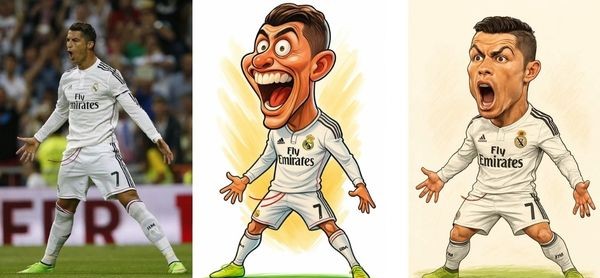
Surely you have laughed at caricatures of famous people in the press or on social networks. Their characteristic is to humorously exaggerate facial features such as eyes, nose, mouth, etc., but viewers can still easily recognize the original character.

Many people still think wrongly ChatGPT just a text Q&A tool. However, its real power lies in its ability to create images (DALL-E) extremely impressive.
Explore ChatGPT's painting capabilities
Explore ChatGPT’s painting capabilities

Instructions for creating caricatures using ChatGPT

Step 1: First, open your browser and visit ChatGPT’s homepage at: https://chatgpt.com/.

Next, perform the login step. For maximum convenience, you can take advantage of an existing account by selecting “Continue with Google”, “Apple” or “Microsoft”.

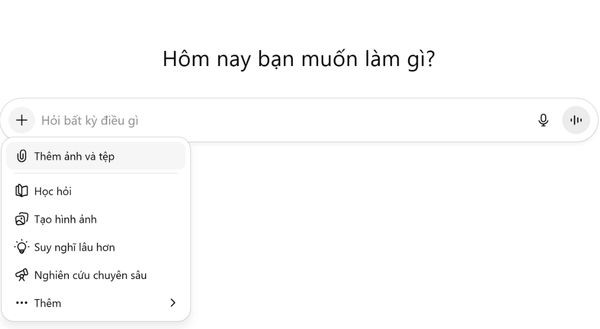
Step 2: At the main interface of the conversation, find and click the pin icon (or “+“) to attach the file. You then select the clear portrait image you want to turn into a caricature from your computer or phone.
The secret to creating caricatures with ChatGPT

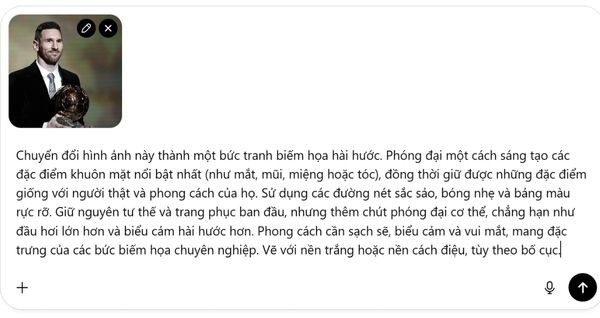
Step 3: In the chat box, copy and paste the following detailed command:

Biến bức ảnh này thành tranh biếm họa vui nhộn, nhấn mạnh một cách sáng tạo những đặc điểm nổi bật trên gương mặt (như mắt, mũi, miệng hoặc mái tóc) nhưng vẫn đảm bảo giữ được nét nhận diện và phong thái riêng của nhân vật. Sử dụng đường nét rõ ràng, độ bóng nhẹ và gam màu tươi sáng. Giữ nguyên dáng pose và trang phục gốc, đồng thời phóng đại nhẹ vóc dáng, chẳng hạn làm đầu lớn hơn và biểu cảm dí dỏm hơn. Phong cách nên gọn gàng, sinh động, dễ nhìn, mang hơi hướng của các tác phẩm biếm họa chuyên nghiệp. Nền có thể là trắng hoặc cách điệu, tùy theo bố cục tổng thể.
Copy and paste the command

Step 4: After sending the command, you just need to wait a moment. ChatGPT will analyze your image and requirements to create a unique caricature.
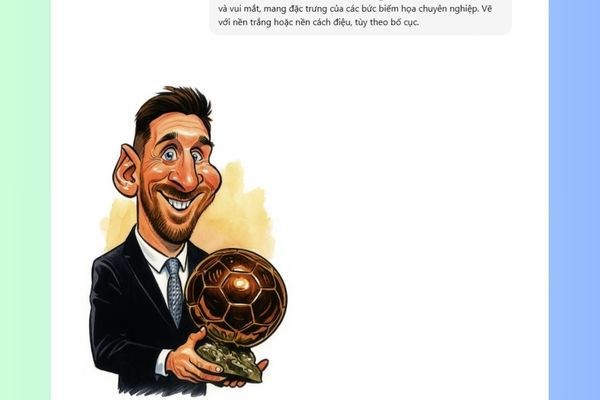
ChatGPT creates a caricature

How to refine the painting until it is satisfactory?

The initial results are not always perfect. If you feel the picture is not funny enough or does not resemble a real person, you can completely ask AI to edit it.

You can ask for corrections naturally, for example: “This painting doesn’t look much like the person in the photo. Adjust it to give your face more character” or “Can you make it funnier?“.

How to refine your painting until you like it
How to fine-tune your painting until you’re satisfied

Once you have the work you like, just click on the download icon to save it to your device.

Tap the download icon

A few important notes you need to know

Each creation is a unique surprise, because even if you use the same image and the same command, ChatGPT will still produce different results. This is the interesting factor, making each of your works unique.

Be privacy conscious when using personal photos, as your images could be used as data to train future AI models. Therefore, you should consider carefully before uploading sensitive images.

Conclusion

Thus, the create caricatures with ChatGPT It’s not as complicated as you think, but it’s also a great way for you to unleash your creativity and bring laughter to your friends. Try it today to see how impressive AI can transform your photos!


Tags: caricaturesChatGPTcreate
Previous Post

Tempi – Professional website design platform opens the way for Vietnamese businesses to breakthrough in the digital age

Next Post

How to configure dynamic IP as static IP with Cloudflare to do Lab at home

AnonyViet

AnonyViet

Related Posts

How to view Facebook stories without others knowing
Tips

How to view Facebook stories without others knowing

October 18, 2026
Instructions for registering a .tech domain name for free for 1 year
Tips

Instructions for registering a .tech domain name for free for 1 year

October 18, 2026
Instructions on how to enter promotional codes on the App Store most accurately
Tips

Instructions on how to enter promotional codes on the App Store most accurately

October 18, 2026
How to open “This PC” instead of “Quick Access” in File Explorer by default
Tips

How to open “This PC” instead of “Quick Access” in File Explorer by default

October 17, 2026
How to create a virtual Pet, a virtual character running around on the Desktop to relax
Tips

How to create a virtual Pet, a virtual character running around on the Desktop to relax

October 15, 2026
15 cách tăng tốc Windows 10 nhanh như gió
Tips

15 cách tăng tốc Windows 10 nhanh như gió

October 14, 2026
Next Post
How to configure dynamic IP as static IP with Cloudflare to do Lab at home

How to configure dynamic IP as static IP with Cloudflare to do Lab at home

0 0 votes
Article Rating
Subscribe
Login
Notify of
guest

guest

0 Comments
Oldest
Newest Most Voted

Recent News

How to view Facebook stories without others knowing

How to view Facebook stories without others knowing

October 18, 2026
Instructions for registering a .tech domain name for free for 1 year

Instructions for registering a .tech domain name for free for 1 year

October 18, 2026
Instructions on how to enter promotional codes on the App Store most accurately

Instructions on how to enter promotional codes on the App Store most accurately

October 18, 2026
How to open “This PC” instead of “Quick Access” in File Explorer by default

How to open “This PC” instead of “Quick Access” in File Explorer by default

October 17, 2026
How to view Facebook stories without others knowing

How to view Facebook stories without others knowing

October 18, 2026
Instructions for registering a .tech domain name for free for 1 year

Instructions for registering a .tech domain name for free for 1 year

October 18, 2026
Instructions on how to enter promotional codes on the App Store most accurately

Instructions on how to enter promotional codes on the App Store most accurately

October 18, 2026
AnonyViet - English Version

AnonyViet

AnonyViet is a website share knowledge that you have never learned in school!

We are ready to welcome your comments, as well as your articles sent to AnonyViet.

Follow Us

Contact:

Email: anonyviet.com[@]gmail.com

Main Website: https://anonyviet.com

Recent News

How to view Facebook stories without others knowing

How to view Facebook stories without others knowing

October 18, 2026
Instructions for registering a .tech domain name for free for 1 year

Instructions for registering a .tech domain name for free for 1 year

October 18, 2026
  • Home
  • Home 2
  • Home 3
  • Home 4
  • Home 5
  • Home 6
  • Next Dest Page
  • Sample Page

say88 tỷ lệ kèo nhà cái kèo nhà cái 5 febet

No Result
View All Result
  • Home
  • News
  • Software
  • Knowledge
  • MMO
  • Tips
  • Security
  • Network
  • Office

say88 tỷ lệ kèo nhà cái kèo nhà cái 5 febet

wpDiscuz
0
0
Would love your thoughts, please comment.x
()
x
| Reply